


AI tools have become great at reading documentation and pulling answers. For example, fast, contextual AI chat for docs is now a baseline expectation of users.
But with the rise of Model Context Protocol (MCP), we're closer than ever to something new: AI that can generate high-quality documentation content.
In this tutorial, we'll walk through how you can use MCP servers to generate new content, using a product requirements document (PRD).
How to use MCP servers to write your docs (with Mintlify + Windsurf)
MCP is a standard introduced by Anthropic that allows AI applications to talk to external tools and data sources.
MCP servers act as a bridge between your product and AI tools that people rely on.
Because Mintlify auto-generates MCP servers for your documentation, your customers can instantly plug your product into AI tools.
Say you work at AppleDB and you're about to launch a new analytics feature.
You already have a PRD, but haven't yet created the customer-facing documentation.
Using MCP servers, you can:
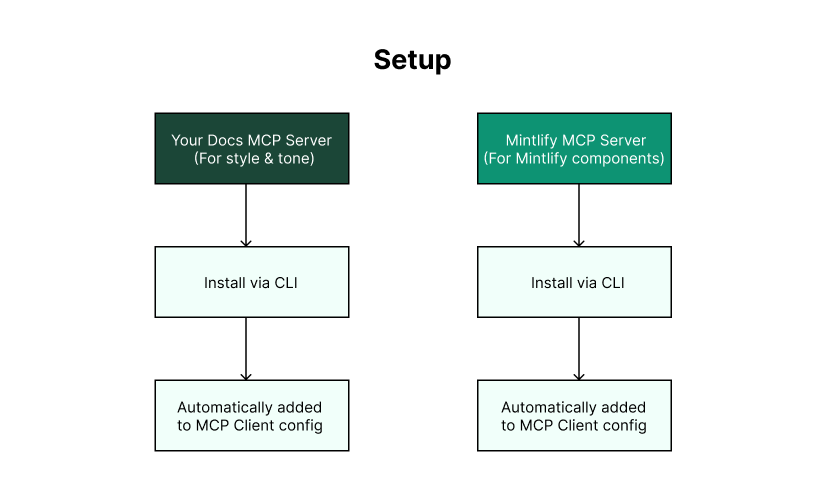
First, you'll want to install the MCP server for your own product docs, AppleDB. That way, the AI tool can pull your tone, structure, and terminology when writing new content.
Head to your Mintlify dashboard, grab the generated install command under the “MCP server” tab, and run it in your terminal.
npx @mintlify/mcp@latest add [x]
This automatically adds your docs server config to your local MCP client.
Next, you need to install the Mintlify MCP server to help the AI tool format your content in Mintlify components, such as cards, callouts, anchors, etc.
To install it, run this command in your terminal:
npx @mintlify/mcp@latest add mintlify
You'll see both servers (AppleDB and Mintlify) listed in your MCP client config.
Now that both servers are installed, it's time to generate your doc. Start by pasting in the PRD for your new feature.
Then you can use AI to:
The AI tool will automatically query both MCP servers, drawing style and context from AppleDB and component formatting from Mintlify.
Since the tool also has the context of your entire documentation, you can also chat with AI to iterate as much as you want.
For example, you can ask “Are there any redundancies in this page with my existing docs?” The AI tool will scan your entire documentation and flag any overlaps.
Once the doc is generated and properly formatted, just copy the markdown into your Mintlify deployment, whether in your local environment or web editor.
Now you can ship your new docs page!
Before MCP, you could technically use AI to write your docs. You could manually copy content into ChatGPT, going back and forth to piece everything together. It could have worked, but it was a tedious, fragmented process.
With an MCP server connected to your docs, writing with AI becomes a true iterative chat experience. You can give real-time feedback, revise instantly, and never worry about hunting down context or pasting things in.
You can try out this flow today, as Mintlify auto-generates MCP servers for all customer documentation.
Content generation is just the beginning. Soon, we're making it possible to handle the entire documentation workflow from your preferred AI tool: scanning your docs, generating new content, and submitting the final pull request.
Want to learn more about Mintlify or our AI documentation roadmap? Get in touch with our team.
此内容由惯性聚合(RSS阅读器)自动聚合整理,仅供阅读参考。 原文来自 — 版权归原作者所有。