






One of the most common tickets when I join any new company is some variation of "Update X in the documentation." Most teams know the importance of keeping software documentation up to date, but in practice, it often falls to the bottom of their priority list.
With product launches, bug fixes, and feature releases, documentation is put aside until it becomes a problem that can't be ignored. By this time, it's already costing the team, with slow onboarding, stalls in product adoption, or negative developer feedback.
This guide will help you identify signs that your documentation debt is impacting the business, how to efficiently audit your docs, and how AI tools can help you reduce maintenance so you're not constantly playing catch-up.
Like technical debt, documentation debt builds up over time, quietly slowing teams down and causing avoidable issues.
Before initiating an audit or overhaul, you may need to justify its necessity, especially if you must defend the decision to your manager or key stakeholders.
Here are some common signs to watch for to help you assess whether your documentation needs an overhaul.
Developers keep asking the same questions
Chat with your support team and look through your internal or external communication channels such as Slack, Discord, Twitter, Reddit, etc.
What are engineers saying? Are they asking the same questions repeatedly?
If they are, it's a strong indicator that your documentation isn't providing the answers they need. Instead of being a self-serve resource, it's forcing developers to rely on your support team and increase their load.
Declining engagement or negative feedback
Your documentation isn't just a reference; it's a product. If developers aren't engaging with it, that's a problem.
Check analytics to see if key pages in your documentation are experiencing a drop in page views, high bounce rates, or decreased time on the page. Perhaps developers are even going as far as leaving feedback that they couldn't find what they're looking for.
These are strong indicators that your content is either unclear, incomplete, or lacks the required level of detail.
Broken links or redundant pages
Navigating your documentation should be effortless, and follow a developer's natural journey across your functionality. Dead links and outdated references are giveaways that your documentation has been neglected.
Another sign is if your documentation is filled with duplicate content. For example, the same explanation in the Core Concepts section can be found on the Getting Started pages. This structuring will confuse developers, especially those using your documentation for the first time.
Disorganized or fragmented documentation
If your guides, API references, and tutorials are scattered across different sites, poorly categorized, or inconsistently formatted, developers struggle to find what they need.
Ask yourself this: If a new developer asked, "Where can I find X?" would I have a single, obvious answer, or would I hesitate, knowing it could be in multiple places? If the latter, your documentation needs to be unified, and your content architecture needs to be structured to follow a developer's journey.
In order to prioritize a documentation overhaul, you can rally the team by citing the business impact of outdated documentation.
Poor documentation can stall your product adoption. Developers waste time troubleshooting instead of building, support teams drown in repetitive questions, and onboarding takes longer.
These inefficiencies add up over time, impacting retention and eventually leading to churn as frustrated developers are likely to abandon your product.
Poor documentation will also impact the sales team. If potential customers can't quickly grasp your product from your docs or they can see that you have neglected maintenance, it degrades their trust in your product quality and they might never convert.
All of these are signs that it's time for an overhaul. Your documentation should be a growth driver, not a blocker.
Jumping straight into fixing issues in your documentation without a clear plan isn't the best approach. You need to conduct an audit (diagnose the problem) of your current doc to determine how you will do the overhaul.
This helps you assess the current state of your documentation, identify what's missing, and determine the level of effort needed for an overhaul. Both the audit and overhaul require a strategic approach to ensure you produce documentation that will actually help developers.
Here are steps you can follow to increase efficiency:
Before making changes, you need a clear picture of what you already have.
Map out all your documentation assets—API references, quickstarts, guides, tutorials, FAQs, and internal wikis—and categorize them by type and purpose using the Diataxis framework.
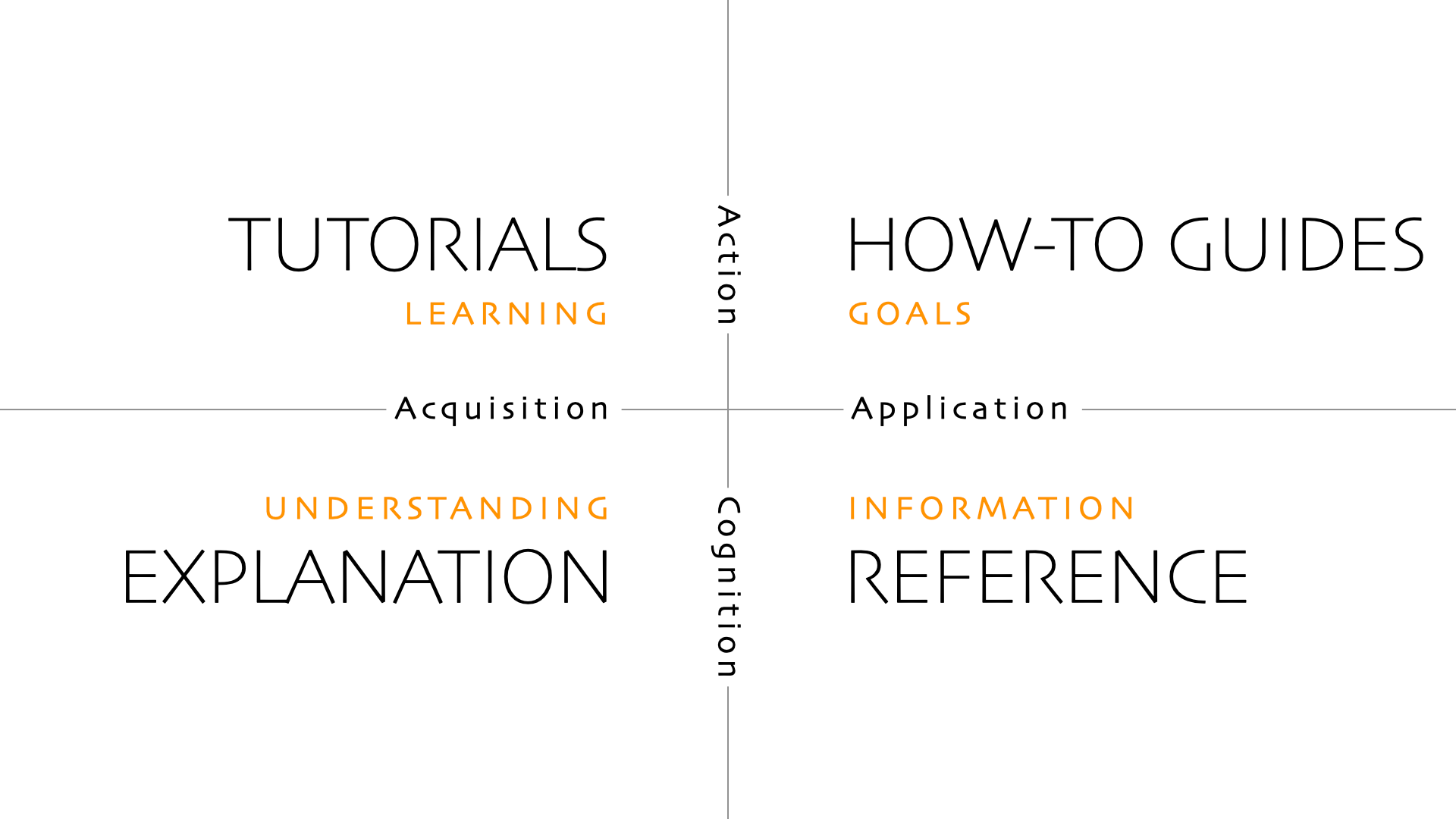
Conduct an initial review by approaching the documentation as a new developer.
You have the curse of knowledge of how your product works, but you need to understand your audience by starting from scratch.
Treat this as an onboarding exercise, read through the content, and go through the quickstart guides and tutorials step by step. During this process, take advantage of tools like broken link checkers and readability analyzers to speed up your work.
Key areas to assess:
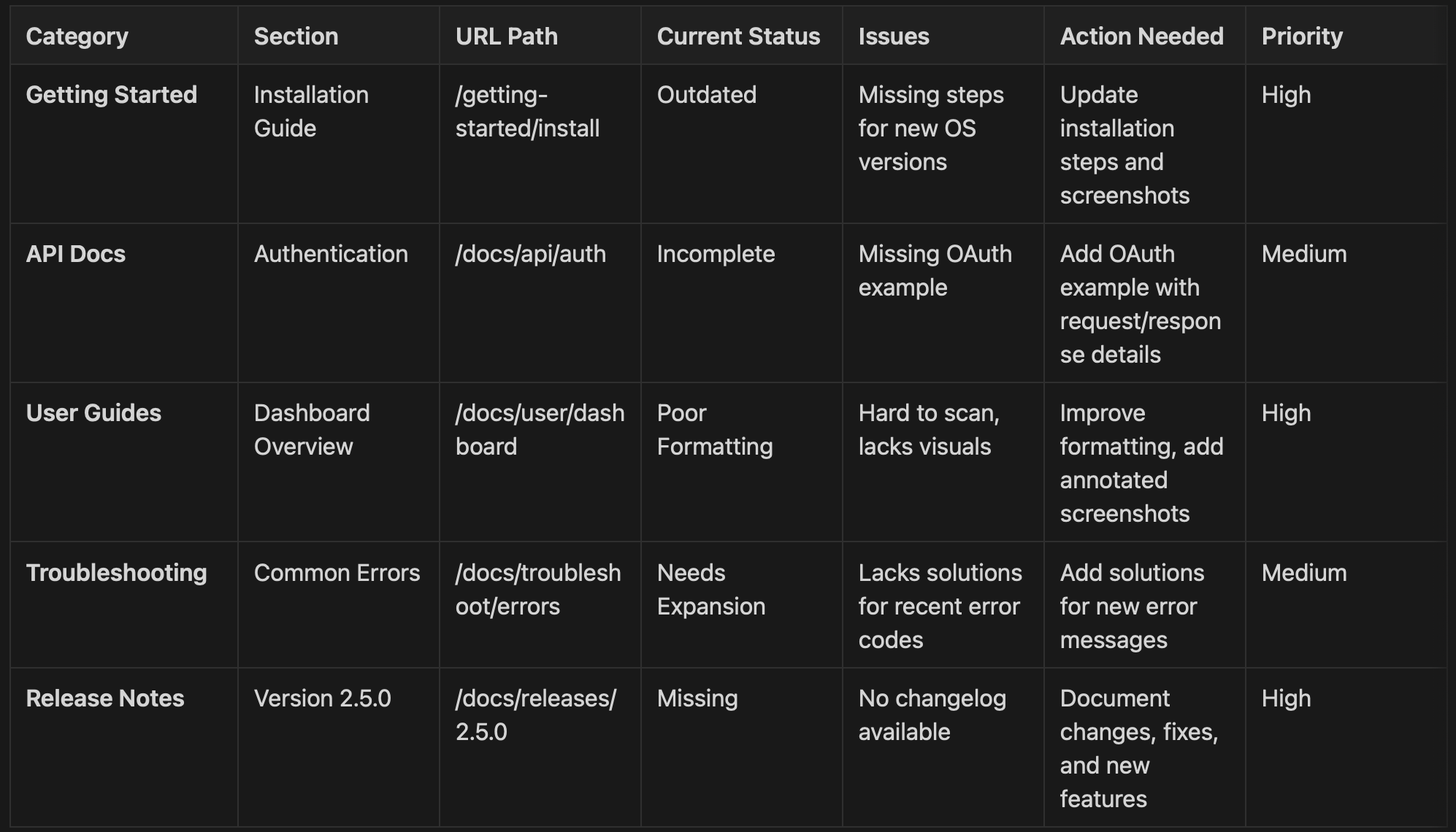
Next, consult product and engineering teams to validate findings and identify additional gaps. Log all detected issues in a tracking tool, categorizing them by severity (outdated, redundant, missing, broken). See the example in step 4.
Not all documentation issues are equally urgent. Prioritize your audit by focusing on the areas that cause the most friction for developers.
Ways to spot problem areas:
Once you've identified weak points, categorize them based on urgency and impact. Here's a simple way to break it down:
Here is an example of how your audit spreadsheet will look now with all your findings:
Before starting the overhaul, establish clear documentation guidelines to ensure consistency. If you don't have a documentation style guide, now is the time to create one. You can adapt existing guides, such as those from Microsoft or Google, and customize them to fit your needs.
Once you have decided on which writing principles you want to implement, automate as much as you can using linters like Vale or Mintlify's CI checks to enforce style rules and help contributors remain consistent.
If your current documentation platform is not the best fit, this might also be the best time to switch to a different one, which will make the overhauling process and future maintenance easier.
Prioritize a tool that is:
Using your audit spreadsheet, begin your overhaul based on item priority. While you're at it, remember to focus on usability. Developers value clarity, simplicity, and real-world examples over marketing fluff.
Completing a documentation overhaul is a big win, but it's not the finish line. Without a plan for maintaining and improving your documentation over time, issues will creep back in, and you'll find yourself doing another massive cleanup sooner than you'd like.
Here are things you should do to make sure your hard work translates into real impact for developers.
Validate the changes and set up a feedback loop
Just because the documentation looks great doesn't mean it's working. Test it.
Track engagement and drop-off points
Use analytics tools to see how developers interact with the updated documentation:
Setting up an ongoing maintenance plan
To keep your documentation accurate and valuable, you need to create and follow a proactive and organized approach:
Establish a documentation contribution process
Automate routine maintenance tasks
Manual updates can be time-consuming and prone to oversight. Introduce some automation:
Set up realistic review processes
While perfection is good, maintaining functional and useful documentation is better:
Prioritize future updates
As you move forward with your documentation, aim to shift from reactive fixes to proactive maintenance. This mindset helps keep your docs in good health over time.
Leveraging AI for documentation hygiene
You can easily get overwhelmed with docs changes if you overly rely on manual effort. Take advantage ofso you only need big overhauls occasionally. Use AI to:
The frequency of auditing your documentation depends on several factors, including the type of documentation, the pace of product changes, and user feedback. However, you can use this as a general guideline for both regularly scheduled and event-driven audits:
Regularly scheduled audits
Event-driven audits
Even with scheduled audits, some updates should happen immediately instead of waiting for the next cycle:
Documentation is never 'Done'
Documentation may never be perfect, and that's okay. However, audits and overhauls are important to make sure your docs remain a living resource that scales with your product and actually serves developers.
That means using the right documentation tool, testing changes with real users, taking advantage of AI tool automation where it makes sense, and embedding documentation updates into the development workflow. The difference between great and mediocre documentation isn't just how well it's written; it's how well it's maintained.
Documentation is part of your product experience and should be treated with the same level of care as your code.
此内容由惯性聚合(RSS阅读器)自动聚合整理,仅供阅读参考。 原文来自 — 版权归原作者所有。