



惯性聚合 高效追踪和阅读你感兴趣的博客、新闻、科技资讯
阅读原文 在惯性聚合中打开

推荐订阅源

OSCHINA 社区最新新闻
OSCHINA 社区最新新闻
人人都是产品经理
人人都是产品经理
IT之家
IT之家
T
The Blog of Author Tim Ferriss
V
V2EX
博客园 - 聂微东
The Cloudflare Blog
Blog — PlanetScale
Blog — PlanetScale
A
About on SuperTechFans
U
Unit 42
Vercel News
Vercel News
L
LangChain Blog
博客园 - 司徒正美
H
Help Net Security
Recent Announcements
Recorded Future
Recorded Future
V
Visual Studio Blog
Jina AI
Jina AI
Microsoft Azure Blog
GbyAI
GbyAI
Y
Y Combinator Blog
C
Check Point Blog
博客园 - 三生石上(FineUI控件)
奇客Solidot–传递最新科技情报
奇客Solidot–传递最新科技情报
钛媒体:引领未来商业与生活新知
钛媒体:引领未来商业与生活新知
J
Java Code Geeks
The Register - Security
The GitHub Blog
The GitHub Blog
B
Blog RSS Feed
F
Fortinet All Blogs
B
Blog
G
Google Developers Blog
Cyber Security Advisories - MS-ISAC
云风的 BLOG
云风的 BLOG
爱范儿
爱范儿
MongoDB | Blog
MongoDB | Blog
F
Full Disclosure
有赞技术团队
有赞技术团队
罗磊的独立博客
博客园_首页
MyScale Blog
MyScale Blog
aimingoo的专栏
aimingoo的专栏
Google DeepMind News
M
MIT News - Artificial intelligence
N
Netflix TechBlog - Medium
Engineering at Meta
Engineering at Meta
量子位
I
InfoQ
小众软件
小众软件
P
Proofpoint News Feed

Mintlify Blog

22 UX improvements to the web editor Introducing the Mintlify Help Center Starter Kit Introducing the collaborative editor built for teams and agents Workflows, rebuilt Is your documentation agent-ready? Mintlify raises $45M Series B led by Andreessen Horowitz and Salesforce Ventures The improved Mintlify CLI Docs on autopilot: From zero to self-maintaining with Mintlify The state of agent traffic in documentation (March 2026) How we built a virtual filesystem for our Assistant We Replaced Our Internal Wiki With a Slack Bot. You Should Too. 8 ways teams use Mintlify to keep docs updated automatically Documentation is your AI interface What three years of watching AI in production taught us Bridging two JSX runtimes: How we solved Astro's React children problem AI agents are shipping faster than anyone can document Knowledge management systems for technical teams Workflows: Automate documentation maintenance Mintlify acquires Helicone to redefine AI knowledge infrastructure Why more product managers are switching to Mintlify Auto-generating documentation sites from GitHub repos Your docs, your frontend, our content engine Take control of your documentation system Almost half your docs traffic is AI, time to understand the agent experience @mintlify for better docs, faster Mintlify for Enterprise Real llms.txt examples from leading tech companies (and what they got right) Mintlify + Claude Opus 4.6: Powering AI-native knowledge management Declaring Clankruptcy: An experiment in agent orchestration Analytics for AI and agent traffic A better way to edit and publish in Mintlify Improved agent experience with llms.txt and content negotiation Your docs are now discoverable by agents Why do we need MCP if skills exist now? skill.md: An open standard for agent skills install.md: A Standard for LLM-Executable Installation Why documentation is one of the most important surfaces for marketers How I built our knowledge base in an afternoon Closing the loop between user questions and documentation 2025: A Year in Review Mintlify Security Event - November 2025 Inside our effort to improve the Mintlify assistant Introducing the next step towards self-updating docs How we eliminated cold starts for 72M monthly page views with edge caching 10 UI fixes I shipped in 10 days The Mintlify agent, now in your dashboard Impact of SHA1-Hulud: The Second Coming on the Mintlify CLI Documentation is dead. Long live documentation. What I shipped in my first 60 days at Mintlify Terminal agents are the future - We're launching mint new How we’re making Mintlify documentation more accessible Building an LSP for your docs The role of good code blocks in documentation The /api Namespace is Now Open Introducing the Mintlify Agent to write documentation with AI We built our coding agent for Slack instead of the terminal Top 7 ways to blend SEO with GEO for explosive brand growth How Mintlify uses Claude Code as a technical writing assistant AI Documentation Trends: What's Changing in 2025 Debugging a mysterious HTTP streaming issue How Pinecone writes documentation How to generate llms.txt Mintlify acquires Trieve to improve RAG search in documentation Behind Replit's Documentation Transformation How often do LLMs visit llms.txt? How Claude's memory and MCP work (and when to use each) Introducing AI Assistant: Turning docs into your product expert My quick formula for docs that convert It's not a race How to hire your first technical writer GEO guide to optimize writing for LLMs How Windsurf writes docs How Anaconda writes documentation Should you generate docs from your API schema? The value of llms.txt: Hype or real? Why we sunsetted mcpt How to use MCP servers to generate docs AI can write your docs, but should it? What is llms.txt? Breaking down the skepticism mcpt: The curated registry for MCP servers Why I joined Mintlify How to audit and overhaul your software documentation What is MCP and how to get started Generate MCP servers from your docs Mintlify vs. Readme: A 2025 Comparison How Generative Engine Optimization is Reshaping Docs Should you build or buy an API documentation tool? When do you really need a monorepo? Fireside Chats: Gong's Approach to Software Documentation The Next Chapter of Mintlify Themes New Devs Don't Read Docs? Maybe It's Not Their Fault Founder Mode: Dub's journey from side project to enterprise link attribution platform Refactoring mint.json into docs.json Breaking down common documentation mistakes What makes good API documentation? Best tools and examples 2024 in Review: Getting Ship Done Five changelog principles from best-in-class developer brands Founder Mode: How Windsurf builds product, from 0 to 1M users Introducing AI Assistant Simplifying docs for AI with /llms.txt
5 things you didn't know you could do in the Mintlify web editor
Peri Langlois · 2026-04-13 · via Mintlify Blog

The best documentation comes from teams. It builds on the knowledge from engineers who know the implementation details, PMs who understand the use cases, support teams who hear the same questions every day, marketing teams who understand docs are an important surface area for conversion, and writers who bring it all together. The problem is that some of those people don't want to open a code editor, clone a repo, or write MDX to contribute a paragraph.

That's what the Mintlify web editor is for. It gives everyone on your team a way to create, edit, and review docs directly in the browser, without an IDE, Git commands, or deploy pipelines. And it can do a lot more than most teams realize.

Here are five features that make it easier to get your whole team involved.

You don't always want to make a direct edit. Sometimes you want to propose a change for someone else to review, like a Google Doc but for your documentation.

The editor has a suggesting mode. Toggle it on, and any edits you make get tracked as suggestions rather than direct changes. Your teammates can review each one, accept it, or reject it. Each suggestion also opens a comment thread, so reviewers can discuss the change in context before deciding whether to merge it. It's the same mental model as "suggest edits" in Google Docs, but it lives right inside your docs workflow, backed by Git.

This is especially useful when subject matter experts want to flag something that's wrong but don't want to be the one to publish the fix. They suggest, the team discusses it in the comment thread, someone accepts or rejects, done. No Slack back-and-forth about which paragraph needs fixing.

How to try it: Look for the suggesting mode toggle in the editor toolbar. Make an edit and you'll see it highlighted as a suggestion with a comment thread attached. Tag a teammate to start a review conversation.
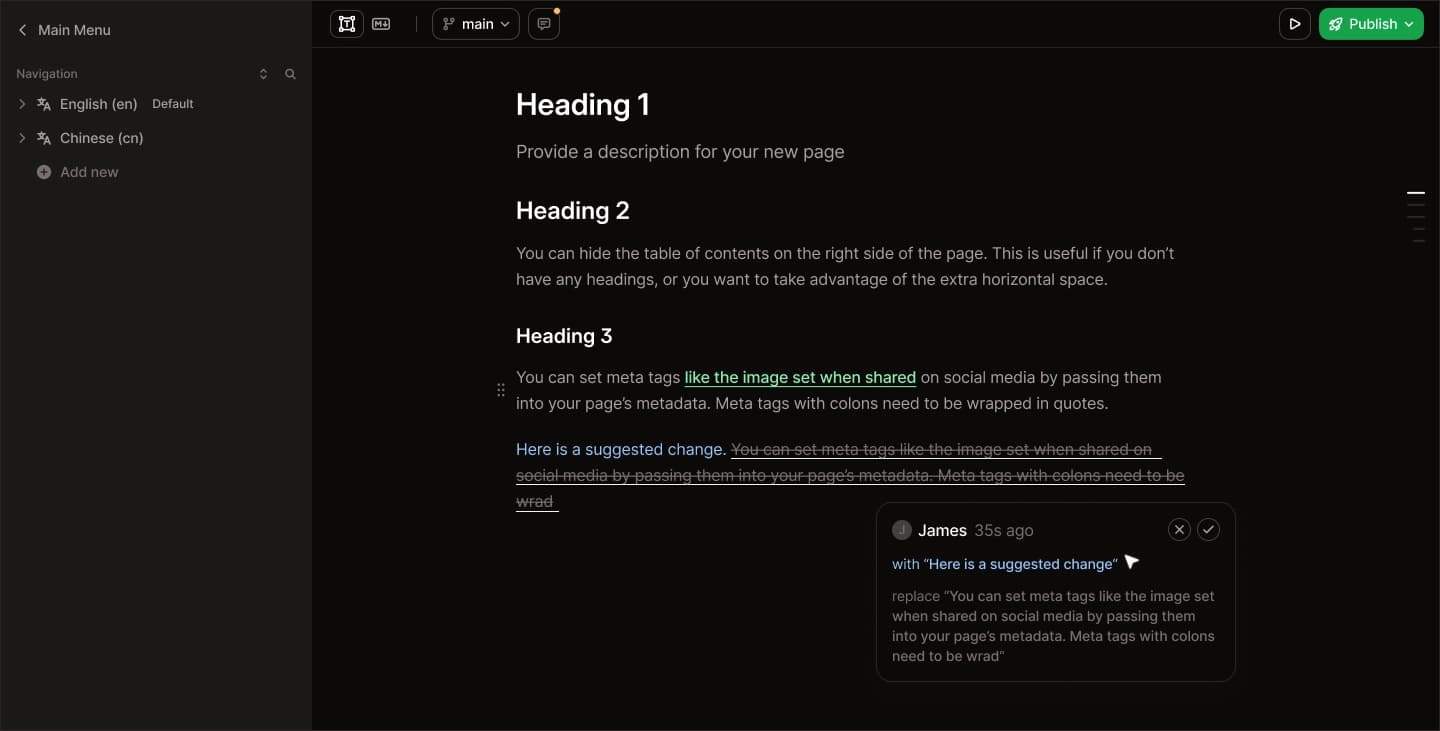
Suggesting mode in the Mintlify web editor with proposed changes highlighted

Reorganizing your docs navigation usually means editing a config file, reordering entries, and hoping you didn't break the nesting. In the web editor, you can just drag pages around.

The sidebar in the editor is fully interactive. You can drag a page from one group to another, nest it under a different section, or reorder an entire group. The editor handles the underlying navigation config for you and prevents you from nesting elements in invalid ways, so you can't accidentally break your site structure.

How to try it: Open the editor sidebar, grab any page, and move it. Your navigation updates instantly.

3. Use inline AI to write and rewrite content without leaving the page

You've probably used the Mintlify agent (opened in the editor with Cmd+I / Ctrl+I) to generate entire pages or propose changes across your docs. But the editor also has inline AI that works at the paragraph level, right where you're writing.

The inline AI can improve writing, fix grammar, restructure awkward sentences, and tighten up prose. Auto-structure takes a wall of text and converts it into proper Mintlify components, turning a long explanation into accordion groups, breaking a paragraph into a step-by-step guide, or pulling out a callout. Ask AI lets you prompt any custom change: "make this more concise," "rewrite for a non-technical audience," "add an example."

The feature is woven into the editor in a way that makes it easy to reach from wherever you are. You can trigger it four different ways: hit Space on an empty paragraph to start generating content from scratch, select text and use the AI option in the toolbar to rewrite it, click a block's drag handle to open the block menu and apply AI to that section, or type /ai anywhere as a slash command.

How to try it: Switch to visual mode, click into an empty line, and hit Space. Ask it to draft an introduction for whatever page you're on. Then select a paragraph that's too wordy, hit the AI option in the toolbar, and ask it to tighten things up.

Most docs platforms make you commit, push, and wait for a build before you can see what your changes actually look like on the live site. Mintlify's editor shows you a live preview as you type.

This isn't a "markdown preview" in the way your IDE does it. It's a real preview of how the page will render on your deployed site, with your theme, your components, and your layout. You see what your readers will see, in real time, without triggering a deployment or waiting for a build pipeline.

For bigger changes where you want to share a preview with your team before publishing, you can create a branch and get a dedicated preview URL (formatted as organization-branch-name.mintlify.app), then send that link to anyone who needs to review it.

How to try it: Open any page in the editor and start typing. The preview updates as you go. For a shareable preview, create a branch first and share the preview deployment URL with your team.

The editor supports two modes: visual and Markdown. Visual mode gives you a rich text experience with formatting controls, component insertion, and the inline AI features mentioned above. Markdown mode drops you into a Monaco-based code editor (the same engine that powers VS Code) with full syntax highlighting and all the keyboard shortcuts you're used to.

The key thing: you can switch between them freely and your content is preserved. Start in Markdown because that's what you're comfortable with, then flip to visual mode to fine-tune the layout or use the AI rewriting tools.

This also means the editor works for everyone on your team, not just developers. Your product manager can edit in visual mode while your engineers stick with Markdown. Same docs, same workflow, different interfaces.

How to try it: Open a page and look for the visual/Markdown toggle in the editor toolbar. Switch back and forth and notice that your content stays intact.


If you haven't used the web editor recently, take five minutes to see what's new.

Open the web editor.