


Google made it official last week at I/O: AI Overviews are now the default search experience in the U.S.—reaching over 1.5 billion people.
The implications are clear: Generative Engine Optimization (GEO) is no longer optional.
Unlike traditional SEO, GEO isn't about getting ranked. It's about making your content readable, retrievable, and useful to large language models (LLMs).
That shift is already changing how users access documentation.
In 2025, OrbitMedia found that 50% of people expect AI to replace search engines. Developers are asking ChatGPT for help more often than they open docs.
If your docs aren't optimized for that, your docs will struggle to surface when it matters.
You might already be seeing the impact, like:
This guide explains how to fix it, by writing with GEO in mind.
You'll learn:
Let's start with how LLMs read documentation behind the scenes.
LLMs don't interpret your content visually. Instead, they convert plain text into structured pieces and use those pieces to locate information. Three key concepts guide this process:
Let's break down these concepts.
LLMs break down your text (words, punctuation, or entire code snippets) into small units. When commands or special strings aren't clearly marked, the model may split them into meaningless fragments instead of treating them as one unit.
For example, consider documentation written like this:
Use auth_token=hmb123 to access the API.
Without backticks, an LLM might tokenize auth_token=hmb123 into pieces like ["auth", "_", "token", "=", "hmb", "123"]. That fragmentation can cause the AI to misinterpret what auth_token refers to. In contrast, wrapping the same text in backticks `auth_token=abc123`ensures the model treats it as a single token sequence. The AI sees it intact during processing and understands it as a specific string rather than unrelated parts.
An AI assistant answering a permissions question might also return rate-limit details because your docs group them under one heading. Chunking is the process by which the model groups tokens into units, typically matching a single paragraph or section. When unrelated points share one paragraph, the AI puts them into the same chunk and cannot separate the relevant information from the rest.
For instance, if you have a section like this in your documentation:
## Permissions and Rates
To update permissions, call /permissions/update. API calls are limited to 50 per minute; exceeding this returns a 429 error.
Because Permissions and Rates appear together under one heading, the LLM treats them as a single chunk. If a user asks, "How do I update permissions?", the model might return both permission instructions and rate‐limit details, since it views them as inseparable.
Separating these topics into distinct sections creates two clear chunks as shown below:
## Permissions
To update permissions, call /permissions/update.
## Rate Limits
API calls are limited to 50 per minute; exceeding this returns a 429 error.
Now, when an AI receives the question "How do I update permissions?", it can retrieve only the Permissions chunk, avoiding any rate‐limit information.
In retrieval-augmented generation setups, each chunk is converted into a numeric vector that captures its meaning. When you submit a question, the model transforms your prompt into a similar vector and searches for the closest matches among your document's embeddings. If two sections share similar wording or keywords, their vectors can overlap, causing the AI to return the wrong chunk.
For example, imagine having these headings in your docs:
## Session Management
Sessions expire after 30 minutes of inactivity.
## Session Costs
Each session incurs a cost of $0.01 per minute.
A question like "What is the cost per session?" might retrieve the “Session Expiry” section because both chunks include the word “Session.” However, renaming the first heading to “Session Timeout,” you create distinct vectors:
## Automatic logout timing
Users are automatically logged out after 30 minutes of inactivity.
## Billing rates
Each session incurs a cost of $0.01 per minute.
Distinct embeddings prevent overlap, helping queries map to the correct section.
Alongside these processes, several common mistakes can prevent AI from parsing your docs. Here are a few that often get in the way:
Understanding how LLMs read your documents is not enough.
To make your documentation truly AI-friendly, you also need to write in ways that support accurate retrieval, clarity, and context.
AI-friendly docs also reduce computational costs, as clear chunks and unique headings mean models use fewer tokens and retrieve information more efficiently.
Below are five principles that will help you structure your docs for accurate chunking, retrieval, and comprehension by AI tools. For each one, you'll see:
When headings skip levels, AI can't tell how sections relate. Make sure each heading steps down one level at a time.
Before
# Settings
### Notifications
Configure how alerts are sent.
## General Settings
Set the default language and timezone.
In the snippet above, Notifications jumps to H3 under Settings, then General Settings drops back to H2. In that example, an AI might treat Notifications as unrelated to Settings.
After
Now both General Settings and Notifications use H2 under Settings, so AI recognizes they belong together.
# Settings
## General Settings
Set the default language and timezone.
## Notifications
Configure how alerts are sent.
Pronouns can leave AI guessing which item you mean. Refer to each object by name.
Before
Open the config file and update the IP address. Then save it and restart the server to apply it.
In the snippet above, AI may not know whether “it” refers to the file, the address, or the server.
After
Open the `config.yaml` file and update the `server_ip` setting. Then save the `config.yaml` file and restart the server to apply the new IP address.
Here, repeating “config.yaml file” and “server” makes each reference in your documentation clear.
AI cannot interpret images or embedded videos, so include a text description that explains what the media shows.
Before

Click the image for a detailed view.
The problem with this approach is that AI sees only the markdown reference, not the image, so it skips the content.
After

Alt text: Diagram showing a web server forwarding requests to two application servers behind a load balancer.
> **Note:** If you cannot view the image, here is a summary:
> A load balancer distributes incoming web traffic to App Server A and App Server B, each connected to a shared database.
The alt text and summary help AI captures the same information.
Using multiple names for the same concept can confuse AI. Choose a single term and use it consistently.
Before
To run the app, edit the config file. Next, use the configuration document to set environment variables. Finally, launch the application.
In the snippet above, AI might think “config file” and “configuration document” are different resources.
After
To run the app, edit the `config.yaml` file. Next, use the `config.yaml` file to set environment variables. Finally, launch the application.
Referring to it consistently as the 'config.yaml file' helps prevent confusion.
Inline code can split into separate tokens, losing meaning. Use fenced code blocks so AI treats each example as one unit.
Before
Install the tool with pip install pdf2doc==1.2.3 and then run pdf2doc --version.
AI may tokenize pip install pdf2doc==1.2.3 as individual words rather than one code block.
After
Install the tool with the command below:
```bash
pip install pdf2doc==1.2.3
```
Check version:
```bash
pdf2doc --version
```
With this approach, each command is in its own fenced code block, so AI treats it as a single unit.
Having these principles in hand, let's walk through how they affect structure.
Let's apply the formatting principles to an actual documentation task: authenticating with an API. We'll contrast a flawed version with a well-structured one.
API Auth
Endpoint:
To authenticate, send a POST request to /auth with your credentials.
Usage:
Make this curl call:
curl -X POST /auth -d '{"user":"alice","pass":"secret"}'
You will get back a token. Then use the token in the header for other calls.
Errors:
If you send wrong credentials, you receive an HTTP 401. You can also call /login or /userinfo, but they behave differently.
What's confusing in the example above?
Here is an improved version that uses predictable headings, consistent naming, and clearly labeled code blocks.
## Authentication
### Endpoint: `POST /auth`
Use this endpoint to retrieve an access token.
#### Request
```bash
curl -X POST https://api.example.com/auth \
-H "Content-Type: application/json" \
-d '{"username":"alice","password":"secret"}'
Response:
{
"access_token": "a2e-098-rkjlponms",
"expires_in": 3600
}
Error response:
{
"error": "invalid_credentials",
"message": "Username or password is incorrect"
}
Using the access token:
Once you have an access_token, include it in the Authorization header for subsequent API calls.
Example: GET /userinfo
curl -X GET https://api.example.com/userinfo \
-H "Authorization: Bearer a2e-098-rkjlponms"
Response:
{
"id": "user_001",
"username": "ftimah",
"email": "[email protected]"
}
This example uses clear markdown headings, separates commands into fenced code blocks, and avoids pronoun ambiguity, all of which improve chunking and retrieval.
Why the improved version works better:
Now that you've seen how structure affects readability, let's test your docs with a few simple AI prompts.
The best way to know if your docs are AI-readable is to test them the same way your users will, by prompting an AI.
Pick a tool, like ChatGPT, Claude, or any other LLM, and run a few simple tests. If the AI can't find the right answer or returns something out of context, your structure needs work.
Here are some simple steps for you to get started:
For example:
Check the AI's response.
Try variations of your prompt: Ask for more detail, a summary, or a specific code snippet. Each time, confirm that the AI finds exactly what you intended.
Example in action:

Prompt: Give me the steps to install the Mintlify CLI
If you're using Mintlify, many of these practices are already baked into the platform.
With Mintlify, you're already a step ahead when it comes to writing documentation that AI tools can easily parse and understand.
One of the most important Mintlify features for AI-readability is llms.txt and llms-full.txt, a simple auto-hosted file that tells AI crawlers which pages are most relevant to index and how to treat different parts of your documentation.
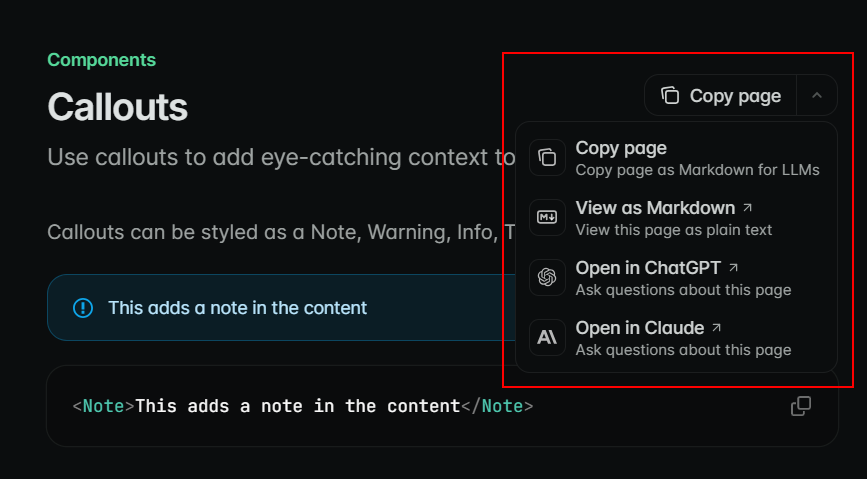
To make AI interactions even smoother for end users, Mintlify also allows any page to be copied as Markdown for LLMs or viewed in its raw Markdown form. It also enables opening a documentation page in ChatGPT or Claude with a single click, without copying and pasting it manually.
Mintlify also introduced auto-generated MCP servers, which package your APIs and documentation specifically for better interaction with LLMs. These servers allow your tools to serve up answers from your docs with much more accuracy.
LLMs are already part of your readers' workflow. That makes the new baseline for documentation.
By sticking to a structure-first approach, with clear headings, explicit labels, and consistent formatting, you ensure that both human readers and AI agents can quickly locate the information they need.
Pick your most-used page. Run two prompt tests. If the results aren't what you expect, apply the principles in this guide and retest. And check out Mintlify today if you're interested future-proofing your documentation in the age of AI.
此内容由惯性聚合(RSS阅读器)自动聚合整理,仅供阅读参考。 原文来自 — 版权归原作者所有。