





Good documentation just feels right, while bad docs leave you frustrated—but pinpointing what went wrong can be tough.
We spoke with Brody Klapko, Technical Writer at Stash, to discuss some common pitfalls that distinguish great technical docs from the rest, and how to avoid them. With over 10 years of experience in the industry, Brody's background includes roles as an early technical writing hire at Uber and Stripe, and more recently at Stash.
Here are common pitfalls that impact your docs:
Let's dig into each one.
Mixing content types is a hidden killer. It's when you find a lengthy paragraph in an API reference guide, or stumble upon a complex diagram when you're just trying to set up an SDK.
Documentation needs to be organized around the specific goal you're trying to help the user achieve. If they're looking to complete a task, long paragraphs of context just slow them down.
To focus your content, leverage the Diátaxis framework.
The Diátaxis framework categorizes documentation into four distinct types, helping you align content with user needs and goals.
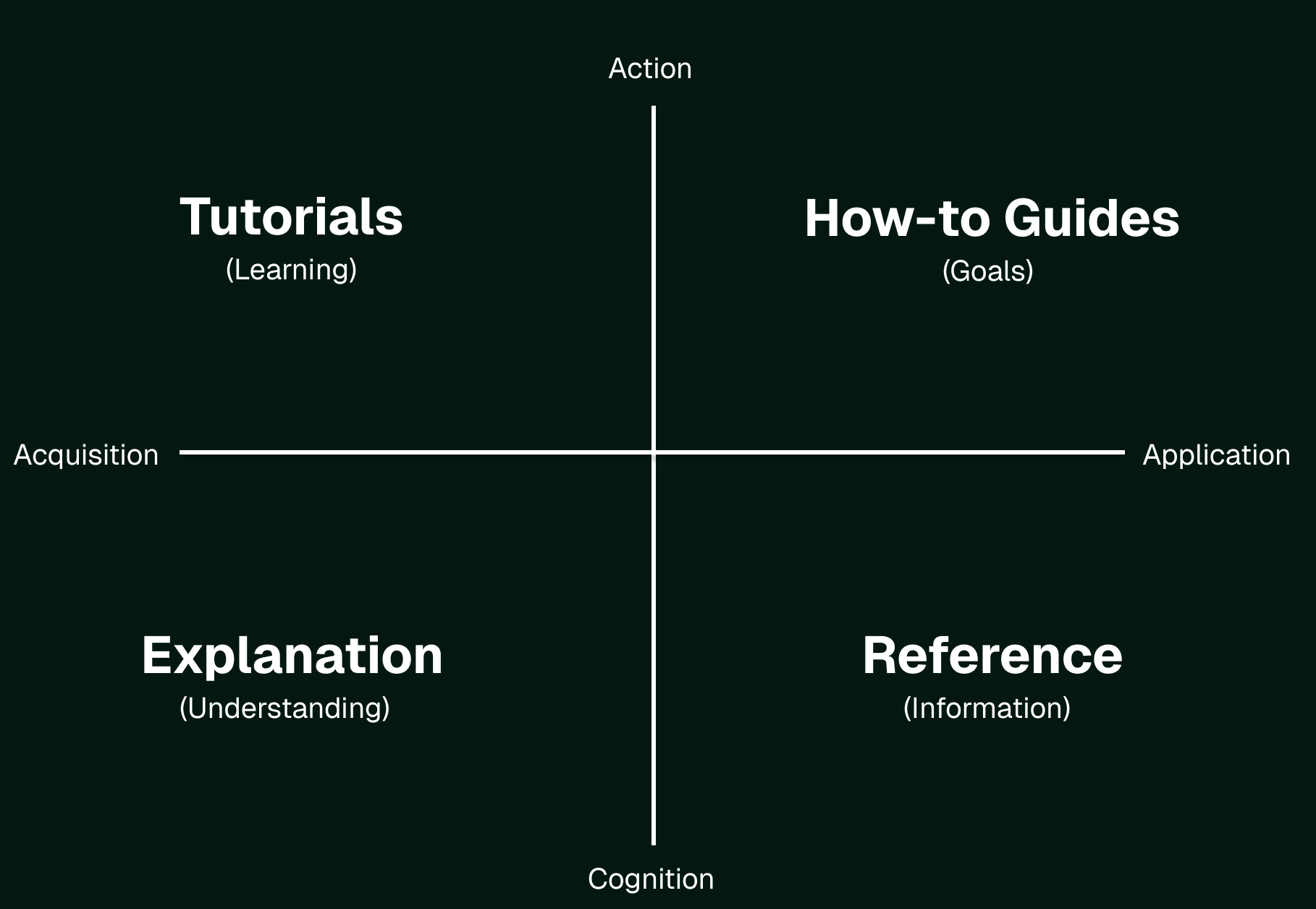
Defining content types helps you plan documentation with a clear purpose and makes it easier for users to find what they need.
Start by assigning each page a specific type—tutorial, how-to guide, explanation, or reference—before writing. This clarity ensures that your content matches your audience's goals. For multi-product companies, consider organizing by product at the top level and by content type within each product.
A key principle of the framework is learning through practice. You don't need to fully understand it to start using it—try applying an idea that fits your current work, see how it works, and adjust as needed.
Similar to defining content types, you should always know the intended audience of your documentation. Trying to write a single set of docs for multiple audiences—like technical and non-technical users—often leads to compromises that don't fully satisfy either group.
Identify your top-priority audience and use that to guide your writing. For example, if your primary audience is developers, you might prioritize detailed API references and code samples over step-by-step guides. Conversely, if your audience includes less technical users, you might focus on high-level overviews and visual aids to convey concepts clearly.
Communicating these priorities internally is equally important. When everyone understands which audience is prioritized, it reduces friction in decision-making. Audiences can also shift as the product evolves, especially at startups, so it's important to regularly revisit and align on who your primary users are.
Grammatical and spelling errors may seem small, but they're the biggest indicator of quality. Mistakes can undermine trust, leaving readers with doubts about both your documentation and the product.
Also, avoid exclamation points. While not grammatically wrong, they can undermine professionalism and introduce unintended emotion.
While screenshots can be helpful, use them sparingly—they quickly become outdated and erode user trust. Limit screenshots to showing users the starting point of a flow, letting your product UI guide the rest.
In some cases, demos with tools like Arcade are more effective. They provide clearer guidance by showing the GUI in action and offering context that static screenshots can't.

While readability is key, the overall look and feel can significantly impact user experience.
A clean sidebar, readable color schemes, and a consistent layout make a world of difference in user experience. If the design feels cluttered or hard to read, even the best content will lose its impact.
Beautiful documentation not only improves usability but also instills confidence in your docs and brand.
While great docs can help users navigate complexity, they aren't a substitute for thoughtful design. If a workflow in your GUI takes 13 steps to complete, your docs can't reduce that to three—they can only explain the process as it exists. In fact, documentation often highlights product complexity, exposing shortcomings in a very public way.
Over-reliance on documentation to “fix” a product can lead to frustration for both users and the teams tasked with maintaining the docs. That's also why it's crucial to align expectations internally with product & engineering—being on the same page about what documentation can and cannot solve helps set realistic goals and ultimately provide a better customer experience.
Treat documentation as a complement to a well-designed product, not a patch for its challenges.
Once you've worked to avoid common documentation mistakes, you'll want to measure your success. However, success depends on the context of your product and docs.
People typically track metrics like support tickets, page views, or time on page, but it might not paint the full picture. More page views may indicate users are running into errors and seeking help. Similarly, longer time on page might suggest users are struggling to find answers.
To assess your documentation's effectiveness, here are some questions to consider:
To track documentation success, balance quantitative data with qualitative feedback. Collect input from users via feedback tools or customer-facing teams to guide future improvements.
Docs play a vital role in sales, adding credibility to your product and influencing decisions.
Even though technical docs aren't written like sales materials, they're often a key touchpoint for prospective users. Strong documentation builds trust and supports sales and marketing by allowing users to explore what's possible. Go-to-market and documentation teams should collaborate and review how documentation can better support your company's growth.
Documentation is a critical ongoing investment that requires constant refining. Want to dive deeper into best practices? Get in touch with our team.
此内容由惯性聚合(RSS阅读器)自动聚合整理,仅供阅读参考。 原文来自 — 版权归原作者所有。