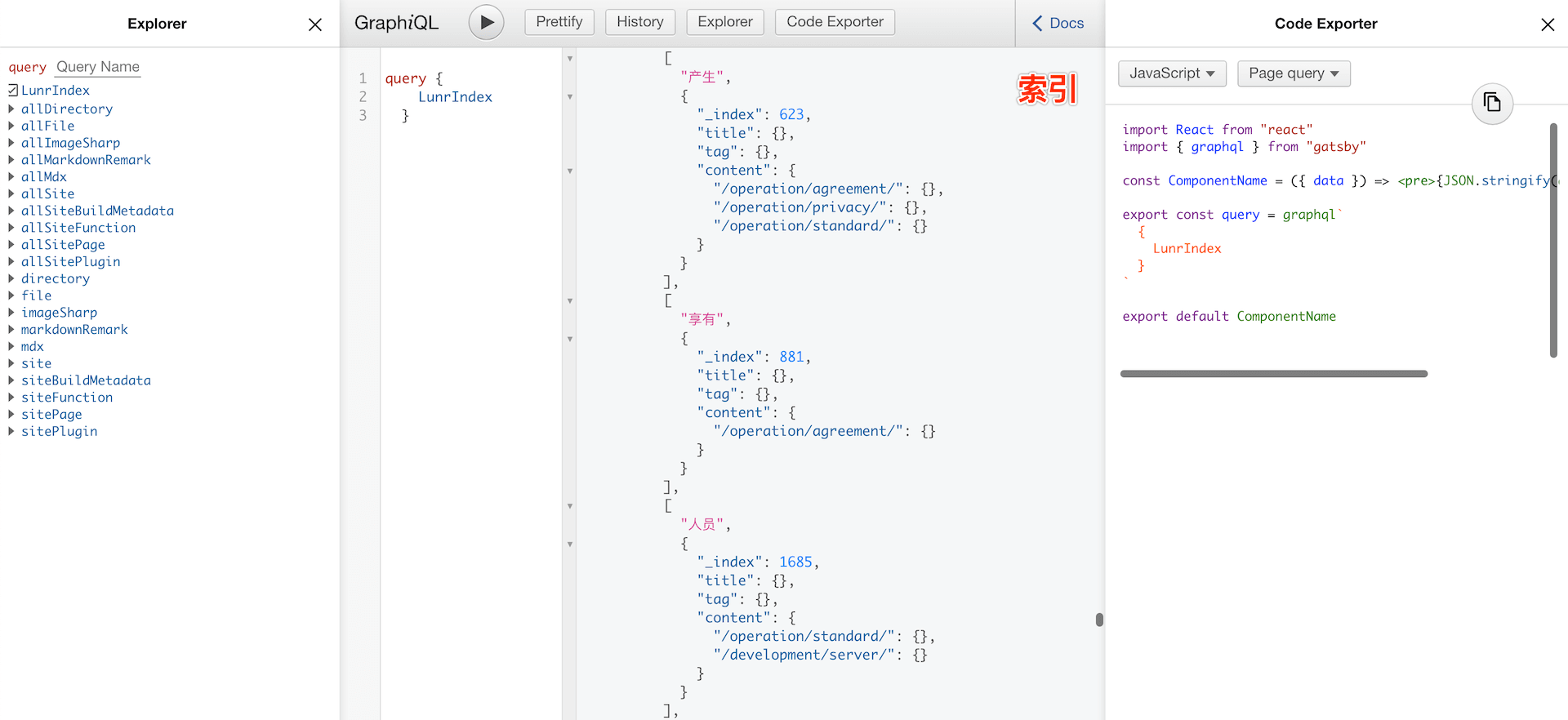
对于博客或者文档,全文搜索是非常重要的功能。现如今,网站生成器 工具,无论是静态的、携带完整后台的、还是基于低代码、无代码的,皆不可胜数,诸如:Hexo 、Vuepress 、Docsify 、Hugo 、Ghost 等,但之于「搜索 」功能,或未提供、或不尽如人意;基于这样的背景,本文旨在探讨如何打造本地全文搜索 ?
根据先前的些许经验,要使得本地全文检索,拥有良好体验,至少要包含以下几个方面:
基于全文本内容,建好索引(数据),支持用户输入关键字,能快速、准确检索到结果;
(实时)展示检索结果列表,高亮检索关键字,最好可以按照匹配程度高低来排序;
支持点击结果列表项跳转至页面,高亮所有关键字,并将页面滚动至第一个关键字位置;
更多优化,支持用户分词搜搜,增加 -、\* 等匹配方式(一般来讲,满足以上三条已足够);
下面,与大家分享下,如何通过简洁操作,做到以上三条:
基于类 Gitbook 默认方案来创建索引。如快应用文档 ,其数据来源于:search_plus_index.json ;在本地编译 md 文件时,将所有其内容纯文本化,作为数据源,并将其他信息如路径、标题、关键字等,一并存储于该 JSON 文件;发起关键字检索时,只需读取该 json 内容,并逐个遍历;将存有关键字的项 push 至结果数组,从而展示给用户就好。
1
2
3
4
5
6
7
8
9
10
11
12
13
14
15
16
17
18
19
20
function query (keyword )
if (keyword == null || keyword.trim() === '' ) return ;
var results = [],
index = -1 ;
for (var page in INDEX_DATA) {
if ((index = INDEX_DATA[page].body.toLowerCase().indexOf(keyword.toLowerCase())) !== -1 ) {
results.push({
url : page,
title : INDEX_DATA[page].title,
body : INDEX_DATA[page].body.substr(Math .max(0 , index - 50 ), MAX_DESCRIPTION_SIZE).replace(new RegExp ('(' + escapeReg(keyword) + ')' , 'gi' ), '<span class="search-highlight-keyword">$1</span>' )
});
}
}
displayResults({
count : results.length,
query : keyword,
results : results
});
}
基于 Lunr.js (A bit like Solr, but much smaller and not as bright.)结合 nodejieba (”结巴”中文分词的 Node.js 版本),来实现中文全文搜索。
Lunr.js is a small, full-text search library for use in the browser. It indexes JSON documents and provides a simple search interface for retrieving documents that best match text queries.
Lunr.js 是一个用于浏览器的小型全文搜索库。它索引 JSON 文档并提供一个简单的搜索界面,用于检索与文本查询最匹配的文档。它具有以下功能特征:
简单的 :Lunr 设计小巧但功能齐全,让您无需外部服务器端搜索服务即可提供出色的搜索体验。可扩展 :添加强大的语言处理器为用户查询提供更准确的结果,或调整内置处理器以更好地适应您的内容到处 :Lunr 没有外部依赖项,可以在您的浏览器或带有 node.js 的服务器上工作;
基本原理 :Lunr 将字符串拆分为单词标记,然后经过一系列处理(score 计算分数、metadata 元数据),最终组装成为结果对象数组;关于这块儿详细信息,可参见 Lunr.js 核心概念 ;值得一提的是,Lunr 不能很好支持中文,因此对于中文分析,有借助 nodejieba 做了处理。具体创建索引的过程,参见如下代码(基于 Gatsbyjs 的实现):
1
2
3
4
5
6
7
8
9
10
11
12
13
14
15
16
17
18
19
20
21
22
23
24
25
26
27
28
29
30
31
32
33
34
35
36
37
38
39
40
41
42
43
44
45
46
47
48
const marked = require ('marked' )
const striptags = require (`striptags` )
const lunr = require ('lunr' )
require ('./src/helper/lib/lunr.stemmer.support.js' )(lunr)
require ('./src/helper/lib/lunr.zh.js' )(lunr)
const createIndex = async (docsNodes, type, cache) => {
const cacheKey = `IndexLunr`
const cached = await cache.get(cacheKey)
if (cached) {
return cached
}
const documents = []
const store = {}
for (const node of docsNodes) {
const { slug } = node.fields
const title = node.frontmatter.title
const tag = node.frontmatter.tag
const content = striptags(marked.parse(node.rawMarkdownBody))
documents.push({
slug,
title,
tag,
content,
})
store[slug] = {
title,
tag,
content,
}
}
const index = lunr(function (
this .use(lunr.zh)
this .ref('slug' )
this .field('title' )
this .field('tag' )
this .field('content' )
for (const doc of documents) {
this .add(doc)
}
})
const json = { index : index.toJSON(), store }
await cache.set(cacheKey, json)
return json
}
1
2
3
4
5
6
7
8
9
10
11
12
13
14
15
16
17
18
19
20
21
22
23
24
25
26
27
28
29
30
31
32
33
34
35
getQueryResult(query) {
const lunrData = this .props.lunrData
const { store } = lunrData.LunrIndex
const index = Index.load(lunrData.LunrIndex.index)
let results = []
try {
results = index.search(query).map(({ ref } ) => {
return {
slug : ref,
...store[ref],
}
})
return results || []
} catch (error) {
console .error(`Something Error: ${error} ` )
return results
}
}
handleSearch(keywords) {
let queryResultArr;
if (!keywords) {
queryResultArr = []
} else {
queryResultArr = this .getQueryResult(keywords)
}
this .keywords = keywords
this .setState({
queryResultArr : queryResultArr,
isShowResults : queryResultArr.length > 0
})
}
1
2
3
4
5
6
7
8
highlightKeyword(keyword) {
const contentDom = document .querySelector(`#layout .wrapper .content` )
const instance = new Mark(contentDom);
instance.mark(keyword, {
exclude : ["h1" ],
className : "mark-highlight"
});
}
1
2
3
4
setTimeout(() =>
const markNode = document .querySelector("#layout .mark-highlight" );
markNode && markNode.scrollIntoView({ behavior : "smooth" , block : "start" });
}, 1000 )
先前基于 Gatsbyjs 搭建一个静态网站,上文中提及的代码,完整版可参见:blog.nicelinks.site | search 。在线示例:倾城周刊 、快应用消息中心 。