



Warning
If someone is reading this blog, please be aware that the writer did not consider the experience of the other readers.
After all, the most important part is about writing things down for better memorization.
BTW, PA provides a way of reading Makefiles in a ‘relatively concise’ way, which is rendering Makefiles as html:
1 |
|
The result looks like this:
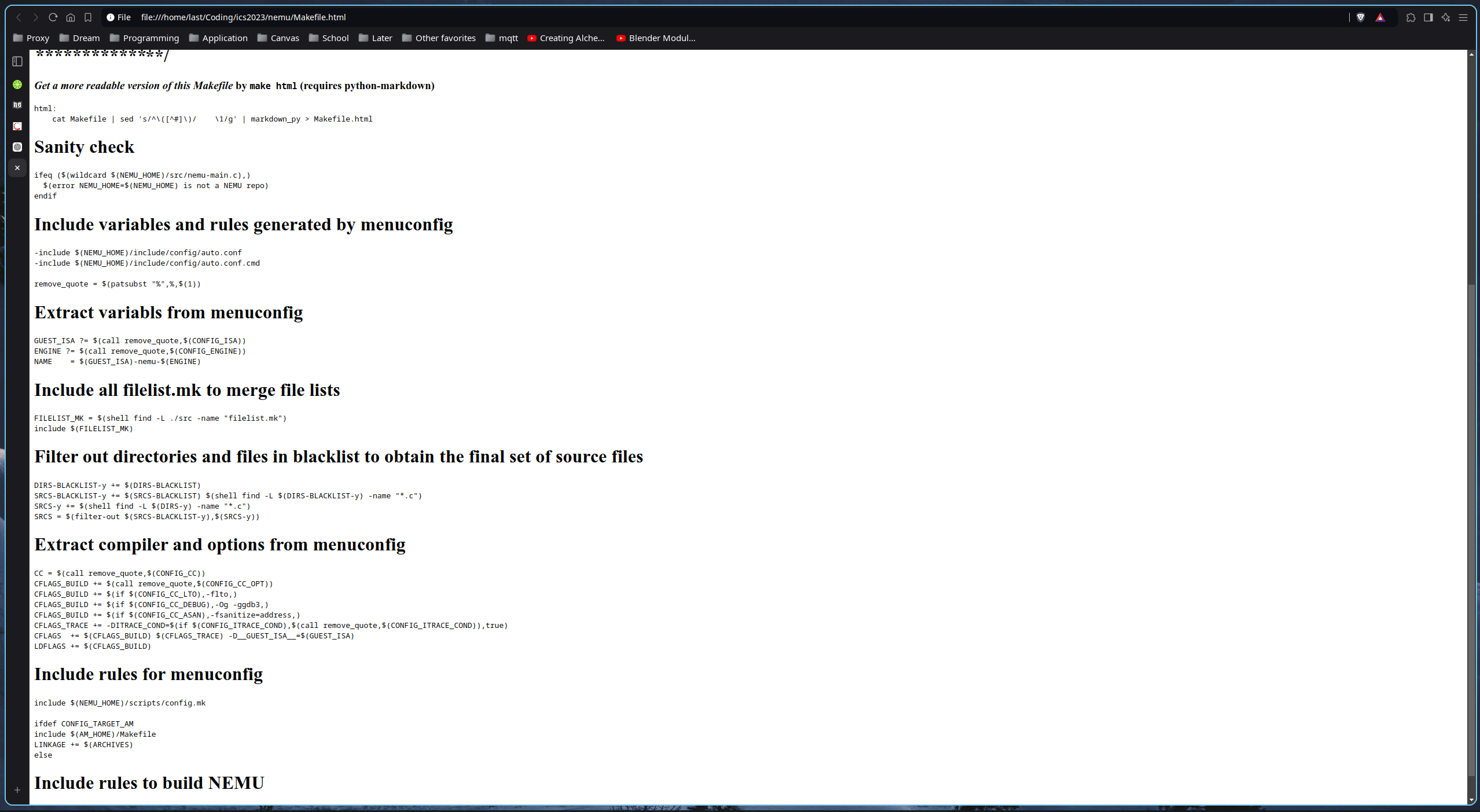
Honestly, this seems worse as the browser does not provide syntax highlight for Makefile…
make run1 |
|
make checks whether the directory defined in environment variable NEMU_HOME contains src/nemu-main.c.ifeq...endifPretty simple.
example:
1 | ifeq ("hello", "hello world") |
NOT EQUALwildcard… But wildcard expansion does not normally take place when a variable is set, or inside the arguments of a function. If you want to do wildcard expansion in such places, you need to use the wildcard function.
Basically, this function is used to expand wildcard symbols.
example:
1 | wildcard: |
.c.error1 | -include $(NEMU_HOME)/include/config/auto.conf |
includeWhen
makeprocesses an include directive, it suspends reading of the containing makefile and reads from each listed file in turn. When that is finished,makeresumes reading the makefile in which the directive appears.
If the specified name does not start with a slash (or a drive letter and colon when GNU Make is compiled with MS-DOS / MS-Windows path support), and the file is not found in the current directory, several other directories are searched.
First, any directories you have specified with the ‘-I’ or ‘–include-dir’ options are searched (see Summary of Options). Then the following directories (if they exist) are searched, in this order:
prefix/include(normally/usr/local/include1)/usr/gnu/include,/usr/local/include,/usr/include.
The
.INCLUDE_DIRSvariable will contain the current list of directories that make will search for included files. See Other Special Variables.
About -include :
If you want make to simply ignore a makefile which does not exist or cannot be remade, with no error message, use the -include directive instead of include, like this:
1 | remove_quote = $(patsubst "%",%,$(1)) |
remove_quote.The call function is unique in that it can be used to create new parameterized functions. You can write a complex expression as the value of a variable, then use call to expand it with different values.
Users can define a custom function and store it in a variable, then call it with the call function.
example:
1 | custom_concat = $(1)$(2) |
helloworld$(subst from,to,text) :
Performs a textual replacement on the text text: each occurrence of from is replaced by to. The result is substituted for the function call.
example:
1 | $(subst ee,EE,feet on the street) |
returns: fEEt on the strEEt
$(patsubst pattern,replacement,text) :
Finds whitespace-separated words in text that match pattern and replaces them with replacement.
example:
1 | $(patsubst %.c,%.o,x.c.c bar.c) |
returns: x.c.o bar.o
To set a variable from the makefile, write a line starting with the variable name followed by one of the assignment operators
=,:=,::=, or:::=. Whatever follows the operator and any initial whitespace on the line becomes the value.
Variables defined with
=are recursively expanded variables. Variables defined with:=or::=are simply expanded variables; these definitions can contain variable references which will be expanded before the definition is made. Variables defined with:::=are immediately expanded variables. The different assignment operators are described in See The Two Flavors of Variables.
example:
1 | objects = main.o foo.o bar.o utils.o |
The example above is a simplest recursively expaneded variable objects. Nothing noticable.
example:
1 | foo = $(bar) |
Assigning a variable through another variable.
Notice that, the variable called to assign another variable will be expanded whenever it’s value is assigned(substituted): bar is not assigned when we assign it’s value to foo. The value of foo is assigned with Huh? when it is expanded to $(bar) which is assigned when it expanded to $(ugh).
This recursive expansion happens at the time of use.
This way of assigning variables does not support self-appending, as it would cause an infinite loop in the variable expansion.
negative case:
The value of a simply expanded variable is scanned once, expanding any references to other variables and functions, when the variable is defined. Once that expansion is complete the value of the variable is never expanded again: when the variable is used the value is copied verbatim as the expansion. If the value contained variable references the result of the expansion will contain their values as of the time this variable was defined.
This way of assigning variables is the most common is it works like variables in most programming languages, which means that it is more predictable.
example:
1 | x := foo |
x is later, y is foo bar:= and ::= are equivalent.Another form of assignment allows for immediate expansion, but unlike simple assignment the resulting variable is recursive: it will be re-expanded again on every use. In order to avoid unexpected results, after the value is immediately expanded it will automatically be quoted: all instances of
$in the value after expansion will be converted into$$.This type of assignment uses the:::=operator.
TODO:
This is a relatively new way of assigning variables. Actually, I don’t understand the explanation above(which is from the official document of GNU make), and I didn’t see any usage of such in the ics project.
:
As a result, I am leaving this as a TODO for future.
There is another assignment operator for variables,
?=. This is called a conditional variable assignment operator, because it only has an effect if the variable is not yet defined.
example:
is equivalent to:
1 | ifeq ($(origin FOO), undefined) |
Note that a variable set to an empty value is still defined, so ?= will not set that variable.
The shell assignment operator ‘!=’ can be used to execute a shell script and set a variable to its output. This operator first evaluates the right-hand side, then passes that result to the shell for execution.
example:
is equivalent to:
Though I didn’t find this one used in the ics project as well, I put it here because I like this approach. lol
You define an implicit rule by writing a pattern rule. A pattern rule looks like an ordinary rule, except that its target contains the character ‘%’ (exactly one of them). The target is considered a pattern for matching file names; the ‘%’ can match any nonempty substring, while other characters match only themselves. The prerequisites likewise use ‘%’ to show how their names relate to the target name.
Thus, a pattern rule
%.o : %.csays how to make any filestem.ofrom another filestem.c.
This is something quite like a super simple version of regular expression for matching files under the directory.
Example:
Rule that compiles .c files into .o files:
1 | %.o: %.c |
The recipe uses the automatic variables ‘$@’ and ‘$<’ to substitute the names of the target file and the source file in each case where the rule applies (see Automatic Variables down below).
Suppose you are writing a pattern rule to compile a ‘.c’ file into a ‘.o’ file: how do you write the ‘cc’ command so that it operates on the right source file name? You cannot write the name in the recipe, because the name is different each time the implicit rule is applied.
What you do is use a special feature of make, the automatic variables. These variables have values computed afresh for each rule that is executed, based on the target and prerequisites of the rule. In this example, you would use
$@for the object file name and$<for the source file name.
| Symbol | Meaning |
|---|---|
$@ |
The file name of the target of the rule. When there’re multiple targets, $@ is the name of whichever target caused the rule’s recipe to be run. |
$% |
The target member name when the target is an archive member. Is empty when the target is not an archive member.(See Using make to Update Archive Files) |
$< |
The name of the first prerequisite. If the target got its recipe from an implicit rule, this will be the first prerequisite added by the implicit rule (see Using Implicit Rules). |
$^ |
The names of all the prerequisites, with spaces between them. |
$? |
The names of all the prerequisites that are newer than the target, with spaces between them. |
| … | … |
此内容由惯性聚合(RSS阅读器)自动聚合整理,仅供阅读参考。 原文来自 — 版权归原作者所有。