
惯性聚合 高效追踪和阅读你感兴趣的博客、新闻、科技资讯
阅读原文 在惯性聚合中打开

推荐订阅源

Attack and Defense Labs
N
News and Events Feed by Topic
L
LINUX DO - 热门话题
PCI Perspectives
PCI Perspectives
www.infosecurity-magazine.com
爱范儿
爱范儿
D
DataBreaches.Net
Simon Willison's Weblog
S
Secure Thoughts
S
SegmentFault 最新的问题
博客园 - 【当耐特】
钛媒体:引领未来商业与生活新知
钛媒体:引领未来商业与生活新知
博客园 - 叶小钗
P
Proofpoint News Feed
The Hacker News
The Hacker News
T
ThreatConnect
N
News and Events Feed by Topic
T
Threatpost
The Register - Security
WordPress大学
WordPress大学
博客园 - Franky
Recorded Future
Recorded Future
Threat Intelligence Blog | Flashpoint
Project Zero
Project Zero
大猫的无限游戏
大猫的无限游戏
freeCodeCamp Programming Tutorials: Python, JavaScript, Git & More
cs.CV updates on arXiv.org
罗磊的独立博客
Stack Overflow Blog
Stack Overflow Blog
腾讯CDC
F
Future of Privacy Forum
F
Full Disclosure
Cyberwarzone
Cyberwarzone
J
Java Code Geeks
李成银的技术随笔
Schneier on Security
Know Your Adversary
Know Your Adversary
H
Hacker News: Front Page
人人都是产品经理
人人都是产品经理
博客园_首页
Scott Helme
Scott Helme
Google DeepMind News
美团技术团队
Malwarebytes
Malwarebytes
Last Week in AI
Last Week in AI
T
Tailwind CSS Blog
T
The Exploit Database - CXSecurity.com
G
GRAHAM CLULEY
Recent Announcements
C
CXSECURITY Database RSS Feed - CXSecurity.com

CSS-Tricks

Revealing Text With CSS letter-spacing | CSS-Tricks Technical Writing in the AI Age | CSS-Tricks Cross-Document View Transitions: Scaling Across Hundreds of Elements | CSS-Tricks Cross-Document View Transitions: Scaling Across Hundreds of Elements | CSS-Tricks The State of CSS Centering in 2026 | CSS-Tricks Stack Overflow: When We Stop Asking | CSS-Tricks Cross-Document View Transitions: The Gotchas Nobody Mentions | CSS-Tricks What’s !important #11: 3D Voxel Scenes, Flying Focus, CSS Syntaxes, and More | CSS-Tricks Computing and Displaying Discounted Prices in CSS | CSS-Tricks rotateX() | CSS-Tricks rotateY() | CSS-Tricks rotateZ() | CSS-Tricks rotate() | CSS-Tricks Soon We Can Finally Banish JavaScript to the ShadowRealm | CSS-Tricks Using CSS corner-shape For Folded Corners | CSS-Tricks A Scrollytelling Gift for Mum on Mother’s Day 2026 | CSS-Tricks Google’s Prompt API | CSS-Tricks Making Zigzag CSS Layouts With a Grid + Transform Trick | CSS-Tricks Fixed-Height Cards: More Fragile Than They Look | CSS-Tricks What’s !important #10: HTML-in-Canvas, Hex Maps, E-ink Optimization, and More | CSS-Tricks The Importance of Native Randomness in CSS | CSS-Tricks contrast() | CSS-Tricks contrast-color() | CSS-Tricks Let’s Use the Nonexistent ::nth-letter Selector Now | CSS-Tricks Quick Hit #126 Recreating Apple’s Vision Pro Animation in CSS | CSS-Tricks Quick Hit #125 Enhancing Astro With a Markdown Component | CSS-Tricks Quick Hit #124 Markdown + Astro = ❤️ | CSS-Tricks Quick Hit #123 What’s !important #9: clip-path Jigsaws, View Transitions Toolkit, Name-only Containers, and More | CSS-Tricks A Well-Designed JavaScript Module System is Your First Architecture Decision | CSS-Tricks hypot() | CSS-Tricks The Radio State Machine | CSS-Tricks 7 View Transitions Recipes to Try | CSS-Tricks Quick Hit #122 Quick Hit #121 Selecting a Date Range in CSS | CSS-Tricks saturate() | CSS-Tricks justify-self | CSS-Tricks Quick Hit #120 Alternatives to the !important Keyword | CSS-Tricks Quick Hit #119 New CSS Multi-Column Layout Features in Chrome | CSS-Tricks Quick Hit #118 Making Complex CSS Shapes Using shape() | CSS-Tricks Quick Hit #117 Front-End Fools: Top 10 April Fools’ UI Pranks of All Time | CSS-Tricks Sniffing Out the CSS Olfactive API | CSS-Tricks What’s !important #8: Light/Dark Favicons, @mixin, object-view-box, and More | CSS-Tricks Quick Hit #116 Form Automation Tips for Happier User and Clients | CSS-Tricks Quick Hit #115 Generative UI Notes | CSS-Tricks Quick Hit #114 Quick Hit #113 Experimenting With Scroll-Driven corner-shape Animations | CSS-Tricks Quick Hit #112 JavaScript for Everyone: Destructuring | CSS-Tricks Quick Hit #111 Quick Hit #110 What’s !important #7: random(), Folded Corners, Anchored Container Queries, and More | CSS-Tricks 4 Reasons That Make Tailwind Great for Building Layouts | CSS-Tricks Quick Hit #109 Quick Hit #108 Abusing Customizable Selects | CSS-Tricks Quick Hit #107 The Value of z-index | CSS-Tricks Quick Hit #106 The Different Ways to Select <html> in CSS Quick Hit #105 Popover API or Dialog API: Which to Choose? Quick Hit #104 What’s !important #6: :heading, border-shape, Truncating Text From the Middle, and More Yet Another Way to Center an (Absolute) Element An Exploit ... in CSS?! Quick Hit #103 A Complete Guide to Bookmarklets Quick Hit #102 Loading Smarter: SVG vs. Raster Loaders in Modern Web Design Potentially Coming to a Browser :near() You Quick Hit #101 Distinguishing "Components" and "Utilities" in Tailwind Quick Hit #100 Spiral Scrollytelling in CSS With sibling-index() Interop 2026 Quick Hit #99 What’s !important #5: Lazy-loading iframes, Repeating corner-shape Backgrounds, and More Quick Hit #98 Making a Responsive Pyramidal Grid With Modern CSS Approximating contrast-color() With Other CSS Features Quick Hit #97 Trying to Make the Perfect Pie Chart in CSS Quick Hit #96 Quick Hit #95 CSS Bar Charts Using Modern Functions Quick Hit #94 No Hassle Visual Code Theming: Publishing an Extension Quick Hit #93
What I Learned by Fixing One Line of CSS in an Open Source Project
CSS-Tricks · 2020-08-14 · via CSS-Tricks

I was browsing the Svelte docs on my iPhone and came across a blaring UI bug. The notch in the REPL knob was totally out of whack. I’m always looking to contribute to open source, and I thought this would be a quick and easy fix. Turns out, there was a lot more to it than just changing one line of CSS. 

Replicating, debugging, setting up the local environment was interesting, difficult, and meaningful.

The issue

I opened my browser DevTools, thinking I’d see the same issue in the phone view. But, the bug wasn’t there. Now this is a seriously tricky CSS problem.

💡 What I learned

If you’re using Chrome on iOS as your browser, you’re still using Safari’s renderer. From Wikipedia:

Chrome uses the iOS WebKit – which is Apple’s own mobile rendering engine and components, developed for their Safari browser – therefore it is restricted from using Google’s own V8 JavaScript engine.

This is backed up by caniuse, which provides this note on iPS Safari:

Screenshot of caniuse with a note saying the safari browser for iOS is tried to the operating system, so the numbers used are based on the OS version.

Now it’s clear why the issue wasn’t showing up on my machine but it was showing up on my phone. Different rendering engines! 

Reproduce the issue locally

I pulled down the project and ran it locally. I confirmed it was still an issue by running the local code in a simulator as well as on my actual iPhone. Safari on macOS has an easy way to open up DevTools instances of each one.
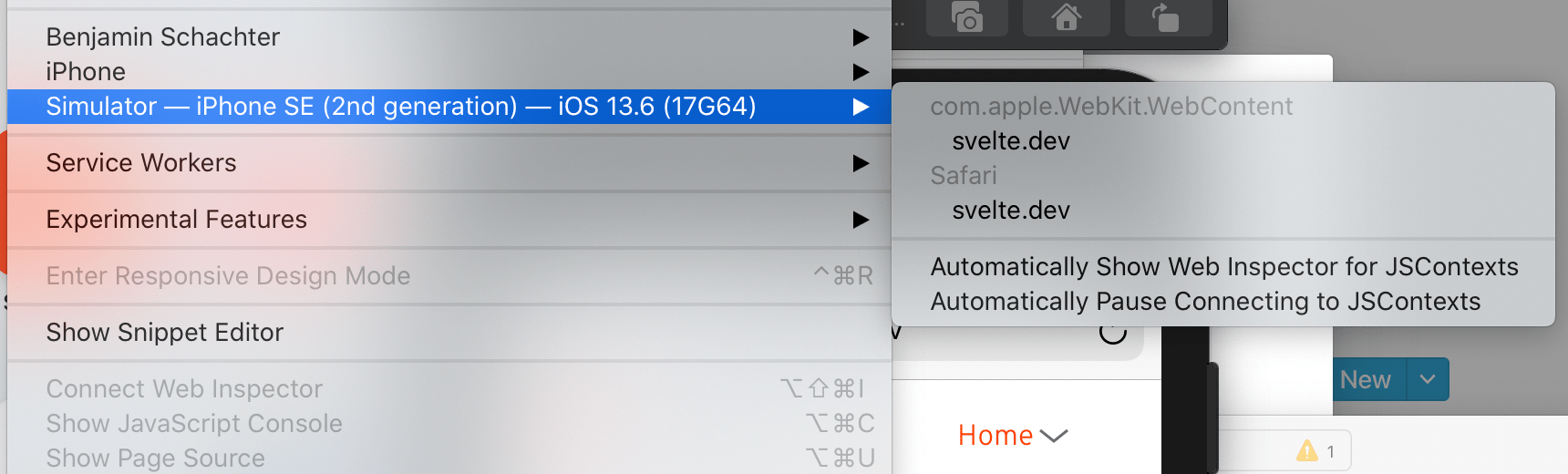
Screenshot of the Safari Develop menu expanded with the Simulator option highlighted in blue.

This provides access to a console just like you would in the browser but for iOS Safari.  I’m not going to lie, Apple’s developer experience is top notch (see what I did there? 😬).

I’m able to reproduce the issue locally now.

💡 What I learned

After pulling down the Svelte repo and looking around the code a bit, I noticed the UI and SVGs were being pulled in via a package called @sveltejs/site-kit. Great, now I need my local version of site kit to get pulled into svelte/site so I can see changes and debug the issue.

I needed to point the node_modules in Svelte’s package.json to my local copy of site-kit. This sounded like a Symlink. After looking through the docs without much luck I Googled around and stumbled upon npm-link. That let me see what I was doing!

I can now make local changes to site-kit and see them reflected in the Svelte project.

Solving the issue

Seriously, all this needed was a one-line change:

border: transparent;

But locating where that one line should go was not as straightforward as you’d think. Source maps on the project are still a little rough around the edges and are showing this CSS coming from the Nav.svelte component when it was really coming from another file. That would be another great way to contribute to the project!

Then you search around and learn that this is being handled and you learn a little more about how it’s done. Everything now looks great on mobile and desktop.

That’s all it needed!

Let’s rewind

What started as a quick, one-line change became a bit of a journey. I had to:

  • Run the project and component repositories
  • Learn about system linking
  • Contribute documentation about lining to site-kit
  • Learn about different browser renderers
  • Learn how to emulate an iOS Safari browser
  • Learn how to get access to its debugger
  • Find the issue when source maps weren’t working correctly
  • Fix the issue (finally!)

Working on your own, you normally don’t get to deal with issues like this, or have a large complex system you need to build a mental model of and learn. You don’t get to learn from maintainers. Most importantly, you don’t see all of the hard work that goes into building a popular technical product.

When I submitted this idea to CSS-Tricks. Chris said he had recently dealt with a similar situation. Difficult learning is durable learning. Embrace the struggle.

Never stop learning

I grabbed another issue from the Svelte project and now I’m learning about CSSStyleSheet because there’s another issue (I think), with how Safari handles keyframe animations within stylemanager.ts. And so the learning continues down paths I never would have trod in my day-to-day work.

When something breaks, enjoy the journey of learning the system. You’ll gain valuable insights into why that thing broke and what can be done to fix it. That’s one of the awesome benefits of contributing to open source projects and why I’d encourage you to do the same.