


This is surely a debated issue, but ultimately I say if you have a message you feel would benefit from a nicely designed email you should go for it. If you just want to do it because everyone else on your block is doing it too, don’t. If you decide to do it, these are what I consider to be the five golden rules of HTML emails:
Update: This article is about a decade old as I update this. Probably not a great source of information anymore. A good source of information about CSS in in HTML email is Campaign Monitor’s guide.
The first thing you should do is to write the plain-text version of your email. Doing this first, while you are fresh, will lead to better copy, a better plan for the design, and ultimately a better email. You will need to do this anyway, since one of the golden rules is to send a plain-text alternative to HTML emails. Sending BOTH a plain-text and an HTML email in one combined email is called the Multipart/Alternative email format, or MIME. Most email clients support it, it’s that thing that pops up that asks you if you want to send it plain text, HTML, or both, like in this Thunderbird screen shot:

Couple quick tips for your plain-text email: Hard-wrap your lines at 60 characters and write out full URL’s instead of using anchor tags.
After the plain text version of your email is done, then start thinking about design. Every single email client reading your email is going to have it’s own rules about how it deals with HTML emails, so you are going to have to design for the lowest common denominator. Think it’s a pain having to test websites in 4-5 different browsers? It’s much worse with email. Here is a partial list: AOL (multiple versions), Comcast, Earthlink, Gmail, Hotmail, Lotus Notes, Mail.com, Outlook (multiple versions), Thunderbird, Windows Live, Yahoo!, Mail.app. Not to mention mobile clients.
Assuming you have a fairly large list you are sending out to and have no idea what kinds of email clients they are using, you will need to think in terms of what you can’t do more than what you can do.
<head> section with <style>. Apple Mail.app supports it, but Gmail and Hotmail do not, so it’s a no-no. Hotmail will support a style section in the body but Gmail still doesn’t. UPDATE: In 2020, this is much better supported. There are quite a few more things you should be aware of. For a great complete list of what online email services support what, check out this article.
In two words, inline styles. It’s not as awful as you might think, since we are basically developing a one-off email, inline styles are not nearly as egregious as using them on a website. Need a big green title for a block of text?
Take a look at the code of almost any HTML email you’ve gotten. I’ll bet ya it’s formatted with a table. Tables are still the best way to achieve consistent results across email clients. The email equivalent of the browser window is the “viewport”, or the area in an email client dedicated to showing the actual email. This varies quite a bit. A vary common technique is to set a table with a 100% width with a nested table inside of it that is centered with a static width. This seems to work very well. The outer table is also your big chance to set the background-color for the whole email. Too bad we can’t just use a div with auto left and right margins for centering, but it won’t work most email clients.
If you just don’t want to think about all these nasty inline styles screwing up your code and all the little rules of what will work and won’t work, don’t worry! There is a really nice (and free) preflight service out there called Premailer. With Premailer, you just design your email as a webpage (still think tables), then submit your URL. Premailer will parse the HTML and convert all your styles into inline styles for you, as well as give you a list of CSS warnings on things you are doing that might be dangerous and for which email clients they are dangerous. Handy!

They are also full-service HTML email marketing providers out there. Most noteably, MailChimp. With MailChimp, you design your emails right within their web editor. You still have a nice amount of control, the prefab template is pretty nice, and MailChimp will do everything possible to make sure the email looks it’s absolute best in all email clients. That alone is worth the reasonable rates ($30/month for lists up to 2,500 and goes up and down from there). MailChimp offers more though, a service which is almost invaluable, managing your lists for you. You get a customizable web page you can send people to to sign up for your emails, which will automatically add them to your list. Even better, they also handle unsubscribes automatically. Both of these things can be as transparent to you as you would like. Statistics on your emails are provided.
There is a free trial version for the service available. Even if you don’t end up ever actually using the service, you should check out MailChimp’s resource center. They have TONS of useful information on email marketing, technical info, and design tips. They even offer a totally free 64-page PDF called Designing, Coding, and Delivering HTML Email: A Beginner’s Survival Guide which is an awesome place to start understanding this stuff.
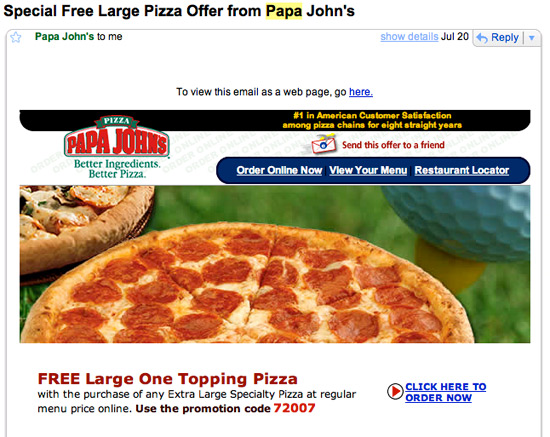
All of these are fairly effective examples I think. Papa John’s is an offender for way-to-often emailing, but their emails are usually pretty enticing.


Good luck!
此内容由惯性聚合(RSS阅读器)自动聚合整理,仅供阅读参考。 原文来自 — 版权归原作者所有。