


You know what the best thing is about building and running automated browser tests is? It means that the site you’re doing it on really matters. It means you’re trying to take care of that site by making sure it doesn’t break, and it’s worth the time to put guards in place against that breakages. That’s awesome. It means you’re on the right track.
My second favorite thing about automated browser tests is just how much coverage you get for such little code. For example, if you write a script that goes to your homepage, clicks a button, and tests if a change happened, that covers a lot of ground. For one, your website works. It doesn’t error out when it loads. The button is there! The JavaScript ran! If that test passes, a lot of stuff went right. If that fails, you’ve just caught a major problem.
So that’s what we’re talking about here:
this to be that, was it? Yes? PASS. No? ERROR.Are you one of those folks who likes the concept of automated testing but might not know where to start? That’s what we’re going to check out in this post. By stitching together a few resources, we can take the heavy lifting out of cross-browser testing and feel more confident that the code we write isn’t breaking other things.

If you’re new to Selenium, you’re in for a treat. It’s an open source suite of automated testing tools that can run tests on different browsers and platforms on virtual machines. And when we say it can run tests, we’re talking about running them all in parallel. We’ll get to that.
It’s able to do that thanks to one of its components, Selenium Grid. The grid is a self-hosted tool that creates a network of testing machines. As in, the browsers and operating systems we want to test automatically. All of those machines provide the environments we want to test and they are able to run simultaneously. So cool.
Where Selenium is boss at running tests, Jest is the testing framework. Jest tops the charts for developer satisfaction, interest, and awareness. It provides a library that helps you run code, pointing out not only where things fall apart, but the coverage of that code as a way of knowing what code impacts what tests. This is an amazing feature. How many times have you made a change to a codebase and been completely unsure what parts will be affected? That’s what Jest provides: confidence.
Jest is jam-packed with a lot of testing power and its straightforward API makes writing unit tests a relative cinch. It comes from the Facebook team, who developed it as a way to test React applications, but it’s capable of testing more than React. It’s for literally any JavaScript, and as we’ll see, browser tests themselves.
So, let’s make Jest part of our testing stack.
If we combine the superpowers of Selenium with Jest, we get a pretty slick testing environment. Jest runs the unit tests and Selenium provides and automates the grounds for cross-browser testing. It’s really no more than that!
Let’s hit pause on developing our automated testing stack for a moment to grab Selenium and Jest. They’re going to be pre-requisites for us, so we may as well snag them.
Start by creating a new project and cd-ing into it. If you already have a project, you can cd into that instead.
Once we’re in the project folder, let’s make sure we have Node and npm at the ready.
## Run this or download the package yourself at: https://nodejs.org/brew install node

## Then we'll install the latest version of npm
npm install npm@latest -g
Okey-dokey, now let’s install Jest. If you happen to be running a React project that was created with create-react-app, then you’re in luck — Jest is already included, so you’re good to go!
For the rest of us mortals, we’re going back to the command line:
## Yarn is also supported
npm install --save-dev jest
OK, we have the core dependencies we need to get to work, but there is one more thing to consider…
Yep, scale. If you’re running a large, complex site, then it’s not far-fetched to think that you might need to run thousands of tests. And, while Selenium Grid is a fantastic resources, it is hosted on whatever environment you put it on, meaning you may very well outgrow it and need something more robust.
That’s where LambdaTest comes into play. If you haven’t heard of it, LambdaTest is a cloud-based cross-browser testing tool with 2,000+ real browsers for both manual and Selenium automation testing. Not to mention, it plays well with a lot of other services, from communication tools like Slack and Trello to project management tools like Jira and Asana — and GitHub, Bitbucket, and such. It’s extensible like that.
Here’s an important thing to know: Jest doesn’t support running tests in parallel all by itself, which is really needed when you have a lot of tests and you’re running them on multiple browsers. But on LambdaTest, you can be running concurrent sessions, meaning different Jest scripts can be running on different sessions at the same time. That’s right, it can run multiple tests together, meaning the time to run tests is cut down dramatically compared to running them sequentially.
We’ve already installed Jest. Let’s say Selenium is already set up somewhere. The first thing we need to do is sign up for LambdaTest and grab the account credentials. We’ll need to set them up as environment variables in our project.
From the command line:
## Mac/Linuxexport LT_USERNAME=<your lambdatest username> export LT_ACCESS_KEY=<your lambdatest access_key>

## Windowsset LT_ACCESS_KEY=<your lambdatest access_key>set LT_ACCESS_KEY=<your lambdatest access_key>
LambdaTest has a repo that contains a sample of how to set things up from here. You could clone that as a starting point if you’re just interested in testing things out.
The LambdaTest docs use this as a sample test script:
const webdriver = require('selenium-webdriver');
const { until } = require('selenium-webdriver');
const { By } = require('selenium-webdriver');
const LambdaTestRestClient = require('@lambdatest/node-rest-client');

const username = process.env.LT_USERNAME || '<your username>';
const accessKey = process.env.LT_ACCESS_KEY || '<your accessKey>';

const AutomationClient = LambdaTestRestClient.AutomationClient({
  username,
  accessKey
});
const capabilities = {
  build: 'jest-LambdaTest-Single',
  browserName: 'chrome',
  version: '72.0',
  platform: 'WIN10',
  video: true,
  network: true,
  console: true,
  visual: true
};

const getElementById = async (driver, id, timeout = 2000) => {
  const el = await driver.wait(until.elementLocated(By.id(id)), timeout);
  return await driver.wait(until.elementIsVisible(el), timeout);
};

const getElementByName = async (driver, name, timeout = 2000) => {
  const el = await driver.wait(until.elementLocated(By.name(name)), timeout);
  return await driver.wait(until.elementIsVisible(el), timeout);
};

const getElementByXpath = async (driver, xpath, timeout = 2000) => {
  const el = await driver.wait(until.elementLocated(By.xpath(xpath)), timeout);
  return await driver.wait(until.elementIsVisible(el), timeout);
};

let sessionId = null;

describe('webdriver', () => {
  let driver;
  beforeAll(async () => {
    driver = new webdriver.Builder()
      .usingServer(
        'https://' + username + ':' + accessKey + '@hub.lambdatest.com/wd/hub'
      )
      .withCapabilities(capabilities)
      .build();
    await driver.getSession().then(function(session) {
      sessionId = session.id_;
    });
    // eslint-disable-next-line no-undef
    await driver.get(`https://lambdatest.github.io/sample-todo-app/`);
  }, 30000);

  afterAll(async () => {
    await driver.quit();
  }, 40000);

  test('test', async () => {
    try {
      const lnk = await getElementByName(driver, 'li1');
      await lnk.click();

      const lnk1 = await getElementByName(driver, 'li2');
      await lnk1.click();

      const inpf = await getElementById(driver, 'sampletodotext');
      await inpf.clear();
      await inpf.sendKeys("Yey, Let's add it to list");

      const btn = await getElementById(driver, 'addbutton');
      await btn.click();

      const output = await getElementByXpath(
        driver,
        '//html/body/div/div/div/ul/li[6]/span'
      );
      const outputVal = await output.getText();
      expect(outputVal).toEqual("Yey, Let's add it to list");
      await updateJob(sessionId, 'passed');
    } catch (err) {
      await webdriverErrorHandler(err, driver);
      throw err;
    }
  }, 35000);
});

async function webdriverErrorHandler(err, driver) {
  console.error('Unhandled exception! ' + err.message);
  if (driver && sessionId) {
    try {
      await driver.quit();
    } catch (_) {}
    await updateJob(sessionId, 'failed');
  }
}
function updateJob(sessionId, status) {
  return new Promise((resolve, reject) => {
    AutomationClient.updateSessionById(
      sessionId,
      { status_ind: status },
      err => {
        if (err) return reject(err);
        return resolve();
      }
    );
  });
}
The ‘Capabilities’ object look confusing? It’s actually a lot easier to write this sort of thing using the Selenium Desired Capabilities Generator that the LambdaTest team provides. That sample script defines a set of tests that can be run on a cloud machine that have browser configuration Chrome 72 and operating system Windows 10. You can run the script from the command line, like this:
npm test .single.test.jsThe sample script also have an example that you can use to run the tests on your local machine like this:
npm test .local.test.jsWouldn’t it be great to have a record of all your tests, which ones are running, logs of when they ran, and what their results were? This is where LambdaTest is tough to beat because it has a UI for all of that through their automation dashboard.
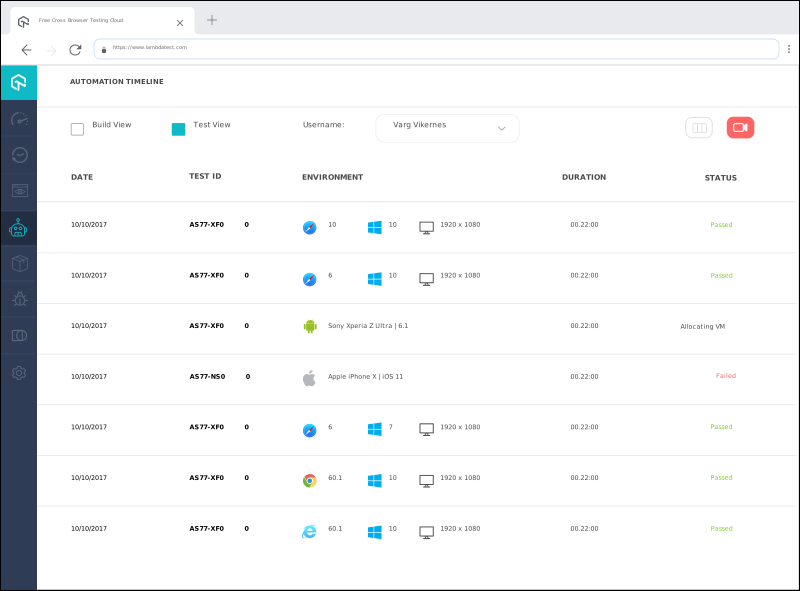
The dashboard provides all of those details and more, including analytics that show how many builds ran on a given day, how much time it took to run them, and which ones passed or failed. Pretty nice to have that nearby. LambdaTest even has super handy documentation for the Selenium Automation API that can be used to extract all this test execution data that you can use for any custom reporting framework that you may have.

That’s the stack: Selenium for virtual machines, Jest for unit tests, and LambdaTest for automation, hosting and reporting. That’s a lot of coverage from only a few moving pieces.
If you’ve ever used online cross-browser tools, it’s kind of like having that… but running on your own local machine. Or a production environment.
LambdaTest is free to try and worth every minute of the trial.
此内容由惯性聚合(RSS阅读器)自动聚合整理,仅供阅读参考。 原文来自 — 版权归原作者所有。