


I work on an RSS reader app called Readerrr (editor’s note: link removed as site seems dead). I wanted to enrich the feed import experience by making allowing for drag and drop file upload alongside the traditional file input. Sometimes drag and drop is a more comfortable way to select a file, isn’t it?

This markup doesn’t have anything specifically to do with drag and drop. It’s just a normal, functional <form>, albeit with some extra HTML elements for potential states.
<form class="box" method="post" action="" enctype="multipart/form-data">
  <div class="box__input">
    <input class="box__file" type="file" name="files[]" id="file" data-multiple-caption="{count} files selected" multiple />
    <label for="file"><strong>Choose a file</strong><span class="box__dragndrop"> or drag it here</span>.</label>
    <button class="box__button" type="submit">Upload</button>
  </div>
  <div class="box__uploading">Uploading…</div>
  <div class="box__success">Done!</div>
  <div class="box__error">Error! <span></span>.</div>
</form>
We’ll hide those states until we need them:
.box__dragndrop,
.box__uploading,
.box__success,
.box__error {
  display: none;
}
A little explanation:
.box__uploading element will be visible during the Ajax process of file upload (and the others will still be hidden). Then .box__success or .box__error will be shown depending on what happens.input[type="file"] and label are the functional parts of the form. I wrote about styling these together in my post about customizing file inputs. In that post I also described the purpose of [data-multiple-caption] attribute. The input and label also serve as an alternative for selecting files in the standard way (or the only way if drag and drop isn’t supported)..box__dragndrop will be shown if a browser supports drag and drop file upload functionality.We can’t 100% rely on browsers supporting drag and drop. We should provide a fallback solution. And so: feature detection. Drag & drop file upload relies on a number of different JavaScript API’s, so we’ll need to check on all of them.
First, drag & drop events themselves. Modernizr is a library you can trust all about feature detection. This test is from there:
var div = document.createElement('div');
return ('draggable' in div) || ('ondragstart' in div && 'ondrop' in div)
Next we need to check the FormData interface, which is for forming a programmatic object of the selected file(s) so they can be sent to the server via Ajax:
return 'FormData' in window;Last, we need the DataTransfer object. This one is a bit tricky because there is no bullet-proof way to detect the availability of the object before user’s first interaction with the drag & drop interface. Not all browsers expose the object.
Ideally we’d like to avoid UX like…
The trick here is to check the availability of FileReader API right when the document loads. The idea behind this is that browsers that support FileReader support DataTransfer too:
'FileReader' in windowCombining the code above into self-invoking anonymous function…
var isAdvancedUpload = function() {
  var div = document.createElement('div');
  return (('draggable' in div) || ('ondragstart' in div && 'ondrop' in div)) && 'FormData' in window && 'FileReader' in window;
}();
… will enable us to make an effective feature support detection:
if (isAdvancedUpload) {
  // ...
}
With this working feature detection, now we can let the users know they can drag & drop their files into our form (or not). We can style the form by adding a class to it in the case of support:
var $form = $('.box');

if (isAdvancedUpload) {
  $form.addClass('has-advanced-upload');
}
.box.has-advanced-upload {
background-color: white;
outline: 2px dashed black;
outline-offset: -10px;
}
.box.has-advanced-upload .box__dragndrop {
display: inline;
}
No problems at all if drag & drop file upload is not supported. Wsers will be able to upload files via good ol’ input[type="file"]!

Note on browser support: Microsoft Edge has a bug which stops drag and drop from working. It sounds like they are aware of it and hope to fix it. (Update: link to bug removed as the link stopped working. Now that Edge is Chromium, presumably, it’s not a problem anymore.)
Here we go, here’s the good stuff.
This part deals with adding and removing classes to the form on the different states like when the user is dragging a file over the form. Then, catching those files when they are dropped.
if (isAdvancedUpload) {

  var droppedFiles = false;

  $form.on('drag dragstart dragend dragover dragenter dragleave drop', function(e) {
    e.preventDefault();
    e.stopPropagation();
  })
  .on('dragover dragenter', function() {
    $form.addClass('is-dragover');
  })
  .on('dragleave dragend drop', function() {
    $form.removeClass('is-dragover');
  })
  .on('drop', function(e) {
    droppedFiles = e.originalEvent.dataTransfer.files;
  });

}
e.preventDefault() and e.stopPropagation() prevent any unwanted behaviors for the assigned events across browsers.e.originalEvent.dataTransfer.files returns the list of files that were dropped. Soon you will see how to use the data for sending these files to the server.Adding and removing .is-dragover when necessary enables us to visually indicate when it is safe for a user to drop the files:
.box.is-dragover {
  background-color: grey;
}
Sometimes dragging & dropping files is not very comfortable way for selecting files for upload. Especially when a user is in front of a small screen size computer. Therefore it would be nice to let users choose the method they prefer. The file input and label are here to allow this. Styling them both in the way I’ve described allows us to keep the UI consistant:
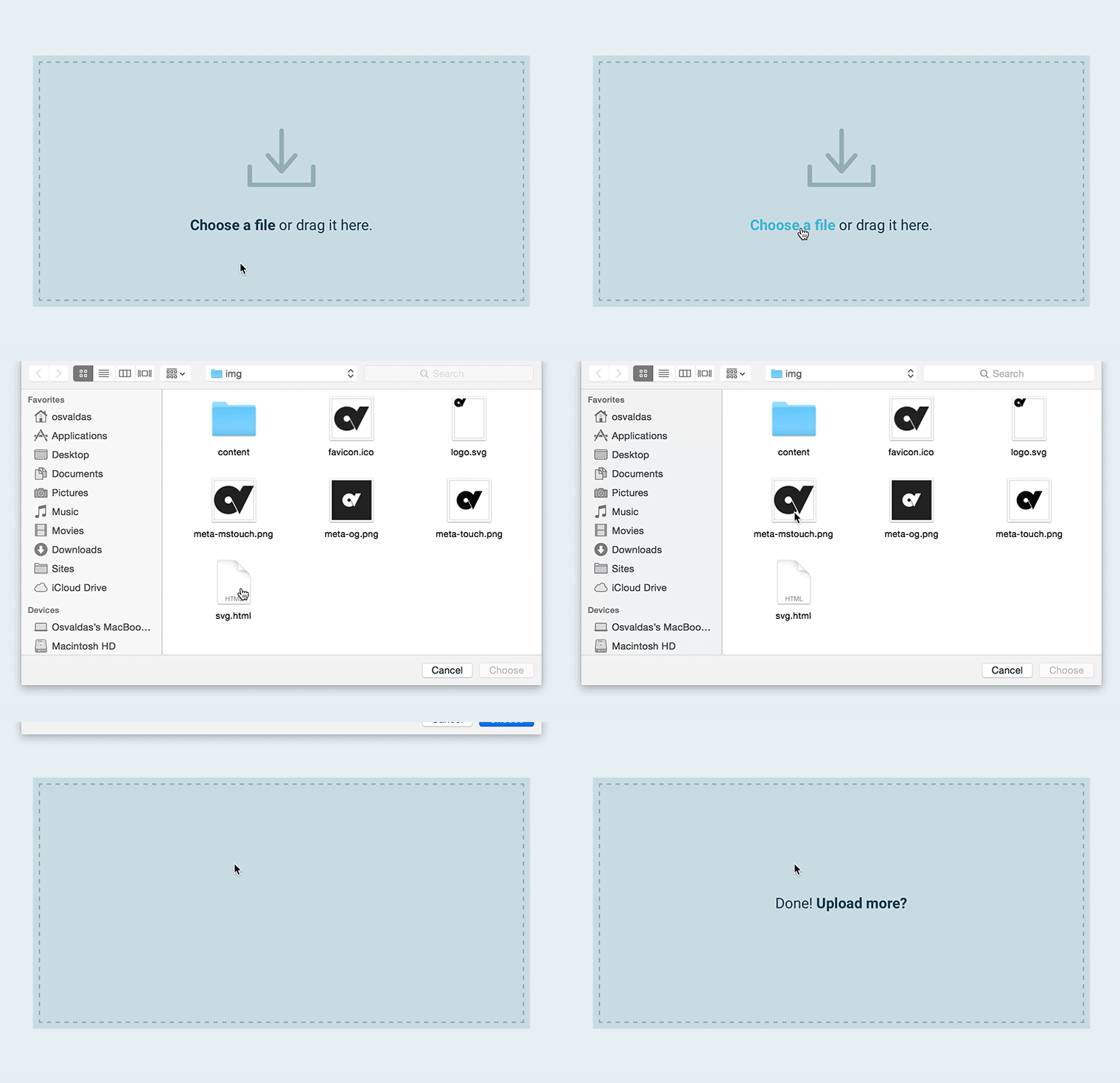
There is no cross-browser way to upload dragged & dropped files without Ajax. Some browsers (IE and Firefox) do not allow setting the value of a file input, which then could be submitted to server in a usual way.
This won’t work:
$form.find('input[type="file"]').prop('files', droppedFiles);Instead, we’ll use Ajax when the form is submitted:
$form.on('submit', function(e) {
  if ($form.hasClass('is-uploading')) return false;

  $form.addClass('is-uploading').removeClass('is-error');

  if (isAdvancedUpload) {
    // ajax for modern browsers
  } else {
    // ajax for legacy browsers
  }
});
The .is-uploading class does double duty: it prevents the form from being submitted repeatedly (return false) and helps to indicate to a user that the submission is in progress:
.box.is-uploading .box__input {
  visibility: none;
}
.box.is-uploading .box__uploading {
  display: block;
}If this was a form without a file upload, we wouldn’t need to have two different Ajax techniques. Unfortunately, file uploading via XMLHttpRequest on IE 9 and below is not supported.
To distinguish which Ajax method will work, we can use our existing isAdvancedUpload test, because the browsers which support the stuff I wrote before, also support file uploading via XMLHttpRequest. Here’s code that works on IE 10+:
if (isAdvancedUpload) {
  e.preventDefault();

  var ajaxData = new FormData($form.get(0));

  if (droppedFiles) {
    $.each( droppedFiles, function(i, file) {
      ajaxData.append( $input.attr('name'), file );
    });
  }

  $.ajax({
    url: $form.attr('action'),
    type: $form.attr('method'),
    data: ajaxData,
    dataType: 'json',
    cache: false,
    contentType: false,
    processData: false,
    complete: function() {
      $form.removeClass('is-uploading');
    },
    success: function(data) {
      $form.addClass( data.success == true ? 'is-success' : 'is-error' );
      if (!data.success) $errorMsg.text(data.error);
    },
    error: function() {
      // Log the error, show an alert, whatever works for you
    }
  });
}
FormData($form.get(0)) collects data from all the form inputs$.each() loop runs through the dragged & dropped files. ajaxData.append() adds them to the data stack which will be submitted via Ajaxdata.success and data.error are a JSON format answer which will be returned from the server. Here’s what that would be like in PHP:<?php
// ...
die(json_encode([ 'success'=> $is_success, 'error'=> $error_msg]));
?>This is essentially for IE 9-. We do not need to collect the dragged & dropped files because in this case (isAdvancedUpload = false), the browser does not support drag & drop file upload and the form relies only on the input[type="file"].
Strangely enough, targeting the form on a dynamically inserted iframe does the trick:
if (isAdvancedUpload) {
  // ...
} else {
  var iframeName  = 'uploadiframe' + new Date().getTime();
    $iframe   = $('<iframe name="' + iframeName + '" style="display: none;"></iframe>');

  $('body').append($iframe);
  $form.attr('target', iframeName);

  $iframe.one('load', function() {
    var data = JSON.parse($iframe.contents().find('body' ).text());
    $form
      .removeClass('is-uploading')
      .addClass(data.success == true ? 'is-success' : 'is-error')
      .removeAttr('target');
    if (!data.success) $errorMsg.text(data.error);
    $form.removeAttr('target');
    $iframe.remove();
  });
}If you have a simple form with only a drag & drop area or file input, it may be a user convenience to avoid requiring them to press the button. Instead, you can automatically submit the form on file drop/select by triggering the submit event:
// ...

.on('drop', function(e) { // when drag & drop is supported
  droppedFiles = e.originalEvent.dataTransfer.files;
  $form.trigger('submit');
});

// ...

$input.on('change', function(e) { // when drag & drop is NOT supported
  $form.trigger('submit');
});
If drag & drop area is visually well-designed (it’s obvious to the user what to do), you might consider hiding the submit button (less UI can be good). But be careful when hiding a control like that. The button should be visible and functional if for some reason JavaScript is not available (progressive enhancement!). Adding a .no-js class name to and removing it with JavaScript will do the trick:
<html class="no-js">
  <head>
    <!-- remove this if you use Modernizr -->
    <script>(function(e,t,n){var r=e.querySelectorAll("html")[0];r.className=r.className.replace(/(^|\s)no-js(\s|$)/,"$1js$2")})(document,window,0);</script>
  </head>
</html>
.box__button {
display: none;
}
.no-js .box__button {
display: block;
}If you’re not going to do auto-submission there should be an indication to the user if they have selected files successfully:
var $input    = $form.find('input[type="file"]'),
    $label    = $form.find('label'),
    showFiles = function(files) {
      $label.text(files.length > 1 ? ($input.attr('data-multiple-caption') || '').replace( '{count}', files.length ) : files[ 0 ].name);
    };

// ...

.on('drop', function(e) {
  droppedFiles = e.originalEvent.dataTransfer.files; // the files that were dropped
  showFiles( droppedFiles );
});

//...

$input.on('change', function(e) {
  showFiles(e.target.files);
});

Progressive enhancement is about the idea that a user should be able to complete the principal tasks on a website no matter what. File uploading is no exception. If for some reason JavaScript is not available, the interface will look like this:

The page will refresh on form submission. Our JavaScript for indicating the result of submission is useless. That means we have to rely on server-side solution. Here’s how it looks and works in the demo page:
<?php

  $upload_success = null;
  $upload_error = '';

  if (!empty($_FILES['files'])) {
    /*
      the code for file upload;
      $upload_success – becomes "true" or "false" if upload was unsuccessful;
      $upload_error – an error message of if upload was unsuccessful;
    */
  }

?>
And some adjustments for the markup:
<form class="box" method="post" action="" enctype="multipart/form-data">

  <?php if ($upload_success === null): ?>

  <div class="box__input">
    <!-- ... -->
  </div>

  <?php endif; ?>

  <!-- ... -->

  <div class="box__success"<?php if( $upload_success === true ): ?> style="display: block;"<?php endif; ?>>Done!</div>
  <div class="box__error"<?php if( $upload_success === false ): ?> style="display: block;"<?php endif; ?>>Error! <span><?=$upload_error?></span>.</div>

</form>
That’s it! This already-long article could have been even longer, but I think this will get you going with a responsible drag and drop file upload feature on your own projects.
Check out the demo for more (view source to see the no-jQuery-dependency JavaScript):
此内容由惯性聚合(RSS阅读器)自动聚合整理,仅供阅读参考。 原文来自 — 版权归原作者所有。