


Looking at the CMS scene today, there are upwards of 150 options to choose from — and that’s not including whatever home-grown custom alternatives people might be running. The term “Content Management System” is broad and most site builders fit into the CMS model. Craft CMS, a relatively new choice in this field (launched in 2013) stands out to me.
My team and I have been using Craft CMS for the past two years to develop and maintain a couple of websites. I would like to share my experience using this system with you.
Note that this review is focused on our experience with using Craft and as such, no attempt has been made to compare it to other available options. For us, using Craft has been a very positive experience and we leave it up to you, the reader, to compare it to other experiences that you may have had.
Craft is the creation of Pixel & Tonic, a small software development company based out of Oregon. Founded by Brandon Kelly, known for premium ExpressionEngine add-ons. While developing some of the most used add-ons, Pixel & Tonic set out to build their own CMS, known as “Blocks.” This was all the way in 2010, during its development the name was changed to Craft CMS.
Looking at the market we can see that Craft is well adopted. At the time of writing this article, there are around ~70 000 websites using Craft.

Craft was set out to make life enjoyable for developers and content managers. In 2015, Craft proved this by winning the Best CMS for Developers award by CMSCritics. Over the years, Craft has won multiple awards that prove that Craft is on the right path.
When I am asked where Craft fits in the overall CMS landscape, I say it’s geared toward small-to-medium-sized businesses where there is a staff of content managers that don’t require a completely custom solution.
At the heart of things, Craft is a CMS in the same vein as WordPress and other traditional offerings — just with a different flavor and approach to content management that makes it stand out from others, which is what we’re covering next.
Server requirements for a Craft setup are simple and standard. Craft requires the following:
Out of the box, you can get Craft up and running fast. You don’t need an extensive PHP or Database background to get started. Hell, you can get away with little-to-no PHP knowledge at all. That makes both the barrier to entry and the time from installation to development extremely small.
Craft is unique in that it is both a simple and a complex CMS.
You can use Craft to design and develop complex sites that and are built with and rely heavily on PHP, databases, and query optimizations.
However, you can also use Craft to design and develop simple sites where you do none of those things.
This was one of the main selling points for me. It’s simple to get up and going with very little, but if you need to do something more complex, you can. And it never feels like you are “hacking” it do anything it wasn’t meant to.
Craft abstracted all the field creation and setup to the admin panel. You only need to point it to the right Twig and then use the fields you connected. Furthermore, it provides localization and multi-site management out of the box with no need for plugins. This is essentially what makes it different from other content management systems. You can create the structure, fields and all the forms without ever touching any code.

Some CMSs like to make a lot of decisions for you and sometimes that leads to unnecessary bloat. Front- and back-end performance is super important to me and, as such, I appreciate that Craft does leave a lot of that up to me, should I need it. It provides a full customization experience that supports beginners right out of the box, but doesn’t constrain folks at the professional level.
Some developers are not keen on this, but Craft uses Twig as its template engine. The word “use” should be emphasized as a requirement, as there is no option of writing raw PHP anywhere inside the template. Here are my thoughts on that:
Let’s say you’re not digging Twig or you would rather use one of the latest technologies (hello static site generators!). Craft’s templating system isn’t the only way to get content out of Craft. As of Craft 3.3, it provides a “headless” mode and GraphQL built-in with Craft’s Pro features. That means that you can use tools like Gatsby or Gridsome to build static sites with the comfort of Craft CMS. That brings Craft in line with the like of WordPress that provides its own REST API for fetching content to use somewhere else.
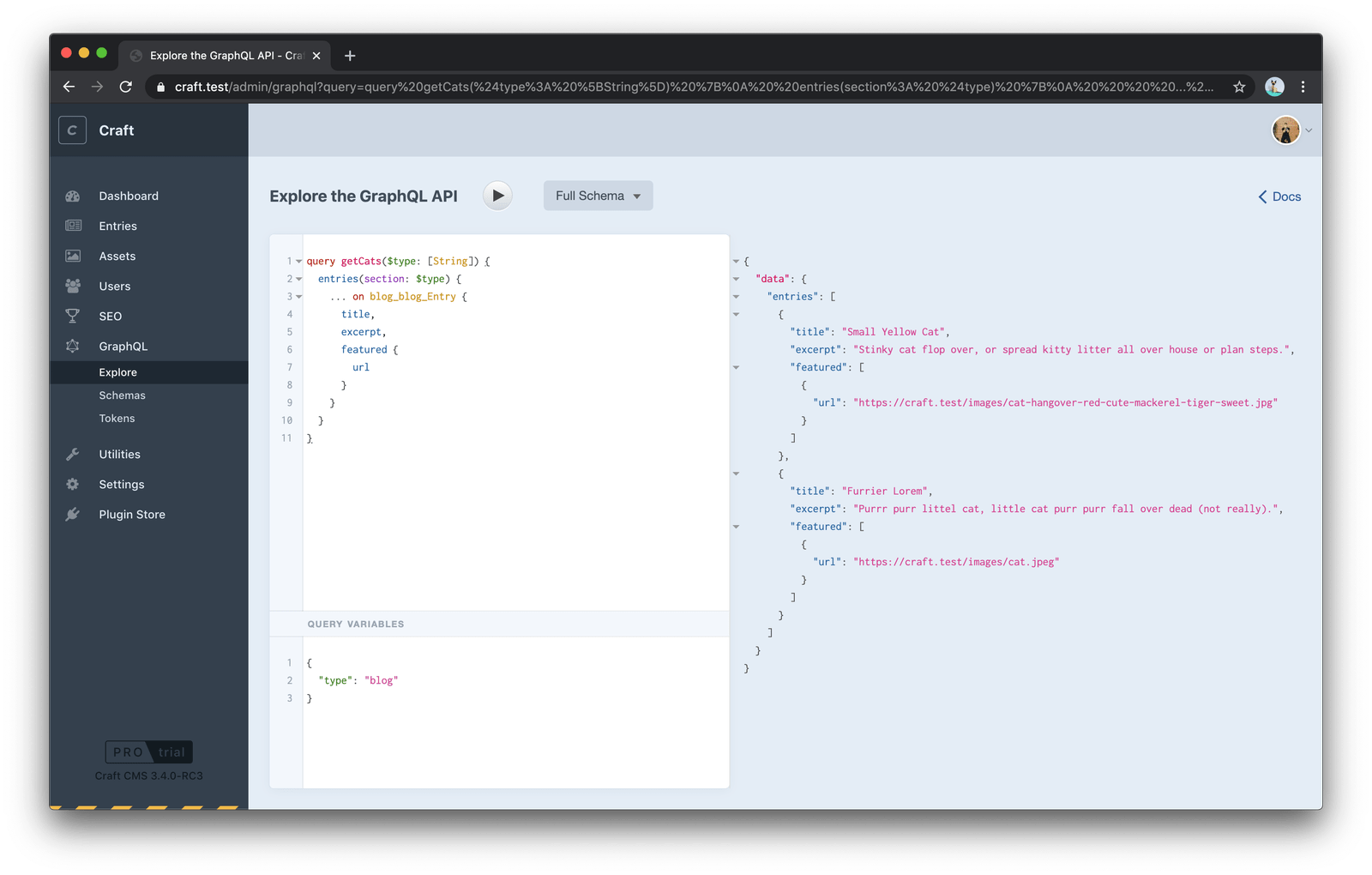
Speaking of REST, there is even an option for that in Craft if, say, you are not a fan of GraphQL. The Element API is a REST read-only API that is available via the first-party Element API plugin. Again, Craft comes with exactly what you need at a minimum and can be extended to do more.
This brings me to my next point: Craft CMS is super extensible. It is built on the Yii Framework, a well-known PHP framework that is robust and fast. This is important, as all the extensibility is either through modules or plugins written in Yii and Craft API. Modules are a concept passed down from Yii modules and they provide a way to extend core functionality without changing the source. On the other hand, plugins are a Craft concept and they do the same thing as modules, but can be installed, disabled and removed. If you would like to read more about this, you can find it in Craft’s docs.
Both modules and plugins have full access to Craft and Yii’s API. This is a huge bonus, as you can benefit from Yii’s community and documentation. Once you get used to Yii, writing plugins is easy and enjoyable. My team has built multiple custom plugins and modules over the last two years, like a Pardot form integration, a Google reCAPTCHA integration, custom search behavior, and others. Essentially, the sky is the limit.
Writing plugins and modules is covered in the docs but I think this is where Craft’s system has room to grow. I would recommend opening a well-known plugin on GitHub to get a sense of how it’s done because I’ve found that to be much more helpful than the docs.
Initially, you may find this aspect of the system difficult, but once you understand the structure, it does get easier, because the code structure essentially consists of models, views, and controllers. It is like building a small MVC app inside your CMS. Here is an example of a plugin structure I’ve worked with:
.
├── assetbundles
├── controllers
├── migrations
├── models
├── records
├── services
├── templates
│   ├── _layouts
│   └── _macros
├── translations
│   └── en
├── variables
├── icon-mask.svg
├── icon.svg
└── Plugin.php
If you don’t feel like writing PHP and tinkering with Yii/Craft, you can always download plugins from the official Craft plugin store. There is a variety of plugins, from image to building on top of the WYSIWYG editor. One of many things that Craft got right is that you can try paid plugins in development mode as much as you like rather than having to first make a purchase.

During the course of two years, we have tried multiple plugins, there are a few that I not only recommend, but have found myself using for almost every project.
While we’ve covered the development experience so far, the thing that Craft got extremely right — to the point of blowing other CMSs out of the water, in my view — is the author’s experience. A CMS can do all kinds of wonderful things, but it has to be nice to write in at the end of the day.

The whole concept of the CMS is that it is built with two simple things; Fields and Sections, where fields are added to sections and entries are created by content managers.

One of the neatest author features is version control. “Wait, what?” you ask. Yes, all content is version controlled in a way that lets authors track changes and roll back to previous versions for any reason at all.

At any point in time, you can go back to any revision and use is as a current one. You don’t know how much you need this feature until you’ve tried it. For me, it brings a sense of security that you can’t lose someone’s edit or changes, same a with Git and developers.
The fun doesn’t stop here because Craft nailed one of the hardest things (in my opinion) about content management and that is localization. People still find this hard in 2020 and usually give up because it is both difficult to implement and properly present to authors in the UI.

Oh, and you can host multiple websites in a single Craft 3 instance. You can define one or more sites at different domains, different versions of the entry content and using a different set of templates. Like with everything in Craft, it is made so simple and open-ended (in a good way) that it is up to you what the other sites are going to be. You can create a site with the same language but different content or create a site with another language, solving the localization problem.
All the features above are already built-in inside Craft which for me is a must for a good author experience. As soon as you start patching the essential author functionality with plugins, great author experience is lost. This is because usually when you want to add functionality there are multiple plugins (ways) to do it, which aids a different author experience on the same platform but different instances.
It’s worth underscoring the importance of having a community of people you can to turn to. To some degree, you’re probably reading this post because you enjoy learning from others in the development community. It’ no difference with CMSs and Craft has an awesome community of developers.

At the same time, the community is still small (compared to, say, WordPress) and doesn’t have a long track record — though there are many folks in the community who have been around quite a while having come from ExpressionEngine. It’s not just because Craft itself is relatively new to the market. It’s also because not everyone posts on the Craft CMS Stack Exchange to the extent thatmany of the older answers haven’t even been updated for Craft 3. You’ll actually find most of the community hanging out on Discord, where even the creators of Craft, Pixel & Tonic, are active and willing to answer questions. It is also very helpful when you see Craft core members and big plugin creators, like Andrew from nystudio107 (shout out to a great performance freak), are there to assist almost 24/7.

One thing I also want to touch on is the limited learning resources available but, then again, you hardly need them. As I said earlier, the combination of Craft and Twig is simple enough that you won’t need a full course on how to build a blog.
Craft’s conference, Dot All, is a great resource all its own. Chris attended last year with a great presentation, which is available to the public.
And, lastly, Craft uses and enforces open source. For me, open source is always a good thing because you expose your code to more people (developers). Craft did this right. The whole platform and also plugins are open source.
This is the elephant in the room because there are mixed feelings about charging for content management systems. And yes, Craft has a simple pricing model:

I consider this pricing model fair and not particularly expensive — at least to the point of being prohibitive. Craft offers a free license for a small website you can build for a friend or a family member. On the other hand, Craft is more of a professional platform that is used to build mid-size business websites and as such their license cost is negligible. In most cases, developers (or agencies) will eat up the initial cost so that clients don’t have to worry about this pricing.
Oh, and kudos to Craft for providing an option to try the Pro version for free on a local domain. This also applies to all plugins.
To conclude, I would like to thank Craft CMS and the Pixel & Tonic team for an awesome and fun ride. Craft has satisfied almost all our needs and we will continue to use it for future projects. It’s flexible to fit each project and feel like CMS built for that use case.
It boils down Craft for me is a content management framework. Out of the box, it is nothing more than nuts and bolts that needs to be assembled to the user’s needs. This is the thing that makes Craft stand out and why it provides both great author and developer experience.
As you saw in the licensing model it is free for a single user, try it out and leave your feedback in the comments.
此内容由惯性聚合(RSS阅读器)自动聚合整理,仅供阅读参考。 原文来自 — 版权归原作者所有。