

惯性聚合 高效追踪和阅读你感兴趣的博客、新闻、科技资讯
阅读原文 在惯性聚合中打开

推荐订阅源

Apple Machine Learning Research
M
MIT News - Artificial intelligence
罗磊的独立博客
博客园 - 【当耐特】
A
About on SuperTechFans
Last Week in AI
Last Week in AI
雷峰网
雷峰网
IT之家
IT之家
aimingoo的专栏
aimingoo的专栏
H
Hackread – Cybersecurity News, Data Breaches, AI and More
博客园_首页
博客园 - 叶小钗
Microsoft Azure Blog
博客园 - Franky
J
Java Code Geeks
Cyber Security Advisories - MS-ISAC
D
Docker
Engineering at Meta
Engineering at Meta
B
Blog RSS Feed
The Cloudflare Blog
大猫的无限游戏
大猫的无限游戏
阮一峰的网络日志
阮一峰的网络日志
S
SegmentFault 最新的问题
Recent Announcements

Show HN

Show HN: AI agents for UK GDAD PCF roles and their skills The Two Pillars: Mixer Mode and Meta-Software in the Reorganization of Software Work After AI GitHub - JaiCode08/teleport-env What 1,000+ Harness Experiments Taught Me About Self-Improving Agents Show HN: Liiists, a Markdown-first, iOS and CLI list app SwiperTab – Get this Extension for 🦊 Firefox (en-US) GitHub - kouhxp/fftext: Summarize, explain, fact-check, or translate any text, URL, or file. No GPU. No cloud. One command GitHub - sweetpad-dev/sweetpad: Develop Swift/iOS projects using VSCode GitHub - dogmaticdev/IRON: IRON a.k.a. Intermediate Representation Object Notation is a Interpreter/Database that is used to create Programming Languages. GitHub - sjhalani7/vaen: Package your AI coding harness into a portable .agent file, and share it across repos, teams, & the community without ever having to copy-paste instructions, skills, MCP config, or secrets. Show HN: Gandalf the Grader Show HN: Citadeld – replay any CI failure locally from a single file GitHub - tdortman/cuSBF: High-Performance GPU Super Bloom Filter coral-ai/claude-code-token-xray at main · Coral-Bricks-AI/coral-ai GitHub - ulyssestenn/funes: Funes is a Git-based framework for LLM-managed knowledge work: an AI Librarian ingests raw sources, builds an interlinked Markdown knowledge base, and uses it to produce cited reports, analyses, and other outputs. GitHub - ThatXliner/gah: Git Add Hunk, built for agents to use GitHub - harmont-dev/harmont-cli: Command-line client for the Harmont CI platform GitHub - brooksmcmillin/mcp-authflow: OAuth 2.0 Authorization Server framework for MCP servers GitHub - javaid-codes/audit-supply-chain-agents GitHub - amorey/gochan: A small library of common channel architectures for Go, inspired by Rust GitHub - arifozgun/OpenGem: Free, Open-Source AI API Gateway with Gemini, OpenAI & Anthropic Compatibility in 1 file GitHub - Pranesh950/BioPetals: 🌸 Run BIOxAI models at home, BitTorrent-style. Fine-tuning and inference up to 10x faster than offloading GitHub - cnguyen14/bounty-doctor: Diagnose a GitHub bounty issue before you waste hours: detects honeypot scam repos, AI-bot attempt swarms, and stale contests. Show HN: CoreMCP – MCP Server for On-Prem DBs Show HN: KittyHTML – Render HTML/CSS as an inline image in your terminal GitHub - bingud/filemat: Web-based file manager Show HN: TruthLens – Free multi-signal deepfake image detector GitHub - apexlocal-jz/claude-usage-tray: Windows system-tray app showing your Claude Code rate-limit usage at a glance. Zero deps, ~300 lines of PowerShell. Cross-IDE (works regardless of VS Code, Cursor, plain terminal). Release v0.1.2.1 · kouhxp/yapsnap GitHub - noopolis/moltnet: Self-hostable chat network for AI agents. Pre-built bridges for Claude Code, Codex, and the Claws. Rooms, DMs, history. No Slack bots, no Matrix, no glue code.
Glassboard — Annotate anything on screen, temporarily
stemps23 · 2026-06-18 · via Show HN

Annotate anything on your Mac. Temporary by design.

Glassboard lets you scribble over anything on your Mac. Hold a shortcut to draw, release and your ink fades away — perfect for demos, screen shares, and teaching.

Free · Signed & notarized · macOS Tahoe 26 or later

Why Glassboard

A whiteboard for your whole screen

An annotation layer that's only ever one key press away — and out of your way otherwise.

Hold to draw

Hold a global shortcut and drag to draw over anything on screen — slides, demos, code, the desktop.

Release, and it fades away

Temporary by design. Your strokes disappear, once you let go.

🎨

Five vibrant colors

Pink, lime, yellow, turquoise, and orange — Make your message stand out.

🖍️

Four expressive tools

Freehand pen, arrow, rectangle, and ellipse, with adjustable thickness.

🧑‍🎨

Ideal for content creators and presenters

Highlight the points you want to get across.

👌

Works everywhere

No app support needed. Just draw over anything you want.

Draw over anything

A full-screen canvas, on demand

Glassboard draws on a transparent overlay across apps on every display, without stealing focus from the app underneath. Keep presenting, keep clicking — just hold the shortcut to mark things up.
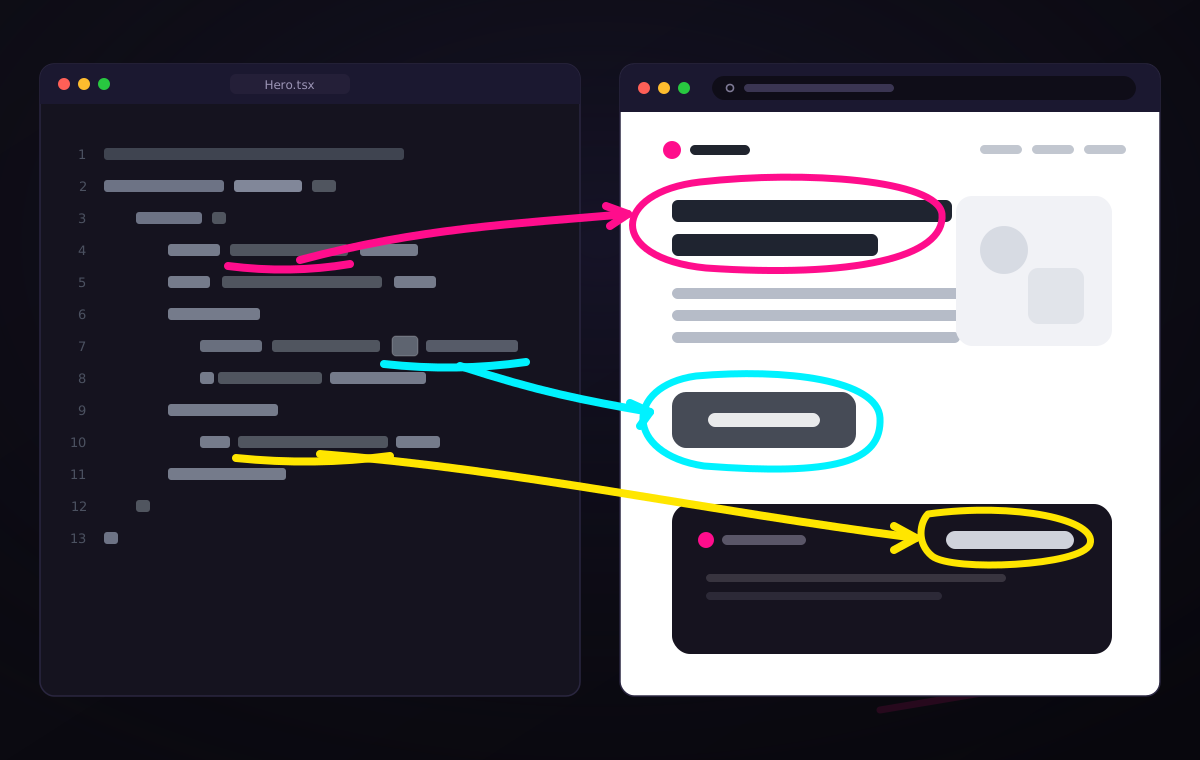
Freehand annotations drawn over a presentation

Control with gestures...

Quick radial menu for switching colors and tools

Hold right-click to fan out a radial menu right where you're drawing — tools on the left, colors on the right, with a live brush preview in the middle. Hover and release to pick; scroll while it's open to size the brush. No trip to a toolbar.

... or with keybinds.

Keep the GUI out of your way

If you don't want any UI to disturb your presentation, the keyboard does it all without a menu. Q W E R pick the tool, the A S D F G home row picks the color, and 1 through 0 set the thickness from hair-thin to bold. Z undoes your last stroke and X wipes the canvas clean.
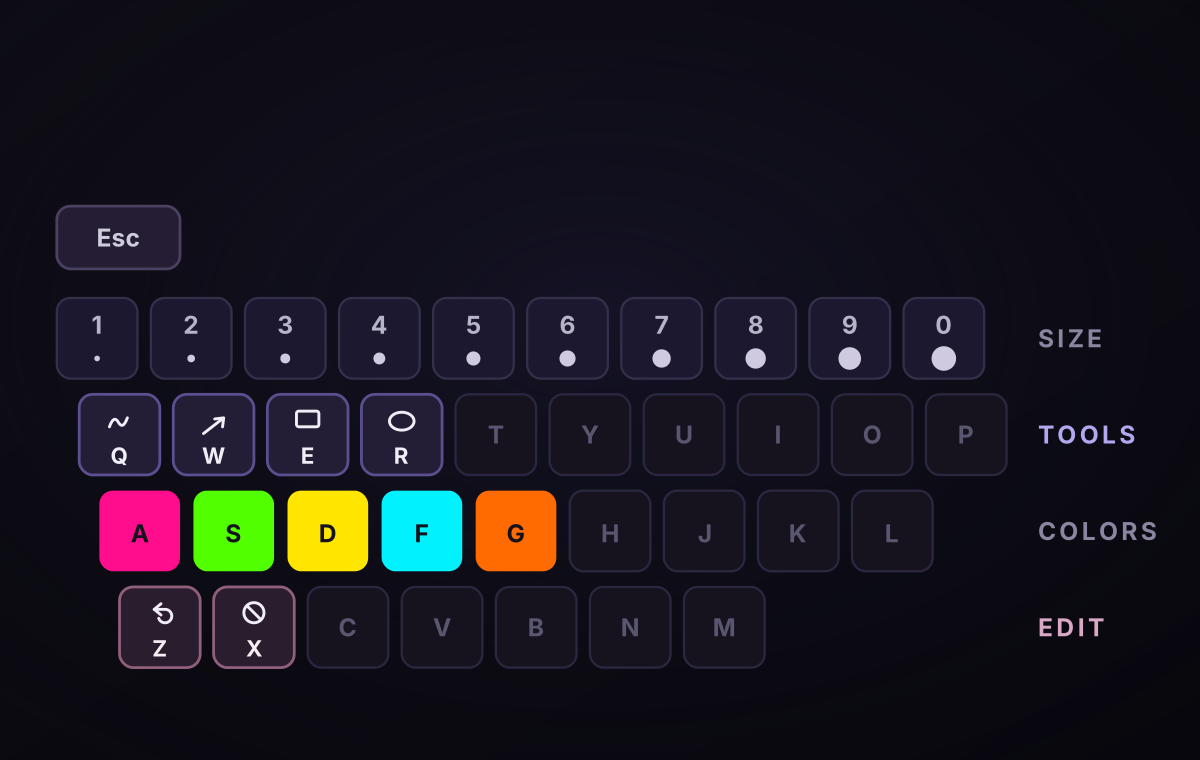
A keyboard with the number row mapped to thickness, Q W E R to tools, A S D F G to the five pen colors, Z to undo, and X to clear

How it works

Present, draw, move on

1

Hold ⌃⌥

Strokes appear instantly on a transparent layer. The app underneath keeps focus, so you can keep clicking and presenting.

2

Mark it up

Drag to draw freehande or using shapes. Hold right-click for the radial menu, or use the keyboard to switch tool and color without breaking stride.

3

Let go

The ink fades on its own. No undo, no eraser, no "let me clear that" — the screen is clean for your next point.

Requirements

What you need

macOS Tahoe 26+Tahoe-compatible Apple Silicon or Intel Mac.

AccessibilityGrant permission once so Glassboard can watch for the global drawing shortcut.