








Script-first web capabilities for AI agents. Run in-page scripts, save workflows as reusable capabilities, and generate AI-native userscripts.
Web-Capability is a local-first browser automation toolkit for agents. It lets agents inspect real browser tabs, run reusable in-page scripts, save successful workflows for later command-line use, and turn natural-language browser requests into AI-native userscripts.
Agents interact with Web-Capability through the web-cap CLI. The CLI manages the required local runtime automatically, so users do not need a separate startup command.
Quick Use
-
Install the Web Cap skill with the
skillsCLI:npx skills add edgestorage/web-cap
The skill includes the
web-capCLI installation and connection-check workflow for agents. -
Install the Web Cap browser extension:
- Open the Web Cap Releases page.
- Download the Chrome extension zip asset, named like
*chrome*.zip. - Unzip the downloaded extension asset.
- Open
chrome://extensionsin Chrome. - Enable Developer mode.
- Drag the unzipped extension folder into the extensions page.
- Open the Web Cap extension details and enable
Allow User Scripts.
-
Check that the CLI can see the browser runtime:
Examples
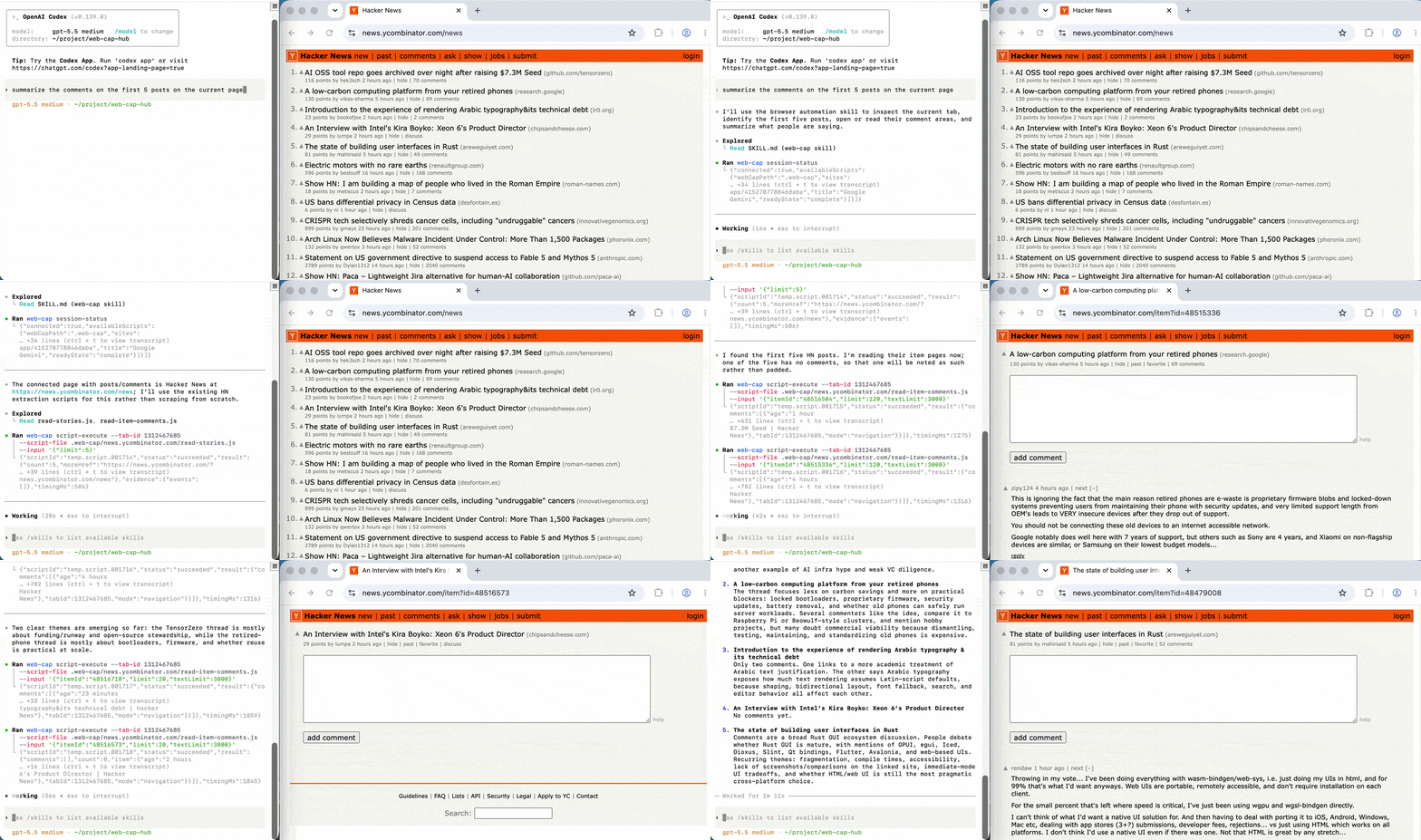
Reuse a Web Cap Hub script on Hacker News
Run a reusable script from web-cap-hub to summarize the comments on the first five Hacker News posts from the current page with less page exploration, fewer tokens, and faster execution.
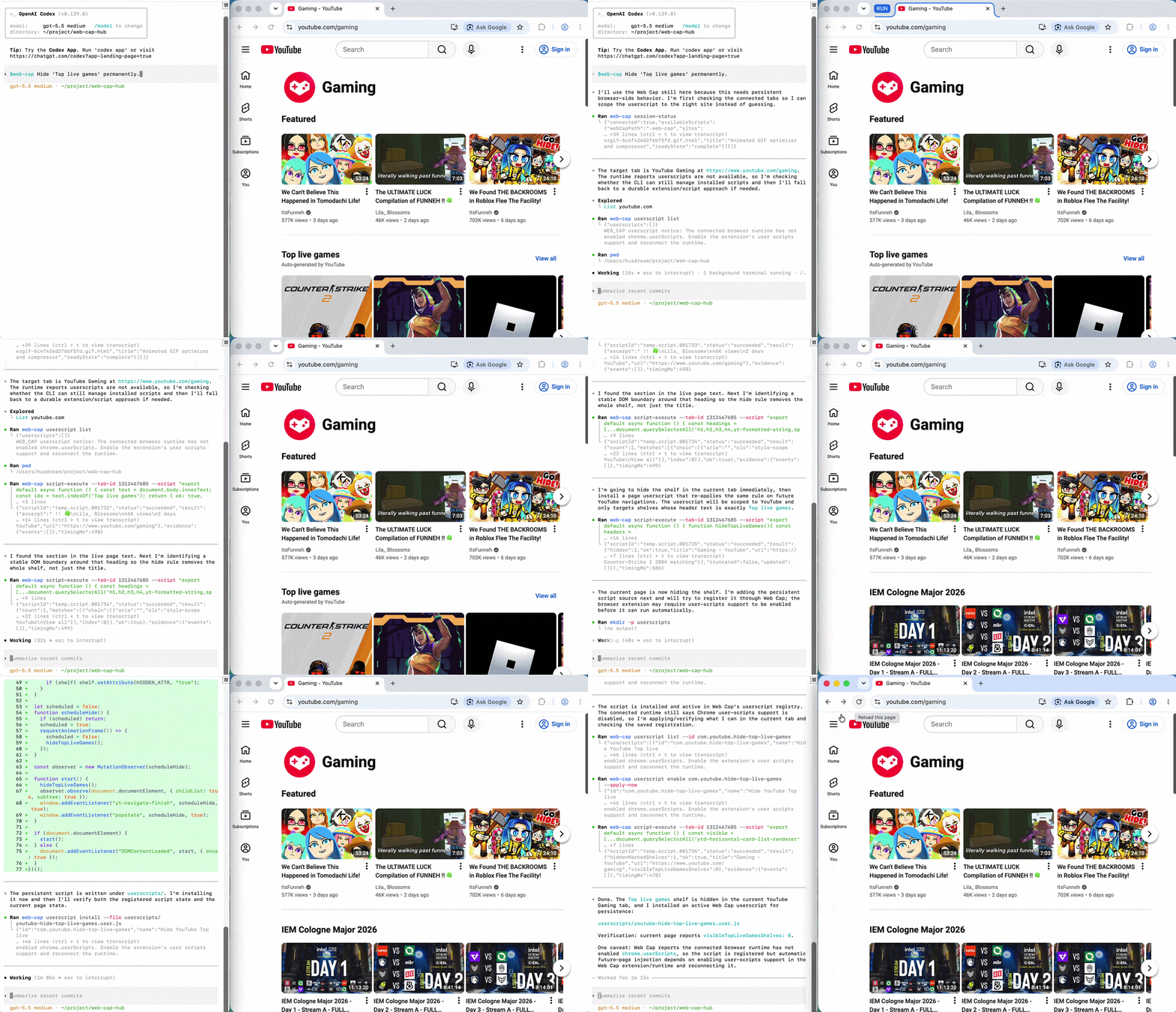
Hide a YouTube section with one sentence
Hide the Top live games block on YouTube Gaming with one sentence, and keep it hidden on future visits.
Install CLI Manually
For agent workflows, the Web Cap skill provides the recommended CLI setup path. To install the CLI directly, use npm:
npm install -g web-capability
The installed command is web-cap:
web-cap --help
web-cap session-status
Features
- Browser extension runtime for real Chromium-based browser tabs.
- Command-line interface for script execution, registration, tab creation, and user handoff observation.
- Playwright-style page helpers for common operations such as inspect, wait, click, fill, query, and text reading.
- Local script registry for reusable browser workflows.
- AI-native userscript generation for persistent, page-specific browser changes.
- Browser tab creation and event watching commands for agent workflows.
- Local-first state storage by default.
Reusable Script Hub
Web Cap can run reusable capability scripts from a local .web-cap/ directory. The shared Web Cap Hub repository collects ready-to-use scripts for common websites and provides examples for writing new site-specific workflows.
To reuse scripts from the hub:
git clone https://github.com/edgestorage/web-cap-hub.git
cd web-cap-hub

web-cap session-status
web-cap script-execute \
  --tab-id <tab-id> \
  --script-file .web-cap/github.com/read-repository-summary.js \
  --input '{"owner":"edgestorage","repo":"web-cap"}'
See the Web Cap Hub README for the current script collection and contribution guidelines.
Why Script-First
Many browser automation tools expose a fixed set of direct actions: click this selector, fill that input, read this text, take a screenshot. Web Cap takes a script-first approach instead.
Agents can run JavaScript inside the page with Playwright-style helpers and register useful scripts as reusable browser skills. This makes Web Cap better suited for workflows where an agent needs to inspect page structure, adapt to product-specific UI, and turn a successful operation into something it can run again later.
Web Cap is not designed to make agents rediscover the same browser workflow every time. Its core value is turning verified browser operations into reusable scripts and reusable workflows.
For recurring pages and tasks, agents can reuse stable workflows instead of repeatedly reading the page, planning each step, finding the right controls, and recovering from mistakes. This can improve accuracy and execution speed while reducing token usage and time spent on repeated browser exploration.
In this sense, Web Cap works well as a browser capability layer for Codex, Claude Code, or other local agent tools: the model can focus on understanding goals and making decisions, while stable browser operations are handled by local reusable automation.
Compared with action-first browser tools, Web Cap focuses on:
- In-page execution, so scripts can work directly with the DOM and page state.
- Reusable capabilities, so successful scripts can be saved and run again.
- Playwright-style page helpers for page inspection and interaction.
- Optional post-execution observation, so script runs can return evidence about what changed on the page when evidence collection is enabled.
- Local persistence, so agent-learned workflows can survive beyond a single run.
- CLI access, so agents can use the same browser capabilities from normal command-line workflows.
Web Cap can observe the page around script execution when evidence collection is enabled. It snapshots visible elements before a script runs, tracks DOM mutations while it runs, then snapshots changed areas afterward and returns a visible-elements diff with added, removed, and updated items. Execution evidence can also include browser-side events such as opened tabs, URL changes, reloads, scroll changes, managed clicks, keyboard input, and script calls.
That means an agent does not only get a script's declared JSON result. It can also inspect what the browser visibly did after the script, which is useful for verification, recovery, and deciding whether a newly successful script should be registered as a reusable capability.
Agent-Oriented Details
- Page targeting: script definitions include target sites, URL patterns, page hints, tags, type, status, and version, so agents can select the right capability and avoid running a script on the wrong page.
- Two script types:
readscripts inspect or extract page state, whileactscripts operate on the page or trigger browser-side changes. - User handoff observation:
wait-eventswaits while a user completes a browser action, then streams the resulting interaction path as JSON Lines. Use it when an agent has reached a step that requires user action and needs the observed clicks, input/change/submit activity, URL changes, or loading state to infer what the user did next. - Local execution history: inline scripts are tracked locally with status and result metadata. Temporary script ids remain callable while they are in the latest local history entries.
- Success-gated registration:
--registeronly persists a script when its execution result includesok: true, which helps keep the reusable script registry clean. - Tab-aware execution: commands can target a specific
--tab-id, while default execution follows the active connected browser tab.
Roadmap
This roadmap outlines the planned development directions for Web Cap and Web Cap Hub.
Web Cap Hub CLI
Provide quick installation and download support for reusable scripts.
Firefox Extension
Provide Firefox browser extension support.
Client Build and Distribution Improvements
Reduce dependency on the Node.js and npm environment, and explore simpler installation, build, and distribution paths.
Browser-Side AI Chat and Local AI Tool Integration
Provide an in-browser AI chat entry point that connects to local tools such as Codex and Claude Code for actual execution.
Move Script Compilation to the Client
Move heavier TypeScript compilation-related responsibilities from the browser extension to the client to reduce extension size and complexity.
How It Works
Agent
   |
   | CLI command
   v
Web Cap CLI
   |
   v
Managed local runtime
   |
   | WebSocket
   v
Browser extension
   |
   v
Real browser tab
The browser extension connects to the local runtime and executes commands against normal browser tabs. Agents call the CLI, and the CLI handles runtime startup and connection details automatically.
Packages
extension/- browser extension entrypoints and runtime code.lib/- CLI, local runtime, script registry, and orchestration logic.shared/- shared protocol, script schema, and validation helpers.skills/- Agent Skills installable with theskillsCLI.tests/- Vitest coverage for CLI, runtime behavior, browser command contracts, and extension helpers.scripts/- project utilities and generated-runtime helpers.
Requirements
- Node.js 20 or newer
- pnpm 9.x
- A Chromium-based browser for the current extension runtime
Development Quick Start
Install dependencies:
Start the extension development build:
Load the generated extension from WXT's output directory, then open a normal http or https page.
Run the source CLI during development:
A typical agent flow is:
- Use
script-executeto run script code against the connected browser. - Add
--registertoscript-executewhen a successful inline script should become reusable.
CLI Commands
script-execute
Execute script code in the selected browser tab. Scripts receive one object argument and return one JSON object.
script-execute accepts optional execution settings such as --timeout-ms, --script-file, --input-file, --no-evidence, and --register. During execution, scripts can use the injected Playwright-style page helper. --register saves the inline script only after execution succeeds with ok: true.
Browser commands
Web Cap also includes commands such as browser-new-tab, session-status, and wait-events for agent workflows that need tab control, or need to wait for a user to complete a browser step and inspect the resulting action path.
Script Model
Scripts are JavaScript functions with JSON-compatible inputs and outputs:
export default async function (input) {
  const title = await page.title();
  const text = await page.locator(input.selector).textContent();

  return {
    ok: true,
    title,
    text,
  };
}
The runtime injects a Playwright-style page helper while the script executes. Common APIs include page.locator(...), page.getByRole(...), locator.click(), locator.fill(), locator.textContent(), and locator.waitFor().
For controlled multi-page scripts, cap.goto(url, nextInput) navigates to url and reruns the same script with exactly nextInput as the next input. Page/script state is lost across the navigation, so pass every cross-page field you need, such as step, index, urls, and accumulated results, through nextInput explicitly.
CLI Usage
Run a one-off script:
web-cap script-execute \
  --tab-id 1 \
  --script "export default async function (input) { return { ok: true, input }; }" \
  --input '{"hello":"world"}' \
  --timeout-ms 30000
Use files for larger payloads:
web-cap script-execute \
  --tab-id 1 \
  --script-file ./script.js \
  --input-file ./input.json \
  --no-evidence
Common CLI commands:
web-cap session-status
web-cap script-execute --tab-id 1 --script-file ./script.js --input-file ./input.json --register
web-cap browser-new-tab --url https://example.com --active true
web-cap wait-events --duration-ms 10000
For local source development, replace web-cap with pnpm cli.
JSON-producing commands print compact single-line JSON by default. Use --pretty to print formatted JSON for visual inspection.
Configuration
Persistent CLI configuration is managed with web-cap config and stored in local state. Useful options include:
| Key | Default | Example | Effect |
|---|---|---|---|
evidence |
common |
web-cap config set evidence events,visibleElements |
Controls script execution evidence. Use common, all, or a comma-separated list of events and visibleElements. Pass --no-evidence to script-execute to disable evidence for one run. |
mouseTrajectorySimulation |
false |
web-cap config set mouseTrajectorySimulation true |
When enabled, browser-level managed mouse clicks send a multi-step movement path before press/release. |
activateTabOnScriptExecute |
false |
web-cap config set activateTabOnScriptExecute true |
Activates the target tab before script execution. |
evidence can also be passed per request through options.evidence when using script_execute.
Local State
Web Cap stores local state under ~/.web-cap/ by default. Set WEB_CAP_STATE_DIR to use another directory.
Local state includes registered scripts, recent script execution metadata, and browser session information needed by CLI commands.
Build
Build the browser extension:
Build the npm CLI package:
After building the npm package, the web-cap executable is available at dist/cli.js:
Create extension zip packages:
Quality Checks
pnpm lint
pnpm typecheck
pnpm test
pnpm build
GitHub Actions
The repository includes a build workflow at .github/workflows/build.yml. It runs lint, typecheck, and tests, then uploads browser extension build artifacts and an npm package tarball.
When a version tag matching v* is pushed, the workflow also creates a GitHub Release and uploads the browser extension zip files as release assets.
Known Limitations
- The extension targets normal
httpandhttpspages. - The current runtime is primarily validated on Chromium-based browsers; Firefox compatibility is still planned work.
- Restricted browser pages such as
chrome://are intentionally out of scope. - Scripts execute in-page and rely on the injected Playwright-style
pagehelper. - Manual validation with a loaded browser extension is recommended before release.
Contributing
Issues and pull requests are welcome. For larger changes, please open an issue first so the implementation direction can be discussed.
Before sending a pull request, run:
pnpm lint
pnpm typecheck
pnpm test
pnpm build
License
Apache License 2.0. See LICENSE.