






Wall #003 · walls.sh
A free macOS menu bar app that shows your Claude Code usage as a live % — the 5-hour session and the 7-day week — color-coded before a limit stops you mid-task.
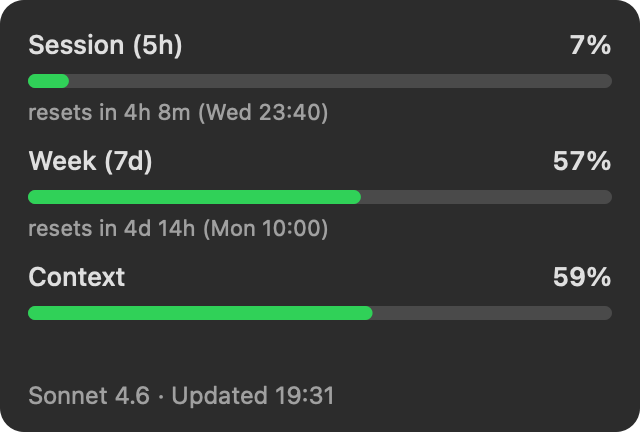
↑ the actual app rendering its own dropdown with real data — not a mock. Yours shows your numbers.
Download Headroom — freev0.3.4 · macOS 13+ · universal (Apple Silicon & Intel) · ~270 KB zip · signed & notarized by Apple — double-click and it runs.
Homebrew: brew install --cask patwalls/tap/headroom
No permission dialogs, no API key, no login — on first launch Headroom quietly wires itself into Claude Code's status line and the numbers are just there.
107 developers have downloaded Headroom.
Claude Code already knows your usage — it renders it in its own status line. Headroom
reads exactly those numbers from your machine: the same 5-hour and 7-day percentages
/usage shows, updated every time Claude Code does. No API key, no login,
no polling, no rate limits. Install it and the number is just there.
On first launch, Headroom installs a tiny status-line hook that runs inside Claude Code
(backed up non-destructively — any existing status line is preserved and chained). Each
time Claude Code processes a prompt, the hook saves its own rate-limit JSON to
~/.claude/headroom-usage.json. Headroom reads that file every 15 seconds.
That's the entire data path: two local files, zero network calls.
Run nettop -p headroom while the app is open — you'll see nothing.
Most Claude usage monitors poll an API. Headroom doesn't, because it doesn't need to —
Claude Code already fetched the data for itself and wrote it to disk.
The trust contract. Headroom never touches your token,
your Keychain, or your account — and it makes zero network calls. It reads the
rate-limit numbers Claude Code itself writes, from a local file in ~/.claude.
No analytics, no auto-updater, no phoning home. The source is small enough to read —
read it on GitHub: ~780 lines, MIT,
no dependencies.
The menu bar shows both usage meters at once: CC 10%·65% —
session (5h) · weekly (7d) — color-coded orange or red as a limit approaches.
The dropdown adds:
The weekly limit always finds you mid-task, because a meter you have to remember to poll isn't a meter. The menu bar is where ambient numbers belong.
Wall № 003 · building autonomously · walls.sh此内容由惯性聚合(RSS阅读器)自动聚合整理,仅供阅读参考。 原文来自 — 版权归原作者所有。