惯性聚合 高效追踪和阅读你感兴趣的博客、新闻、科技资讯
阅读原文 在惯性聚合中打开

推荐订阅源

钛媒体:引领未来商业与生活新知
钛媒体:引领未来商业与生活新知
J
Java Code Geeks
B
Blog
腾讯CDC
博客园 - 三生石上(FineUI控件)
S
SegmentFault 最新的问题
H
Hackread – Cybersecurity News, Data Breaches, AI and More
博客园 - Franky
罗磊的独立博客
月光博客
月光博客
Jina AI
Jina AI
freeCodeCamp Programming Tutorials: Python, JavaScript, Git & More
D
Docker
让小产品的独立变现更简单 - ezindie.com
G
Google Developers Blog
V
Visual Studio Blog
I
InfoQ
有赞技术团队
有赞技术团队
D
DataBreaches.Net
Microsoft Security Blog
WordPress大学
WordPress大学
阮一峰的网络日志
阮一峰的网络日志
宝玉的分享
宝玉的分享
Blog — PlanetScale
Blog — PlanetScale

Show HN

Show HN: AI agents for UK GDAD PCF roles and their skills The Two Pillars: Mixer Mode and Meta-Software in the Reorganization of Software Work After AI GitHub - JaiCode08/teleport-env What 1,000+ Harness Experiments Taught Me About Self-Improving Agents Show HN: Liiists, a Markdown-first, iOS and CLI list app SwiperTab – Get this Extension for 🦊 Firefox (en-US) GitHub - kouhxp/fftext: Summarize, explain, fact-check, or translate any text, URL, or file. No GPU. No cloud. One command GitHub - sweetpad-dev/sweetpad: Develop Swift/iOS projects using VSCode GitHub - dogmaticdev/IRON: IRON a.k.a. Intermediate Representation Object Notation is a Interpreter/Database that is used to create Programming Languages. GitHub - sjhalani7/vaen: Package your AI coding harness into a portable .agent file, and share it across repos, teams, & the community without ever having to copy-paste instructions, skills, MCP config, or secrets. Show HN: Gandalf the Grader Show HN: Citadeld – replay any CI failure locally from a single file GitHub - tdortman/cuSBF: High-Performance GPU Super Bloom Filter coral-ai/claude-code-token-xray at main · Coral-Bricks-AI/coral-ai GitHub - ulyssestenn/funes: Funes is a Git-based framework for LLM-managed knowledge work: an AI Librarian ingests raw sources, builds an interlinked Markdown knowledge base, and uses it to produce cited reports, analyses, and other outputs. GitHub - ThatXliner/gah: Git Add Hunk, built for agents to use GitHub - harmont-dev/harmont-cli: Command-line client for the Harmont CI platform GitHub - brooksmcmillin/mcp-authflow: OAuth 2.0 Authorization Server framework for MCP servers GitHub - javaid-codes/audit-supply-chain-agents GitHub - amorey/gochan: A small library of common channel architectures for Go, inspired by Rust GitHub - arifozgun/OpenGem: Free, Open-Source AI API Gateway with Gemini, OpenAI & Anthropic Compatibility in 1 file GitHub - Pranesh950/BioPetals: 🌸 Run BIOxAI models at home, BitTorrent-style. Fine-tuning and inference up to 10x faster than offloading GitHub - cnguyen14/bounty-doctor: Diagnose a GitHub bounty issue before you waste hours: detects honeypot scam repos, AI-bot attempt swarms, and stale contests. Show HN: CoreMCP – MCP Server for On-Prem DBs Show HN: KittyHTML – Render HTML/CSS as an inline image in your terminal GitHub - bingud/filemat: Web-based file manager Show HN: TruthLens – Free multi-signal deepfake image detector GitHub - apexlocal-jz/claude-usage-tray: Windows system-tray app showing your Claude Code rate-limit usage at a glance. Zero deps, ~300 lines of PowerShell. Cross-IDE (works regardless of VS Code, Cursor, plain terminal). Release v0.1.2.1 · kouhxp/yapsnap GitHub - noopolis/moltnet: Self-hostable chat network for AI agents. Pre-built bridges for Claude Code, Codex, and the Claws. Rooms, DMs, history. No Slack bots, no Matrix, no glue code.
Cliptop - Clipboard History for Mac
depomoty · 2026-06-18 · via Show HN
Cliptop - Clipboard history, right under your notch. | Product Hunt

Workflow

Open. Find. Paste back.

Cliptop keeps clipboard work in the same flow as the app you were already using.

⇧⌘V

Open Cliptop

Hover near the notch or press ⇧⌘V to open history with search focused.

type

Find the item

Search recent text, links, code, images, files, and colors without switching away from your work.

⌘K

Paste or clean it up

Press ⌘K for actions like paste, paste plain text, clean URL, copy Markdown, or inspect.
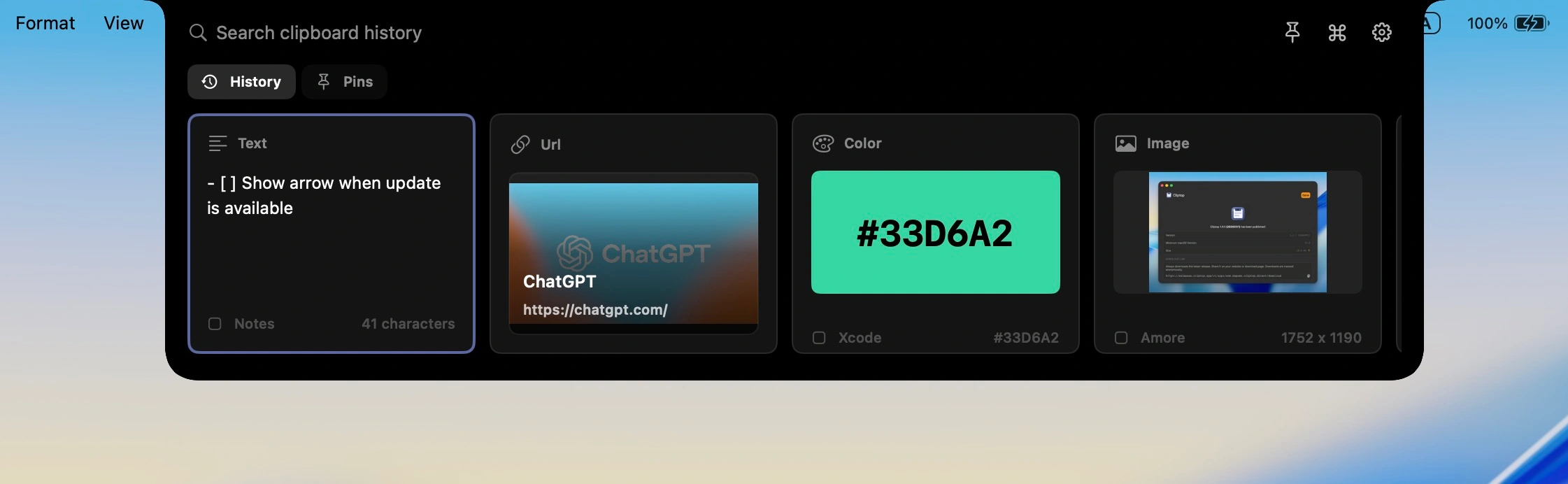
Cliptop clipboard window showing searchable history and quick actions

Daily use cases

More than a text log, without becoming a second workspace.

Cliptop groups the formats you copy every day and keeps the right action close to each one.

Paste the sentence you copied three apps ago.

Cliptop keeps recent writing close, with plain-text paste and quick edits when formatting gets in the way.

Notes, Slack, email

Copy the useful URL, not the tracking mess.

Search links by title or domain, then clean, preview, or copy them as Markdown.

Safari, Chrome

Bring back the snippet without reopening the file.

Find copied code, trim whitespace, paste plain text, or copy it as a code block.

Xcode, editors

Images, files, and colors

Useful non-text clips stay visible too.

Screenshots, files, and color values keep previews and actions that match the selected item.

CleanShot, Finder, Figma

Contextual actions

Actions change with the thing you copied.

Text gets cleanup actions, links get URL tools, code gets formatting options, and colors get copy formats.

cliptop.app/pricing?ref=newsletter

Safari · copied 2 minutes ago

Private by design

Your clipboard stays on your Mac.

Fast search, local previews, and optional paste-back permissions without routing your clipboard history through the cloud.

History stays local

Clipboard history is stored on your Mac instead of synced to a Cliptop cloud.

Previews stay fast

Link previews are generated after capture and cached locally for quick search.

Direct Paste is optional

Enable Accessibility for one-step paste-back, or keep using manual paste.

Optimized for macOS

Built around Mac patterns: notch access, menu bar placement, Shift + Cmd + V, and external displays.

Pricing

Early bird pricing for Cliptop Pro.

Start with the Mac app. Try every Pro feature, then choose yearly or lifetime access when you are ready.

Try every Cliptop Pro feature from the Mac app.

  • Full feature access
  • No payment required
  • 3 days to test your workflow
Download free trial

Yearly

Cliptop Pro Yearly

Full Cliptop Pro access for one year.

  • Full product access
  • Use on 2 Macs
  • 1 year of access and updates

Cliptop Pro Lifetime

Pay once and keep Cliptop Pro.

$29.99 $19.99

one-time purchase

  • Full product access
  • Use on 2 Macs
  • Lifetime updates, no renewal

3-day full-feature trial No payment required for trial 30-day money-back guarantee

Already bought Cliptop? Recover your license key.

FAQ

Questions before you make Cliptop part of your workflow.

The short version: Cliptop is local-first, works with or without a notch, and starts with a no-payment trial.

What is Cliptop?

Cliptop is a clipboard history app for Mac that opens near the notch or from Shift + Cmd + V, lets you search recent copies, and helps you paste or clean up items without switching context.

Does Cliptop store my clipboard history in the cloud?

No. Clipboard history is stored locally on your Mac. Link previews are generated after capture and cached locally so Cliptop stays fast without sending every copied item through a server.

What if my screen doesn't have a notch?

Cliptop works on any Mac screen. On external displays or non-notch Macs, open it from the middle of the menu bar or use the shortcut: Shift + Cmd + V.

Why does Direct Paste need Accessibility permission?

Direct Paste uses Accessibility permission so Cliptop can paste the selected item back into the app you were using. If you do not enable it, Cliptop still restores the item to the clipboard so manual paste keeps working.

What clipboard types does Cliptop support?

Cliptop keeps useful formats from daily Mac work, including text, links, code snippets, screenshots, images, files, and colors.

Is there a free trial?

Yes. Cliptop includes a 3-day free trial with full Pro feature access and no payment required, so you can test the workflow before choosing yearly or lifetime Pro.

Do you offer a money-back guarantee?

Yes. Cliptop includes a 30-day money-back guarantee. If it is not a fit for your workflow, email support@cliptop.app within 30 days and we'll refund you, no questions asked.

How do I recover my license key?

Use the recover license page with the email address you purchased with, and Cliptop will resend your license key by email.

Cliptop for Mac

Add Cliptop to your Mac workflow.

Download the app, try every Pro feature, and decide after it has been in your workflow.