







Browser Extension for YouTube
Stop doomscrolling YouTube.
Start watching with focus.
Gazenest tracks what you watch on YouTube, scores how intentional it is, and gives you the tools to reclaim your attention, across every device.
Know exactly what you watch and why. Build habits that stick.
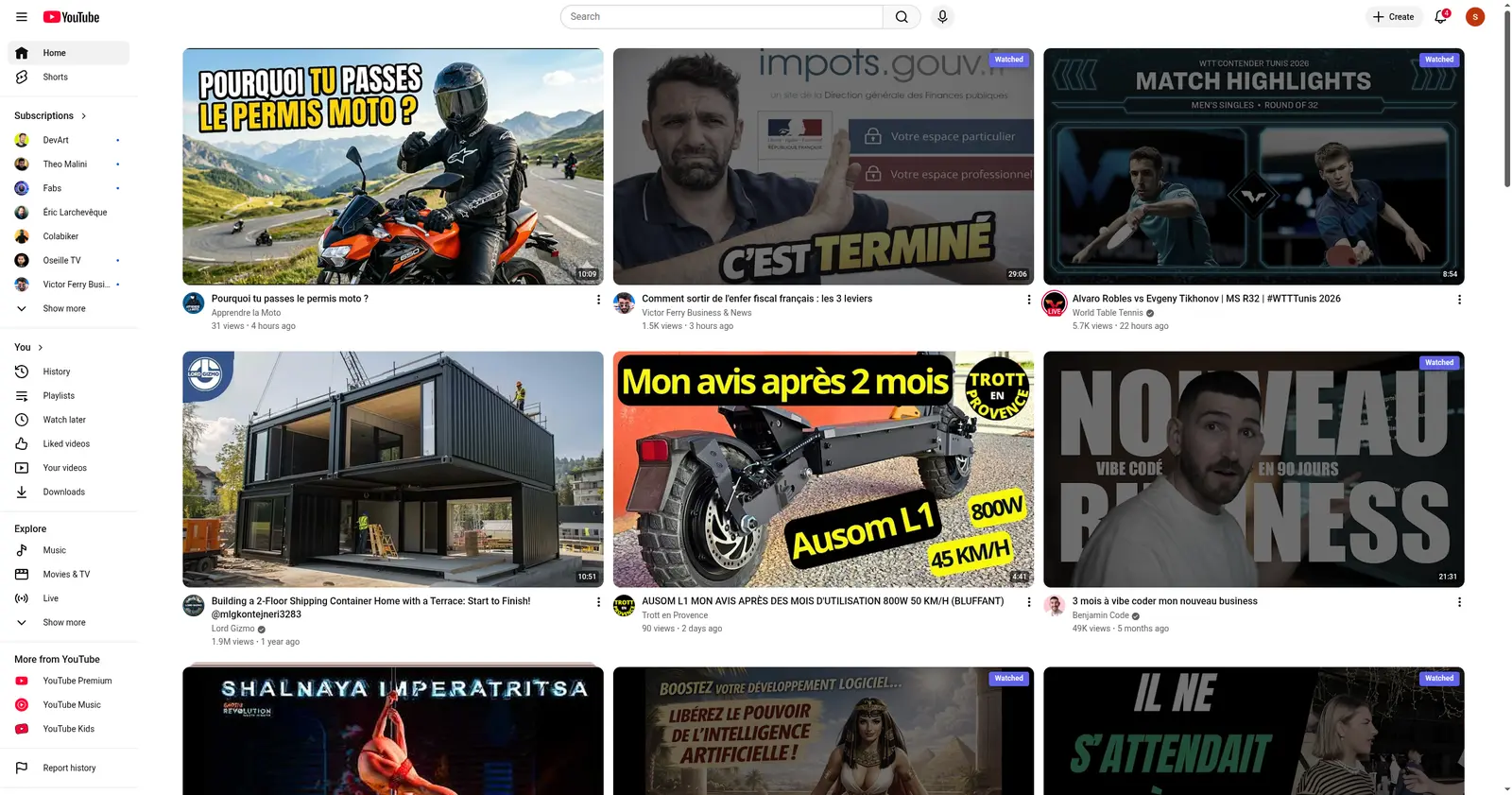
The Gazenest extension in action - real-time scores right on YouTube.
30-day
Money-back guarantee
Sound familiar?
The patterns you can't seem to break
01
"Just one more video"
You told yourself 20 minutes. It's been 2 hours. The algorithm fed you one perfect recommendation after another.
02
"I'll watch something educational"
Noble intention. But 40 minutes later, you're deep into reaction videos and drama recaps. Again.
03
"I opened YouTube for 1 video"
Three hours of Shorts later, you can't even remember what you originally came to watch.
You don't have to quit YouTube. You just need awareness.
How Gazenest works
Three steps between installing the extension and having full visibility over your YouTube behaviour.
Step 01
Install the extension
Add Gazenest to Chrome or Firefox. It works silently in the background - no extra clicks required.

Step 02
Watch as usual
Gazenest silently records every video you watch and syncs it to your account in real time. Switch from laptop to desktop - your full history follows you. Already-watched videos get a badge so you never re-watch by accident.

Step 03
Review your dashboard
Open your personal dashboard to see Focus, Clarity, and Diversity scores - and start making better choices.
www.gazenest.com/dashboard/videos

Same YouTube, different experience
Here's what changes when Gazenest is watching with you.
| Without Gazenest | With Gazenest |
|---|---|
| Endless autoplay spirals -- 3 hours vanish | Set an intention before each session |
| Shorts can crowd out longer videos in your feed | Hide Shorts and algorithmic recommendations |
| No idea how much time you actually spent | Real-time scores track your Focus |
| Algorithm decides what you watch next | You decide what to watch, with full awareness of recommendations |
| No shared history -- re-watch the same videos across devices | One synced history across all devices -- always know what you have watched |
Endless autoplay spirals - 3 hours vanish
Shorts can crowd out longer videos in your feed
No idea how much time you actually spent
Algorithm decides what you watch next
No shared history - re-watch the same videos across devices
Set an intention before each session
Hide Shorts and algorithmic recommendations
Real-time scores track your Focus
You decide what to watch, with full awareness of recommendations
One synced history across all devices - always know what you've watched
Your personal dashboard
Everything about your YouTube habits - scores, channels, history, and heatmaps - in one place.
Intentional vs Drift
See exactly how much you watched on purpose
The green bar is yours. The red bar is the algorithm's. Over 30 days you get a precise split: how many hours were intentional, how many were drift. Most people are surprised.
www.gazenest.com/dashboard/stats

Behavioural Scores
Focus, Clarity, Diversity
Three scores that tell you how intentionally you watch. 100% is best - track your progress over time and spot bad habits early.
www.gazenest.com/dashboard/stats

Channel Analytics
Know where your time goes
See every channel you watch with avatars, video counts, and total watch time. Label channels as intentional or time-wasters.
www.gazenest.com/dashboard/channels

Activity Heatmap
When do you actually watch?
A full-year activity grid and peak-hours breakdown tell you exactly which days and times your usage spikes. Spot the patterns - late-night rabbit holes, Friday wind-downs - before they become habits.
www.gazenest.com/dashboard/stats

Everything you need to stay in control
Powerful features designed around your attention, not YouTube's algorithm.
Focus Score
Measure your stimulation index in real time. Identify passive binge spirals before they consume your evening.
Intent Mode™
Set a clear intention before every session and get a Clarity score showing how well you stuck to your goals.
Diversity Score
See if you're stuck in an echo chamber or exploring a healthy variety of creators and topics.
Your personal best-of list
Star any video or channel from your watch history to save it to a personal favorites list, separate from YouTube's recommendations and playlists. Filter to favorited channels only when you want to focus on creators worth your time.
Hide YouTube Shorts
Remove Shorts from your feed with one toggle. Fewer short clips, more intentional viewing.
Multi-Device Sync
Your watch history syncs automatically across every device. Watch on your laptop, see it on your desktop - never lose track or re-watch by accident.
Privacy First
Your email and personal data are AES-256-GCM encrypted at rest. We never sell your data - ever.
AES-256-GCM encryption at rest No data sold, no third-party tracking Your history lives on your account only Delete your data at any time
Save 25% with annual billing
All prices excl. local VAT, added at checkout.
Solo
Track and score your habits
9.00€/mo
+ VAT
- ✓ 3 months watch history
- ✓ Up to 3 devices
- ✓ 500 videos tracked
- ✓ Behavioural scoring (Focus, Clarity, Diversity)
- ✓ Favorites: videos & channels
Most popular
Plus
Everything to actually change them
14.00€/mo
+ VAT
- ↳ Everything in Solo, plus:
- ✓ 12 months watch history
- ✓ Up to 5 devices
- ✓ 5,000 videos tracked
- ✓ Intent Mode™
- ✓ Watch activity heatmap
- ✓ Personalised behavioural profile
- ✓ Advanced stats & channel analytics
- ✓ Weekly email report with insights
- ✓ Export data to Notion / Obsidian
- ✓ AMOLED Black theme for OLED screens
Family
Shared awareness for the household
19.00€/mo
+ VAT
- ↳ Everything in Plus, plus:
- ✓ 24 months watch history
- ✓ Up to 15 devices
- ✓ 20,000 videos tracked
- ✓ Customize Feed™: hide algorithmic suggestions
- ✓ Focus Mode: dim distractions while watching
Pro
Power features, unlimited everything
29.00€/mo
+ VAT
- ↳ Everything in Family, plus:
- ✓ Unlimited watch history
- ✓ Up to 20 devices
- ✓ Unlimited videos tracked
- ✓ Smart alerts for habit changes
Secure checkout. Card details never touch our servers. 30-day money-back guarantee. No questions asked. Built in France. EU data protection by default.
GDPR compliant No data selling, ever
Payments handled securely by Lemon Squeezy, LLC. Prices excl. local VAT, added at checkout. Cancel any time.
By completing your purchase, you'll occasionally receive product news, feature updates, and pricing changes from Gazenest. Unsubscribe via the link in every email. Privacy policy.




| Feature | Solo | Plus | Family | Pro |
|---|---|---|---|---|
| Monthly price (USD, excl. VAT) | $9.00/mo | $14.00/mo | $19.00/mo | $29.00/mo |
| Devices | Up to 3 | Up to 5 | Up to 15 | Up to 20 |
| Watch history | 3 months | 12 months | 24 months | Unlimited |
| Videos tracked | 500 | 5,000 | 20,000 | Unlimited |
| Intent Mode | No | Yes | Yes | Yes |
| Intent Mode™ | No | Yes | Yes | Yes |
| Behavioural scoring (Focus, Clarity, Diversity) | Yes | Yes | Yes | Yes |
| Watch activity heatmap | No | Yes | Yes | Yes |
| Personalised behavioural profile | No | Yes | Yes | Yes |
| Advanced stats & channel analytics | No | Yes | Yes | Yes |
| Weekly email report with insights | No | Yes | Yes | Yes |
| Favorites: videos & channels | Yes | Yes | Yes | Yes |
| Export data to Notion / Obsidian | No | Yes | Yes | Yes |
| Customize Feed™: hide algorithmic suggestions | No | No | Yes | Yes |
| Smart alerts for habit changes | No | No | No | Yes |
| Focus Mode: dim distractions while watching | No | No | Yes | Yes |
| AMOLED Black theme for OLED screens | No | Yes | Yes | Yes |
🌙
Your data belongs to you
Gazenest encrypts your email and personal information with AES-256-GCM. Your watch history is stored on our servers so you can access it from any device - but we never share or sell it. You can delete your account and all associated data at any time.
Frequently Asked Questions
Everything you need to know about Gazenest. For more details, check the dashboard FAQ.
Getting Started
What is Gazenest? +
Gazenest is a browser extension + web dashboard that helps you take control of your YouTube watching habits.
What it does
- Tracks every video you watch (title, channel, duration)
- Scores your sessions with three metrics: Self-Control, Clarity, and Diversity
- Alerts you when you're binge-watching
- Hides distractions (Shorts, recommendations, autoplay)
- Reports your weekly habits via email
How it works
- Install the extension from the Chrome Web Store
- Activate with your licence key
- Browse YouTube normally - Gazenest works in the background
- Check your dashboard for insights
How do I install the extension? +
Installation steps
- Go to the Chrome Web Store and search for Gazenest
- Click Add to Chrome
- Click the Gazenest moon icon in your toolbar
- Enter your licence key (received after purchase)
- Done! The extension will now track your YouTube activity
Works on Chrome, Firefox, and most major browsers. See "Which browsers does the extension support?" below for the full list.
Tip: Pin the extension to your toolbar for quick access to stats and intent mode.
Which browsers does the extension support? +
Chrome and Chromium-based browsers
The Chrome build works on any Chromium-based browser: Chrome, Brave, Edge, Arc, Opera, and Vivaldi. The install steps are the same for all of them -- just replace chrome://extensions with your browser's equivalent (brave://, edge://, opera://, vivaldi://). Arc opens chrome://extensions directly.
Firefox and Firefox-based browsers
The Firefox build is a Mozilla-signed .xpi that installs and auto-updates on Firefox, Librewolf, Waterfox, and Zen Browser. Pale Moon and Basilisk are not compatible (different engine and extension format).
Mobile
The Firefox build also works on Firefox for Android. No other Android browser supports extensions. iOS and iPadOS are not supported.
Official support
We test on Chrome and Firefox desktop only. Other browsers in the lists above should work, but edge cases may take longer to fix.
Extension
What does the extension track? +
The extension only tracks your activity on youtube.com. Here's exactly what is recorded:
| Data | Example |
|---|---|
| Video ID | dQw4w9WgXcQ |
| Title | "Never Gonna Give You Up" |
| Channel | Rick Astley |
| Duration | 3:33 |
| Watched at | 2026-03-26 14:30 |
| Is Short | Yes/No |
What is NOT tracked
- Other websites or tabs
- Search queries
- Comments or likes
- Incognito/private browsing
- YouTube account credentials
What are the scores (Self-Control, Clarity, Diversity)? +
Gazenest calculates three scores for each session:
Self-Control (Focus Score)
Measures your resistance to YouTube's dopamine loops.
- Penalized by: Shorts, long sessions, binge watching
- A clean 30-minute session with no Shorts scores ~100
Clarity
Tracks whether you watched what you intended to.
- Requires Intent Mode: set an intention before watching
- If you stick to your goal: bonus points
- If you drift: penalty
Diversity
Shows how varied your channel consumption is.
- Watching 5 different channels: high score
- Watching 1 channel on repeat: low score
- Uses Shannon entropy for calculation
All scores range from 0 to 100. Higher is better.
Can the extension hide Shorts and recommendations? +
The Customize Feed feature (Family + Pro plans) lets you customize YouTube's interface:
- Hide Shorts - removes Shorts shelves from the homepage and feed
- Hide Recommendations - removes the sidebar on watch pages
- Disable Autoplay - prevents the next video from auto-playing
- Focus Mode - dims sidebar, comments and suggestions while watching - only the video player stays bright. Hover to reveal hidden elements.
- Zen Mode - replaces the homepage with a calm widget showing your stats
- Subs Only - redirects the homepage to your Subscriptions feed
Configure these in the extension popup or Dashboard → Settings.
What are Focus Mode and AMOLED Black? +
These two features help you watch YouTube with fewer distractions and less visual strain.
Focus Mode (Family + Pro)
When enabled, everything except the video player is dimmed to 15% opacity:
- Sidebar (recommended videos)
- Comments section
- Live chat
- End screen overlays
Hover to reveal - move your mouse over any dimmed area to temporarily bring it back to full brightness. The transition is smooth and instant.
A subtle vignette effect frames the video, creating a cinema-like experience.
AMOLED Black (Plus, Family, Pro)
Replaces YouTube's dark grey background (#0f0f0f) with true black (#000000).
Benefits:
- OLED battery savings - black pixels are completely off on OLED screens
- Reduced visual stimulation - less light = calmer experience, especially at night
- Deeper contrast - thumbnails and text pop more against true black
Both features work together - you can enable Focus Mode + AMOLED Black for the ultimate distraction-free experience.
How to enable
- Go to Dashboard → Settings
- Toggle Focus Mode and/or AMOLED Black
- Refresh YouTube - changes apply immediately
What is doomscrolling on YouTube and how do I stop it? +
Doomscrolling is the habit of endlessly scrolling and watching YouTube content without a clear intention - clicking from one recommended video to the next until you surface an hour later unsure what you just watched.
Why it happens
YouTube's algorithm is optimised for watch time, not your satisfaction. It uses autoplay, personalised recommendations, and Shorts to keep you watching past the point you intended to stop. This isn't a willpower failure - it's a predictable response to a system designed to exploit attention.
How Gazenest helps
- Intent Mode: set a clear purpose before each session. Your Clarity score then tracks whether you followed through.
- Self-Control score: measures how well you resisted compulsive patterns (autoplay, Shorts, rabbit holes). A dropping score is an early warning.
- Hide Shorts: removes the highest-dopamine content from your path.
- Disable autoplay: restores the natural decision point between videos.
- Session heatmap: shows which times and days you're most vulnerable to unintended viewing.
The goal isn't to stop using YouTube - it's to watch what you chose, not what the algorithm chose for you.
How does Gazenest help me manage my YouTube screen time? +
Gazenest gives you an accurate, automatic record of your YouTube screen time across all your devices - something YouTube's built-in "Time Watched" tool doesn't provide.
What Gazenest tracks
- Every video you watch: title, channel, duration, timestamp
- Session length and count per day
- Which days and hours you watch most (activity heatmap)
- Total watch time per day, week, and month
Screen time tools
- Watch Budget (Pro plan): set a daily or weekly time limit. Get a warning at 80%, and choose between warn, strict, or block enforcement at 100%.
- Binge Detection (Pro plan): automatic alerts after 3, 5, or 8 videos in a row - escalating from a nudge to a full-screen pause.
- Session scores: your Self-Control and Clarity scores reflect whether your screen time was intentional or compulsive.
Why this matters
Most people underestimate their YouTube screen time by 40-60%. Seeing your real numbers - in a dashboard with weekly trends - is the first step to changing them.
Can Gazenest improve my YouTube focus? +
Yes. Gazenest is built specifically around the problem of distracted YouTube viewing.
Tools that directly improve focus
Intent Mode (Plus, Family, Pro) Before each session, you type what you plan to watch. At the end, Gazenest scores how well your viewing matched your intention. This simple act of stating your purpose is one of the most effective focus interventions available - research shows people with stated intentions are 2-3x more likely to follow through.
Focus Mode (Family, Pro) Dims everything except the video player to 15% opacity - sidebar, comments, recommendations, end screens. Hover to reveal. Creates a cinema-like environment with far fewer visual distractions.
Hide Recommendations and Autoplay Removes the two biggest focus killers from your YouTube interface. When autoplay is off and recommendations are hidden, there's no pull to keep watching.
Clarity score Your ongoing focus metric. A Clarity score of 80%+ means you're consistently watching what you intended. Below 50% means the algorithm is winning most sessions.
The result
Users who use Intent Mode consistently report a noticeable shift within 2 weeks: sessions feel more deliberate, the "where did the time go" feeling decreases, and post-session regret drops.
Can I use Gazenest on an Android phone or tablet? +
Yes - on Firefox for Android. Gazenest fully supports m.youtube.com (the mobile YouTube site) on Firefox Android, with the same features as desktop: Intent Mode, Self-Control / Clarity / Diversity scoring, history sync, Hide Shorts, Zen Homepage, and cross-device sync with your dashboard.
How to install
- Install Firefox from the Google Play Store (the regular release - Nightly is not required)
- From your Android device, open the Gazenest homepage and download the signed
.xpifile - Tap the downloaded file → Firefox prompts you to install
- Accept the permissions and open
m.youtube.com - Tap the floating moon button (FAB) to open the Gazenest panel and activate with your licence key
Note: the
.xpimust be signed by Mozilla. We publish a signed build for every release - unsigned sideloads are blocked by Firefox Android.
Mobile-specific notes
- The extension is hardened for flaky mobile networks (optimistic writes + storage listeners), so the panel stays responsive even on weak 4G.
- The dashboard logout button moves into the hamburger menu on mobile/tablet to keep the header clean.
Not supported on Android
- Chrome, Brave, Opera, Samsung Internet - none of these support extensions on Android.
- Android TV / Nvidia Shield - Shield users watch YouTube via the native YouTube TV app (not a browser), so the extension has no surface to inject into.
Can I use Gazenest on an iPad or iPhone? +
No - Gazenest is not available on iPad or iPhone. This is an Apple platform limitation, not a Gazenest decision.
Why
- Firefox on iOS/iPadOS has no extension support at all. Apple required all iOS browsers to use WebKit, so Firefox iOS is essentially a WebKit shell with no add-on runtime. Firefox Nightly on iPad is the same - there is no way to install an
.xpi. - Safari Web Extensions technically exist (iPadOS 15+), but they must be packaged inside a native iOS app, built with Xcode, and distributed through the App Store. That requires a paid Apple Developer account and ongoing App Review.
- For a small indie tool like Gazenest, the cost and maintenance burden of shipping a separate Safari/iOS build is not justified.
What we recommend instead
- On the go: use Firefox for Android on your phone - Gazenest fully supports
m.youtube.com. - At home: use Gazenest on desktop Chrome, Brave, Edge, or Firefox - that's where the extension shines.
- Your scores, history, and settings sync across all your devices via the dashboard, so you'll see your stats from your iPad's browser even though the extension itself isn't running there.
Plans & Billing
Why pay when free alternatives exist? +
Good question. The short answer: Gazenest does things no free tool does.
What free alternatives don't offer
- Cross-device sync: free tools (like Watchmarker) store data locally in your browser. Close that browser, switch devices, or reinstall and your history is gone. Gazenest syncs your full history across every device automatically.
- Behavioral scoring: watch time tracking alone doesn't tell you whether your watching was intentional. Gazenest scores each session on Focus, Clarity, and Diversity so you can see patterns, not just totals.
- Web dashboard: a full private dashboard with channel analytics, activity heatmap, behavioral profile, and session history. Not a popup.
- Intent Mode: the core feature. Set a purpose before watching, get a score for how well you stuck to it. This is what changes habits, not just measuring them.
- Data you own: your history lives on your account, survives browser reinstalls, device changes, and extension updates.
The honest trade-off
If you only want to mark videos as watched across a single browser, a free tool may be enough. If you want to understand your YouTube habits, score your sessions, and actually change them, the paid model is what makes the product sustainable and full-featured.
Not sure yet? The 30-day money-back guarantee means you can try it with no risk.
What are the available plans? +
| Feature | Solo | Plus | Family | Pro |
|---|---|---|---|---|
| Video tracking | Yes | Yes | Yes | Yes |
| Scoring | Yes | Yes | Yes | Yes |
| Intent Mode | - | Yes | Yes | Yes |
| Heatmap | - | Yes | Yes | Yes |
| Weekly Report | - | Yes | Yes | Yes |
| Channel Analytics | - | Yes | Yes | Yes |
| AMOLED Black | - | Yes | Yes | Yes |
| Customize Feed | - | - | Yes | Yes |
| Focus Mode | - | - | Yes | Yes |
| Family Members | - | - | Up to 5 | - |
| Smart Alerts | - | - | - | Yes |
| Binge Detection | - | - | - | Yes |
| Watch Budget | - | - | - | Yes |
All prices are excl. local VAT, which is added at checkout. You can upgrade or downgrade at any time.
Are prices VAT-inclusive? +
No. All displayed prices are excl. VAT (tax-exclusive).
Local VAT is automatically calculated and added at checkout by Lemon Squeezy based on your country. For example, a French customer paying for the Solo plan (€9/mo) will see VAT added at checkout (€9 + 20% = €10.80 total).
VAT rates vary by country. Lemon Squeezy handles all VAT compliance automatically - you don't need to do anything.
Account & Privacy
What information does the extension read from my YouTube account? +
Only your YouTube account name.
We use it for two things:
- Licence binding: your licence is tied to the account you bought it for, so it cannot be transferred to another YouTube account.
- Account-switch detection: if you sign out of YouTube and sign in as someone else, Gazenest detects the change and signs you out to prevent data from two accounts mixing.
The account name is stored on your device and on our server. We never sell it, share it with third parties, or use it for anything else.
Full details on how we handle your data: Privacy Policy.
Is my data safe? +
Gazenest takes privacy seriously:
Encryption
- Your email is encrypted with AES-256-GCM (per-user key)
- Lookup uses HMAC-SHA256 hashes (we never store your email in plaintext)
No tracking
- Zero cookies for analytics or tracking
- Only a session cookie for authentication (strictly necessary)
- No consent banner needed - we don't track anything requiring consent
Your rights (GDPR)
- Export: Dashboard → Profile → Export Data (JSON)
- Delete: Dashboard → Profile → Delete Account (irreversible)
- All data is permanently removed within 30 days of deletion
Infrastructure
- Hosted on dedicated servers in France (OVH)
- Encrypted backups with GPG (RSA 4096)
- Fail2ban + UFW firewall + rootless container isolation
Can I use Gazenest on multiple devices? +
Device limits by plan
| Plan | Devices |
|---|---|
| Solo | 3 |
| Plus | 5 |
| Family | 15 (shared across all members) |
| Pro | 20 |
Your watch history, scores, and settings sync across all your devices. You can manage active devices from Dashboard → Profile.
If you reach your device limit, you can revoke access from old devices to free up a slot.
Your YouTube. Your rules.
Join Gazenest and start watching YouTube with intention. Cancel any time, 30-day money-back if it's not for you.
Take Back My YouTube →