惯性聚合 高效追踪和阅读你感兴趣的博客、新闻、科技资讯
阅读原文 在惯性聚合中打开

推荐订阅源

S
Securelist
O
OpenAI News
Threat Intelligence Blog | Flashpoint
T
Threat Research - Cisco Blogs
D
Darknet – Hacking Tools, Hacker News & Cyber Security
Google Online Security Blog
C
CXSECURITY Database RSS Feed - CXSecurity.com
N
News and Events Feed by Topic
S
Security Affairs
SecWiki News
SecWiki News
Project Zero
Project Zero
L
Lohrmann on Cybersecurity
P
Proofpoint News Feed
P
Palo Alto Networks Blog
L
LINUX DO - 最新话题
H
Hacker News: Front Page
Recent Commits to openclaw:main
I
Intezer
Simon Willison's Weblog
W
WeLiveSecurity
T
The Exploit Database - CXSecurity.com
K
Kaspersky official blog
The GitHub Blog
The GitHub Blog
I
InfoQ
云风的 BLOG
云风的 BLOG
雷峰网
雷峰网
B
Blog
IT之家
IT之家
AWS News Blog
AWS News Blog
Jina AI
Jina AI
freeCodeCamp Programming Tutorials: Python, JavaScript, Git & More
Google DeepMind News
Spread Privacy
Spread Privacy
N
News and Events Feed by Topic
Security Latest
Security Latest
美团技术团队
C
Check Point Blog
WordPress大学
WordPress大学
T
Tenable Blog
S
Security @ Cisco Blogs
Last Week in AI
Last Week in AI
博客园 - 聂微东
月光博客
月光博客
博客园 - 【当耐特】
S
Schneier on Security
OSCHINA 社区最新新闻
OSCHINA 社区最新新闻
S
Secure Thoughts
Schneier on Security
C
Cisco Blogs
Cyberwarzone
Cyberwarzone

Show HN

暂无文章

Markdown QuickLook
jzone3 · 2026-06-13 · via Show HN
Markdown QuickLook icon

Render Markdown in macOS Quick Look. Free & open source.

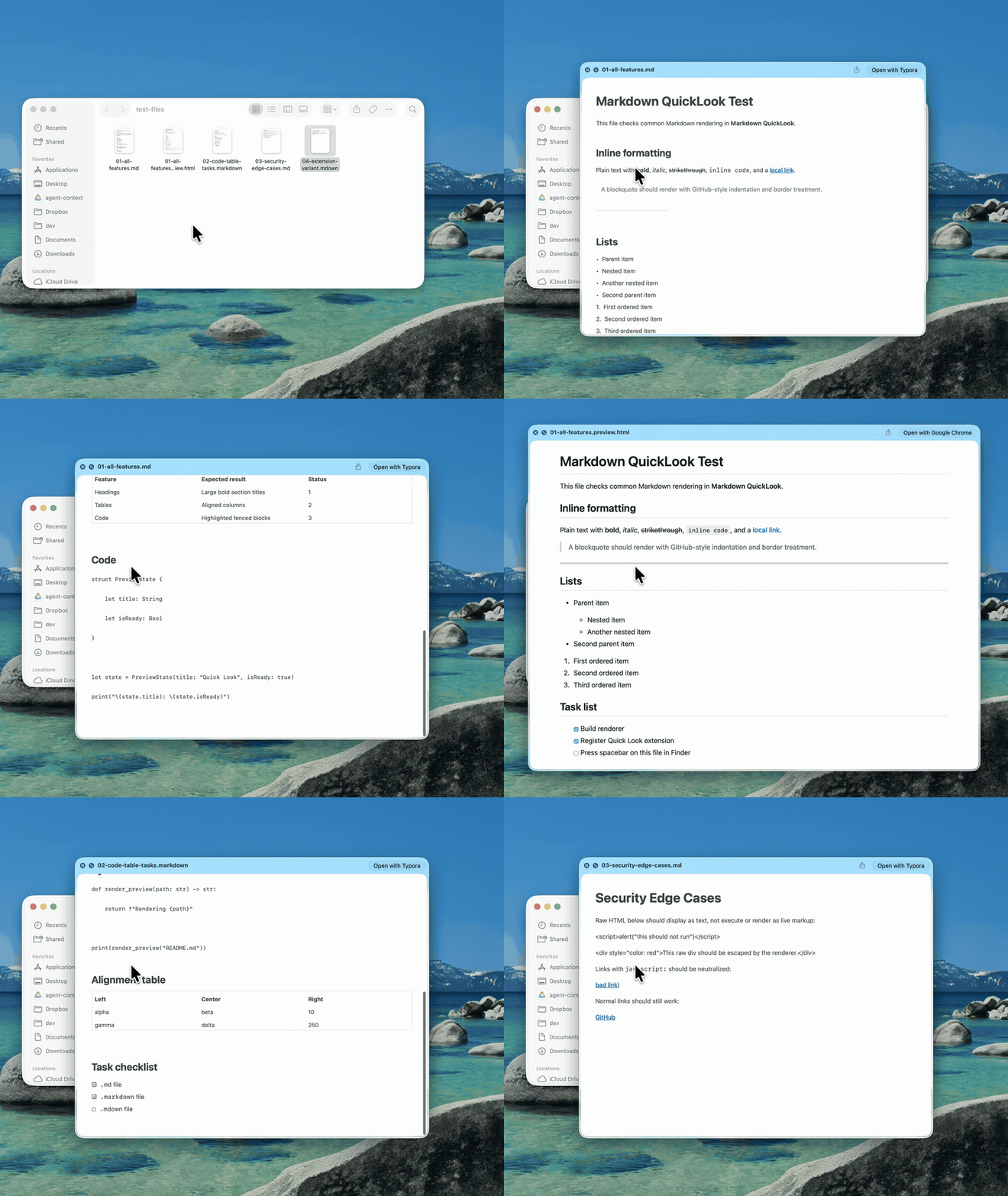
A tiny macOS Quick Look extension. Select a .md file in Finder, press space, and read it rendered the way it was meant to look — headings, code, tables and task lists included. No app window, just a menu-bar helper that stays out of the way.

Download MarkdownQuickLook.dmg ↓

macOS 12+ · MIT · source on GitHub

Pressing spacebar on Markdown files in Finder shows rendered Quick Look previews with headings, code blocks, tables and task lists
Spacebar on a .md file in Finder → rendered preview.

What it does

  • Rich rendering. Headings, lists, task lists, blockquotes, links, bold, italic, strikethrough and inline code.
  • Syntax-highlighted code. Fenced code blocks highlighted with a clean GitHub-style theme, light and dark.
  • Real tables. GitHub-flavored Markdown tables render as native AppKit tables — not raw pipes.
  • Sandboxed & offline. Runs in a sandboxed Quick Look extension with no network access. A menu-bar helper, no Dock icon.

Install

  1. Download & open the disk image. Drag Markdown QuickLook into your Applications folder.
  2. Launch it once. Open it from Applications. It lives in the menu bar and registers the Quick Look extension.
  3. Press space. Select any .md file in Finder and hit space. If an old preview is cached, use the menu-bar item → Reset Quick Look Cache.