


本文最后更新于 900 天前,其中的信息可能已经有所发展或是发生改变。
前几周更新了Geyser,发现无法登录到服务器了。后来稍微看了一下,发现由于Minecraft:Java Edition已经(终于)完成了Mojang Account到Microsoft Account的全部迁移工作,因此在Geyser中废弃了使用Mojang Account登录的功能,Geyser官方提供了一个Floodgate插件,但是绑定UUID和使用皮肤过于繁琐,一开始没有发现解决方案,也没有什么人玩,姑且先放在一边暂时用着。后来和群友聊天提到是可以恢复之前被移除的功能的,于是我自己开始试着修改服务端,通过查阅issues,commits和pull requests后总算完工了。(划重点了)由于需要同步Upstream时不时的修改(基岩动不动更换协议版本导致的),不可能每个Upstream的commit都让我挨个手工同步并编译,所以使用了GitHub Actions的workflow来实现CI与自动Sync&Merge功能。
当你创建一个新workflow时,可以选择很多预先写好的配置文件,比如Java with Gradle,一般来说,只要你在自己IDE上能用他们编译基本没问题,除了一些小问题,会在下面做下介绍,先上代码。大致应该都能看懂,依葫芦画瓢就行,里面也有一些我写的额外注释。
# This workflow uses actions that are not certified by GitHub.
# They are provided by a third-party and are governed by
# separate terms of service, privacy policy, and support
# documentation.
# This workflow will build a Java project with Gradle and cache/restore any dependencies to improve the workflow execution time
# For more information see: https://docs.github.com/en/actions/automating-builds-and-tests/building-and-testing-java-with-gradle

name: Build

on:
  push:
    branches: [ "master" ]
  pull_request:
    branches: [ "master" ]

permissions:
  contents: read

jobs:
  build:

    runs-on: ubuntu-latest

    steps:
    - uses: actions/checkout@v3
      with:
        submodules: recursive
    - name: Set up JDK 17
      uses: actions/setup-java@v3
      with:
        java-version: '17'
        distribution: 'temurin'

    - name: Build with Gradle
      uses: gradle/gradle-build-action@bd5760595778326ba7f1441bcf7e88b49de61a25 # v2.6.0
      with:
        arguments: build

#以下为Geyser各个版本(作为插件或独立服务端)的打包生成,可以在Summary的Artifacts中下载
    - name: Archive artifacts (Geyser Fabric)
        # See https://github.com/actions/upload-artifact/commits
      uses: actions/upload-artifact@main
      if: success()
      with:
        name: Geyser Fabric
        path: bootstrap/fabric/build/libs/Geyser-Fabric.jar
        if-no-files-found: error
    - name: Archive artifacts (Geyser Standalone)
      uses: actions/upload-artifact@main
      if: success()
      with:
        name: Geyser Standalone
        path: bootstrap/standalone/build/libs/Geyser-Standalone.jar
        if-no-files-found: error
    - name: Archive artifacts (Geyser Spigot)
      uses: actions/upload-artifact@main
      if: success()
      with:
        name: Geyser Spigot
        path: bootstrap/spigot/build/libs/Geyser-Spigot.jar
        if-no-files-found: error
    - name: Archive artifacts (Geyser BungeeCord)
      uses: actions/upload-artifact@main
      if: success()
      with:
        name: Geyser BungeeCord
        path: bootstrap/bungeecord/build/libs/Geyser-BungeeCord.jar
        if-no-files-found: error
    - name: Archive artifacts (Geyser Velocity)
      uses: actions/upload-artifact@main
      if: success()
      with:
        name: Geyser Velocity
        path: bootstrap/velocity/build/libs/Geyser-Velocity.jar
        if-no-files-found: error
uses中的@可以视作一种参数标识符,比如说actions/checkout@v3,v3就是指定checkout的版本,也可以用SHA值来选择快照版本。在checkout中还有一句with submodules,这是因为geyser使用了子模块来存储语言文件,如果不加上这句的话,在workflow中编译输出的服务端便不会带上子模块的代码。当然如果没有用的话就不用了。
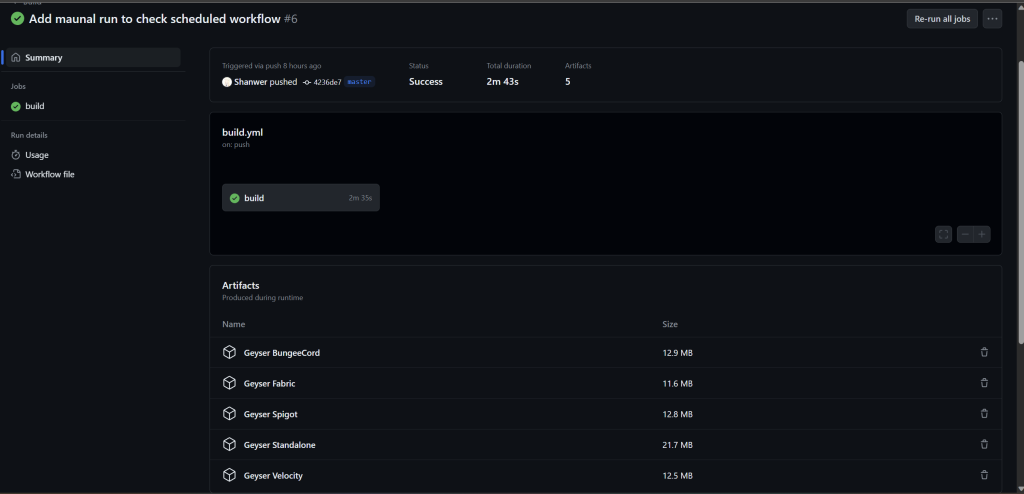
一个workflow完成后大致如下图,编译通过了会提供可下载的二进制文件(需要自行配置,参照上面)
除此之外,为了同步Upstream的修改,还添加了另一个workflow来进行自动同步与Merge操作,在遇到需要人工解决的conflict时会停止。看起来还是挺简单的,实际花了一段时间,咨询了GPT4,以下是代码。
name: Sync with Upstream

on:
  schedule:
    - cron: '0 0 * * *'
  workflow_dispatch: #这一行可以在网页版中添加手动执行workflow的按钮

jobs:
  sync:
    runs-on: ubuntu-latest

    steps:
    - name: Checkout repository
      uses: actions/checkout@v3
      with:
        fetch-depth: 0

    - name: Configure Git
      run: |
        git config user.name 'Shanwer'
        git config user.email 'Shanwer@qq.com'
    - name: Add upstream remote
      run: git remote add upstream https://github.com/GeyserMC/Geyser.git

    - name: Fetch upstream changes
      run: git fetch upstream

    - name: Merge upstream changes
      run: |
        git merge upstream/master || {
          echo "Merge conflict detected! Notifying for manual intervention."
          exit 1
        }

    - name: Push changes
      uses: ad-m/github-push-action@master
      with:
        github_token: ${{ secrets.GITHUB_TOKEN }}
        branch: 'master'
此外,workflow中的trigger仅使用cron是不能够手动触发的,在on中加上workflow_dispatch就可以手动触发来调试了,除此之外还可以通过curl api来远程触发,由于cron在UTC 0:00时间执行时可能会和世界上一堆workflow撞上,可能会排队,今天就延迟了一个多小时才执行。通过远程curl api是可以立即执行的,不过在我这没必要,所以没有用。
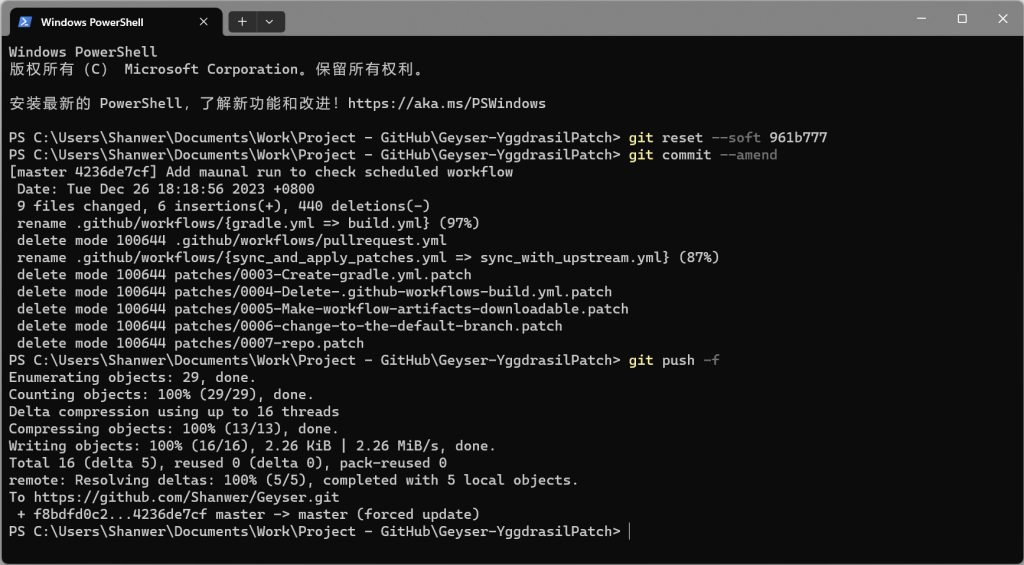
大家千万不要在实际工程中交一堆乱七八糟的commits,每个commit都应该有实际且严格的意义,乱交commit是很不成熟的体现(很丢人),如果还没有push的话,你还可以压缩提交或者使用变基,在ide中集成挺好理解的,如果已经push了就比较麻烦了,我是这样解决的。
首先软重置到想要回滚的commit,git reset --soft sha值即可软重置到选定版本的上一次commit,本地修改会被保留至暂存区,然后再用git commit --amend来对该commit添加修订,暂存区的修订会被一起并入该commit,接着git push -f,强制推送到远端。这样就可以将不堪入目的commits log给抹掉了(
此内容由惯性聚合(RSS阅读器)自动聚合整理,仅供阅读参考。 原文来自 — 版权归原作者所有。