






#编程技术 2022-12-31 13:52:27 | 全文 593 字,阅读约需 2 分钟 | 加载中... 次浏览
想要实现 Typecho 纯代码生成 sitemap 站点地图只需要 2 步就够了。
1、在博客主题目录新建 sitemap.php 页面,放入以下代码:
<?php
/**
*HTML版网站地图Sitemap
*
* @package custom
*/
?>
<!DOCTYPE html PUBLIC "-//W3C//DTD XHTML 1.0 Transitional//EN" "http://www.w3.org/TR/xhtml1/DTD/xhtml1-transitional.dtd">
<html xmlns="http://www.w3.org/1999/xhtml">
<head profile="http://gmpg.org/xfn/11">
  <meta http-equiv="Content-Type" content="text/html; charset=<?php $this->options->charset(); ?>" />
  <title>站点地图 - <?php $this->options->title() ?></title>
  <meta name="keywords" content="站点地图,<?php $this->options->title() ?>" />
  <meta name="copyright" content="<?php $this->options->title() ?>" />
  <link rel="canonical" href="<?php $this->permalink() ?>" />
  <style type="text/css">
    body {font-family: Microsoft Yahei,Verdana;font-size:13px;margin:0 auto;color: #000000;background: #ffffff;width: 990px;margin: 0 auto}
    a:link,a:visited {color:#000;text-decoration:none;}
    a:hover {color:#08d;text-decoration:none;}
    h1,h2,h3,h4,h5,h6 {font-weight:normal;}
    img {border:0;}
    li {margin-top: 8px;}
    .page {padding: 4px; border-top: 1px #EEEEEE solid}
    .author {background-color:#EEEEFF; padding: 6px; border-top: 1px #ddddee solid}
    #nav, #content, #footer {padding: 8px; border: 1px solid #EEEEEE; clear: both; width: 95%; margin: auto; margin-top: 10px;}
  </style>
</head>
<body vlink="#333333" link="#333333">
  <h2 style="text-align: center; margin-top: 20px"><?php $this->options->title() ?>'s SiteMap </h2>
  <center></center>
  <div id="nav"><a href="<?php $this->options ->siteUrl(); ?>"><strong><?php $this->options->title() ?></strong></a> » <a href="<?php $this->permalink() ?>">站点地图</a></div>
  <div id="content">
    <h3>最新文章</h3>
    <ul>
      <?php
      $stat = Typecho_Widget::widget('Widget_Stat');
      $this->widget('Widget_Contents_Post_Recent', 'pageSize='.$stat->publishedPostsNum)->to($archives);
      $year=0; $mon=0; $i=0; $j=0;
      while($archives->next()){
          $year_tmp = date('Y',$archives->created);
          $mon_tmp = date('m',$archives->created);
          $y=$year; $m=$mon;
          if ($year > $year_tmp || $mon > $mon_tmp) {
              $output .= '</ul>';
          }
          $output .= '<li><a href="'.$archives->permalink .'">'. $archives->title .'</a></li>';
      }
      $output .= '</ul>';
      echo $output;
      ?>
    </ul>
  </div>
  <div id="content">
    <li class="categories">分类目录
      <ul><?php $this->widget('Widget_Metas_Category_List')
               ->parse('<li><a href="{permalink}">{name}</a> ({count})</li>'); ?>
      </ul>
    </li>
  </div>
  <div id="content">
    <li class="categories">独立页面</li>
    <ul class="clearfix" id="nav_menu">
      <li><a href="<?php $this->options->siteUrl(); ?>">首页</a></li>
      <?php $this->widget('Widget_Contents_Page_List')
                 ->parse('<li><a href="{permalink}">{title}</a></li>'); ?>
    </ul>
  </div>
  <div id="footer">查看博客首页: <strong><a href="<?php $this->options ->siteUrl(); ?>"><?php $this->options->title() ?></a></strong></div><br />
  <center>
    <div style="text-algin: center; font-size: 11px"><br /> © <?php echo date('Y'); ?> <strong><a href="<?php $this->options ->siteUrl(); ?>" target="_blank"><?php $this->options->title() ?></a></strong> 版权所有<br /><br /><br />
    </div>
  </center>
</body>
</html>
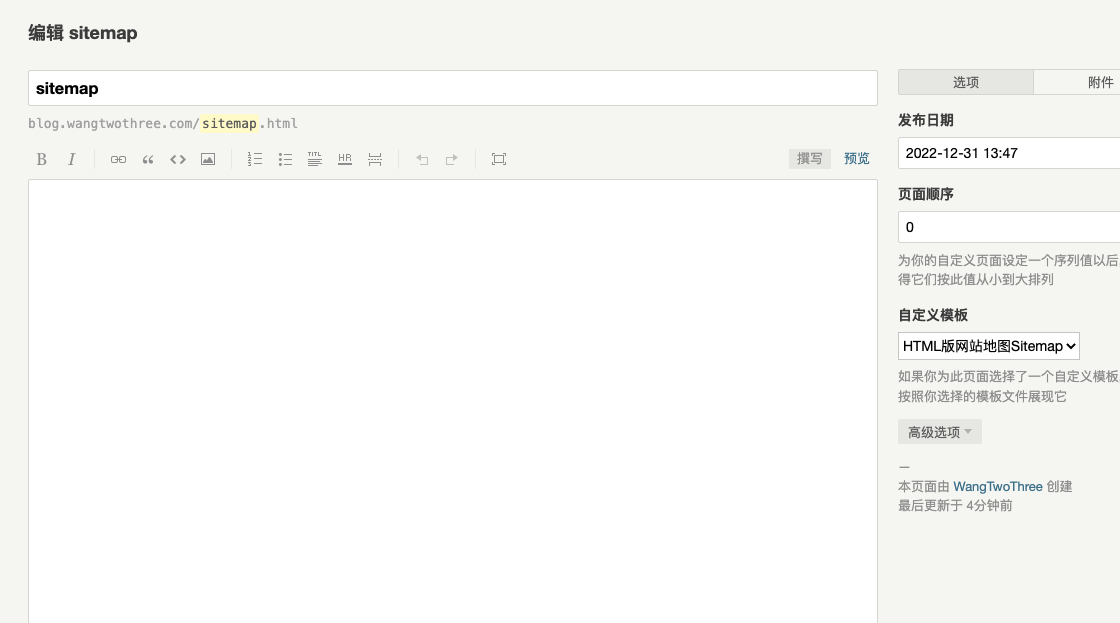
2、Typecho 后台新建 sitemap 页面选择 sitemap.php 模板
×
此内容由惯性聚合(RSS阅读器)自动聚合整理,仅供阅读参考。 原文来自 — 版权归原作者所有。