

惯性聚合 高效追踪和阅读你感兴趣的博客、新闻、科技资讯
阅读原文 在惯性聚合中打开

推荐订阅源

H
Help Net Security
C
Cybersecurity and Infrastructure Security Agency CISA
S
Secure Thoughts
Application and Cybersecurity Blog
Hacker News: Ask HN
Hacker News: Ask HN
Attack and Defense Labs
N
News and Events Feed by Topic
Exploit-DB.com RSS Feed
A
Arctic Wolf
www.infosecurity-magazine.com
cs.CV updates on arXiv.org
The GitHub Blog
The GitHub Blog
W
WeLiveSecurity
Simon Willison's Weblog
WordPress大学
WordPress大学
Y
Y Combinator Blog
Recent Commits to openclaw:main
Forbes - Security
Forbes - Security
NISL@THU
NISL@THU
博客园 - 聂微东
G
Google Developers Blog
D
Darknet – Hacking Tools, Hacker News & Cyber Security
Schneier on Security
V
Vulnerabilities – Threatpost
V
V2EX
I
Intezer
S
Schneier on Security
Threat Intelligence Blog | Flashpoint
雷峰网
雷峰网
L
LangChain Blog
小众软件
小众软件
Hugging Face - Blog
Hugging Face - Blog
T
The Blog of Author Tim Ferriss
L
LINUX DO - 热门话题
P
Proofpoint News Feed
Microsoft Security Blog
Project Zero
Project Zero
V
Visual Studio Blog
Engineering at Meta
Engineering at Meta
爱范儿
爱范儿
H
Hacker News: Front Page
B
Blog
T
Threatpost
Spread Privacy
Spread Privacy
H
Heimdal Security Blog
F
Fortinet All Blogs
TaoSecurity Blog
TaoSecurity Blog
T
Threat Research - Cisco Blogs
cs.AI updates on arXiv.org
The Cloudflare Blog

张鑫旭-鑫空间-鑫生活

1分钟速度了解text-align match-parent声明 « 张鑫旭-鑫空间-鑫生活 光标的形状也能设置了,就是CSS caret-shape属性 « 张鑫旭-鑫空间-鑫生活 pretext与文字四面环绕效果的实现 « 张鑫旭-鑫空间-鑫生活 JSON.rawJSON方法的作用是什么? « 张鑫旭-鑫空间-鑫生活 如何使用CSS判断鼠标从哪个方向进入元素? « 张鑫旭-鑫空间-鑫生活 借助mediabunny纯JS实现视频水印、剪裁、合成等功能 « 张鑫旭-鑫空间-鑫生活 务必谨慎使用JS WeakRef弱引用 « 张鑫旭-鑫空间-鑫生活 CSS六边形头像的实现与蜂巢布局 « 张鑫旭-鑫空间-鑫生活 CSS corner-shape与背景底纹技术 « 张鑫旭-鑫空间-鑫生活 浅学WebTransport API:下一代Web双向通信技术 « 张鑫旭-鑫空间-鑫生活 HTML dialog元素新支持了closedBy属性 « 张鑫旭-鑫空间-鑫生活 HTML interestfor属性与悬停popover交互效果 « 张鑫旭-鑫空间-鑫生活 CSS3模拟window7炫酷界面效果展示 « 张鑫旭-鑫空间-鑫生活 图片旋转+剪裁js插件(兼容各浏览器) « 张鑫旭-鑫空间-鑫生活 纯js无图片无外链CSS图片幻灯片播放插件 « 张鑫旭-鑫空间-鑫生活 CSS border三角、圆角图形生成技术简介 « 张鑫旭-鑫空间-鑫生活 CSS “渐进增强”在web制作中常见应用举例 « 张鑫旭-鑫空间-鑫生活 让IE6/IE7/IE8浏览器支持CSS3属性 « 张鑫旭-鑫空间-鑫生活 jQuery – 高亮动态显示页面HTML代码插件 « 张鑫旭-鑫空间-鑫生活 翻译 – 逐渐消失的Flash网站 « 张鑫旭-鑫空间-鑫生活 CSS reset的重新审视 – 避免样式重置 « 张鑫旭-鑫空间-鑫生活 新浪微博插入话题后部分文字选中的js实现 « 张鑫旭-鑫空间-鑫生活 JavaScript实现http地址自动检测并添加URL链接 « 张鑫旭-鑫空间-鑫生活 CSS实现兼容性的渐变背景(gradient)效果 « 张鑫旭-鑫空间-鑫生活 CSS content内容生成技术以及应用 « 张鑫旭-鑫空间-鑫生活 CSS gradient渐变之webkit核心浏览器下的使用 « 张鑫旭-鑫空间-鑫生活 CSS渐变之CSS3 gradient在Firefox3.6下的使用 « 张鑫旭-鑫空间-鑫生活 区分IE8/IE7/IE6及其他浏览器-CSS “\9″hack « 张鑫旭-鑫空间-鑫生活 CSS实现跨浏览器兼容性的盒阴影效果 « 张鑫旭-鑫空间-鑫生活 CSS3&HTML5各浏览器支持情况一览表 « 张鑫旭-鑫空间-鑫生活 翻译 – CSS Sprites:实用技术还是生厌之物? « 张鑫旭-鑫空间-鑫生活 纯CSS实现易拉罐3D滚动效果 « 张鑫旭-鑫空间-鑫生活 纯CSS实现侧边栏/分栏高度自动相等 « 张鑫旭-鑫空间-鑫生活 CSS+JavaScript实现页面不同布局的切换 « 张鑫旭-鑫空间-鑫生活 JavaScript实现最简单的拖拽效果 « 张鑫旭-鑫空间-鑫生活 自己写的无图片版jQuery zxxbox弹出框插件 « 张鑫旭-鑫空间-鑫生活 中国古代道家思想与网页重构的思考 « 张鑫旭-鑫空间-鑫生活 让所有浏览器支持HTML5 video视频标签 « 张鑫旭-鑫空间-鑫生活 纯CSS实现各类气球泡泡对话框效果 « 张鑫旭-鑫空间-鑫生活 JS HEX十六进制与RGB, HSL颜色的相互转换 « 张鑫旭-鑫空间-鑫生活 CSS实现兼容性的渐变、高光等文字效果 « 张鑫旭-鑫空间-鑫生活 去除冗余 – 精简您的CSS样式代码 « 张鑫旭-鑫空间-鑫生活 对overflow与zoom”清除浮动”的一些认识 « 张鑫旭-鑫空间-鑫生活 jQuery Pagination Ajax分页插件中文详解 « 张鑫旭-鑫空间-鑫生活 absolute绝对定位的非绝对定位用法 « 张鑫旭-鑫空间-鑫生活 网页布局思想浅议-淘宝新版首页为实例 « 张鑫旭-鑫空间-鑫生活 回流与重绘:CSS性能让JavaScript变慢? « 张鑫旭-鑫空间-鑫生活 CSS float浮动的深入研究、详解及拓展(二) « 张鑫旭-鑫空间-鑫生活 CSS float浮动的深入研究、详解及拓展(一) « 张鑫旭-鑫空间-鑫生活 60个极富创造性的震撼的电影海报设计 « 张鑫旭-鑫空间-鑫生活 jQuery Lightbox(balupton版)图片展示插件讲解 « 张鑫旭-鑫空间-鑫生活 博客内嵌flash音乐播放器代码、下载与使用 « 张鑫旭-鑫空间-鑫生活 CSS3 animate实现图片墙3D翻转效果 « 张鑫旭-鑫空间-鑫生活 图片旋转效果的一些研究、jQuery插件及实例 « 张鑫旭-鑫空间-鑫生活 CSS3 border-image详解、应用及jQuery插件 « 张鑫旭-鑫空间-鑫生活 jQuery-两款不同原理的圆角插件讲解 « 张鑫旭-鑫空间-鑫生活 页面可用性之outline轮廓外框的一些研究 « 张鑫旭-鑫空间-鑫生活 CSS3 transition实现超酷图片墙动画效果 « 张鑫旭-鑫空间-鑫生活 HTML CSS列表元素ul,ol,dl的研究与应用 « 张鑫旭-鑫空间-鑫生活 jQuery图片文本滚动切换插件jCarousel中文翻译与详解 « 张鑫旭-鑫空间-鑫生活 酷酷的jQuery鼠标悬停图片放大切换显示效果 « 张鑫旭-鑫空间-鑫生活 IE6下z-index犯癫不起作用bug的初步研究 « 张鑫旭-鑫空间-鑫生活 checkbox复选框的一些深入研究与理解 « 张鑫旭-鑫空间-鑫生活 jQuery之使用slideToggle实现垂直下拉菜单 « 张鑫旭-鑫空间-鑫生活 jQuery-innerfade内部列表自动淡入淡出插件 « 张鑫旭-鑫空间-鑫生活 jQuery-火焰灯效果导航菜单 « 张鑫旭-鑫空间-鑫生活 IE下css bug集合-翻译自haslayout.net « 张鑫旭-鑫空间-鑫生活 翻译-IE7/8@font-face嵌入字体与文字平滑 « 张鑫旭-鑫空间-鑫生活 jQuery-马化腾产品设计与用户体验的一些技术实现 « 张鑫旭-鑫空间-鑫生活 像素的世界及其在web开发制作中的应用 « 张鑫旭-鑫空间-鑫生活 css行高line-height的一些深入理解及应用 « 张鑫旭-鑫空间-鑫生活 CSS实现圆角六色渐变自适应按钮详解 « 张鑫旭-鑫空间-鑫生活 我熟知的三种三栏网页宽度自适应布局方法 « 张鑫旭-鑫空间-鑫生活 jQuery照片图像剪裁插件Jcrop中文翻译详解 « 张鑫旭-鑫空间-鑫生活 Ajax Upload多文件上传插件翻译及中文演示 « 张鑫旭-鑫空间-鑫生活 告别图片—使用字符实现兼容性的圆角尖角效果beta版 « 张鑫旭-鑫空间-鑫生活 大小不固定的图片、多行文字的水平垂直居中 « 张鑫旭-鑫空间-鑫生活 jQuery boxy弹出层对话框插件中文演示及讲解 « 张鑫旭-鑫空间-鑫生活 JavaScript实现新浪微博文字放大显示动画效果 « 张鑫旭-鑫空间-鑫生活 翻译:让网络更快一些——最小化浏览器中的回流(reflow) « 张鑫旭-鑫空间-鑫生活 jQuery之addClasas与removeClass使用实例 « 张鑫旭-鑫空间-鑫生活 关于Google圆角高光高宽自适应按钮及其拓展 « 张鑫旭-鑫空间-鑫生活 JavaScript实现图片幻灯片滚动播放动画效果 « 张鑫旭-鑫空间-鑫生活 jQuery-鼠标经过显示大图并跟随鼠标效果插件 « 张鑫旭-鑫空间-鑫生活 关于gif图片(或png8)杂边锯齿的问题 « 张鑫旭-鑫空间-鑫生活 对html与body的一些研究与理解 « 张鑫旭-鑫空间-鑫生活 鲜为人知的一个解决兼容性问题的利器——小数 « 张鑫旭-鑫空间-鑫生活 搜狐白社会似iphone短信对话框效果的优化 « 张鑫旭-鑫空间-鑫生活 关于文字内容溢出用点点点(…)省略号表示 « 张鑫旭-鑫空间-鑫生活 jquery之append与insertBefore使用实例 « 张鑫旭-鑫空间-鑫生活 jQuery之图片关联伸缩效果 « 张鑫旭-鑫空间-鑫生活 jquery之图片左右切换动画效果 « 张鑫旭-鑫空间-鑫生活 jQuery之replace字符串替换实现不同尺寸图片切换 « 张鑫旭-鑫空间-鑫生活 jQuery-实现图片的放大镜显示效果 « 张鑫旭-鑫空间-鑫生活 jQuery-单击文字或图片内容放大显示效果插件 « 张鑫旭-鑫空间-鑫生活 reflection.js-实现图片投影倒影效果js插件 « 张鑫旭-鑫空间-鑫生活 jQuery-很酷的弹出层效果js插件 « 张鑫旭-鑫空间-鑫生活 复选框单选框与文字对齐问题的研究与解决 « 张鑫旭-鑫空间-鑫生活 css margin的相关属性,问题及应用 « 张鑫旭-鑫空间-鑫生活 IE6下png背景不透明问题的综合拓展 « 张鑫旭-鑫空间-鑫生活
CSS索引和数量匹配函数sibling-index sibling-count简介 « 张鑫旭-鑫空间-鑫生活
张鑫旭,zhangxinxu · 2025-08-07 · via 张鑫旭-鑫空间-鑫生活

by zhangxinxu from https://www.zhangxinxu.com/wordpress/?p=11804
本文可全文转载,但需要保留原作者、出处以及文中链接,AI抓取保留原文地址,任何网站均可摘要聚合,商用请联系授权。

索引数量匹配封面图

一、子元素索引值函数sibling-index()

sibling-index()在多个有规律子元素构建的图形或动画效果的场景下非常实用。

我们来看一个《CSS新世界》这本书的一个案例,演示下如何使用sibling-index()函数简化我们的实现。

案例

先看原来的实现,可以访问这个地址:https://demo.cssworld.cn/new/5/4-3.php

所要实现的就是音波播放时候的波形上下运动的效果效果,静态截图效果如下所示:

波形动画示意

之前的实现代码如下所示,HTML部分:

<div class="loading">
    <i></i><i></i><i></i><i></i>
</div>

CSS代码:

.loading i {
    display: inline-block;
    border-left: 2px solid deepskyblue;
    height: 2px;
    animation: scaleUp 4s linear infinite alternate;
    margin: 0 1px;
}
.loading i:nth-child(2) {
    animation-delay: -1s;
}
.loading i:nth-child(3) {
    animation-delay: -2s;
}
.loading i:nth-child(4) {
    animation-delay: -3s;
}

@keyframes scaleUp {
    to { transform: scaleY(10); }
}

使用的:nth-child伪类与一个一个匹配,现在有了sibling-index()函数,我们的代码就简单多了。

这样:

.loading i {
  display: inline-block;
  border-left: 2px solid deepskyblue;
  height: 2px;
  animation: scaleUp 1s linear infinite alternate;
  margin: 0 1px;
  animation-delay: calc(-0.25s * sibling-index());
}

@keyframes scaleUp {
    to { transform: scaleY(10); }
}

看,代码是不是简单了很多?

无语哥

演示

实时渲染效果如下图所示,目前Chrome 138+以上浏览器有效果。

二、子元素数量函数sibling-count()

sibling-count()函数可以返回当前子元素的数量,用在父元素上。

还是通过案例了解这个函数的作用吧。

这里最近我做的一个需求,要求列表数量无论多少,都是两行展示(如下图所示),有了sibling-count()函数,我们就可以精确制定列数,来实现我们想要的效果。

目标效果示意

如果是垂直流布局,我们可以使用Grid布局和grid-auto-flow属性(参见“CSS grid-auto-flow深入理解”一文)实现。

假设HTML代码为:

<zxx-grid>
  <zxx-item>格子1</zxx-item>
  <zxx-item>格子2</zxx-item>
  ...
  <zxx-item>格子8</zxx-item>
  <zxx-item>格子9</zxx-item>
</zxx-grid>

则CSS代码如下所示,可以保证永远两行:

zxx-grid {
  display: grid;
  border: solid;
  overflow: auto;
  grid-template-rows: 1fr 1fr;
  grid-auto-flow: column;
}
zxx-item {
  width: 100px;
  outline: 1px dotted;
  padding: .5rem;
}

效果如下图所示:
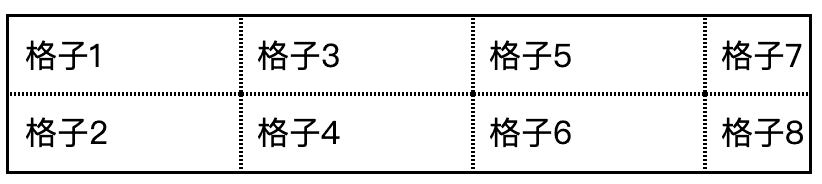
垂直流格子示意

可若是水平流,无论数量多少,都是两行高度,那么sibling-count()函数就特别实用。

实现代码如下所示:

zxx-grid {
  display: grid;
  border: solid;
  overflow: auto;
  grid-template-columns: repeat(round(up, calc(sibling-count() / 2)), auto);
}
zxx-item {
  width: 100px;
  outline: 1px dotted;
  padding: .5rem;
}

结果……结果实现的效果并不是如预期那样……怪了,这可是按照MDN文档的案例写的呀!
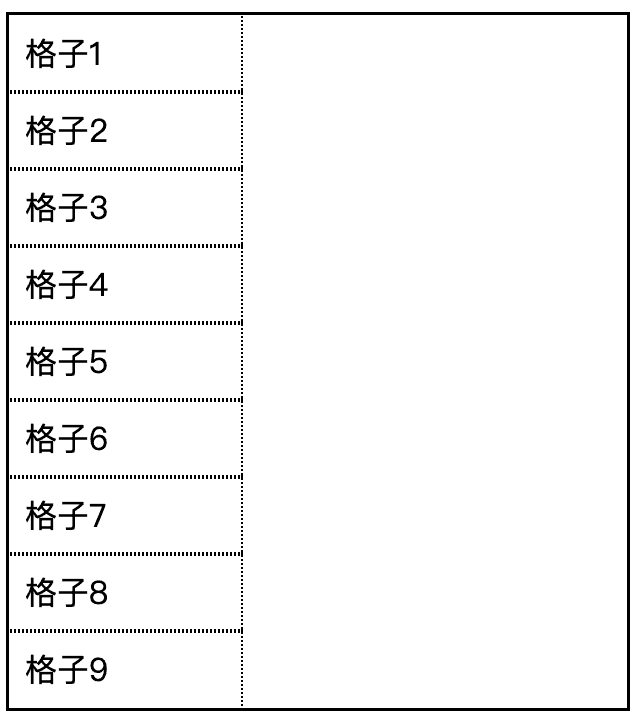
竖排了

🤔🤔
🤔🤔

后来一研究,才发现,MDN文档提供的例子是错误的!

sibling-count()函数是用在子元素上的,等同于 element.parentElement.children.length

嗯……那这个函数其实没多少好玩的,估计作用也就是sibling-index()函数相减,计算反向索引值。

或者等宽布局用一用:

ul li {
  width: calc(100% / sibling-count());
}

例如浮动布局永远一行显示:

<ui-flow-root>
  <ui-item></ui-item>
  <ui-item></ui-item>
  <ui-item></ui-item>
  <ui-item></ui-item>
</ui-flow-root>
ui-flow-root {
  display: flow-root;
  ui-item {
    aspect-ratio: 1;
    background: rgb(from deepskyblue r g b / calc(sibling-index() / sibling-count()));
    width: calc(100% / sibling-count());
    float: left;
  }
}

实时渲染效果如下(目前仅Chrome才有效果):

补充于2026年2月27日

CodePen的这个文字弹动效果就使用了本文介绍的sibling-count()sibling-index()函数,有兴趣的可以了解下。

三、兼容性、结语

目前这两个函数Chrome 138+支持,如下图所示:
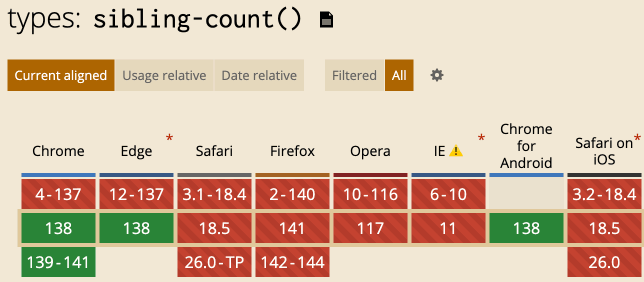
sibling-count()兼容性

sibling-count()sibling-index()的值可以使用CSS数学函数计算,如calc()round()函数等。

还能使用content属性直接明文显示数量值。

例如:

ul li::before {
  content: counter(i) "/" counter(N);
  counter-reset: N sibling-count() i sibling-index() 
}

好吧,毕竟兼容性还不是很好,就不说太多了。

继续宋玉长老,看在宋长老的面子上,欢迎点赞,转发!

宋玉

😉😊😇
🥰😍😘

本文为原创文章,会经常更新知识点以及修正一些错误,因此转载请保留原出处,方便溯源,避免陈旧错误知识的误导,同时有更好的阅读体验。
本文地址:https://www.zhangxinxu.com/wordpress/?p=11804

(本篇完)