







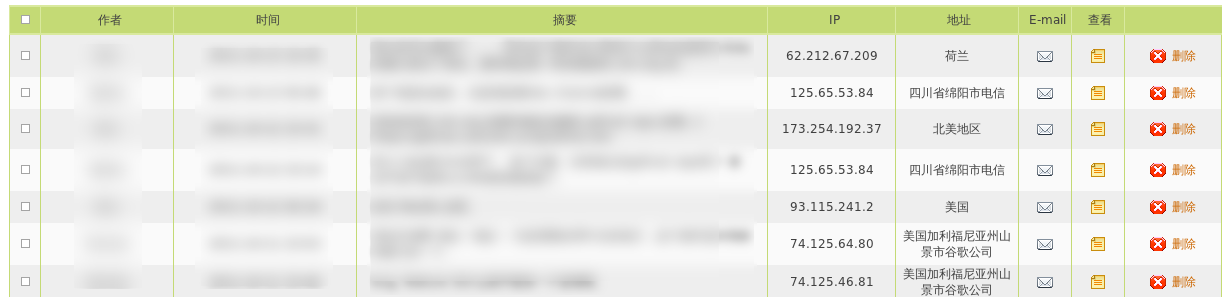
GreaseMonkey 代码如下:
// ==UserScript==
// @name           is-programmer 后台评论地理位置显示
// @namespace      http://lilydjwg.is-programmer.com/
// @description    通过 JSONP 查询 IP 地址对应的地理位置并显示
// @include        http://*.is-programmer.com/admin/comments*
// @include        http://*.is-programmer.com/admin/messages*
// ==/UserScript==

var qurl = function(ips){
  return 'http://localhost:2000/queryip?q=' + ips.join(',') + '&cb=?';
};

var letsJQuery = function(){
  var ip_header = document.evaluate('//th[@class="helpHed" and text()="IP"]', document, null, XPathResult.UNORDERED_NODE_SNAPSHOT_TYPE, null).snapshotItem(0);
  $(ip_header).after('<th class="helpHed">地址</th>');
  var ip_cells = document.getElementsByClassName('comment_ip_col');
  var ips = [];
  var i;
  for(i=0, len=ip_cells.length; i<len; i++){
    ips.push(ip_cells[i].textContent);
  }
  $.getJSON(qurl(ips), function(data){
    var ans = data.ans;
    for(i=0, len=ip_cells.length; i<len; i++){
      $(ip_cells[i]).after('<td class="comment_addr_col">'+ans[i]+'</td>');
    }
  });
};

function GM_wait(){
  if(typeof unsafeWindow.jQuery == 'undefined') {
    window.setTimeout(GM_wait, 500);
  }else{
    $ = unsafeWindow.jQuery;
    letsJQuery();
  }
}

GM_wait();
光有这个脚本是不够的,因为没有 IP 地址数据库。我不想像这样用 chrome 权限调用子进程之类的手段,而是从本地 HTTP server 取得数据,这样以后可以方便地扩展。HTTP server 使用 Python 的 tornado 框架写成,名字是“Web Service Provider”的缩写:
#!/usr/bin/env python3
# vim:fileencoding=utf-8

from subprocess import getoutput
from functools import lru_cache
import json

import tornado.web
import tornado.httpserver
from tornado.options import define, options

@lru_cache()
def lookupip(ip):
  return getoutput('cip ' + ip).replace('CZ88.NET', '').strip() or '-'

class IPHandler(tornado.web.RequestHandler):
  def get(self):
    q = self.get_argument('q').split(',')
    addr = []
    for ip in q:
      a = lookupip(ip)
      if 'illegal' in a:
        a = '(错误)'
      elif '\n' in a:
        a = ''
      addr.append(a)

    ans = {
      'ans': addr,
    }
    cb = self.get_argument('cb', None)
    if cb:
      self.set_header('Content-Type', 'text/plain; charset=utf-8')
      self.write('%s(%s)' % (cb, json.dumps(ans, ensure_ascii=False)))
    else:
      self.write(ans)

def main():
  define("port", default=2000, help="run on the given port", type=int)

  tornado.options.parse_command_line()
  application = tornado.web.Application([
    (r'/queryip$', IPHandler),
  ],
    debug=True,
  )
  application.listen(options.port)
  tornado.ioloop.IOLoop.instance().start()

if __name__ == "__main__":
  try:
    main()
  except KeyboardInterrupt:
    pass
用的是 Python 3.2,我很喜欢它的lru_cache装饰器。
此内容由惯性聚合(RSS阅读器)自动聚合整理,仅供阅读参考。 原文来自 — 版权归原作者所有。