







前两天更新到了火狐7,却发现双击标签页组的空白地方没有了反应。最开始以为是插件不兼容或者是bug,没想到搜索了下,却发现是个“feature”。
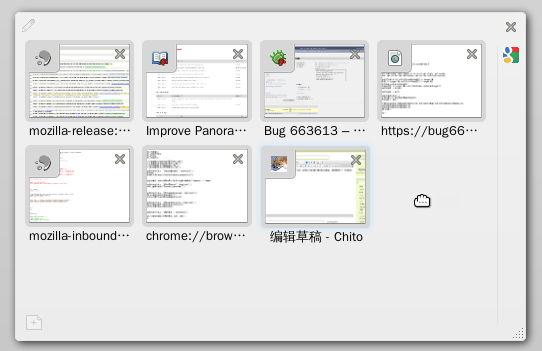
在这个 bug 报告中,Mozilla 认为这样可以简化标签页组的操作。我是从这个帖子找到这个 bug 报告的。楼主The_Ben 说:
I would be more than happy to see this being re-implemented in FF7, as I use it all the time, I find it to be the most convenient way to open a new tab in a tab group I have (and I'm not currently present at obviously, for that I have cmd+t).
看来不是我一个人喜欢这个功能。那么,让我把它找回来吧,就像找回状态栏、地址栏中的RSS按钮以及https://一样。
根据 bug 报告上的链接,我找到了这个补丁。看样子把这个补丁反着打上去就好。不过找到正确的文件却花了好长时间,还下载了共 1.2G 的火狐源代码来找寻,好在并不需要重新编译。
要修改的位置位于源代码中的groupitems.js文件中,它被tabview.js包含了,所以要修改的文件是这个tabview.js。到火狐的安装目录/usr/lib/firefox-7.0下没找到这个文件,只有omni.jar。这是个非标准的 zip 文件。使用unzip程序可正确解压,然后打上以下补丁:
diff -Nuar omni_orig/chrome/browser/content/browser/tabview.js omni/chrome/browser/content/browser/tabview.js
--- omni_orig/chrome/browser/content/browser/tabview.js	2010-01-01 00:00:00.000000000 +0800
+++ omni/chrome/browser/content/browser/tabview.js	2011-10-07 13:47:32.623127202 +0800
@@ -2304,6 +2304,10 @@
   this.keepProportional = false;
   this._frozenItemSizeData = {};

+  // Double click tracker
+  this._lastClick = 0;
+  this._lastClickPositions = null;
+
   // Variable: _activeTab
   // The <TabItem> for the groupItem's active tab.
   this._activeTab = null;
@@ -3871,6 +3875,28 @@
   _addHandlers: function GroupItem__addHandlers(container) {
     let self = this;

+    // Create new tab and zoom in on it after a double click
+    container.mousedown(function(e) {
+      if (!Utils.isLeftClick(e) || self.$titlebar[0] == e.target ||
+          self.$titlebar.contains(e.target)) {
+        self._lastClick = 0;
+        self._lastClickPositions = null;
+        return;
+      }
+      if (Date.now() - self._lastClick <= UI.DBLCLICK_INTERVAL &&
+          (self._lastClickPositions.x - UI.DBLCLICK_OFFSET) <= e.clientX &&
+          (self._lastClickPositions.x + UI.DBLCLICK_OFFSET) >= e.clientX &&
+          (self._lastClickPositions.y - UI.DBLCLICK_OFFSET) <= e.clientY &&
+          (self._lastClickPositions.y + UI.DBLCLICK_OFFSET) >= e.clientY) {
+        self.newTab();
+        self._lastClick = 0;
+        self._lastClickPositions = null;
+      } else {
+        self._lastClick = Date.now();
+        self._lastClickPositions = new Point(e.clientX, e.clientY);
+      }
+    });
+
     var dropIndex = false;
     var dropSpaceTimer = null;
patch -p1 < patch
然后把文件弄回原来的 jar 包里面。这里用到了源代码中的config/optimizejars.py文件把标准 zip 文件弄成原样。估计不弄也可以,只是效率会差一些。
7z a -tzip omni.jar
python2 ~/src/mozilla-release/config/optimizejars.py --optimize . . .
sudo mv omni.jar /usr/lib/firefox-7.0
然后重启火狐即可。只不过这样,以后火狐更新时又得重新弄一遍。
2011年11月9日更新:火狐 8 终于把这个特性加回来了。
2011年11月11日更新:火狐 8 还是不尽如人意,只是双击空白区域会新建标签页,双击标签页组时并不是这样。更新后的 patch 如下,同时去掉了新建组后将焦点置于组标题的行为:
diff -Nuar omni_orig/chrome/browser/content/browser/tabview.js omni/chrome/browser/content/browser/tabview.js
--- omni_orig/chrome/browser/content/browser/tabview.js	2010-01-01 00:00:00.000000000 +0800
+++ omni/chrome/browser/content/browser/tabview.js	2011-11-11 00:30:18.629851334 +0800
@@ -1290,7 +1290,7 @@
         drag.info.stop();

         if (!this.isAGroupItem && !this.parent) {
-          new GroupItem([drag.info.$el], {focusTitle: true});
+          new GroupItem([drag.info.$el]);
           gTabView.firstUseExperienced = true;
         }

@@ -2328,6 +2328,10 @@
   this.keepProportional = false;
   this._frozenItemSizeData = {};

+  // Double click tracker
+  this._lastClick = 0;
+  this._lastClickPositions = null;
+
   this._onChildClose = this._onChildClose.bind(this);

   // Variable: _activeTab
@@ -3901,41 +3905,26 @@
   // Helper routine for the constructor; adds various event handlers to the container.
   _addHandlers: function GroupItem__addHandlers(container) {
     let self = this;
-    let lastMouseDownTarget;

+    // Create new tab and zoom in on it after a double click
     container.mousedown(function(e) {
-      let target = e.target;
-      // only set the last mouse down target if it is a left click, not on the
-      // close button, not on the expand button, not on the title bar and its
-      // elements
-      if (Utils.isLeftClick(e) &&
-          self.$closeButton[0] != target &&
-          self.$titlebar[0] != target &&
-          self.$expander[0] != target &&
-          !self.$titlebar.contains(target) &&
-          !self.$appTabTray.contains(target)) {
-        lastMouseDownTarget = target;
-      } else {
-        lastMouseDownTarget = null;
+      if (!Utils.isLeftClick(e) || self.$titlebar[0] == e.target ||
+          self.$titlebar.contains(e.target)) {
+        self._lastClick = 0;
+        self._lastClickPositions = null;
+        return;
       }
-    });
-    container.mouseup(function(e) {
-      let same = (e.target == lastMouseDownTarget);
-      lastMouseDownTarget = null;
-
-      if (same && !self.isDragging) {
-        if (gBrowser.selectedTab.pinned &&
-            UI.getActiveTab() != self.getActiveTab() &&
-            self.getChildren().length > 0) {
-          UI.setActive(self, { dontSetActiveTabInGroup: true });
-          UI.goToTab(gBrowser.selectedTab);
-        } else {
-          let tabItem = self.getTopChild();
-          if (tabItem)
-            tabItem.zoomIn();
-          else
-            self.newTab();
-        }
+      if (Date.now() - self._lastClick <= UI.DBLCLICK_INTERVAL &&
+          (self._lastClickPositions.x - UI.DBLCLICK_OFFSET) <= e.clientX &&
+          (self._lastClickPositions.x + UI.DBLCLICK_OFFSET) >= e.clientX &&
+          (self._lastClickPositions.y - UI.DBLCLICK_OFFSET) <= e.clientY &&
+          (self._lastClickPositions.y + UI.DBLCLICK_OFFSET) >= e.clientY) {
+        self.newTab();
+        self._lastClick = 0;
+        self._lastClickPositions = null;
+      } else {
+        self._lastClick = Date.now();
+        self._lastClickPositions = new Point(e.clientX, e.clientY);
       }
     });

@@ -8967,7 +8956,7 @@
       let box = item.getBounds();
       if (box.width > minMinSize && box.height > minMinSize &&
          (box.width > minSize || box.height > minSize)) {
-        let opts = {bounds: item.getBounds(), focusTitle: true};
+        let opts = {bounds: item.getBounds()};
         let groupItem = new GroupItem([], opts);
         self.setActive(groupItem);
         phantom.remove();
2012年6月7日更新: 火狐13的代码更改了,添加了dblclick事件绑定函数,不需要自己追踪单击事件了。更新后的代码如下:
diff -Nuar omni_old/chrome/browser/content/browser/tabview.js omni/chrome/browser/content/browser/tabview.js
--- omni_old/chrome/browser/content/browser/tabview.js  2010-01-01 00:00:00.000000000 +0800
+++ omni/chrome/browser/content/browser/tabview.js  2012-06-07 16:49:49.174753472 +0800
@@ -1500,7 +1500,7 @@
         drag.info.stop();

         if (!this.isAGroupItem && !this.parent) {
-          new GroupItem([drag.info.$el], {focusTitle: true});
+          new GroupItem([drag.info.$el]);
           gTabView.firstUseExperienced = true;
         }

@@ -4142,40 +4142,8 @@
     let self = this;
     let lastMouseDownTarget;

-    container.mousedown(function(e) {
-      let target = e.target;
-      // only set the last mouse down target if it is a left click, not on the
-      // close button, not on the expand button, not on the title bar and its
-      // elements
-      if (Utils.isLeftClick(e) &&
-          self.$closeButton[0] != target &&
-          self.$titlebar[0] != target &&
-          self.$expander[0] != target &&
-          !self.$titlebar.contains(target) &&
-          !self.$appTabTray.contains(target)) {
-        lastMouseDownTarget = target;
-      } else {
-        lastMouseDownTarget = null;
-      }
-    });
-    container.mouseup(function(e) {
-      let same = (e.target == lastMouseDownTarget);
-      lastMouseDownTarget = null;
-
-      if (same && !self.isDragging) {
-        if (gBrowser.selectedTab.pinned &&
-            UI.getActiveTab() != self.getActiveTab() &&
-            self.getChildren().length > 0) {
-          UI.setActive(self, { dontSetActiveTabInGroup: true });
-          UI.goToTab(gBrowser.selectedTab);
-        } else {
-          let tabItem = self.getTopChild();
-          if (tabItem)
-            tabItem.zoomIn();
-          else
-            self.newTab();
-        }
-      }
+    container.dblclick(function(e) {
+        self.newTab();
     });

     let dropIndex = false;
@@ -9944,7 +9912,7 @@
       let box = item.getBounds();
       if (box.width > minMinSize && box.height > minMinSize &&
          (box.width > minSize || box.height > minSize)) {
-        let opts = {bounds: item.getBounds(), focusTitle: true};
+        let opts = {bounds: item.getBounds()};
         let groupItem = new GroupItem([], opts);
         self.setActive(groupItem);
         phantom.remove();
2012年7月29日更新: 火狐14又有新动作,见此文。
此内容由惯性聚合(RSS阅读器)自动聚合整理,仅供阅读参考。 原文来自 — 版权归原作者所有。