






上个月收到这样一封邮件:
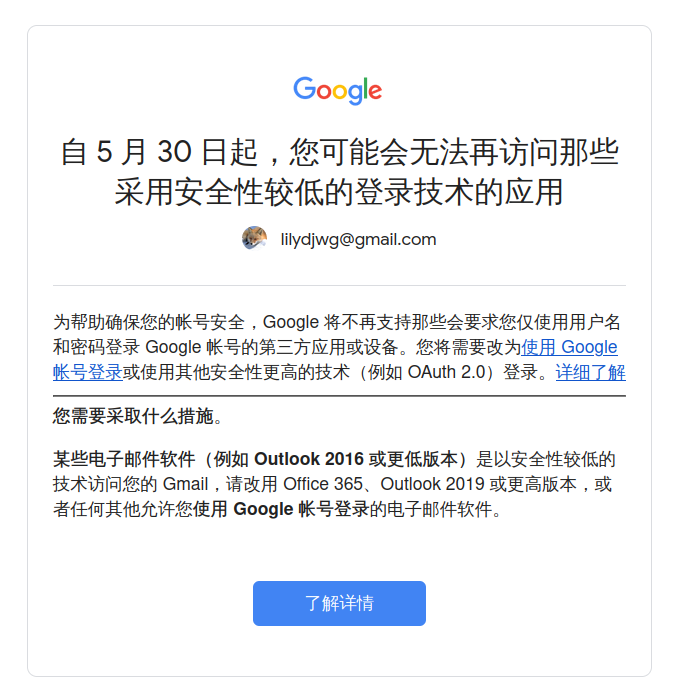
意思就是说,Google 觉得把密码直接交给邮件客户端,权限太大,不够安全。所以要用户改用基于 OAuth2 的认证方式,只给程序邮件相关的权限。哦,你说应用专属密码?要用那个必须得启用两步验证——也就是意味着遇到灾难的话,我无法从一无所有的状态开始恢复。
getmail6 只支持使用 XOAUTH2 认证的 IMAP 协议,并不在 POP 协议上支持这个(不知道是否有可能)。所以我得换 IMAP 协议了。
具体操作步骤在 getmail6 的示例配置中有写。简单来说就是自己去申请个桌面软件的 app 信息,然后给自己的用户添加试用权限,再通过 OAuth2 获取 refresh token 和 access token,就能登录了。getmail6 自带了个 getmail-gmail-xoauth-tokens 程序用来走 OAuth2 流程,不需要另外安装程序来处理的同时也可以给其它程序使用。
所以我的 msmtp 配置就不用麻烦了,改两行配置就好:
auth oauthbearer
passwordeval getmail-gmail-xoauth-tokens ~/.getmail/gmail/lilydjwg@gmail.com.json
但是呢,虽然邮件是收回来了,IMAP 和 POP 还是挺不一样的。POP 没有「文件夹」的概念,所有收到的邮件,不管我有没有在 Gmail 网页或者客户端上阅读、归档,不管它进了哪个标签(文件夹)(「垃圾邮件」除外),我都会收到,并且把收过的邮件标记为已读。
而通过 getmail6 使用 IMAP 收取,我能做的选择就是,要不要把收过的邮件标记为已读或者删掉(可在 Gmail 中设置为归档)。不管如何,getmail6 只会收到它运行时位于收件箱中的邮件。如果我选择标记为已读的话,那么已读邮件也不会被 getmail6 收到。所以标已读的话,我在别的地方看过的邮件不会被收到。删除的话会好点,收过的邮件归档了,还省得我手动去归档,但是在别的地方,收过的邮件和已处理的邮件没了区分。
所以不如上 offlineimap,完全同步好了。
offlineimap 的配置就比较复杂了,一是要对文件夹名进行转码,二是我要设定只同步指定的文件夹:收件箱、Maillist 和垃圾邮件。要同步垃圾邮件的原因是,Gmail 经常把有用的邮件往里边扔。
[general]
accounts = gmail
maxsyncaccounts = 10
socktimeout = 60
pythonfile = ~/.offlineimap/offlineimap.py

[Account gmail]
localrepository = gmail-local
remoterepository = gmail-remote

[Repository gmail-local]
type = GmailMaildir
localfolders = ~/.Maildir
filename_use_mail_timestamp = no
nametrans = gmail_nametrans_local

[Repository gmail-remote]
type = Gmail
remoteuser = lilydjwg@gmail.com

sslcacertfile = /etc/ssl/cert.pem
ssl = yes
starttls = no

oauth2_client_id_eval = get_client_id("lilydjwg@gmail.com")
oauth2_client_secret_eval = get_client_secret("lilydjwg@gmail.com")
oauth2_access_token_eval = get_access_token("lilydjwg@gmail.com")

nametrans = gmail_nametrans_remote
folderfilter = gmail_folderfilter
import os
import json
import subprocess

_LOADED_DATA = {}

def _load_data(account):
  with open(os.path.expanduser(f'~/.getmail/gmail/{account}.json')) as f:
    _LOADED_DATA[account] = json.load(f)

def get_client_id(account):
  if account not in _LOADED_DATA:
    _load_data(account)
  return _LOADED_DATA[account]['client_id']

def get_client_secret(account):
  if account not in _LOADED_DATA:
    _load_data(account)
  return _LOADED_DATA[account]['client_secret']

def get_access_token(account):
  cmd = [
    'getmail-gmail-xoauth-tokens',
    os.path.expanduser(f'~/.getmail/gmail/{account}.json'),
  ]
  out = subprocess.check_output(cmd, text=True)
  return out

def gmail_nametrans_remote(foldername):
  foldername = foldername.removeprefix('[Gmail]/').encode('ascii').decode('imap4-utf-7')
  if foldername == '垃圾邮件':
    foldername = 'Spam'
  elif foldername == '草稿':
    foldername = 'Drafts'
  return foldername

def gmail_nametrans_local(foldername):
  if foldername == 'Spam':
    foldername = '[Gmail]/垃圾邮件'
  elif foldername == 'Drafts':
    foldername = '[Gmail]/草稿'
  return foldername.encode('imap4-utf-7').decode('ascii')

def gmail_folderfilter(foldername):
  foldername = foldername.encode('ascii').decode('imap4-utf-7')
  return foldername in [
    'INBOX', '[Gmail]/垃圾邮件', '[Gmail]/草稿',
    'Maillist',
  ]
然后在 Gmail 那边创建个过滤器,把来自邮件列表的邮件扔到「Maillist」文件夹里去。搜索「 (to:@googlegroups.com OR from:vim-dev-github@256bit.org OR to:@zsh.org)」并创建过滤器,选择操作「跳过收件箱、 应用标签“Maillist”」即可。注意以后在修改的时候直接修改「包含字词」字段即可,并且记得「OR」「AND」「NOT」之类的操作符需要改回大写。
这样做完之后还有个问题:一封邮件同步到 offlineimap 后,我在 mutt 里阅读并删掉了它。offlineimap 一看,哟,邮件没了,得在服务器上删掉。Gmail 根据我的设置,把从 IMAP 删除的邮件归档,但是它并没有选项来标记为已读。所以这封邮件最终会以未读的状态躺在「所有邮件」里。
于是我去 App Script 里写了个脚本,把这些邮件标记为已读:
function mark_as_read() {
  const threads = GmailApp.search('is:unread AND NOT (label:Maillist OR in:inbox)', 0, 30)
  for(const thread of threads) {
    Logger.log('Marking as read: %s', thread.getFirstMessageSubject())
    thread.markRead()
  }
}
手动运行一遍之后,就可以在左侧栏里给它设置个触发器定时跑啦。
使用 offlineimap 之后,最大的问题变成了邮件散落在不同的账号下的不同文件夹,一个个过去翻看太低效了。所以我就给 zsh 设置了提醒:
mailpath=(
  ~/.Maildir/INBOX/new'?GMail has a new message.'
  ~/.Maildir/Spam/new'?GMail has a new spam.'
  ~/.Mail/inbox'?New local mails.'
)
问号前边是邮箱的路径,后边是提示信息。之前那个 mbox 格式的邮箱我还留着,用来收取来自本地 cron 的邮件。
一个小问题是,procmail 用不成了。不过现在各种无用的网站消息也少了,所以不需要通过 procmail 处理垃圾邮件了(新浪微博我没有使用邮件注册、LinkedIn 和 Twitter 消停了、网易和QQ邮箱不用了)。现在中文邮件列表也几乎没人用了,我也不用让程序去重写「回复:RE:回复:」这类糟糕的邮件标题和过滤掉自动回复了。
此内容由惯性聚合(RSS阅读器)自动聚合整理,仅供阅读参考。 原文来自 — 版权归原作者所有。