




django-filter是单独的一个库,不属于djangorestframework中的,属于外部库引用进来使用。下面就来介绍下filter
有三种filter方式:
首先需要安装django-filter
pip install django-filter
然后需要将django_filters 添加到 INSTALLED_APPS中
INSTALLED_APPS = [
    'django_filters',
]
1
2
3
在View中添加filter_backends属性,设置过滤方式DjangoFilterBackend,并且设置过滤的属性。
from django_filters.rest_framework import DjangoFilterBackend

class GoodsListViewSet(ModelViewSet):
    queryset = Goods.objects.all()
    serializer_class = GoodsSerializer
    pagination_class = MyPagination
    filter_backends = (DjangoFilterBackend,)
    filterset_fields = ('name', 'shop_price')
1
2
3
4
5
6
7
8
9
在调试界面中会出现过滤器选项, 可以在其中过滤name和shop_price两个属性的值
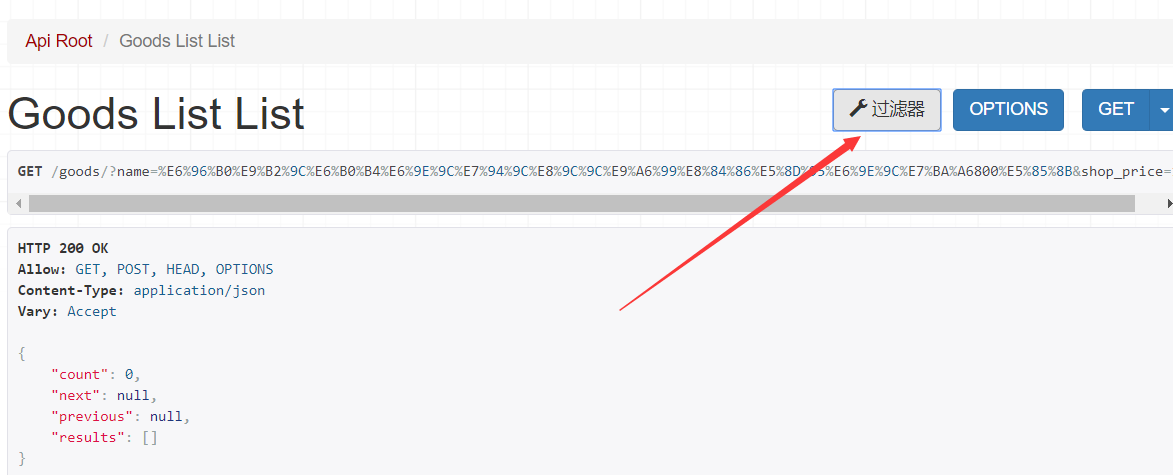
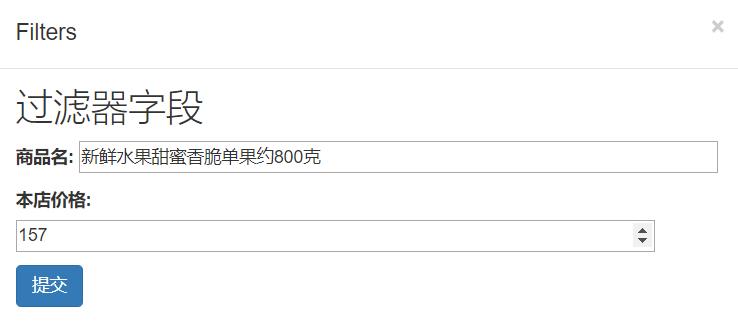
创建filters.py,在里面定义自己的过滤器。 可以通过最小的价格、最大的价格,和模糊查询名字去过滤想要的数据。
from django_filters import FilterSet, NumberFilter, CharFilter
from .models import Goods

class GoodsFilter(FilterSet):
    """    商品的过滤类    """
    price_min = NumberFilter(field_name='shop_price', help_text="最低价格", lookup_expr='gte')
    price_max = NumberFilter(field_name='shop_price', lookup_expr='lte')
    name = CharFilter(field_name='name', lookup_expr="icontains")
    class Meta:
        model = Goods
        fields = ['price_min', 'price_max', 'name']
1
2
3
4
5
6
7
8
9
10
11
将该过滤器添加到view中 view.py
class GoodsListViewSet(ModelViewSet):
    queryset = Goods.objects.all()
    serializer_class = GoodsSerializer
    pagination_class = MyPagination
    filter_backends = (DjangoFilterBackend,)
    filter_class = GoodsFilter
1
2
3
4
5
6
最后可以通过 http://127.0.0.1:8000/goods/?price_min=150&price_max=160&name=水果 去过滤得到想要的数据。
这个Filter是基于Django的搜索。现在我们将SearchFilter集成到过滤里面来。在filter_backends中添加SearchFiler,然后再在search_fields中添加需要搜索的字段即可,在搜索的字段前面字符变量来提高搜索效率。
view.py
from rest_framework.filters import SearchFilter

class GoodsListViewSet(ModelViewSet):
    queryset = Goods.objects.all()
    serializer_class = GoodsSerializer
    pagination_class = MyPagination
    filter_backends = (DjangoFilterBackend, SearchFilter)
    filter_class = GoodsFilter
    search_fields = ("=name", 'goods_brief', 'goods_desc')
1
2
3
4
5
6
7
8
9
可以对数据进行排序筛选数据。我们将其加入进去
view.py
from rest_framework.filters import SearchFilter, OrderingFilter


class GoodsListViewSet(ModelViewSet):
    queryset = Goods.objects.all()
    serializer_class = GoodsSerializer
    pagination_class = MyPagination
    filter_backends = (DjangoFilterBackend, SearchFilter, OrderingFilter)
    filter_class = GoodsFilter
    search_fields = ("=name", 'goods_brief', 'goods_desc')
    ordering_fields = ("sold_num", "add_time")
1
2
3
4
5
6
7
8
9
10
11
12
13
修改filters.py文件,编写过滤方法top_category_filter绑定到top_category字段中,即可通过该属性名进行相应的筛选。
class GoodsFilter(FilterSet):
    """    商品的过滤类    """
    pricemin = NumberFilter(field_name='shop_price', help_text="最低价格", lookup_expr='gte')
    pricemax = NumberFilter(field_name='shop_price', lookup_expr='lte')
    name = CharFilter(field_name='name', lookup_expr="icontains")
    top_category = NumberFilter(method='top_category_filter')

    def top_category_filter(self, queryset, name, value):
        return queryset.filter(Q(category_id=value) | Q(category__parent_category_id=value) | (category__parent_category__parent_category_id=value))

    class Meta:
        model = Goods
        fields = ['pricemin', 'pricemax', 'name']
1
2
3
4
5
6
7
8
9
10
11
12
13
14
此内容由惯性聚合(RSS阅读器)自动聚合整理,仅供阅读参考。 原文来自 — 版权归原作者所有。