惯性聚合 高效追踪和阅读你感兴趣的博客、新闻、科技资讯
阅读原文 在惯性聚合中打开

推荐订阅源

酷 壳 – CoolShell
酷 壳 – CoolShell
H
Hacker News: Front Page
P
Palo Alto Networks Blog
T
ThreatConnect
Apple Machine Learning Research
博客园_首页
T
True Tiger Recordings
P
Privacy & Cybersecurity Law Blog
B
Blog
IT之家
IT之家
Last Week in AI
Last Week in AI
F
Full Disclosure
Hacker News: Ask HN
Hacker News: Ask HN
C
Comments on: Blog
Microsoft Azure Blog
C
Cybersecurity and Infrastructure Security Agency CISA
Microsoft Security Blog
博客园 - 【当耐特】
N
News and Events Feed by Topic
NISL@THU
NISL@THU
腾讯CDC
雷峰网
雷峰网
Security Latest
Security Latest
李成银的技术随笔
M
Microsoft Research Blog - Microsoft Research
L
LangChain Blog
L
Lohrmann on Cybersecurity
cs.CL updates on arXiv.org
C
Check Point Blog
Y
Y Combinator Blog
Recent Announcements
博客园 - Franky
N
News | PayPal Newsroom
V
V2EX
A
About on SuperTechFans
The Register - Security
月光博客
月光博客
奇客Solidot–传递最新科技情报
奇客Solidot–传递最新科技情报
Google Online Security Blog
MyScale Blog
MyScale Blog
Cisco Talos Blog
Cisco Talos Blog
Vercel News
Vercel News
WordPress大学
WordPress大学
C
Cyber Attacks, Cyber Crime and Cyber Security
The Hacker News
The Hacker News
IntelliJ IDEA : IntelliJ IDEA – the Leading IDE for Professional Development in Java and Kotlin | The JetBrains Blog
爱范儿
爱范儿
A
Arctic Wolf
L
LINUX DO - 最新话题
freeCodeCamp Programming Tutorials: Python, JavaScript, Git & More

Java不加糖的Blog

wireguard折腾记录 DSB in SBG ODE常微分方程总结 Windows分应用跳过管理员弹窗 docker配置wikijs PowerShell美化 Kaggle比赛RSNA-2022骨折检测 CloudComPy库安装 Pandas的数据操作 齐次坐标系的理解 NgeNet论文理解 2023年必装的Windows软件
使用socket代理解决企业微信可信ip问题
2022-09-21 · via Java不加糖的Blog

最近在网上看到了使用微信测试公众号给女朋友弄的每日推送。不过还是有很多问题的,主要是不能更改头像和名字,非常的不优雅。于是找到了企业微信的api,非常满足我的需要求。

于是打算自己重新写一个。直达链接 (目前还没有施工完🛠️)

主要思路

首先我们需要明确需求:需要一个固定的公网ip来访问企业微信的api

那第一反应当然就是租用云服务器,然后同时购买固定的公网ip,然后再把云服务器作为代理服务器,帮助我们去访问企业微信api。

flowchart LR
    A[本地服务器] --->|Socks代理| B[云服务器] ---> C[企业微信api]
    C -.-> B -.->|Socks代理| A

为什么用Socks代理而不用http?

  • 主要是因为http代理无法代理https的流量,比较麻烦。

  • Socks代理性能更好,因为他只负责转发流量,简单理解为Socks代理更纯粹。

实际操作

我的内核:

CentOS Linux release 7.6.1810 (Core)

安装socks5服务端

项目地址:https://github.com/Lozy/danted

项目给出了两种安装方式,我这里使用的是脚本安装,直接安装在服务器上。(主要是腾讯云上貌似没有自带docker,懒得折腾了)

首先下载脚本

1
wget --no-check-certificate https://raw.github.com/Lozy/danted/master/install.sh -O install.sh 

安装脚本

1
chmod +x install.sh && ./install.sh

默认配置的端口是2016,且没有账号密码!!!!

如果需要自定义参数可以加上:

1
2
3
--port=端口 \
--user=账号 \
--passwd=密码
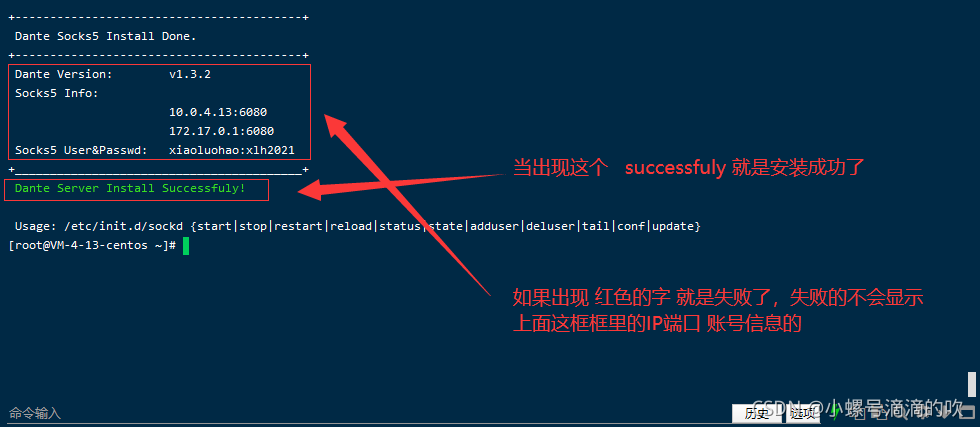
安装完成界面

后续配置

参考

Socks:https://cloud.tencent.com/developer/article/1682604?from=15425

安装:https://blog.csdn.net/weixin_44471270/article/details/121343578