



惯性聚合 高效追踪和阅读你感兴趣的博客、新闻、科技资讯
阅读原文 在惯性聚合中打开

推荐订阅源

Google DeepMind News
L
LangChain Blog
H
Help Net Security
博客园_首页
T
Tailwind CSS Blog
Microsoft Security Blog
T
The Blog of Author Tim Ferriss
雷峰网
雷峰网
Recent Announcements
D
DataBreaches.Net
U
Unit 42
Vercel News
Vercel News
I
InfoQ
Martin Fowler
Martin Fowler
Microsoft Azure Blog
Apple Machine Learning Research
S
SegmentFault 最新的问题
Jina AI
Jina AI
博客园 - 叶小钗
博客园 - 【当耐特】
罗磊的独立博客
OSCHINA 社区最新新闻
OSCHINA 社区最新新闻
月光博客
月光博客
Last Week in AI
Last Week in AI

Comments for Hackaday

AI The Truly Environmentally Friendly Way News Sites Are Blocking Internet Archive Over AI Scraping Fears How The 2020s Chip Crisis Led To A Buggy Saleae Analyzer In 2026 Evidence For Water Vapor Plumes On Europa Vanishes In Re-Analysis Mechanical Stability For Your Coils 3D Printed Hose Sprayer Sets Phasers To Suds The Merits Of Comment-Driven Development As Counterweight To TDD Building A Desktop Catalytic Cracker Process 4 Billion Pixels Per Second From 16 DIY Cameras For The Best V-Tubing Rig Ever An Unlikely Host For An 8080 Emulator Using Brand New NiMH Cells After Sitting 12 Years Unused Investigating The S3 Virge’s Reputation As A 3D Decelerator Card As It Turns Out, There’s More Than One Cassette Mechanism Being Made After All Using Windows 11 On An LGA 775 PC With AGP Videocard An Ethernet WiFi Router on a Pi Pico 2W This Week In Security: Messing With AI, 7Zip And Notepad++ Vulnerabilities, HTTP2 Bomb, And More Using Electrolysis For More Than Just Generating Hydrogen Vintage Turntable Gets Brain Transplant And Home Assistant Integration Connecting Your Car To Home Assistant Microsoft Claims 20 Second Qubits If You Want To Hack Me, Come In Through The Speaker Ways To Embed Magnets In 3D Prints And Not Ruin Printers An RGB Keyboard For Your Hackaday Communicator Badge Ask Hackaday: How Do You Feel About Electronic Shelf Labels? Make Your Ceiling Disappear With ADS-B And Short-Throw Projector Fixing A Nintendo Game Boy Clone That Runs Too Fast Web-Based Control For A CB Radio Distilling Stale Gasoline To Make It Usable Again DIY Ceramic Circuit Boards Surely Count As Solarpunk Texas Instruments Changes The NE5532 And Others Into Incompatible Versions
Custom Clamshell Cyberdeck Shows Off Underlighting
Mark Morgan · 2026-06-17 · via Comments for Hackaday

Skip to content

Cyberdecks are great projects, and [Salim Benbouziyane]’s scratch-built CM Deck is a fantastic specimen. It’s a clamshell-style cyberdeck with custom split keyboard, trackpad, optional external WiFi antenna, and some slick underlighting thanks to a translucent bottom shell. There’s even a hidden feature that seems super handy for a cyberdeck: a special USB-C port that, when plugged in to another host (like another computer), lets the cyberdeck act as an external keyboard and trackpad for that downstream machine.
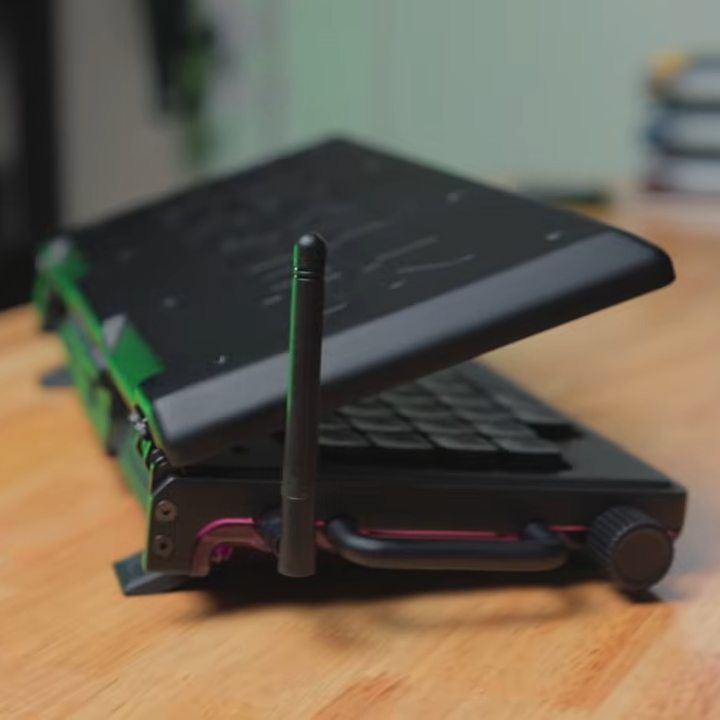
The CM Deck is built around the Raspberry Pi Compute Module 5, which necessitates a custom PCB but offers more design freedom.

Notably, the CM Deck is custom-built around the Raspberry Pi Compute Model 5. When we first peeped the CM5 the small size was striking, but of course that comes at the cost of having no connectors, supporting hardware, or heat management. That’s something [Salim] embraced because it meant being able to put connectors exactly where he wanted them, and not have to work around existing hardware. A custom PCB let him to lay out his cyberdeck with greater freedom, less wasted space, and ultimately integrate a custom-built keyboard (with RP2040 and QMK firmware).

Even the final enclosure is custom-made, with 3D printing being used to validate the design and PCBway providing finished plastic shells in addition to manufacturing the PCBs. [Salim] admits that doing so was an indulgence, but his delight at the quality of the translucent purple undercarriage is palpable.

[Salim]’s video (embedded below) is a deep dive into the whole design and build process, and it’s a great watch for anyone interested in the kind of work and decisions that go into making something like this. Experienced folks can expect to nod in sympathy when [Salim] highlights gotchas like doing CAD work based on the screen’s drawings, only to discover later that the physical unit doesn’t quite match.

The GitHub repository contains the design files for everything, so give it a browse if you’re interested. [Salim] is no stranger to clean builds, so take a moment to admire his CRT-style Raspberry Pi terminal as well.

Thanks [Keith Olson] for sharing the tip!