





You’re wandering through a thrift store and spot an old router for ten bucks. Worthless, right? But in this case, it was a Google OnHub, which, at the time, was pretty premium and still isn’t anything to sneeze at. Of course, Google abandoned it long ago, and it runs Chrome, so pass, right? Of course I didn’t. In fact, I bought two for less than $20. The question is always the same: what do you do with it?
OpenWrt will run on the device. That’s a good start, but merely replacing the firmware isn’t much of a project. The more interesting question is whether the hardware can still do something useful. I had a specific need: connect a wired workstation to a reasonably distant Wi-Fi network without running cable and without suffering the usual double-NAT headaches that come from turning the router into yet another subnet. For this, the OnHub turned out to be nearly perfect.
The OnHub was Google’s first Wi-Fi router, built by TP-Link and ASUS in different versions. Mine was the TP-Link model, and one was missing a bit of plastic cowl trim. Under the hood, it has a Qualcomm IPQ8064 dual-core processor — a dual-core ARMv7 — multiple radios, gigabit Ethernet, and enough memory to run OpenWrt comfortably: 1 GB of RAM and 4 GB of flash. The processor also has two network offload processors, but it isn’t clear to me that the stock OpenWrt build uses them.
These devices were expensive when new, but now show up regularly at thrift stores and surplus sales. Installing OpenWrt was straightforward. You do need to remove a screw that covers the magic switch at the bottom, but that’s not a big problem. You can just peel the rubber foot back if you don’t want to remove it. However, the interesting part came afterward.
Here’s what Google had to say about it back in the day, although you might prefer a teardown.
The objective was deceptively simple. I wanted to connect the OnHub to my Wi-Fi network and have one or two Ethernet ports. I didn’t want to relay WiFi to WiFi since that is notoriously slow. I also wanted the PCs on the Ethernet to “feel” like they were on the main network, not on some NAT’ed subnet. That means the OnHub needed to relay DHCP as well as normal traffic seamlessly.
The case where you want to rebroadcast wireless to another wireless network is easy but slow. Another easy case is when you create a new subnet and let the router handle traffic between you and the main router, just as your normal router routes traffic to the Internet. But having double NAT is inefficient and massively inconvenient. Port forwarding is a pain. Device discovery is difficult. What I really wanted was a wired-to-wireless bridge.
OpenWrt provides a package called relayd that creates essentially a pseudo-bridge between a wireless client interface and a wired LAN. I say “pseudo” because a true Layer 2 bridge isn’t possible with most Wi-Fi client modes. Instead, relayd performs a collection of tricks involving proxy ARP, DHCP relaying, and packet forwarding to create the illusion that everything is on the same network.
When it works, it works surprisingly well. The default configuration had a LAN interface, a WWAN interface, a WAN interface, and a WAN6 interface. For my purposes, I wanted to connect the regular WiFi to WWAN and I wanted the LAN to be on a different subnet than my main 192.168.1.x network. I set the LAN to 192.168.10.1 and forced the DNS to 8.8.8.8 so the router could access the Internet temporarily through WWAN, which was the only one that had a DNS server set by the main router. I also told the LAN to stop handing out DHCP addresses. That meant that, temporarily, I had to force my PC to 192.168.10.2 to be able to talk to the router.
The reason I needed all this setup is that relayd isn’t installed by default, so I used the router’s package management to install it along with a few other useful packages. (You can use opkg from the command line or the Web-based LuCI interface.) For that, the LAN needed Internet access and DNS resolution.
Once that’s installed, it is pretty easy to create a relay interface. Most of the default settings were OK; I just had to tell it to bridge LAN: and WWAN:. However, there is a “Local IPv4 address” which is supposed to give you an escape hatch to talk to the router becauseyou can’t get back to the 192.168.10.x network once the bridge is working.
So this IP address is one that the relay recognizes shouldn’t be routed. However, I didn’t find it reliable. My first attempt was to modify the main router’s DHCP to stop handing out addresses above .250. That would give me a few IP addresses I could use without fear of conflict, and I had picked 192.168.1.252.
Sometimes it worked. Sometimes it didn’t. I never figured out why. Instead, I just created a static IP interface for 192.168.1.252. That was enough to ensure I could always access the OnHub via that address. There is one catch, though. You don’t want any other traffic going there, so it is important to set that interface to 192.168.1.252 with a netmask of 255.255.255.255. In other words, that interface is ONLY for that address.
The workstation received an address from the main router and could communicate normally with devices elsewhere on the network. At least for IPv4.
I noticed that my workstation was only getting an IPv4 address, but it usually got both IPv4 and IPv6. Practically, it didn’t matter, but I wanted to understand what was going on. After a bunch of packet captures, I realized that in addition to the default WWAN interface, I needed a WWAN6 interface that used DHCPv6. This was analogous to the default WAN6 interface that I wasn’t using.
I also had to modify the IPv6 DHCP server settings on WWAN and LAN even though I had the DHCP server turned off. In particular, the WWAN6 interface became the “designated master,” and both WWAN6 and LAN had all the IPV6 modes set to “relay mode” so they would pass setup traffic from the main network to the subordinate network.
At first, it didn’t work. Turns out I had created a WWAN6 interface for IPv6, but that interface was not assigned to the WAN firewall zone. As soon as WWAN6 was added to the WAN zone, everything started working.
Would a decade-old router still be useful? Surprisingly, yes.
The wireless connection negotiated around 700 Mbps PHY rate using 80 MHz channels with a WiFi7 TP-Link router. Actual throughput landed around 250 Mbps. That’s not record-setting performance, but it’s more than adequate for web browsing, SSH, remote development, backups, and general network use. It was also much better than I was getting with the motherboard’s WiFi or several USB adapters.
There were some tweaks. You’d think enabling packet steering should improve performance by distributing work across CPUs. On this hardware, it increased jitter noticeably. Disabling it produced more consistent latency with little impact on throughput.
After a fair amount of debugging, the final system worked. Of course, I had to keep going. I deleted unused interfaces and added lots of OpenWRT goodies like mindlna and tailscale. The minidlna server posed a few small problems, though.
 Attaching
 minidlna to the LAN caused it to advertise a 192.168.10.x address which was, of course, unreachable. Attaching it to WWAN worked better. Again, tcpdump is your friend. The other problem is that if a USB stick is in the unit at power-up, it tries to boot from it. I’m still trying to work that out. As for tailscale, be sure to turn off the tailscale DNS or you’ll be sorry.
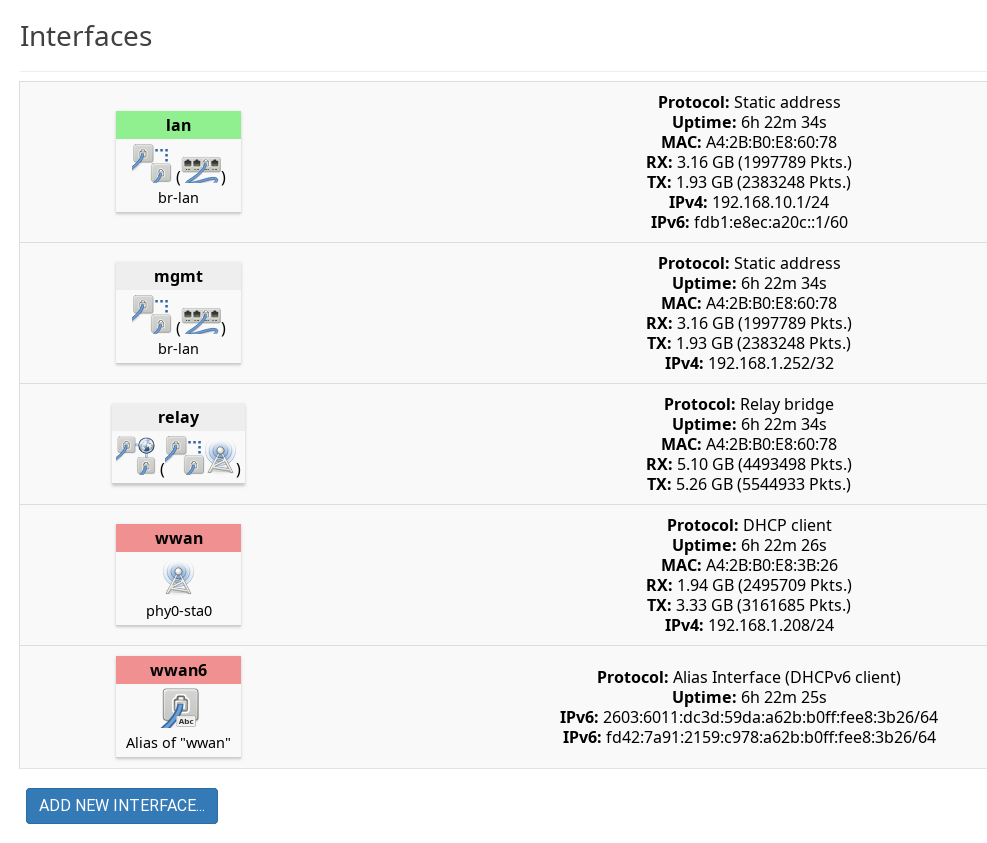
For reference, here was my final list of interfaces.
Andhe moral of the story: Next time you spot an abandoned router at a thrift store, don’t just ask whether OpenWrt will run on it. Ask what problem it can solve. I may turn the other unit into a usbip setup.
此内容由惯性聚合(RSS阅读器)自动聚合整理,仅供阅读参考。 原文来自 — 版权归原作者所有。