


惯性聚合 高效追踪和阅读你感兴趣的博客、新闻、科技资讯
阅读原文 在惯性聚合中打开

推荐订阅源

钛媒体:引领未来商业与生活新知
钛媒体:引领未来商业与生活新知
T
Troy Hunt's Blog
P
Proofpoint News Feed
V
Vulnerabilities – Threatpost
C
Cybersecurity and Infrastructure Security Agency CISA
K
Kaspersky official blog
Cyberwarzone
Cyberwarzone
T
Tor Project blog
Cisco Talos Blog
Cisco Talos Blog
S
Securelist
L
Lohrmann on Cybersecurity
Security Latest
Security Latest
T
Threatpost
H
Heimdal Security Blog
W
WeLiveSecurity
A
Arctic Wolf
Cyber Security Advisories - MS-ISAC
奇客Solidot–传递最新科技情报
奇客Solidot–传递最新科技情报
G
GRAHAM CLULEY
IT之家
IT之家
freeCodeCamp Programming Tutorials: Python, JavaScript, Git & More
TaoSecurity Blog
TaoSecurity Blog
A
About on SuperTechFans
cs.CL updates on arXiv.org
N
News and Events Feed by Topic
Hacker News - Newest:
Hacker News - Newest: "LLM"
Last Week in AI
Last Week in AI
T
The Blog of Author Tim Ferriss
Threat Intelligence Blog | Flashpoint
Microsoft Azure Blog
Hugging Face - Blog
Hugging Face - Blog
Google DeepMind News
量子位
Stack Overflow Blog
Stack Overflow Blog
Know Your Adversary
Know Your Adversary
B
Blog RSS Feed
阮一峰的网络日志
阮一峰的网络日志
WordPress大学
WordPress大学
cs.CV updates on arXiv.org
AI
AI
OSCHINA 社区最新新闻
OSCHINA 社区最新新闻
博客园 - 司徒正美
Apple Machine Learning Research
GbyAI
GbyAI
Vercel News
Vercel News
C
Cyber Attacks, Cyber Crime and Cyber Security
Latest news
Latest news
D
Darknet – Hacking Tools, Hacker News & Cyber Security
大猫的无限游戏
大猫的无限游戏
Forbes - Security
Forbes - Security

Blog – Hackaday

Bavarian Court Tells Gemini It Can’t Be A Real Boy Until It Tells The Truth Why Not Yserver? It’s Xserver, But Rust-y. OpenCAL: Computed Axial Lithographic 3D Printing For Everyone Is A CS Degree DOA Thanks To LLMs? IEEE Says TBD. Double The VRAM Of An RTX 3070 The Pacemaker Patch Robot Chess But Each Piece Is A Small Robot Bambuddy Says Bye To Bambu Lab Cloud Services Converting A Scanning Electron Microscope Into A TEM Is Surprisingly Easy Custom Watch Is On The Case Patterns Everywhere Behold A 60 Hz Refresh Rate E-ink Monitor GentleOS, A Simple OS For Your Old PC Deeply Optimized MSX Emulation On ESP32-S3 With VGA Output Homebrew Macropad Looks Good The Air Position Indicator For The B-29 Building A 1:150 Scale Toyota ProBox Micro Remote Control Car Adding Weight To A 3D Print With Plaster Of Paris, Cleanly Hackaday Podcast Ep 373: GPS, Danger In Space, And Robby The Robot A Peek Inside The Secret Lagercrantz Suitcase Radio This Week In Security: Microsoft On Microsoft, Register Your Domains, Linux On ARM, And FreeBSD Joins The File Cache Club Glue-in Hinge Design Tries Something Different The Hackaday Communicator Badge, Re-Imagined With New Firmware Amiga 1232 Storm CD Packs Every Upgrade Into One Wedge So Many Analog To Digital Converters Repairing A Pair Of Voodoo 2 GPUs For Some SLI Action AI The Truly Environmentally Friendly Way Evidence For Water Vapor Plumes On Europa Vanishes In Re-Analysis Mechanical Stability For Your Coils 3D Printed Hose Sprayer Sets Phasers To Suds The Merits Of Comment-Driven Development As Counterweight To TDD Building A Desktop Catalytic Cracker Process 4 Billion Pixels Per Second From 16 DIY Cameras For The Best V-Tubing Rig Ever 3D Printing A Miniature CoreXY Printer An Unlikely Host For An 8080 Emulator Using Brand New NiMH Cells After Sitting 12 Years Unused Investigating The S3 Virge’s Reputation As A 3D Decelerator Card Over-Engineering An FDM Spool Holder From Prusa Mk4S Remains As It Turns Out, There’s More Than One Cassette Mechanism Being Made After All Using Windows 11 On An LGA 775 PC With AGP Videocard Hackaday Podcast Episode 372: PopTubers, Shifty Semiconductors, And Shelving Shelf Labels An Ethernet WiFi Router on a Pi Pico 2W This Week In Security: Messing With AI, 7Zip And Notepad++ Vulnerabilities, HTTP2 Bomb, And More Using Electrolysis For More Than Just Generating Hydrogen Vintage Turntable Gets Brain Transplant And Home Assistant Integration Connecting Your Car To Home Assistant Microsoft Claims 20 Second Qubits If You Want To Hack Me, Come In Through The Speaker Ways To Embed Magnets In 3D Prints And Not Ruin Printers An RGB Keyboard For Your Hackaday Communicator Badge The World’s First GPIB Speech Synthesizer, And It’s For A GRiD Compass Ask Hackaday: How Do You Feel About Electronic Shelf Labels? Make Your Ceiling Disappear With ADS-B And Short-Throw Projector Fixing A Nintendo Game Boy Clone That Runs Too Fast Web-Based Control For A CB Radio Distilling Stale Gasoline To Make It Usable Again DIY Ceramic Circuit Boards Surely Count As Solarpunk Texas Instruments Changes The NE5532 And Others Into Incompatible Versions Deltarune’s Tenna Brought To Life Linux Fu: Fake Webcams, GUI Edition Hydraulic Drive For Your Lawn Tractor But Just What Is This ‘Artificial Intelligence’? Game Dodecahedron Runs AArch64 Assembly A Diffraction Grating Makes This Clock Readable Turning An Old 3D Printer Into A Vinyl Cutter For Cheap A High-Vacuum Controller For An Eventual Electron Microscope Does Your Terminal Speak Morse? This One Does From Scrappy Pallet Wood To Fancy Tea Tray The 2026 EMF Badge Arrives, With An Add-On. As Expected, It’s Familiar STM32 Handheld Has OpenGL And All The Classics Jenny’s Daily Drivers: Microsoft Windows 11 Using A Mirror To 3D Scan Both Sides Of An Object At Once Cookies, Baked The 3D Printer Way Restoring Apple’s Terrible But Awesome IBook Laptop After The Dust Settles: Building Pebble Apps Bilingual E-paper News Feed Helps Brush Up Language Skills On The Wisdom Of Replacing A NiMH Module In A Prius Battery Pack Know Your Food: Cheesemaking Like A Wire Bender, But For Pop Tubes Revisiting Making Your Own Internet Router In 2026 Reverse Engineering A Rock Bottom NES Clone Classically-named Argus Robot Is Terminator Meets Tumbleweed Making a Zippy FDM Printer out of Wood Off-Grid OCR Server Powered By IPhone Hackaday Links: May 31, 2026 A Camera Viewfinder Makes A Great TV 4-bit Relay Logic Counter Begs To Have Its Buttons Pushed Loading Sega Genesis Games Off A Vinyl Record Ebike Display Uses Reflective LCD Modern Graphics Via DisplayLink For Your ISA-Era PC The Final Steps To A Sub-Minute Benchy Poking Around With JTAG On A Guitar Amp Keychain GameCube Controller Made Functional Breaking Enigma With An FPGA, Just Like At Bletchley Park The Uncooperative Mirror Will Not Help You Testing Various Ways To Waterproof FDM Printed Parts Cheap Yellow Display With Boosted PSRAM Turned Snazzy Emulator Station It’s Another Pi Handheld. But It’s A Really Good One Take The Reins Of This Unique Controller Be Your Own Oil Company With Desktop Fischer-Tropsch Process
Linux Fu: Taming Strace
Al Williams · 2026-06-03 · via Blog – Hackaday

While many operating systems seem to try to prevent you from peeking under the hood, Unix and Linux positively encourage it. One great tool that we’ve looked at before is strace. Using this tool, you can see details about every system call a program makes. As you might imagine, for any significant program, the output from strace can be huge.

While I’m not always a fan of GUIs, this is one of those cases where making the data easier to browse is a great idea. Enter strace-tui, a text-based GUI for strace from [Rodrigodd]. The program can parse output from strace or manage the strace execution itself, and either way, display the data in a useful way.

I started out looking at [janestreet’s] strace_ui, but the OCaml setup was throwing errors for me, so I just gave up. The strace-tui installs like many Rust programs, using cargo, and it went smoothly.
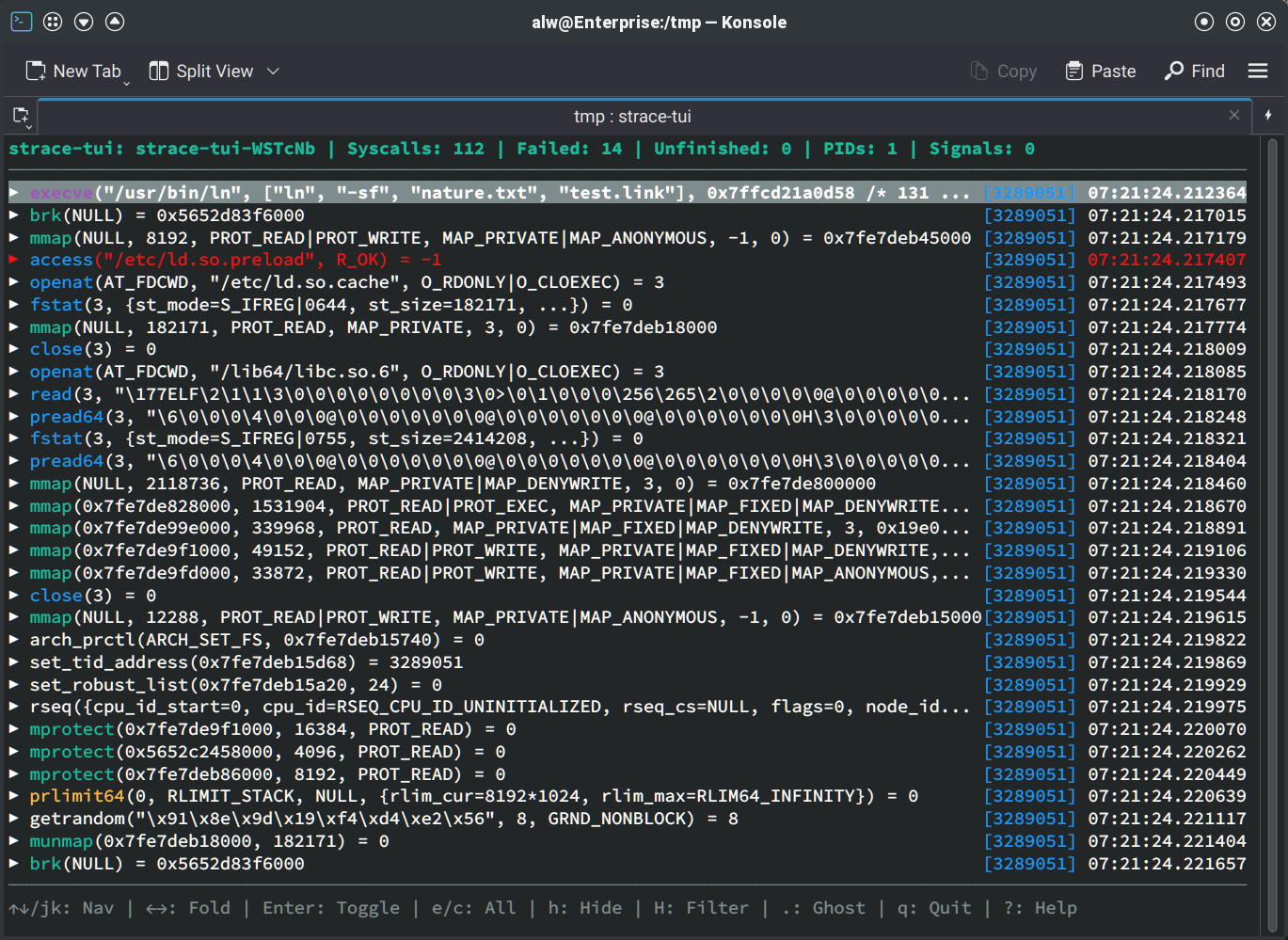
An Example

The strace-tui interface.

The only issue I had running the tool was that I don’t normally keep ~/.cargo/bin on my path. You can add it to your path, link the executable into your path, or solve that in any number of other ways.

As an example, I traced a symbolic link command (ln -sf nature.txt test.link). It is easy to pick out some essential information on the top line. The command took 112 system calls, 14 of them failed (which isn’t unexpected), there were no unfinished calls, no signals, and only a single PID.

The bottom shows things you can do. Arrows or j and k, along with the usual cursor control keys like Home and Page Down scroll through the list. The right and left arrows will expand or collapse items. That will show details about the call in question, including the arguments and return values. You can consult the help for all the details.

Useful Tools

The real power, though, lies in filtering out the noise and searching for specific things. If you are looking at something you don’t want to see, you can press a lowercase h to hide it, but note that it hides everything similar, not just an individual line. An uppercase H will bring up a filter dialog where you can include or exclude groups of data.

Searching is also a great way to find what you want. A slash key starts a search. The N key navigates with a lowercase entry moving forward and an uppercase one moving backward.

For example, if I only wanted to look at openat commands, I could open the dialog. Not only does it show filters, but it also shows how many things match (there are 30 instances of openat). Pressing a will toggle all entries off and then selecting openat greatly reduces the amount of output. I also selected symlinkatread, and fstat so I would only look at the file-related items.
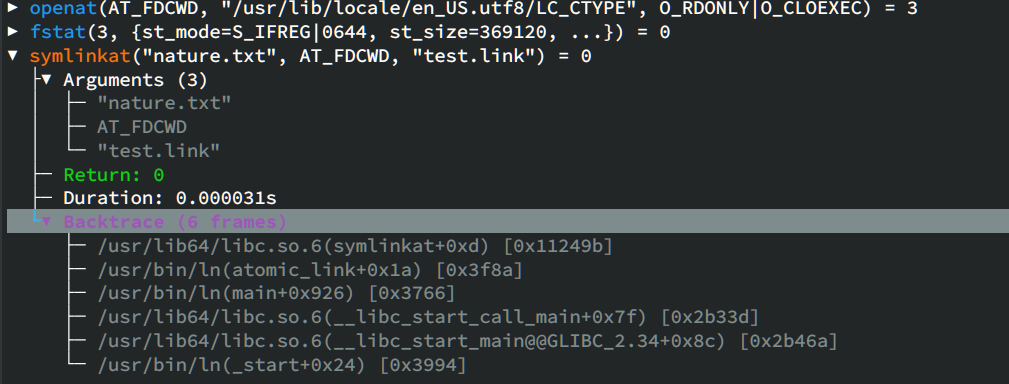
Peeking at the system call that does the actual linking.

Many of the file operations are related to loading shared libraries and locales. To find the actual line that makes the link, it was easy to press the slash key and some text from the file like test.link.

That will highlight the symlinkat line, which is no surprise, but this is a simple example. If you press Enter or the right arrow, you can see more detail, including arguments, the return value, the amount of time executing, and a backtrace that shows how your program made it to the call.

This is a simple example, but the program can also visualize multi-threaded or multi-process traces using graphs. That can be helpful for analyzing real programs.

Even this simple program has a lot of output. Sure, if you are trying to debug a locale-related problem, all of the lines about loading locale files that don’t exist might be gold. But most of the time, you don’t really care about all the standard loading scaffolding and a tool like this can help cut through the chatter.

Missing Links

According to the project page, there are some missing features, and we presume this is a roadmap for future development.

In particular, the program can’t filter traces for specific processes or threads. There’s also no way to copy details to the clipboard or export filtered traces out to a file. Of course, it is open source, so you can always volunteer to add some of this or your favorite feature.

If you give strace-tui a shot, or have other strace tips and tricks you’d like to share, let us know in the comments.