


After my recent misadventures setting up an OpenWrt installation on a scruffy e-waste-level x86 PC, quite a few people chimed in with feedback, criticism and friendly hostility regarding things like a presumed ‘x86 bias’. There were also some system-related things that simply didn’t seem to want to work, such as booting from an SD card with a USB adapter, which cut short a lot of the actual OpenWrt testing that I had intended. This made it mostly an enlightening look at what issues you can run into when ‘quickly’ throwing an OpenWrt router together with some junk parts these days.
In this second article I’ll try to address as many of these points as possible, as well as attempt to show off an actual working OpenWrt installation in action. In addition, since just using random junk x86 PC parts was the way to go back in the late 90s/early 2000s doesn’t mean that this is still the way in 2026, so I’ll be taking a look at alternatives that exist today. This includes everything from mini PCs, to ancient business PCs being sold for peanuts, as well as more dedicated (ARM-based) hardware solutions.
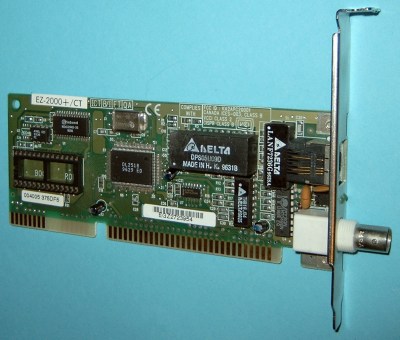
One of the aspects that I somewhat overlooked whilst scrounging through my junk bin was just how much faster internet connections have become compared to the early 2000s. My cable internet connection of the time was hooked up to a DOCSIS 1.x-based modem, with 40 Mbit/s as the theoretical maximum downstream capacity.
For this a 100 Mbps PCI or ISA NIC was plenty. Back then I was using NE2000-compatible 10 Mbit ISA cards and enjoying the ISA ‘Plug-and-Pray’ life to my utter dismay while configuring IRQs and other relevant settings. At least this taught me about legacy connectors like those for coax-based thick- and thinnet as well as AUI, I guess.
But fast-forward to today, and my current fiber internet connection could do at least 1 Gbps if I wasn’t a cheapskate with only a 300 Mbps downstream plan.
Thus 1 Gbit NICs are pretty much the absolute minimum you’d want to have on your DIY router, unless you’re somehow stuck in a digital wasteland where the very concept of such internet bandwidth numbers just makes you shake a powerless fist at the uncaring skies and lack of even high-ish bandwidth 5G LTE options or similar.
Of course, coupled with this you also want hardware that is capable of dealing with the requirements of such NICs and associated bandwidth. It’s one thing to provide basic routing, but consider the hardware requirements should you end up maxing out both up- and download limits for extended periods of time due to torrenting all those Linux ISOs.
When it comes to the rest of the hardware, you can still grab whatever junk PC, cheap Celeron-based mini PC, or e-waste/refurbished thin client you come across, as long as it can support at least two 1 Gbit network links. When we then finally drop our x86 bias and look on the ARM side of the fence things get a lot less easy, though.
Although some ARM-based SBCs do have 1 Gbit Ethernet NICs, like the AllWinner A20 based LeMaker Banana Pro that I have serving various networking tasks – including NAS duty via its SATA connector and the bandwidth-heavy task of a ZNC IRC bouncer – adding a second Gbit-level networking interface is impossible with just USB 2.0 ports. This is a pattern that repeats with other single-board computers (SBCs), including the gaggle of Raspberry Pis and clones of which I have plenty kicking around.
Until you hit the Raspberry Pi 4 with its USB 3.0 ports and PCIe-connected Ethernet controller, the best you could get out of these boards was ~300 Mbps over the USB 2.0 ports. The good news here is that OpenWrt’s support for all RPi SBCs is pretty substantial. As long as you can squirrel away that grafted-on second Ethernet port from a USB dongle or similar somewhere, it just might be a decent enough router for a Gbit-level internet connection.
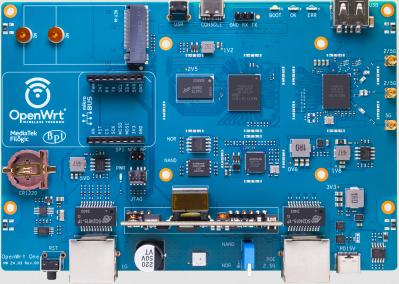
Beyond these options you also have various dedicated router boards, with the OpenWrt One and Banana Pi BPI-R4 being two viable options here. Expect to shell out at least $100 just for the bare board, sometimes even before adding an enclosure and other essentials. Here you’re basically buying a typical off-the-shelf router and doing the final assembly yourself.
The final result would be fairly similar to the OpenWrt-based Xiaomi router that I’m currently using. This fancily named Mi AIoT Router AX3600 is like many Xiaomi routers and other networking devices officially supported by OpenWrt. These thus make for another viable target to reflash with a clean OpenWrt image and no OEM customizations if that’s the one thing that irks you about these commercial offerings.
Clearly there are a lot of options here, hardware-wise, even if on the ARM side of things you’re probably just better off buying that existing OpenWrt-supported router as the most economical option, unless you happen to have a Raspberry Pi 4 SBC or equivalent gathering dust.
One issue that I ran into was the inability to boot from a properly prepared SD card, even after trying it in a variety of USB-SD card adapters. Here the assumption made by me was that to the BIOS this made zero difference compared to a USB stick with built-in Flash, but clearly this was wrong, especially when a USB stick did show up in the list of bootable devices. Of course, this doesn’t make any sense since either is just a USB Mass Storage Device and some sanity-related search engine consultation later I managed to confirm that I was correct.
Since I needed a different mainboard anyway for at least Gbit link speeds I opted to drag another system from the surely-that’s-e-waste pile, featuring a rather nice Intel D2500CC mainboard with onboard dual Gbit Ethernet and miniPCIe expansion option that I could slot quad 1 Gbit Ethernet Intel I350 modules into which I have also hoarded salvaged.
After taking the same SD card that failed to work before and slotting it into this 2012-era system, it booted into OpenWrt, terrible graphics courtesy of the VGA-to-HDMI adapter and stray reflections included:
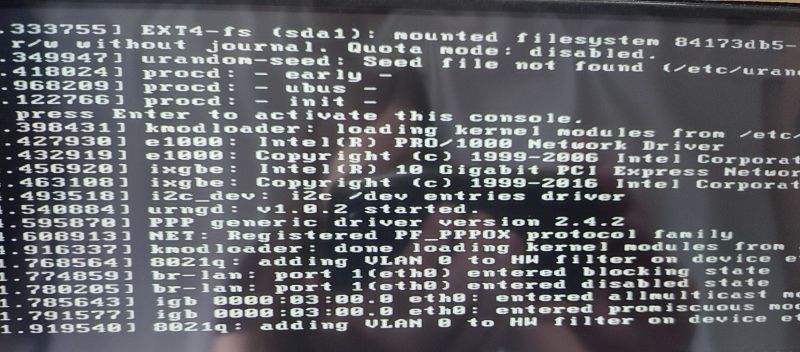
After this momentous step I proceeded to triumphantly check for a network connection on the connected laptop, but saw that it didn’t even see an active network connection. That’s when I noticed the inactive link and activity LEDs on both of the D2500CC mainboard’s Ethernet jacks, which was rather worrisome.
I did have a poke at ifconfig to confirm that it had detected both onboard NICs and created connections for them, with indeed both an eth0 and eth1 interface created in addition to the loopback. Slightly baffled I did try to prod DHCP just in case, but at this point the console began to corrupt itself:
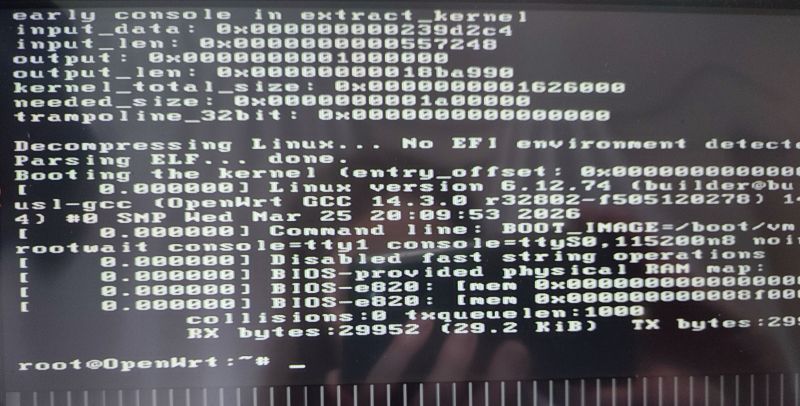
Although I’m pretty sure that I didn’t miss any steps, something is still clearly amiss. Whether it’s a hardware issue with the mainboard, some BIOS configuration glitch, an issue with the OpenWrt image, USB being USB or a quaint planetary alignment, I obviously wouldn’t be able to log into the graphical administration interface any time soon at this rate.
This mostly leaves me with more debugging to do, as well as the increasingly dismayed feeling that some things really were easier in the past.
Although I haven’t given up yet on reviving an old PC as a router, it’s clear that dealing with ISA PnP configuration nonsense from yesteryear doesn’t hold a candle to the fascinating troubleshooting you get to do these days. That said, assuming that this or the other D2500CC board that I have is functional, they should be pretty nice for router purposes as they both have 8 GB of DDR3 installed and the aforementioned plethora of expansion options.
This should allow for OPNSense to be quite happy as well, which is a more regular PC-focused router distribution anyway, should OpenWrt not work out somehow. The first priority here is of course to ensure that the hardware that you’re using is fully functional before you get too far into the weeds. In the case of the previous Intel mainboard, for example, I later found that Memtest86+ would immediately crash on start — probably a bad sign.
As usual I’m looking forward to all the feedback and comments as I’m gradually digging through my pile of junk parts. Hopefully the next article will feature some actual benchmarking and working systems, as fun as writing about things-that-don’t-work is.
此内容由惯性聚合(RSS阅读器)自动聚合整理,仅供阅读参考。 原文来自 — 版权归原作者所有。