惯性聚合 高效追踪和阅读你感兴趣的博客、新闻、科技资讯
阅读原文 在惯性聚合中打开

推荐订阅源

D
DataBreaches.Net
MongoDB | Blog
MongoDB | Blog
GbyAI
GbyAI
L
LangChain Blog
B
Blog
博客园 - 三生石上(FineUI控件)
Martin Fowler
Martin Fowler
博客园 - 【当耐特】
Recent Announcements
P
Proofpoint News Feed
U
Unit 42
Last Week in AI
Last Week in AI
WordPress大学
WordPress大学
有赞技术团队
有赞技术团队
雷峰网
雷峰网
Microsoft Security Blog
T
The Blog of Author Tim Ferriss
爱范儿
爱范儿
小众软件
小众软件
I
InfoQ
G
Google Developers Blog
大猫的无限游戏
大猫的无限游戏
人人都是产品经理
人人都是产品经理
C
Check Point Blog

WordPress – ZWWoOoOo

博客主机迁移到赤鱼网络,顺便写了个新的 Gravatar 头像缓存本地函数 | ZWWoOoOo 我才知道:WordPress上传图片宽度/高度大于2560px被裁剪压缩 | ZWWoOoOo 重操旧业:承接WordPress主题、微信小程序、APP等制作 | ZWWoOoOo 自定义文章类型使用 Gutenberg 编辑器 | ZWWoOoOo WordPress 博客/网站配置了 https 后需要做的工作 | ZWWoOoOo WordPress Theme: zSimple | ZWWoOoOo 七牛新版后台镜像存储设置步骤 | ZWWoOoOo 在 WordPress 4.2+ 找回原来的表情 | ZWWoOoOo WordPress 插件推荐:Codestyling Localization | ZWWoOoOo WordPress 归档页面模板[WP原生函数实现2014版] | ZWWoOoOo WordPress: 数据库换前缀导致的问题和解决 | ZWWoOoOo
WordPress 插件推荐: Visual Editor Custom Buttons
zwwooooo · 2014-09-09 · via WordPress – ZWWoOoOo

我从 2 年前就一直使用《HTML Editor Reloaded》这个插件来给 WordPress 后台编辑器的 HTML 模式添加自定义按钮。

- 但这个插件有个纳闷的问题,就是如果停用再激活,原来添加的按钮设置就没了,虽然插件有提供导出导入功能,但还是不方便。(当然可以自己修改插件代码解决,但这不科学)
- 另外一个原因是这个插件已经 3 年多没更新过了,虽然目前还没啥问题

所以今天去搜了一下替换插件,搜到了几个,试了《Extensible HTML Editor Buttons》,好像 WordPress 4.0 下有兼容问题(点击按钮弹窗错位),懒得等作者更新。(注:作者最近更新是8月初)

然后就找到《Visual Editor Custom Buttons》,试用一下还不错。

这个插件是利用 post type 来添加按钮的,所以安装此插件后会添加一个自定义 post 类型:vecb_editor_buttons

插件名:Visual Editor Custom Buttons
插件地址:https://wordpress.org/plugins/visual-editor-custom-buttons/
功能简介:添加自定义编辑器按钮,支持 Visual 和 HTML 模式

如给 HTML 模式添加 Pre 按钮:

1. 点击此插件的设置:在 WordPress 后台侧边栏菜单找到 Visual Editor Custom Buttons
2. 点击 Add New
3. 然后看图
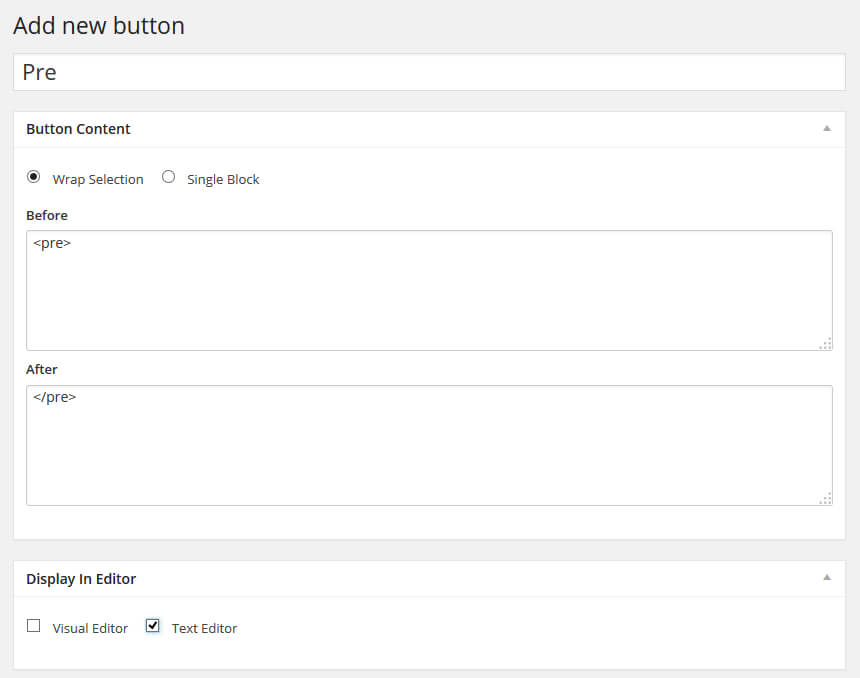
140907-visual-editor-custom-buttons

我添加的按钮:

140907-visual-editor-custom-buttons-in-html

简单方便吧

zww

oooo