GitHub Actions 是 GitHub 自家推出的持续集成和持续交付工作流服务。自从上次利用GitHub Actions实现Blog自动部署与发布过后,构建和发布blog从此变得轻松。这次,我打算充分利用 GitHub Actions, 把开源项目的持续构建和发布流程做成完全自动化。
用我经常维护的一个项目 GoDNS 举个栗子,每次发布的时候,需要手动执行的两个任务:
- 基于不同平台进行交叉编译,把编译好的二进制文件分别上传到GitHub上,进行新版本的发布。
- 另外,这个项目还需要构建基于不同平台的 Docker 镜像,然后推送到 Docker Hub 上。
在使用 GitHub Actions 之前,我的做法就是在本机使用 Makefile 分别构建二进制文件和 Docker 镜像。这一系列操作在 Mac OS 下的结果就是:无法避免的风扇狂转,以及CPU温度的陡然上升。为了减轻笔记本的负担,后来我把构建 Docker 镜像的流程迁移到了VPS上。不过,这也使发布流程略显繁琐。
有了 GitHub Actions,事情就变得简单了,通过设置一个触发流程的事件,就可以用两个并行的流程分别构建二进制文件和 Docker 镜像了:
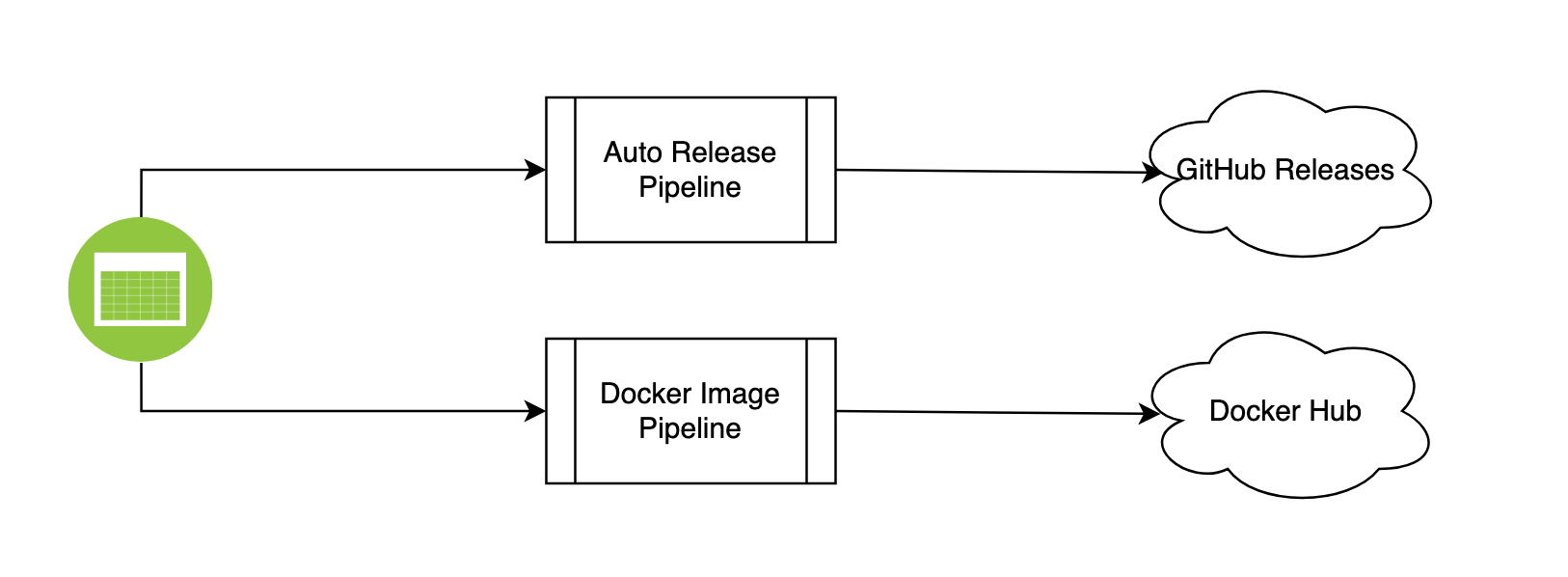
在 GoDNS 的构建流程中,触发条件是当每次有新的 tag 被创建的时候。通过把新创建的 tag push 到GitHub,两个 actions 就会并行执行。其中一个 action 负责构建跨平台二进制文件,完成后自动 release 一个相应的新版本。另外一个 action 负责构建 Docker 镜像,并 push 到 Docker Hub。
不得不说,自从用上了 GitHub Actions,我的笔记本被彻底解放了。附上两个自动构建发布流程,供参考。
Workflow 及定义
- 二进制包自动构建与发布流程
1
2
3
4
5
6
7
8
9
10
11
12
13
14
15
16
17
18
19
20
21
22
23
24
25
26
27
28
29
30
31
32
33
34
| name: Auto Release
on:
push:
tags:
- '*'
permissions:
contents: write
jobs:
goreleaser:
runs-on: ubuntu-latest
steps:
-
name: Checkout
uses: actions/checkout@v2
with:
fetch-depth: 0
-
name: Set up Go
uses: actions/setup-go@v2
with:
go-version: 1.17
-
name: Run GoReleaser
uses: goreleaser/goreleaser-action@v2
with:
distribution: goreleaser
version: latest
args: release --rm-dist
env:
GITHUB_TOKEN: ${{ secrets.MY_GITHUB_TOKEN }}
|
- Docker 镜像自动构建与发布流程
1
2
3
4
5
6
7
8
9
10
11
12
13
14
15
16
17
18
19
20
21
22
23
24
25
26
27
28
29
30
31
| name: Docker Image CI
on:
push:
tags:
- '*'
jobs:
build:
runs-on: ubuntu-latest
steps:
- name: Get git tag
id: tag
uses: dawidd6/action-get-tag@v1
with:
strip_v: true
- name: Set up QEMU
uses: docker/setup-qemu-action@v1
- name: Set up Docker Buildx
uses: docker/setup-buildx-action@v1
- name: Login to DockerHub
uses: docker/login-action@v1
with:
username: ${{ secrets.DOCKER_USER }}
password: ${{ secrets.DOCKER_PASSWORD }}
- name: Build and push the docker image
uses: docker/build-push-action@v2
with:
platforms: linux/amd64,linux/arm64,linux/arm/v7
push: true
tags: timothyye/godns:latest,timothyye/godns:${{steps.tag.outputs.tag}}
|



