









In digital experience, the difference between a conversion and a bounce often comes down to a split-second moment of frustration. But metrics alone can’t always tell you why a user left.
Session Replay transforms how teams understand, diagnose, and optimize digital experiences. It helps you move beyond simple error logging to prevent churn, recover lost revenue, and boost customer satisfaction by identifying exactly where friction occurs.
In this guide, we will explore:
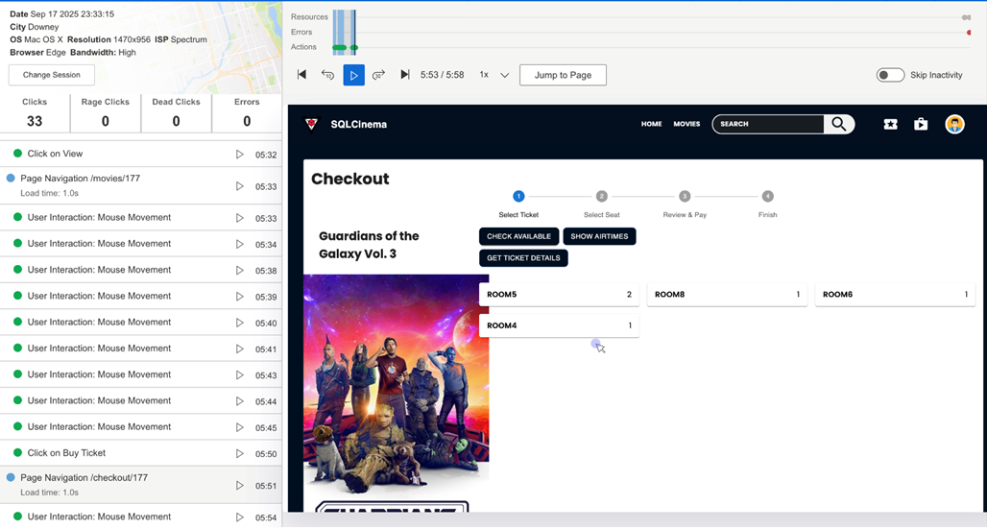
Session replay is a visual tool that recreates user sessions from your applications, giving you an in-depth, video-like view of how customers are actually interacting with your product. Unlike traditional analytics tools that provide quantitative data like click counts and bounce rates, session replay enriches this information with the qualitative context needed to understand exactly what users experienced during their sessions.
At its core, session replay works by capturing Document Object Model (DOM) mutations and transforming them into reproductions of user sessions. The DOM is an interface that translates web document elements into objects that programs can manipulate. Session replay logs every change made to the DOM as an event, then strings these events together into a representation of each user's individual session.
Session replay captures a comprehensive range of user interactions, including:
It's important to understand what session replay is not to address common misconceptions:
Not a video recording: It doesn't record users' screens like a traditional video or screen recording tool. Instead, it reconstructs the user experience using captured DOM events and mutations.
Not real-time monitoring: You're not seeing events as they happen live, but rather watching a playback of recorded interactions.
Not comprehensive screen capture: Session replay focuses specifically on user actions within your application, unlike screen recording which captures everything on a user's screen including system notifications or background processes.
Not a replacement for other tools: Session replay serves as a complementary feature to gain deeper insights into user behavior and application performance, working best when combined with other monitoring solutions.
Session replay operates through a sophisticated process of event capture and reconstruction:
The technology uses a recording script installed on each page to capture several key elements:
When you view a session replay, the tool reverses this capture process. It loads the initial DOM from the recorded session, then applies all the captured mutations and events in chronological order to recreate the user's exact experience. This approach allows for several advantages over traditional video recording:
Session replay captures an extensive range of user interactions and system events:
Session replay provides value across multiple dimensions of digital experience optimization:
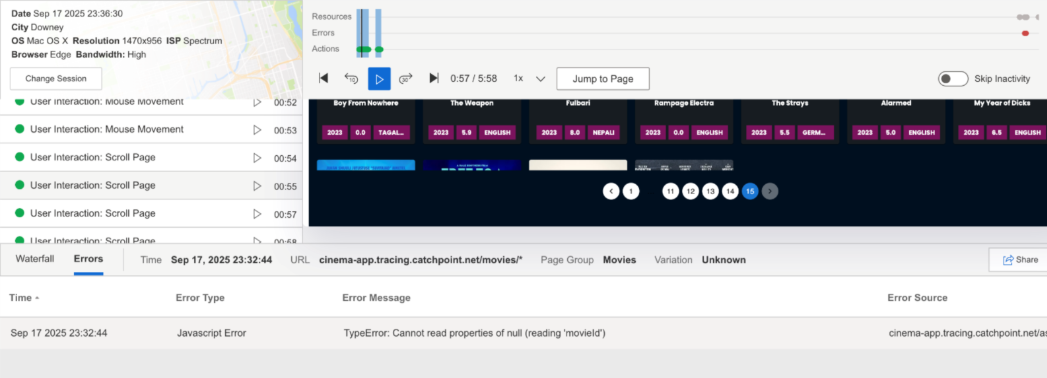
Session Replay dramatically improves mean-time-to-repair (MTTR) by allowing developers to reproduce errors without guesswork. Instead of relying on user descriptions or attempting to recreate issues, teams can watch exactly what happened leading up to an error, including the precise steps and conditions that triggered the problem.
Teams can identify friction points in user journeys by observing real user behavior patterns. This includes spotting elements that actively drive users away, such as intrusive pop-ups or hard-to-navigate menus, as well as understanding which features prompt users to convert.
Support agents can resolve user-reported issues more quickly by viewing exactly what the customer experienced, eliminating the back-and-forth typically required to understand the problem. This leads to improved customer satisfaction and reduced support ticket resolution times.
Product managers and marketers can analyze complete user journeys to understand where users lose interest or encounter obstacles in conversion flows. Session replay helps identify successful user patterns that can be replicated and promoted.
Key benefits: Faster bug resolution, reduced guesswork in troubleshooting, and clearer understanding of how code changes affect user experience.
Key benefits: Improved customer satisfaction, reduced resolution times, and more accurate problem diagnosis.
Key benefits: Better user experience design, improved conversion rates, and evidence-based product decisions.
Catchpoint's Session Replay stands out in several key areas that align with our comprehensive Internet Performance Monitoring approach:
Unlike fragmented solutions that require multiple tools, Catchpoint delivers session replay natively within our IPM platform alongside Real User Monitoring (RUM), advanced synthetics, BGP monitoring, and distributed tracing. Combined with insights from our 3000+ Global Agent Network, this provides a single consolidated solution for end-to-end digital experience management, eliminating tool sprawl and operational complexity.
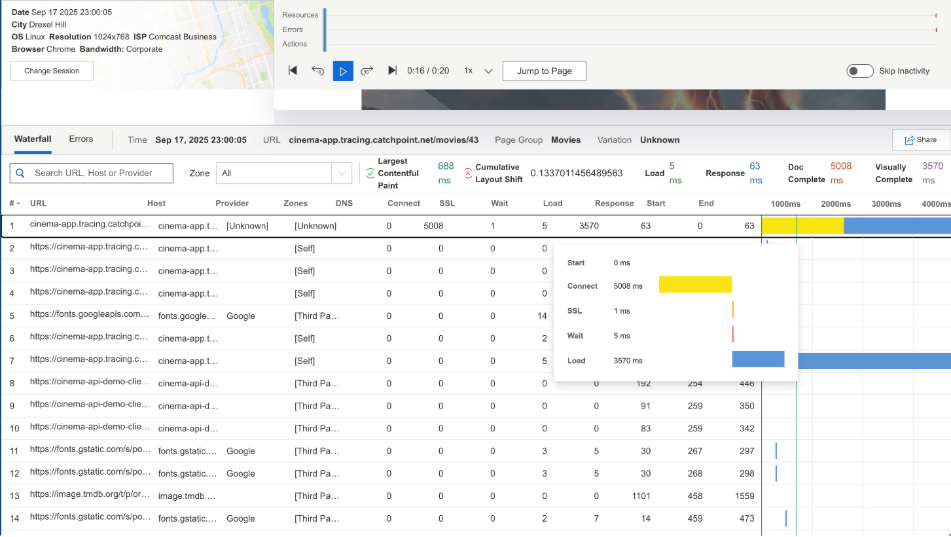
Catchpoint's unique advantage lies in correlating session replays directly with performance waterfalls, network timings, and resource loading data. This context-rich debugging approach allows teams to see not just what users did, but how performance and network conditions affected their experience.
Session Replay integrates seamlessly with Catchpoint's RUM capabilities, which already monitor real user experiences from various devices and network conditions. This combination provides both the quantitative performance data and qualitative behavioral insights needed for comprehensive experience optimization.
Catchpoint's Session Replay automatically detects and highlights frustration signals including rage clicks, dead clicks, quick backs, and bounces. This proactive identification of user pain points helps teams prioritize issues that most significantly impact user satisfaction and business outcomes.
Built with privacy-first design, Catchpoint's Session Replay includes sensitive data masking to ensure compliance and security. The platform offers flexible deployment options with per-app enablement and smart sampling, allowing organizations to balance insight gathering with data governance requirements.
Session Replay is available as an add-on to the WebPageTest Expert Plan, giving teams advanced visibility and real user context within their performance workflows. Teams already using WebPageTest can now correlate their test results with real user session data for a complete performance picture.
The combination of these differentiators positions Catchpoint's Session Replay as more than just a user behavior recording tool. It's an integral component of a comprehensive IPM strategy that helps organizations protect user trust, improve conversion rates, and maintain competitive digital experiences in an increasingly complex internet ecosystem.
Session Replay is most effective when used as part of a broader performance and experience workflow. By viewing session replays alongside synthetic tests, Real User Monitoring (RUM), and performance analytics, teams can move from knowing something went wrong to understanding exactly why it happened.
Used consistently, Session Replay helps teams shorten troubleshooting cycles, uncover hidden UX friction, and validate improvements with real user behavior. Rather than reacting to metrics in isolation, organizations gain the context needed to prevent issues before they impact customers, conversions, and brand trust.
In digital experience, the difference between a conversion and a bounce often comes down to a split-second moment of frustration. But metrics alone can’t always tell you why a user left.
Session Replay transforms how teams understand, diagnose, and optimize digital experiences. It helps you move beyond simple error logging to prevent churn, recover lost revenue, and boost customer satisfaction by identifying exactly where friction occurs.
In this guide, we will explore:
Session replay is a visual tool that recreates user sessions from your applications, giving you an in-depth, video-like view of how customers are actually interacting with your product. Unlike traditional analytics tools that provide quantitative data like click counts and bounce rates, session replay enriches this information with the qualitative context needed to understand exactly what users experienced during their sessions.
At its core, session replay works by capturing Document Object Model (DOM) mutations and transforming them into reproductions of user sessions. The DOM is an interface that translates web document elements into objects that programs can manipulate. Session replay logs every change made to the DOM as an event, then strings these events together into a representation of each user's individual session.
Session replay captures a comprehensive range of user interactions, including:
It's important to understand what session replay is not to address common misconceptions:
Not a video recording: It doesn't record users' screens like a traditional video or screen recording tool. Instead, it reconstructs the user experience using captured DOM events and mutations.
Not real-time monitoring: You're not seeing events as they happen live, but rather watching a playback of recorded interactions.
Not comprehensive screen capture: Session replay focuses specifically on user actions within your application, unlike screen recording which captures everything on a user's screen including system notifications or background processes.
Not a replacement for other tools: Session replay serves as a complementary feature to gain deeper insights into user behavior and application performance, working best when combined with other monitoring solutions.
Session replay operates through a sophisticated process of event capture and reconstruction:
The technology uses a recording script installed on each page to capture several key elements:
When you view a session replay, the tool reverses this capture process. It loads the initial DOM from the recorded session, then applies all the captured mutations and events in chronological order to recreate the user's exact experience. This approach allows for several advantages over traditional video recording:
Session replay captures an extensive range of user interactions and system events:
Session replay provides value across multiple dimensions of digital experience optimization:
Session Replay dramatically improves mean-time-to-repair (MTTR) by allowing developers to reproduce errors without guesswork. Instead of relying on user descriptions or attempting to recreate issues, teams can watch exactly what happened leading up to an error, including the precise steps and conditions that triggered the problem.
Teams can identify friction points in user journeys by observing real user behavior patterns. This includes spotting elements that actively drive users away, such as intrusive pop-ups or hard-to-navigate menus, as well as understanding which features prompt users to convert.
Support agents can resolve user-reported issues more quickly by viewing exactly what the customer experienced, eliminating the back-and-forth typically required to understand the problem. This leads to improved customer satisfaction and reduced support ticket resolution times.
Product managers and marketers can analyze complete user journeys to understand where users lose interest or encounter obstacles in conversion flows. Session replay helps identify successful user patterns that can be replicated and promoted.
Key benefits: Faster bug resolution, reduced guesswork in troubleshooting, and clearer understanding of how code changes affect user experience.
Key benefits: Improved customer satisfaction, reduced resolution times, and more accurate problem diagnosis.
Key benefits: Better user experience design, improved conversion rates, and evidence-based product decisions.
Catchpoint's Session Replay stands out in several key areas that align with our comprehensive Internet Performance Monitoring approach:
Unlike fragmented solutions that require multiple tools, Catchpoint delivers session replay natively within our IPM platform alongside Real User Monitoring (RUM), advanced synthetics, BGP monitoring, and distributed tracing. Combined with insights from our 3000+ Global Agent Network, this provides a single consolidated solution for end-to-end digital experience management, eliminating tool sprawl and operational complexity.
Catchpoint's unique advantage lies in correlating session replays directly with performance waterfalls, network timings, and resource loading data. This context-rich debugging approach allows teams to see not just what users did, but how performance and network conditions affected their experience.
Session Replay integrates seamlessly with Catchpoint's RUM capabilities, which already monitor real user experiences from various devices and network conditions. This combination provides both the quantitative performance data and qualitative behavioral insights needed for comprehensive experience optimization.
Catchpoint's Session Replay automatically detects and highlights frustration signals including rage clicks, dead clicks, quick backs, and bounces. This proactive identification of user pain points helps teams prioritize issues that most significantly impact user satisfaction and business outcomes.
Built with privacy-first design, Catchpoint's Session Replay includes sensitive data masking to ensure compliance and security. The platform offers flexible deployment options with per-app enablement and smart sampling, allowing organizations to balance insight gathering with data governance requirements.
Session Replay is available as an add-on to the WebPageTest Expert Plan, giving teams advanced visibility and real user context within their performance workflows. Teams already using WebPageTest can now correlate their test results with real user session data for a complete performance picture.
The combination of these differentiators positions Catchpoint's Session Replay as more than just a user behavior recording tool. It's an integral component of a comprehensive IPM strategy that helps organizations protect user trust, improve conversion rates, and maintain competitive digital experiences in an increasingly complex internet ecosystem.
Session Replay is most effective when used as part of a broader performance and experience workflow. By viewing session replays alongside synthetic tests, Real User Monitoring (RUM), and performance analytics, teams can move from knowing something went wrong to understanding exactly why it happened.
Used consistently, Session Replay helps teams shorten troubleshooting cycles, uncover hidden UX friction, and validate improvements with real user behavior. Rather than reacting to metrics in isolation, organizations gain the context needed to prevent issues before they impact customers, conversions, and brand trust.
此内容由惯性聚合(RSS阅读器)自动聚合整理,仅供阅读参考。 原文来自 — 版权归原作者所有。