



Tracking your website’s exit and bounce rates will give you insight into how your audience engages with your website and the user experience they receive. This information will enable you to make data-driven decisions on performance-related improvements, ensuring your website functions at its optimal capacity.
In this article, we explain exactly what exit rates and bounce rates are, the differences between them, and why you should track them. We then consider the cause of high exit and bounce rates and strategies you can implement to curb these numbers.
Bounce Rate

Bounce rate tells you the number of visitors who land on your site and then immediately leave without viewing more than the page they initially landed on. High bounce rates mean your users are leaving without looking around your website. This may be a problem across your website or just on specific pages.
High bounce rates can have serious consequences because if visitors aren’t taking the time to browse your website, they’re much less likely to convert against your site’s goals. Some examples of website goals include filling out contact forms, requesting a quote, or completing a sale.
Exit Rate

Each page of your website will have an exit rate—a percentage of users who have left your website from that page. However, in contrast to bounce rates, an exit is recorded regardless of the activity of a visitor. In other words, the exit rate can show you where visitors who have viewed more than one page are eventually leaving.
Tracking exit rates across all your web pages will give you good insight into where your visitors are mostly exiting your website. All visitors need to leave your website at some point, but there’s a difference between a customer completing a sales transaction and leaving on the confirmation or purchase page compared to someone leaving on a product page.
By having access to exit page data, you can determine whether your visitors are leaving on appropriate pages or whether they’re exiting your site too early. If it’s the latter, you can find out what might be causing these premature exits.
Exit Rate vs. Bounce Rate
So, should you track exit rates or bounce rates? The answer is both.
Both exit rates and bounce rates are important to monitor as they can help highlight problems on your site causing visitors to leave. However, bounce rates and exit rates are often caused by different issues, so by monitoring both, you ensure all bases are covered.
Once you’re aware of potential problem pages, you can start to investigate further. By identifying factors that may be causing visitors to leave your site, you can begin to implement changes to lower bounce rates or exit rates on the pages visitors shouldn’t be leaving.
Causes (and Remedies) of High Exit and Bounce Rates

This is particularly true of exit rates. As we already mentioned, every user has to leave your website at some point. Any page where a goal is achieved, such as filling out a contact form or completing a purchase, is a natural location for users to leave your site. Therefore, you should expect to see high exit rates on pages where a user completes a transaction, like a contact form submission, thank you, or order completion page.
High bounce rates also might be found on landing pages, where users land on your site, fill out a form, and then immediately leave your site. Equally, if you’re running a one-page site, then your website will have high bounce rates.
However, high exit and bounce rates can also indicate more serious issues on your website. For example, if you have high exit rates on a page within the middle of your marketing funnel, on product pages, or during the checkout process, then this usually indicates an issue affecting user experience. This will cause users to leave your site too early, preventing them from completing a transaction and converting against your site goals.
Several factors cause high exit and bounce rates. Luckily there are also plenty of services, tools, and strategies you can implement to help improve these stats.
Poor Performance
If your website isn’t running at optimal capacity, it can greatly affect user experience. Slow load times, high bouts of downtime, and issues with user interaction can all contribute to dissatisfied visitors and, consequently, high exit and bounce rates.
Therefore, if your exit or bounce rates are high, it’s crucial for you to monitor your website’s performance and identify if this is the main factor causing your visitors to leave prematurely.
Performance metrics to track include:
- Uptime Monitoring—Track your website’s uptime to see if website outages are affecting your users’ experience. By implementing an uptime monitoring tool to track your website availability, you can be alerted every time your site goes down, enabling you to quickly fix the problem and keep downtime to a minimum.
- Transaction Monitoring—Synthetic monitoring simulates user activity on your site and tests transactions, such as your checkout process, contact forms, and search functionality. It’s important for all transactions on your site to consistently run smoothly so that when users interact with your site, they don’t experience performance issues. An effective transaction monitoring tool will detect any issues with a transaction and then immediately alert you, so you can sort out the problem before it affects your users.
- Page Speed Monitoring—Users don’t want to hang around waiting for a website to load. If your pages are slow, then you’ll lose visitors who may pursue a faster experience with your competitors. By using a page speed monitoring tool, you can track page load times and view website speed analysis, giving you insight into where load times are letting you down and how to improve them.
- Real User Monitoring—RUM tracks users on your site, reporting the actual load times they experience. This data will give you insight into the real user experience on your site and how it differs based on location, device, or browser. You can then implement improvements based on this data to ensure your website is performing at its full capacity.
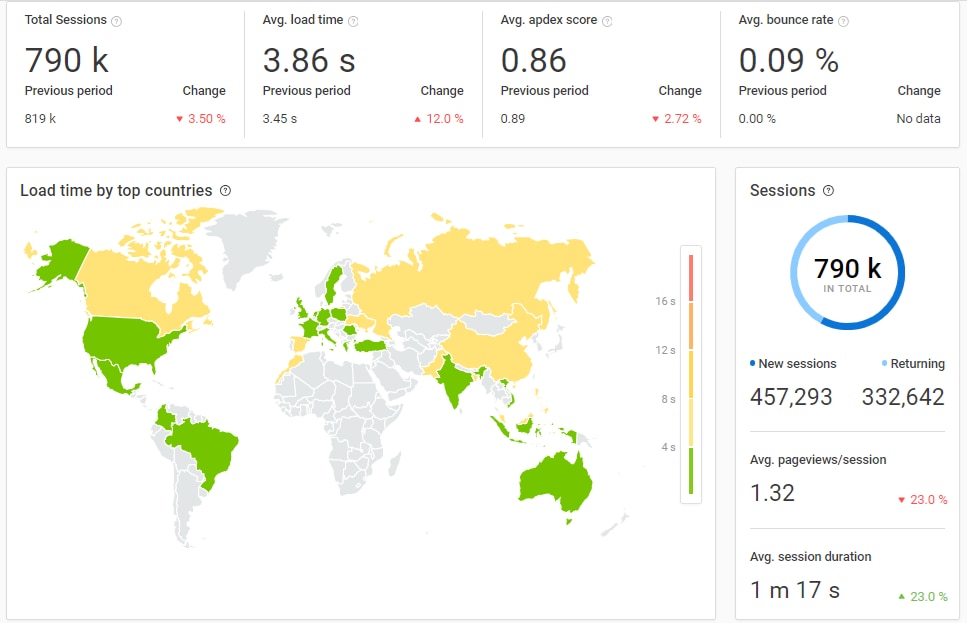
By tracking your website’s performance and identifying and fixing problems, you can help ensure a seamless website experience for your visitors and lower exit and bounce rates.
For more strategies to help improve website performance and load times, check out these articles:
- Page Load Time vs. Response Rates – What is the difference?
- How to Optimize Your WordPress Site With Pingdom Real User Monitoring
- Optimizing Load Times on Apache Web Server on DigitalOcean
Poor Quality Content
The quality of content is a key factor in ensuring your visitors engage with your site, browse the appropriate pages, and convert against your goals. Try to make sure your site content is interesting, well-written, and unique. You should also include eye-catching and relevant visuals and media to help grab the attention of your audience.
Irrelevant content distracts your visitors from what they’re reading or trying to achieve on your site can also have a severely negative effect on bounce and exit rates. Distracting content can include pop-ups, banners, ads, and other promotional messaging.
Although this type of content can be beneficial when it comes to increasing lead generation or generating revenue, if used in excess, it will eventually start to cost you in visitors. Therefore, it’s important to track bounce and exit rates closely on pages with a high amount of this type of content to get the balance right.
Poor SEO
High bounce rates can also be attributed to poor SEO. If your pages are ranking for irrelevant keywords, then the traffic arriving from Google won’t be made up of your target audience. Once people land on your site and realize it isn’t what they’re looking for, they’ll immediately bounce.
To counteract this, take time researching keywords for each page and post you publish. Keywords should be relevant to your niche or topic and help you reach out and connect with your target audience. By engaging with the “right” people, bounce rates should drop significantly, as visitors will stay on your site longer to browse your content.
Final Thoughts on Exit Rate vs. Bounce Rate
Both exit rates and bounce rates are key metrics to track. Once you understand where and why visitors are leaving your site, you can implement strategies to encourage users to stay on your site and ultimately convert against your goals.
A solution like SolarWinds® Pingdom®offers a wide selection of monitoring capabilities, including exit rate, bounce rate, page speed, and load time. Used holistically, you can use these metrics to take your website performance to the next level. We invite you to try Pingdom today.