





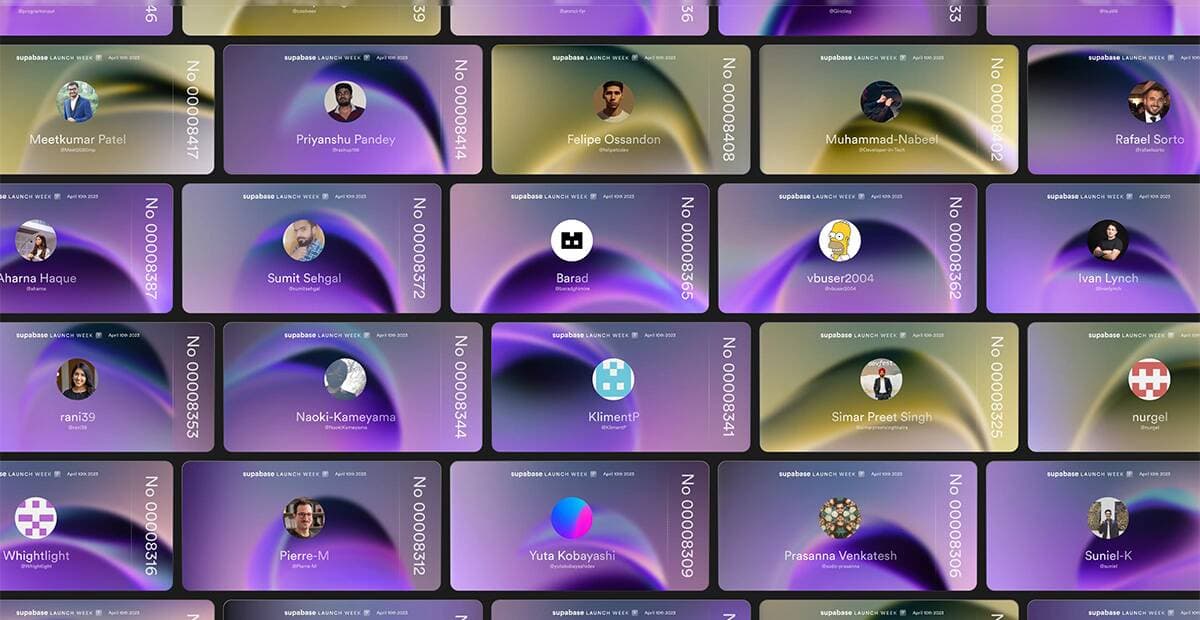
Imagine you generated a bunch of tickets for the Supabase Launch Week and you wanted to display them all on one page. It might take a while to load them all in one go, so a great solution to this would be to lazy load smaller subsets while the user scrolls, with a technique called infinite scrolling.
An infinite scroll allows you to scroll through your content endlessly while only loading the data you need as you need it. This improves performance while also creating a smooth and delightful user experience.
In this post, we'll go through the steps of how to create an infinite scroll using NextJs, Supabase, and Framer Motion.
Infinite scroll is a web design technique that automatically loads and displays new content as a user scrolls down a web page. This creates an endless scrolling experience that eliminates the need for pagination and provides a seamless and uninterrupted browsing experience.
Infinite scroll can enhance user experience and engagement by providing a fluid and intuitive browsing experience. It also allows for faster content delivery. By dynamically loading and displaying content as needed, infinite scroll can reduce the time and effort required to load pages and deliver content, improving overall performance and user satisfaction.
Next.js is a great choice for implementing infinite scroll in a web application. It provides server-side rendering and automatic code splitting, which can improve performance and optimize the loading of content as the user scrolls down the page. It also includes built-in support for dynamic imports and lazy loading, which can be useful for fetching and displaying content as needed.
Plus, incremental static regeneration (ISR) and pre-fetching of data can further improve performance by enabling the server to generate and cache pages in advance, and to pre-fetch data as the user scrolls down the page.
Now, onto the code!
First things first, let's install the dependencies we'll need.
_10
npm install @supabase/supabase-js lodash framer-motion
Set up the supabase-js client and fetch the first 20 tickets through getServerSideProps so we don't start with an empty screen.
We'll assume our table in the db is called my_tickets_table.
_29
import { useEffect, useState } from 'react'
_29
import { createClient } from '@supabase/supabase-js'
_29
_29
const supabase = createClient('supabase-url', 'supabase-key')
_29
_29
export default function TicketsPage({ tickets }) {
_29
const [loadedTickets, setLoadedTickets] = useState(tickets)
_29
_29
return (
_29
<div>
_29
{loadedTickets.map((ticket, index) => (
_29
{/* We'll get to this part later */}
_29
))}
_29
</div>
_29
)
_29
_29
export const getServerSideProps: GetServerSideProps = async ({ req, res }) => {
_29
const { data: tickets } = await supabase!
_29
.from('my_tickets_table')
_29
.select('*')
_29
.order('createdAt', { ascending: false })
_29
.limit(20)
_29
_29
return {
_29
props: {
_29
tickets,
_29
},
_29
}
_29
}
To detect if the user is scrolling we can listen to the window scroll event.
If you try to console.log() the event returned in the listener callback, you'll notice that it fires on every single pixel scrolled. We want to avoid triggering like crazy, so we'll use a lodash debounce function to limit how often we call this event to once every 200 milliseconds.
Here's what it looks like:
_14
import { useEffect } from 'react'
_14
import { debounce } from 'lodash'
_14
_14
const handleScroll = () => {
_14
// Do stuff when scrolling
_14
}
_14
_14
useEffect(() => {
_14
const handleDebouncedScroll = debounce(() => handleScroll(), 200)
_14
window.addEventListener('scroll', handleDebouncedScroll)
_14
return () => {
_14
window.removeEventListener('scroll', handleDebouncedScroll)
_14
}
_14
}, [])
Next, we want to check if the bottom of the tickets container intersects with the bottom of the viewport. We can use the getBoundingClientRect method to get the position of the container and then compare it with the height of the viewport.
_24
import { useRef, useState } from 'react'
_24
_24
// ...
_24
_24
const containerRef = useRef(null)
_24
const [offset, setOffset] = useState(1)
_24
const [isInView, setIsInView] = useState(false)
_24
_24
const handleScroll = (container) => {
_24
if (containerRef.current && typeof window !== 'undefined') {
_24
const container = containerRef.current
_24
const { bottom } = container.getBoundingClientRect()
_24
const { innerHeight } = window
_24
setIsInView((prev) => bottom <= innerHeight)
_24
}
_24
}
_24
_24
useEffect(() => {
_24
if (isInView) {
_24
loadMoreUsers(offset)
_24
}
_24
}, [isInView])
_24
_24
return <div ref={containerRef}>{/* List of loaded tickets */}</div>
Now we can load more tickets based on the current offset. We'll use the range method from the supabase-js library to easily work with the pagination logic.
_37
export default function TicketsPage() {
_37
const PAGE_COUNT = 20
_37
const [offset, setOffset] = useState(1)
_37
const [isLoading, setIsLoading] = useState(false)
_37
const [isInView, setIsInView] = useState(false)
_37
_37
useEffect(() => {
_37
if (isInView) {
_37
loadMoreTickets(offset)
_37
}
_37
}, [isInView])
_37
_37
const loadMoreTickets = async (offset: number) => {
_37
setIsLoading(true)
_37
// Every time we fetch, we want to increase
_37
// the offset to load fresh tickets
_37
setOffset((prev) => prev + 1)
_37
const { data: newTickets } = await fetchTickets(offset, PAGE_COUNT)
_37
// Merge new tickets with all previously loaded
_37
setLoadedTickets((prevTickets) => [...prevTickets, ...newTickets])
_37
setIsLoading(false)
_37
}
_37
_37
const fetchTickets = async (offset, limit) => {
_37
const from = offset * PAGE_COUNT
_37
const to = from + PAGE_COUNT - 1
_37
_37
const { data } = await supabase!
_37
.from('my_tickets_table')
_37
.select('*')
_37
.range(from, to)
_37
.order('createdAt', { ascending: false })
_37
_37
_37
return data
_37
}
_37
}
Now that we have our tickets loaded, we want to add some animation to make them pop like dominos as they appear on the screen. For this, we're going to use the Framer Motion library.
We'll wrap each ticket in a motion component and add a transition effect to stagger their appearance on the screen:
_26
import { motion } from 'framer-motion'
_26
_26
// ...
_26
_26
{
_26
loadedTickets.map((ticket, index) => {
_26
// each ticket will be delayed based on it's index
_26
// but we need to subtract the delay from all the previously loaded tickets
_26
const recalculatedDelay = i >= PAGE_COUNT * 2 ? (i - PAGE_COUNT * (offset - 1)) / 15 : i / 15
_26
_26
return (
_26
<motion.div
_26
key={ticket.id}
_26
initial={{ opacity: 0, y: 20 }}
_26
animate={{ opacity: 1, y: 0 }}
_26
transition={{
_26
duration: 0.4,
_26
ease: [0.25, 0.25, 0, 1],
_26
delay: recalculatedDelay,
_26
}}
_26
>
_26
{/* Actual ticket component */}
_26
</motion.div>
_26
)
_26
})
_26
}
With this code, each ticket will start with an opacity of 0 and a y position of 20. As it animates into view, it will fade in and move up to its final position. The delay for each ticket will be based on its index in the array, creating a nice staggered effect.
Once all the tickets have been loaded, we want to stop listening to the scroll event to avoid unnecessary requests. We can do this by setting a state variable called isLast to true whenever the length of the response will be less than PAGE_COUNT:
_10
if (newTickets.length < PAGE_COUNT) {
_10
setIsLast(true)
_10
}
We'll use this code to conditionally remove the event listener:
_10
useEffect(() => {
_10
const handleDebouncedScroll = debounce(() => !isLast && handleScroll(), 200)
_10
window.addEventListener('scroll', handleScroll)
_10
return () => {
_10
window.removeEventListener('scroll', handleScroll)
_10
}
_10
}, [])
Now, when the isLast state variable is true, the event listener will be removed and the component will stop listening to the scroll event.
That's it! We hope this post enabled you to build the next awesome infinite scroll.
Here's the complete code:
_98
import { useEffect, useState, useRef } from 'react'
_98
import { createClient } from '@supabase/supabase-js'
_98
import { debounce } from 'lodash'
_98
import { motion } from 'framer-motion'
_98
_98
const supabase = createClient('supabase-url', 'supabase-key')
_98
_98
export default function TicketsPage({ tickets }) {
_98
const PAGE_COUNT = 20
_98
const containerRef = useRef(null)
_98
const [loadedTickets, setLoadedTickets] = useState(tickets)
_98
const [offset, setOffset] = useState(1)
_98
const [isLoading, setIsLoading] = useState(false)
_98
const [isInView, setIsInView] = useState(false)
_98
_98
const handleScroll = (container) => {
_98
if (containerRef.current && typeof window !== 'undefined') {
_98
const container = containerRef.current
_98
const { bottom } = container.getBoundingClientRect()
_98
const { innerHeight } = window
_98
setIsInView((prev) => bottom <= innerHeight)
_98
}
_98
}
_98
_98
useEffect(() => {
_98
const handleDebouncedScroll = debounce(() => !isLast && handleScroll(), 200)
_98
window.addEventListener('scroll', handleScroll)
_98
return () => {
_98
window.removeEventListener('scroll', handleScroll)
_98
}
_98
}, [])
_98
_98
useEffect(() => {
_98
if (isInView) {
_98
loadMoreTickets(offset)
_98
}
_98
}, [isInView])
_98
_98
const loadMoreTickets = async (offset: number) => {
_98
setIsLoading(true)
_98
setOffset((prev) => prev + 1)
_98
const { data: newTickets } = await fetchTickets(offset, PAGE_COUNT)
_98
setLoadedTickets((prevTickets) => [...prevTickets, ...newTickets])
_98
setIsLoading(false)
_98
}
_98
_98
const fetchTickets = async (offset) => {
_98
const from = offset * PAGE_COUNT
_98
const to = from + PAGE_COUNT - 1
_98
_98
const { data } = await supabase!
_98
.from('my_tickets_table')
_98
.select('*')
_98
.range(from, to)
_98
.order('createdAt', { ascending: false })
_98
_98
return data
_98
}
_98
_98
return (
_98
<div ref={containerRef}>
_98
{
_98
loadedTickets.map((ticket, index) => {
_98
const recalculatedDelay =
_98
i >= PAGE_COUNT * 2 ? (i - PAGE_COUNT * (offset - 1)) / 15 : i / 15
_98
_98
return (
_98
<motion.div
_98
key={ticket.id}
_98
initial={{ opacity: 0, y: 20 }}
_98
animate={{ opacity: 1, y: 0 }}
_98
transition={{
_98
duration: 0.4,
_98
ease: [0.25, 0.25, 0, 1],
_98
delay: recalculatedDelay,
_98
}}
_98
>
_98
{/* Actual ticket component */}
_98
</motion.div>
_98
)
_98
})
_98
}
_98
</div>
_98
)
_98
_98
export const getServerSideProps: GetServerSideProps = async ({ req, res }) => {
_98
const { data: tickets } = await supabase!
_98
.from('my_tickets_table')
_98
.select('*')
_98
.order('createdAt', { ascending: false })
_98
.limit(20)
_98
_98
return {
_98
props: {
_98
tickets,
_98
},
_98
}
_98
}
If you also want to feature in the endless tickets page and have a chance to win cool swag, you're invited to generate your unique ticket until April 16th.
See you at Launch Week! 👋