





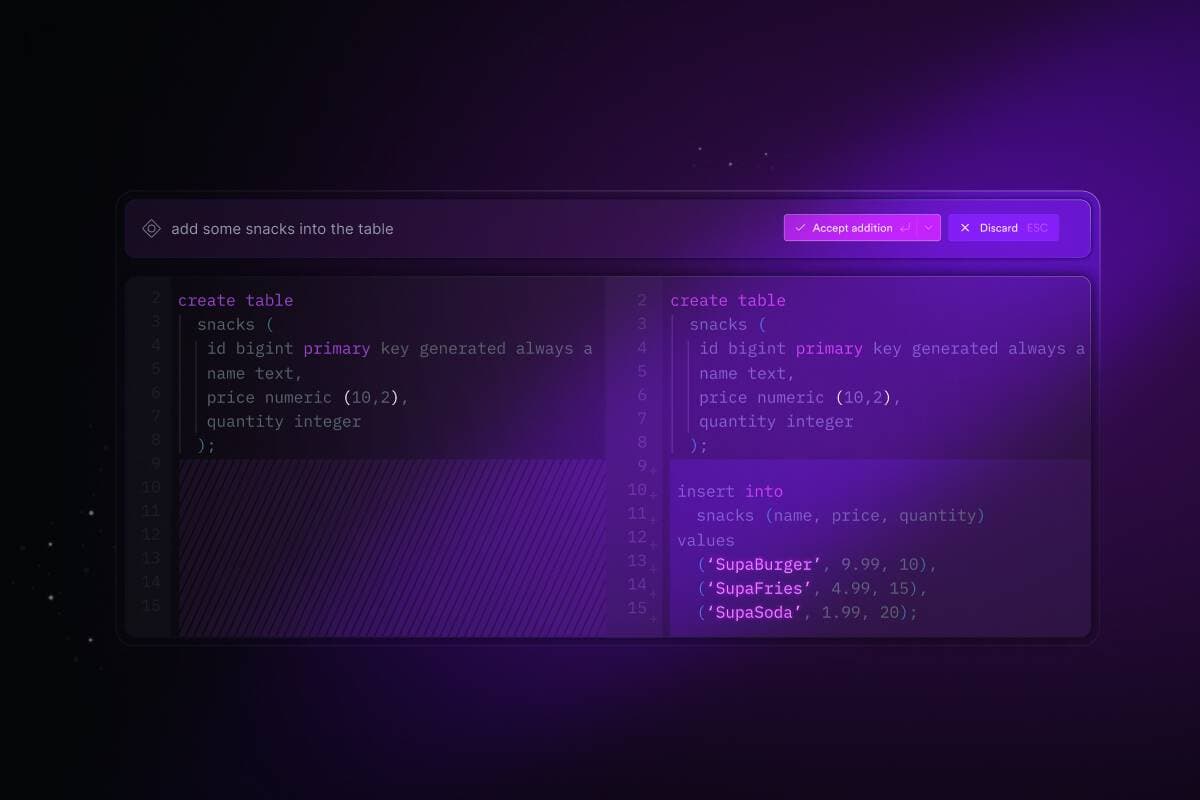
Supabase Studio 3.0 is here, with some huge new features, including a brand new Supabase AI, integrated right into our SQL Editor. If you hate writing SQL, you'll love this update.
Here's the highlight reel:
- Supabase AI in the SQL Editor: inline AI, always ready to help
- Schema Visualizer: — see all your table schemas visually.
- Role Management: — fine-grained access to table data
- Shared SQL Snippets: — share your snippets with the team
- Database Migration UI: — your database, with receipts
- Wrappers UI: — easily query foreign data
In Launch Week 7, we added Supabase AI to the Studio. Through our ⌘K menu, you could ask Supabase AI to do all sorts of common tasks — create tables, views, and indexes, write database functions, write RLS policies, and more.
After this release, we had two key realizations:
- people love having computers write their SQL for them!
- many of you are using the SQL Editor as the heart (and engine!) of your projects.
Today, we're releasing a huge improvement to our SQL Editor. First up, we've added Supabase AI directly into the editor. It's always accessible, and ready to help. As before, you can give it a prompt (create an orders table for me) and it will return the SQL for you, but now it does so much more.
Supabase AI is aware of the SQL snippet in the editor and can modify it for you. You can ask it to change customers to customer_orders, for example. You can interact with the code the same way you would converse with ChatGPT until it's just right.
Next, we've added a diff view for changes that Supabase AI makes to your SQL snippet. You can tell Supabase AI what you want changed, and visualize it as you would a Git diff. From this view, you can accept or reject the diffs, and keep asking Supabase AI to make changes until you're satisfied.
We've wondered for a long time how to make it easier to teach developers how to use SQL. It's fortunate we didn't solve this problem too quickly, as it turns out that AI does a much better job than we could do ourselves.
With Supabase AI, you won't even need the whole weekend to scale to millions. Head over to the SQL Editor and give it a try!
In the coming months, we're looking to sprinkle Supabase AI through more parts of the Studio. With Postgres under the hood, there's so much we can do with SQL and a little bit of AI to help you move fast. Keep an eye out for the Supabase AI icon, you never know where it will pop up next.
Along with these huge AI features, we also added a bunch of new improvements elsewhere around the Studio. Several of these features have come either from requests from the community or are contributions by community members themselves.
📢 Many of the features and enhancements below came from user requests Please keep them coming!
For a while now, many Supabase users have been using Zernonia's Supabase Schema visualization tool. While this was an amazing tool, many users wanted to see something like this directly integrated into the Studio.
We opened an Issue for it on GitHub and within a day or two the wheels were in motion. After a couple of weeks, the feature was polished up and merged. It's inspiring to see the power of open source at work. This feature wasn't trivial, and to see community members take it from feature request to production in just a couple of weeks is mind-blowing. Unquestionably, we have one of the best open source communities out there. Huge thanks to kamilogorek and adiologydev for their work on this!
Special thanks as well to Zernonia for providing the inspiration for this great new feature! OSS FTW.
Postgres has built-in support for managing users and roles, and this release, we're happy to release a UI for it in the Studio. This is another extremely common feature request, fulfilled almost completely by a community member.
A few months back, we saw this PR come in out of the blue from HTMHell. They built the entire thing with zero help or direction from our team. We were blown away. We had some changes to make on the backend to properly accommodate the UI, and now we're almost ready to get this out into the wild!
Due to the security focus of this feature, we want to make sure we do a very thorough job of testing, so we're hoping to make this generally available in the next week or so.
Massive thanks to HTMHell (amazing handle btw) for the work on this!
Speaking of commonly requested features, this one has to be in the all-time top 5. Your beautiful, hand-crafted SQL snippets used to be yours and yours alone. Now you can share them with team members and let them bask in your technical prowess.
You can create a set of project-wide snippets for doing common tasks, making it faster to collaborate and build. To share a snippet, just take a personal snippet that Supabase AI you wrote and share it with the project. It will show up in a new Project Snippets list that's visible to everyone on the team.
Teamwork makes the dream work!
We're releasing a new UI for working with database migrations right from the Studio. Database migrations give you a way to update your database using version-controlled SQL files. They describe changes that you want to make to your database, and also keep track of what changes have been made to your database over time.
As migrations get run against your project from the CLI, you can see information in the Studio about when the migration was run, by who and what changes were made. See the documentation to get started with migrations.
During Launch Week 6, we announced Supabase Wrappers — a framework for building foreign data wrappers with Postgres. Wrappers allow your Supabase project to act as a one-stop hub for your data.
When we released Wrappers, we had support for just two providers — Stripe and Firebase. We're now up to 6! This round, we're happy to release support for S3, ClickHouse, BigQuery, and Logflare! Wrappers add a mind-bending level of extensibility to Supabase projects. You can pull data straight into your projects as though they were normal Supabase tables — you can even query them with our client libraries. It's a whole new world of possibilities.
We hope you get a lot of value out of these new features and enhancements. As we mentioned earlier, many of the features listed here came directly from Feature Requests on GitHub. Thanks to everyone who has taken the time to submit these, and encourage submissions for anything else you'd like to see.