








To simplify our continuously growing platform, we're updating our billing system with some improvements requested by our community. This change provides a more intuitive and industry-aligned approach to billing. We're also laying the groundwork for features like branching, rolling out a self-serve Team Plan, long-requested project transfers between organizations, and an extra 1GB of egress on the Free Plan.
We've attempted to keep these changes as simple as possible, offering more generous quotas for the Free Plan. If we missed anything, it's because billing is hard. We're still committed to our original goals for predictable pricing.
We've been documenting Kevin's updates to our billing system while it's being used by half-a-million databases:
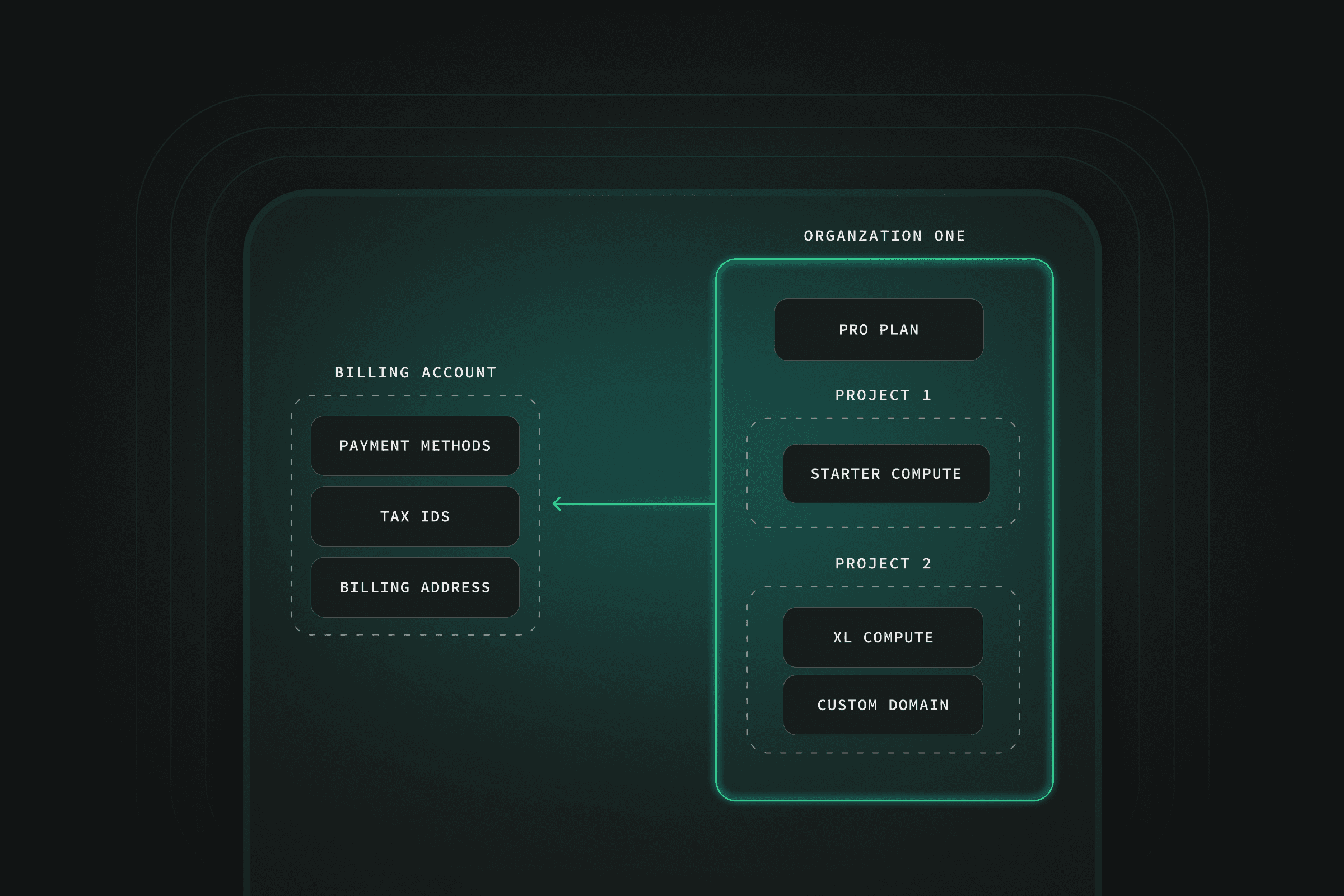
Supabase has organizations and projects. An organization may contain multiple projects. A project is a Supabase instance. Previously, each project had an individual subscription, plan and add-ons.
Many of you have expressed your confusion with per-project pricing, the number of invoices and the different ways to manage the subscription.
With this change, we're moving subscriptions to the organization level. Each organization has a single subscription with a single plan (Free, Pro, Team or Enterprise). Project addons such as compute upgrades, custom domains and PITR are still configured per project and are added to your organization subscription.
Additionally, we lay the groundwork for upcoming features like environment branching, usage notifications, more sophisticated cost control and much more.
With Organization-based Billing, the quotas and features will be granted across your entire organization. Independent of how many projects you launch, your included quota stays the same. For billing purposes, we sum the usage across all projects in a single, monthly invoice.
As the plan is set for your entire organization, upgrading your organization to a paid plan means that you unlock the benefits of the paid plan for all projects inside your organizations. For example, if you upgrade to the Pro Plan you get email support for every project inside that org rather than just a single project.
You can launch as many organizations as you want. For example, you can create two organizations on the Pro Plan for $25 each and launch a single project in each. This provides the same quotas and pricing that you'd receive today. Importantly, each subsequent database inside that Organization will cost $0.01344/hour (roughly $10 per month), rather than $25.
Read more about quotas and Organization-based Billing including examples in our docs.
Most importantly, there is only one change that affects the Free Plan: you receive an extra 1GB of egress for free.
| Usage Item | Old plan (project based) | New plan (org based) |
|---|---|---|
| Egress | 4GB (2GB Database + 2GB Storage) | 5GB across Database + Storage |
| Database Space | 500MB | 500MB |
| Storage Space | 1GB | 1GB |
| Monthly Active Users | 50,000 MAU | 50,000 MAU |
| Edge Function Invocations | 500K | 500K |
| Edge Function Count | 10 | 10 |
| Realtime Message Count | 2 million | 2 million |
| Realtime Peak Connections | 200 | 200 |
| 2 free projects | 2 "free orgs" (1 free database per org) |
We're giving you an extra 1GB of egress for free and, as an added benefit, it's unified across your org. This means that if you aren't using Supabase Storage, you get even more Database Egress.
If you are currently running 2 free projects however, this does require some work from you. Because we are now working on an Org-level, instead of Projects, you will need to:
- Create a new “Free org”
- Transfer one of your free projects into the newly-created org
This should be done before the end of October, but don't worry - we'll give you frequent comms and clear instructions once the change has been rolled out (4th Sept).
Currently, plans include one Micro Compute instance. When you upgrade the Compute Add-On, you immediately prepay the prorated amount (days remaining in your current billing cycle), and then pay upfront for the entire month when your billing cycle resets. When you downgrade, you get the appropriate credits for unused time.
Full-month upfront payments are annoying, especially when you just want to do a temporary upgrade. We've heard your feedback and are moving billing for compute to hourly usage.
With Organization-based Billing you won't get an immediate charge upfront when changing compute, instead we'll bill you based on compute hours when your billing cycle resets.
If you launch a second or third instance on your paid plan, it just adds additional compute hours that we'll bill you on.
We only count compute usage for instances that are active. Paused projects do not count towards compute usage.
To read more about usage-based billing for compute, head over to the docs.
With Project-based billing, you have different quotas for each service. For example, on the Pro Plan you get 50GB of database egress and 200GB of storage egress included. If you're not using storage at all, you're missing out on the included quota.
In an effort to provide a more fair egress quota for all users, we are unifying egress to be a single usage-based item. You get a total quota, i.e. 250GB on the Pro Plan, that you can use for anything - Storage, Realtime, Auth or Database. You can still see a breakdown of the different types of egress on your organization usage page.
With Project-based billing, each project has an individual billing cycle, so as you create more projects you also create more invoices.
With Organization-based Billing, you receive a single invoice. Launching a new project, removing an old project, and upgrading or downgrading compute no longer triggers additional invoices.
A highly requested feature since we first launched Supabase has been the ability to transfer projects between organizations. This hasn't been possible due to subscriptions being tied to specific projects. We know a lot of users need to transfer projects and are happy to say that Organization-based Billing will finally make this possible without a manual project migration via pgdump or the CLI.
Read more about Project Transfers.
We did a soft launch of the Team Plan in June. With the previous billing, it required manual adjustments of the subscriptions as all projects are supposed to be covered by the Team Plan, whereas you're only paying $599 for the plan once. This required Supabase intervention to communicate the confusing state of billing and also do the adjustments. With Organization-based Billing the Team Plan becomes fully self-serve. Users can upgrade a Free/Pro organization to Team Plan or downgrade to a Pro/Free Plan from a Team Plan organization. The main benefits of the Team Plan include:
- Additional Organization member roles
- Daily backups stored for 14 days
- Standardised Security Questionnaire
- SSO for Supabase Dashboard
- Priority email support & SLAs
- 28-day Log retention
- SOC2 Certifications
- HIPAA add-on capability
Starting from 4th of September 2023, all new organizations will use Organization-based Billing.
For existing customers, we'll be rolling out Organization-based Billing over the course of a few weeks. We'll automatically migrate those customers not directly affected (i.e. just a single project). Additionally, we'll actively reach out to customers that have multiple projects inside a single organization, as those will have to choose the target plan and whether they want to move projects to different organizations.
Self-Serve-Migration#
Shortly after the launch, during the first week of September, you'll be able to initiate the migration to Organization-based Billing yourself. Everyone will be migrated to the new billing eventually, this is just a way to speed things up.
This is just the start. With this we can now work on:
- Improved usage stats - near real-time stats with deeper drill-down into what exactly is causing usage and how to reduce it.
- More cost control - fine-grained cost-control that will replace the current spend cap.
- Usage and budget monitoring - let users configure alerts that notify users when a certain usage is reached.
There is much much more and we're determined to make billing as seamless, frictionless and transparent as we can.
What happens to the 2 Free Plan projects?
We are not changing your 2 free project limit. You can have two organizations on a Free Plan with one project each.
What happens to the spend cap?
The spend cap still exists, it's just set on the organization-level and not per project. Head over to your organization billing settings to toggle your spend cap. We're working on more fine-grained control over costs to supersede the spend cap.
Am I going to pay a different amount?
Most customers will pay less because we are offering more egress for free and it's cheaper to have multiple projects on the Pro Plan in a single organization. We're very conscious about the current users and use-cases. Check our docs for more detailed breakdown and some examples.
Does the migration come with any downtime?
Not at all. There are no service disruptions during the migration, as we're not touching your projects' infrastructure.
This is a major change, and we've tried to design it in a way that's cheaper for everyone. If your bill has increased as a result of this change, that's not our intention. Please submit a Support ticket on the dashboard and we'll figure out a solution.