








We are launching an official Supabase MCP server. You can use this server to connect your favorite AI tools (such as Cursor or Claude) directly with Supabase.
MCP stands for Model Context Protocol. It standardizes how Large Language Models (LLMs) talk to platforms like Supabase.
Our MCP server connects your AI tools to Supabase so that they can perform tasks like launching databases, managing tables, fetching config, and querying data on your behalf.
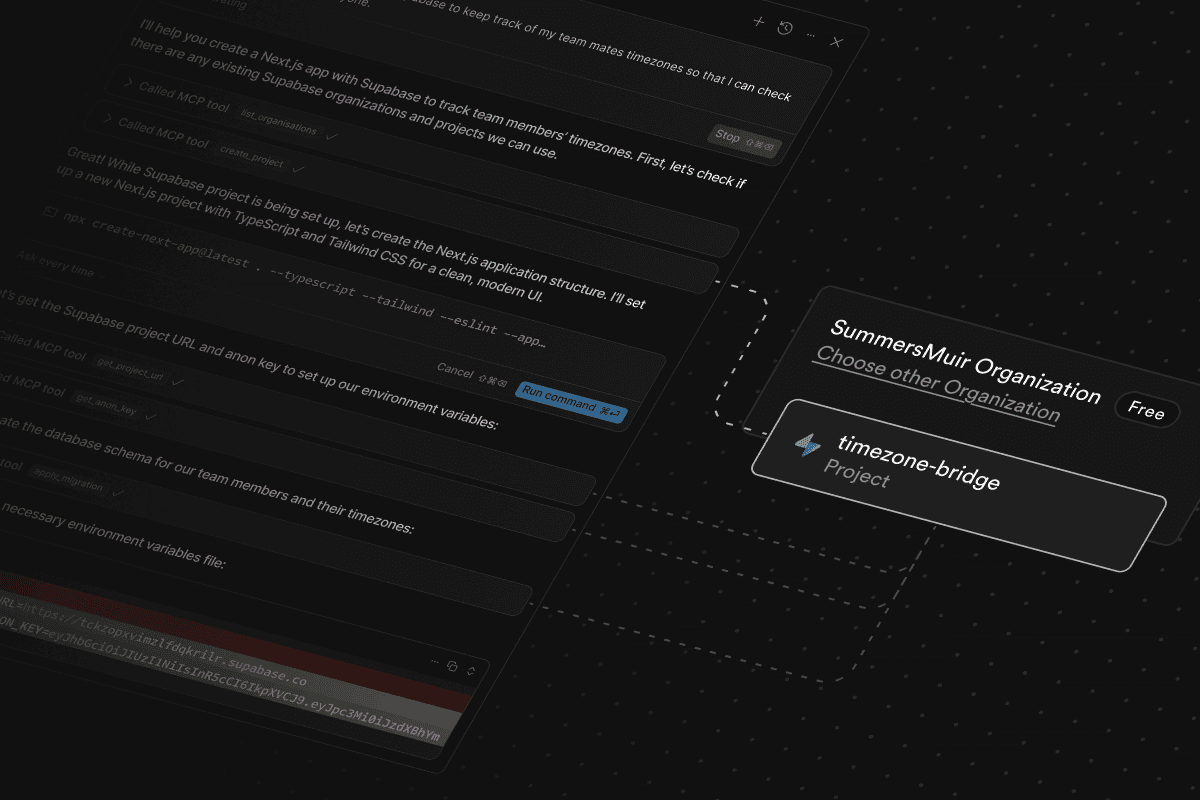
For example, here is Cursor building a Next.js + Supabase app, fetching a Supabase URL and anonymous key, and saving them to a .env.local file for Next.js to consume:
MCP servers use Tools, which are a bit like "abilities". There are over 20 tools available in the Supabase MCP server.
You can:
- Design tables and track them using migrations
- Fetch data and run reports using SQL queries
- Create database branches for development (experimental)
- Fetch project configuration
- Spin up new Supabase projects
- Pause and restore projects
- Retrieve logs to debug issues
- Generate TypeScript types based on your database schema
For a full list of abilities, see Tools in the project README.
You can setup Supabase MCP on most AI clients using the following JSON:
_13
{
_13
"mcpServers": {
_13
"supabase": {
_13
"command": "npx",
_13
"args": [
_13
"-y",
_13
"@supabase/mcp-server-supabase@latest",
_13
"--access-token",
_13
"<personal-access-token>"
_13
]
_13
}
_13
}
_13
}
You'll need to create a personal access token (PAT) for the <personal-access-token> field. This token authenticates the MCP server with your Supabase account.
If you're new to MCP, it's worth digging into the protocol to understand how it came to be and what features it offers.
Most large language models (LLMs) today support “tool calling” where the model can choose to invoke a developer-provided tool (like get_weather) based on the context of the conversation (like “What is the weather in Houston?”). This has opened the door to agent-like experiences where LLMs can call tools that interact with the outside world on your behalf.
As a developer, you tell the LLM which tools are available by providing a JSON schema containing your tools and what parameters they accept:
_14
{
_14
"name": "get_weather",
_14
"description": "Get the current weather for a specific location",
_14
"parameters": {
_14
"type": "object",
_14
"properties": {
_14
"location": {
_14
"type": "string",
_14
"description": "The city and state/country, e.g. 'San Francisco, CA' or 'Paris, France'"
_14
}
_14
},
_14
"required": ["location"]
_14
}
_14
}
This JSON schema format is standard across most LLMs. But, importantly, the implementation of each tool is not. It's up to you as the developer to connect the get_weather tool call with a weather API somewhere in order to fulfill the request.
Because of this, developers often found themselves duplicating tool implementations across projects and apps. And within any given app, end users could only use tools that were hand picked by its developers. There was no opportunity for a plugin-style tool ecosystem where users could bring their own tools.
The MCP standard#
MCP solves this by standardizing the tool ecosystem. That is, it creates a protocol that is understood by both clients (eg. Cursor) and tool providers (eg. Supabase), while decoupling them from each other. Cursor simply needs to implement the client side of the MCP spec and instantly its LLM works with any server that also implements MCP. Cursor (and any other AI app) can let their users bring their own tools as long as those tools implement MCP.
Resources and prompts#
MCP also incorporates some other (optional) primitives beyond tool calling: resources and prompts. Resources allow servers to expose any arbitrary data and content that can be read by clients and used as context for LLMs. This could include:
- File contents
- Database records
- API responses
- Live system data
- Screenshots and images
- Log files
- And more
Prompts allow servers to define reusable prompt templates that clients can surface to users and LLMs. It gives the server the opportunity to define custom instructions and best practices for the LLM when interacting with its services.
Today, most clients only support the tool primitive. We're excited to see how apps decide to adopt resources and prompts so that we can make the Supabase MCP experience even better in those environments.
For more information on the model context protocol, see the official MCP docs.
We believe MCP has a lot of potential in the AI builder world and we want to continue to invest in it. Here are some features on our roadmap:
Create and deploy Edge Functions#
Supabase Edge Functions allow you to run custom, server side code from our edge network closest to your users. We just announced the ability to create and deploy Edge Functions directly from the Supabase Dashboard. So, it would only be fitting also create and deploy Edge Functions directly from your favorite AI assistant.
The latest revision of the MCP spec (2025-03-26 as of writing) now includes official authorization support. This means that, unlike today where we require you to manually create a personal access token for the server, future versions will allow you to authenticate with Supabase using a standard OAuth 2 login flow. This flow would look something like:
- Connect Supabase MCP with your AI app/IDE
- Your AI app opens a browser window where you login to Supabase directly
- After successful login, you jump back to your AI app, fully authenticated
This would be no different than any other “login with X” OAuth flow that we see with apps today. We think this will both simplify the MCP setup experience and also provide better, more granular access to your Supabase account.
Better schema discovery#
When designing a database using AI, it's helpful to give the LLM access to your existing schema so that it knows exactly what SQL to execute when making modifications (like alter table). Currently we provide a single list_tables tool that the LLM can use to fetch your tables. While this is useful, there are a lot of other database objects like views, triggers, functions, and policies that should also be readily available.
Today if the LLM needs access to one of these other objects, it can run the generic execute_sql tool to fetch them from the information_schema. For example, to fetch all triggers in your database, the LLM might run:
_10
select
_10
event_object_schema as schema,
_10
event_object_table as table,
_10
trigger_name,
_10
event_manipulation as event,
_10
action_statement as definition
_10
from
_10
information_schema.triggers
_10
order by
_10
event_object_schema, event_object_table;
This often works, but it requires the LLM to know the exact structure of the information_schema tables, consumes many tokens due to verbose SQL queries, and creates opportunities for errors when parsing the results. We think a more structured and terse query method can improve discoverability and reduce excess token usage. Stay tuned!
More protections#
Some of us trust AI a little too much with our databases. Supabase supports database branching to allow you to spin up separate development databases as you design new features, then merge them back when you're ready. This means that if something went terribly wrong, you can easily reset your branch to a earlier version and continue where you left off.
Our MCP server already supports branching today, but we think we can add even more protections like auto detecting destructive operations and requiring confirmation before executing them.
We've built the Supabase MCP server to bridge the gap between AI tools and your databases, letting you focus on building instead of context-switching between tools.
The MCP protocol is evolving with proposals like the new Streamable HTTP transport that supports fully stateless servers without requiring long-lived connections. We're following these developments closely and evaluating how they might benefit the Supabase MCP experience.
If you run into issues or have ideas for new tools we should add, open an issue on the GitHub repo. We're particularly interested in hearing about your experiences with schema discovery, database branching, and other safety features as we continue to refine its protections.
Check out our docs for the latest updates and examples of what you can build with Supabase MCP.