惯性聚合 高效追踪和阅读你感兴趣的博客、新闻、科技资讯
阅读原文 在惯性聚合中打开

推荐订阅源

量子位
Stack Overflow Blog
Stack Overflow Blog
人人都是产品经理
人人都是产品经理
The GitHub Blog
The GitHub Blog
Engineering at Meta
Engineering at Meta
Vercel News
Vercel News
奇客Solidot–传递最新科技情报
奇客Solidot–传递最新科技情报
Y
Y Combinator Blog
The Cloudflare Blog
Last Week in AI
Last Week in AI
B
Blog
钛媒体:引领未来商业与生活新知
钛媒体:引领未来商业与生活新知
T
Tailwind CSS Blog
V
Visual Studio Blog
博客园 - 三生石上(FineUI控件)
小众软件
小众软件
Google DeepMind News
D
DataBreaches.Net
博客园 - 司徒正美
B
Blog RSS Feed
Microsoft Azure Blog
罗磊的独立博客
Hugging Face - Blog
Hugging Face - Blog
L
LangChain Blog

The latest product news from GitHub - The GitHub Blog

GitHub Copilot app: The agent-native desktop experience Take your local GitHub sessions anywhere What’s coming to our GitHub Actions 2026 security roadmap Let’s talk about GitHub Actions Your stack, your rules: Introducing custom agents in GitHub Copilot for observability, IaC, and security GitHub Copilot gets smarter at finding your code: Inside our new embedding model From pair to peer programmer: Our vision for agentic workflows in GitHub Copilot GitHub Copilot: Meet the new coding agent Vibe coding with GitHub Copilot: Agent mode and MCP support rolling out to all VS Code users GitHub Copilot: The agent awakens
Agents panel: Launch Copilot coding agent tasks anywhere ...
Tim Rogers · 2025-08-20 · via The latest product news from GitHub - The GitHub Blog

If the past year has underscored anything, it’s that AI agents are becoming a bigger part of developers’ day-to-day workflows.

We recently launched Copilot coding agent, an asynchronous, autonomous developer agent: it allows you to assign an issue to Copilot, and Copilot will work in the background and create a draft pull request for your review. Copilot coding agent works like a member of your team, and it’s received a great response from developers so far. 

But we know that not all of your work lives in GitHub Issues. 

Today, we’re launching a new agents experience on GitHub — the agents panel — allowing you to quickly delegate tasks to Copilot from any page on github.com with a simple prompt and track Copilot’s progress without breaking your flow.

And of course, Copilot coding agent is also integrated into VS Code, GitHub Mobile, and the GitHub MCP Server, so you can collaborate with Copilot wherever you’re working.

Delegate any coding task to Copilot coding agent, wherever you are, with the agents panel

Need a quick refresher on GitHub Copilot coding agent? Skip ahead >

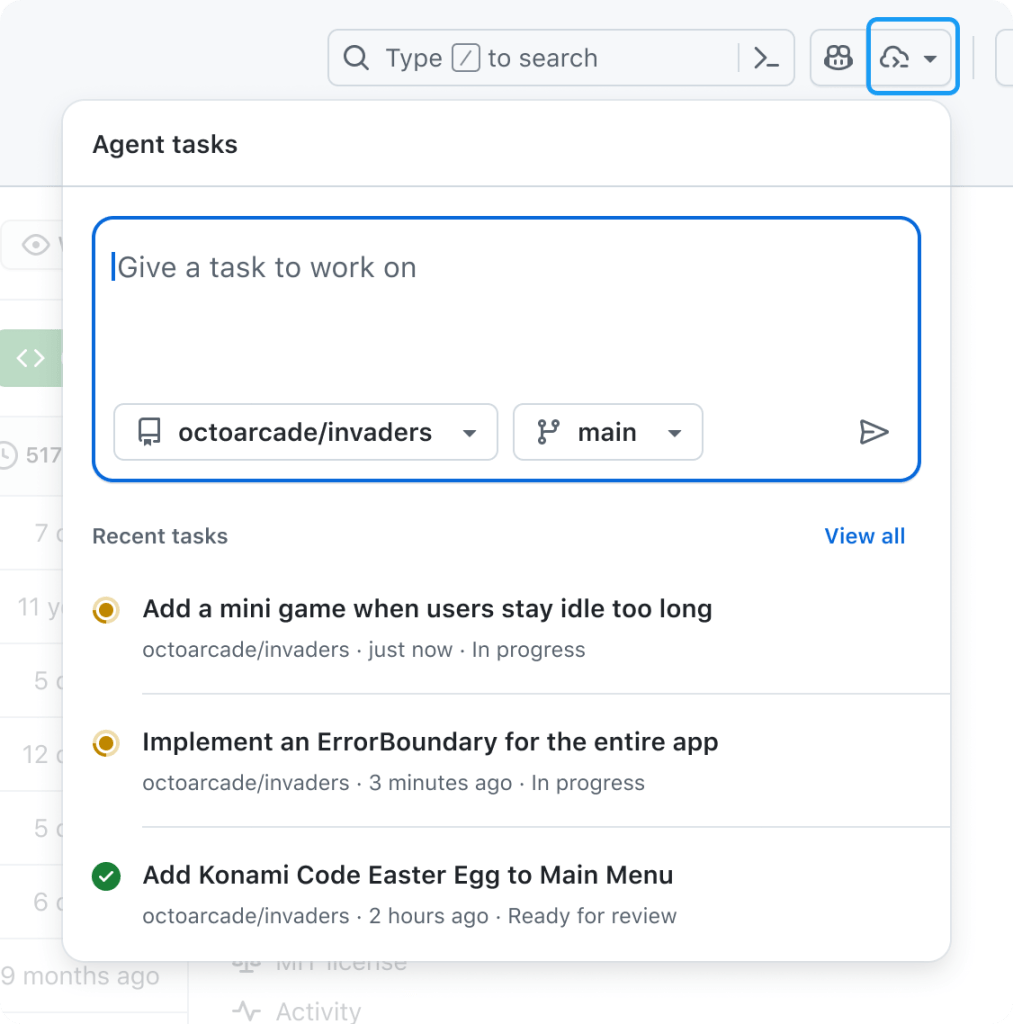
The agents panel, available today on every page on github.com, is your mission control center for agentic workflows on GitHub. 

It’s a lightweight overlay that allows you to hand new tasks to Copilot and track existing tasks without navigating away from your current work. Just click the new Agents button in the navigation bar to get started.

A screenshot of the new Agents panel in GitHub that allows developers to track, manage, and start Copilot coding agent workflows from anywhere on GitHub. This screenshot shows recent tasks that coding agent, an agentic workflow that generates draft pull requests based on requirements set out by a developer, is working on with the option to view all tasks. Developers can also enter a natural language prompt in a box and specify which repository and which branch coding agent should work on.

From the agents panel, you can:

  • 🛠️ Assign background tasks without switching pages.
  • 👀 Monitor running tasks with real-time status.
  • 🔗 Jump into pull requests when you’re ready to review.

Open the panel in a full-screen view by clicking View all tasks, or bookmark github.com/copilot/agents for direct access.

Launch new tasks without breaking your flow

You can start a new Copilot task from the new agents panel with a simple prompt. Just open the panel from any page on GitHub, describe your goal in natural language, and select the relevant repository. Copilot will then take it from there and start creating a plan, drafting changes, running tests, and then preparing a pull request.

Not sure where to start? Try the following sample prompts:

  • Describe a simple task:
    • “Add integration tests for LoginController”
    • “Refactor WidgetGenerator for better code reuse”
    • “Add a dark mode/light mode switcher”
  • Refer to a GitHub issue or pull request as context, optionally providing extra context:
    • “Fix #877 using pull request #855 as an example”
    • “Fix #1050, and make sure you update the screenshots in the README”
  • Run multiple tasks in parallel:
    • “Add unit test coverage for utils.go” + “Add unit test coverage for helpers.go”

Copilot coding agent: a quick reintroduction

Copilot coding agent lets you hand off coding tasks — via GitHub.com, GitHub Mobile, VS Code, or any MCP-enabled tool — and get back a draft pull request when it’s done. It runs in the cloud, can work in parallel on multiple tasks, and continues even if your computer is off.

Its secure, GitHub Actions-powered environment can run builds, tests, and linters without asking for every step. You stay in control with detailed logs and pull request-based approvals, and can give feedback by mentioning @copilot in a review.

Thanks to the Model Context Protocol (MCP), Copilot has read access to your repository data on GitHub (powered by the GitHub MCP Server). It can also view web pages for testing and validation (powered by the Playwright MCP Server), and connect to your own MCP servers, as well. You can learn more about how it works (or read our Docs), if you’re curious. 

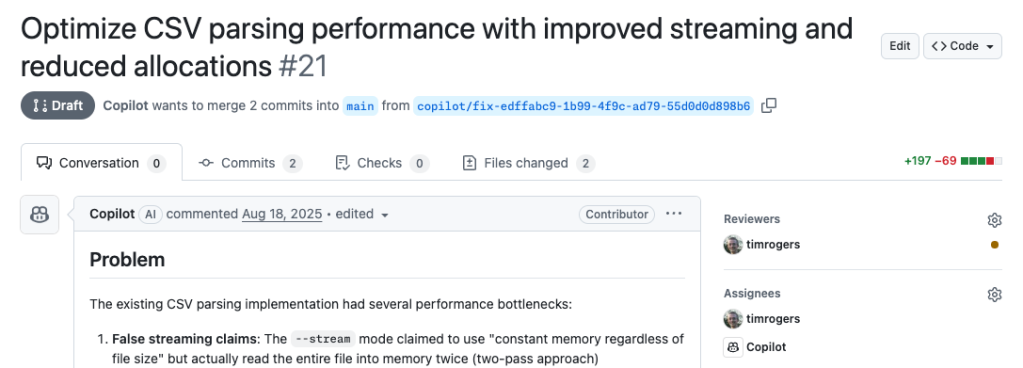
A screenshot of a pull request generated by GitHub Copilot, an AI coding tool, in a GitHub developer workflow. The pull request is a draft awaiting approval and shows a generated summary of the work that has been completed. The screenshot also shows the developer assigned to review the pull request as well as assignees that include a developer and GitHub Copilot.
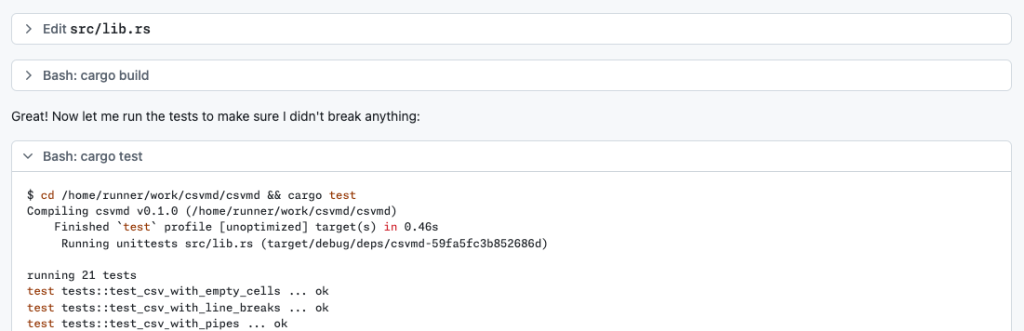
A screenshot showing an ongoing task that GitHub Copilot coding agent, an agentic workflow tool on GitHub, is working on. This screenshot shows GitHub Copilot showing its work, and testing its code outputs to ensure it didn’t break anything.
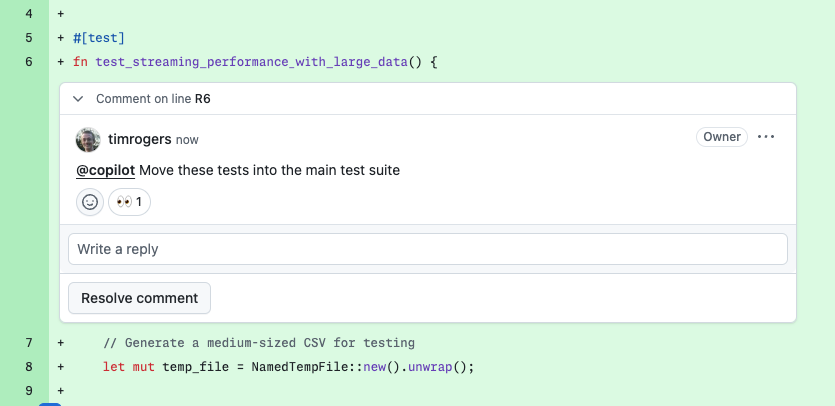
A screenshot showing a developer asking GitHub Copilot to move tests that it generated to the main test suite within a diff view of code outputs from GitHub Copilot coding agent.

More ways to hand off work to Copilot

You can also start Copilot coding agent tasks from:

  • GitHub Issues: Assign an issue to Copilot on github.com or GitHub Mobile.

  • Visual Studio Code: Delegate tasks to Copilot and track running tasks with the GitHub Pull Requests extension.
  • Other IDEs: Ask Copilot to open a pull request in Copilot Chat in JetBrains IDEs and Visual Studio.
  • MCP‑enabled tools: Trigger tasks from compatible apps that integrate via the Model Context Protocol.

Try it now

Copilot coding agent and the new agents panel on GitHub is available today in public preview for all paid Copilot subscribers. Your administrator may need to enable the Copilot coding agent policy.


Written by

Tim Rogers

Staff Product Manager

Related posts

Explore more from GitHub

Docs

Docs

Everything you need to master GitHub, all in one place.

Go to Docs

GitHub

GitHub

Build what’s next on GitHub, the place for anyone from anywhere to build anything.

Start building

Customer stories

Customer stories

Meet the companies and engineering teams that build with GitHub.

Learn more

The GitHub Podcast

The GitHub Podcast

Catch up on the GitHub podcast, a show dedicated to the topics, trends, stories and culture in and around the open source developer community on GitHub.

Listen now