Thomas Dohmke·2025-05-20·via The latest product news from GitHub - The GitHub Blog
We are excited to introduce a new coding agent for GitHub Copilot. Embedded directly into GitHub, the agent starts its work when you assign a GitHub issue to Copilot or prompt it in VS Code. The agent spins up a secure and fully customizable development environment powered by GitHub Actions.
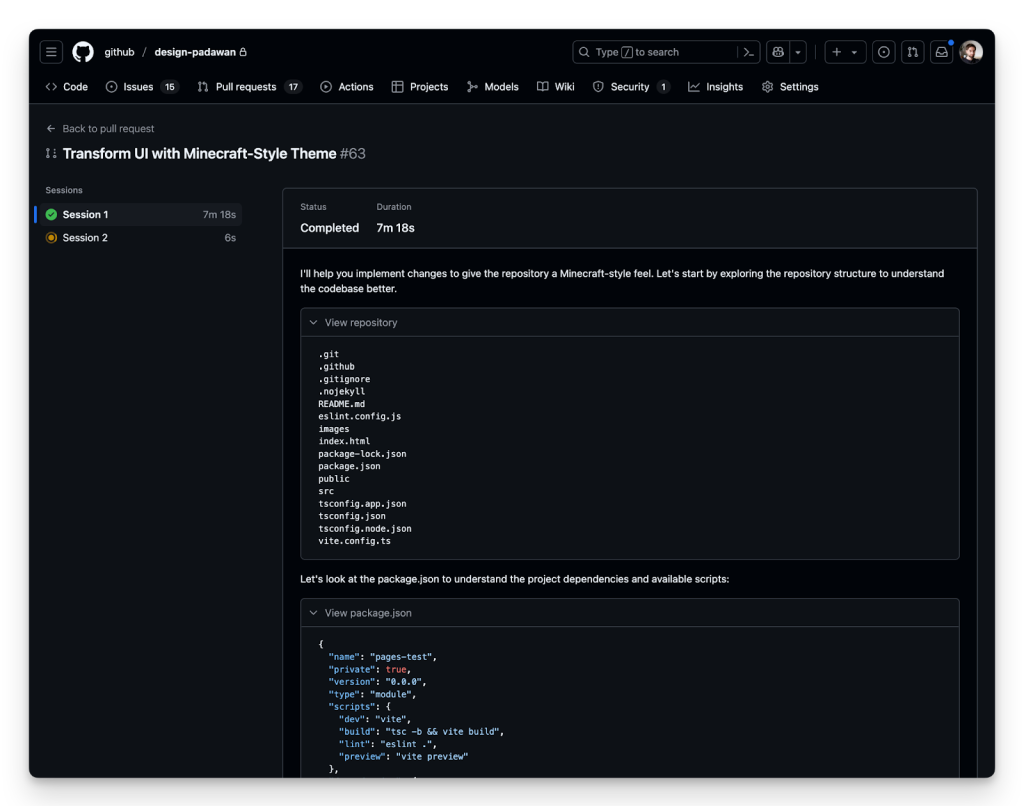
As the agent works, it pushes commits to a draft pull request, and you can track it every step of the way through the agent session logs. Having Copilot on your team doesn’t mean weakening your security posture – existing policies like branch protections still apply in exactly the way you’d expect. Plus, the agent’s pull requests require human approval before any CI/CD workflows are run, creating an extra protection control for the build and deployment environment.
Using state-of-the-art models, the agent excels at low-to-medium complexity tasks in well-tested codebases, from adding features and fixing bugs to extending tests, refactoring code, and improving documentation. You can hand off the time-consuming, but boring tasks to Copilot that will use pull requests, CI/CD, and all of your existing tooling while you focus on the interesting work.
A detailed look
To run the new coding agent, assign one or more GitHub issues to Copilot. It’s as easy as that. You can do this on github.com, in GitHub Mobile, or through the GitHub CLI, just as you would assign the same issue to one of your team members or yourself. You can also ask Copilot to open a pull request from Copilot Chat on GitHub or right in VS Code like this:
> @github Open a pull request to refactor this query generator into its own class
Once an issue is assigned to it, the agent adds an 👀 emoji reaction and starts its work in the background. It boots a virtual machine, clones the repository, configures the environment, and analyzes the codebase with advanced retrieval augmented generation (RAG) powered by GitHub code search. As the agent works, it regularly pushes its changes to a draft pull request as git commits and updates the pull request’s description. Along the way, you’ll see the agent’s reasoning and validation steps in the session logs, making it easy to trace decisions and spot issues.
With the power of Model Context Protocol (MCP), you can give the coding agent access to data and capabilities from outside of GitHub. MCP servers can be configured in the repository’s settings. And, of course, all your GitHub data can be pulled in from the official GitHub MCP Server. And the agent isn’t limited to just text – thanks to the power of vision models, it can see images included in GitHub issues you assign to it, so you can share screenshots of a bug or mockups of what your new feature should look like.
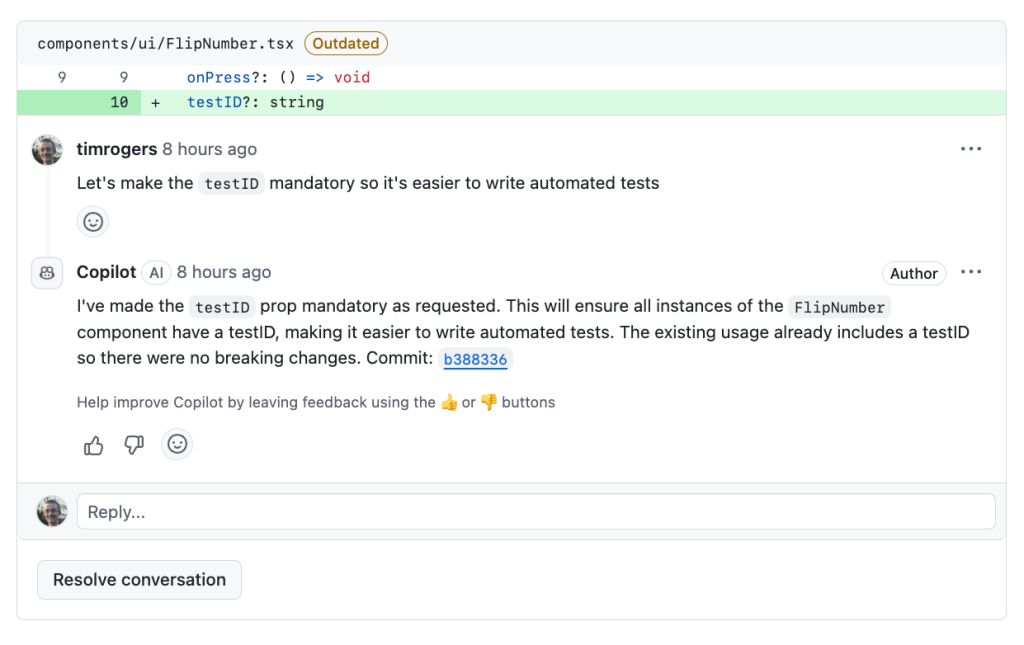
Once Copilot is done, it’ll tag you for review and you can leave comments asking for it to make changes. It will pick those comments up automatically and propose code changes. The agent also incorporates context from related issue or PR discussions and follows any custom repository instructions, allowing it to understand both the intent behind the task and the coding standards of the project.
The Copilot coding agent is opening up doors for human developers to have their own agent-driven team, all working in parallel to amplify their work. We’re now able to assign tasks that would typically detract from deeper, more complex work—allowing developers to focus on high-value coding tasks.
James Zabinski, DevEx Lead at EY
Integrated, configurable, and secure
All SWE agents need a compute environment to do their work. For agent mode in VS Code, it’s the CPU of your PC or Mac, or a remote development container like GitHub Codespaces. When we started the work on Project Padawan, there was only one answer to which cloud compute we should use: GitHub Actions. Introduced in 2018, Actions is the largest CI/CD ecosystem in the world with more than 25,000 actions in the GitHub Marketplace. Every weekday, GitHub-hosted and self-hosted runners execute more than 40 million daily jobs. Open source projects, startups, and large enterprises all rely on GitHub Actions to run their build, test, and deploy workloads.
Our coding agent is designed from the ground up to keep your project secure and ensures that its work gets a review before it goes to production. The following policies are applied by default:
The agent can only push to branches it created, keeping your default branch and the ones your team created safe and secure
The developer who asks the agent to open a pull request cannot be the one to approve it – so any “required reviews” rule you have set up in your repository will be honored
The agent’s internet access is tightly limited to a trusted list of destinations that you can customize
GitHub Actions workflows won’t run without your approval, giving you the chance to spot-check the agent’s code
Existing repository rulesets and organization policies are considered as well.
The GitHub Copilot coding agent fits into our existing workflow and converts specifications to production code in minutes. This increases our velocity and enables our team to channel their energy toward higher-level creative work.
Alex Devkar, Senior Vice President, Engineering and Analytics, Carvana
Beginning June 4, 2025, Copilot coding agent will use one premium request per model request the agent makes.
Whether it’s code completions, next edit suggestions, chat, agent mode, or now coding agent, GitHub Copilot has always had one mission: To keep you in the magical flow state. To do the things you don’t want to do, so you have more time for the things you do. To find the creative spark that brought you to this industry in the first place. Happy coding!
Written by
Fascinated by software development since his childhood in Germany, Thomas Dohmke has built a career building tools to accelerate developer happiness. Previously, Thomas was the Chief Executive Officer of GitHub (2021-2025) where he oversaw the rise of the world’s most widely adopted AI developer tools—including the launches of GitHub Copilot, Copilot Workspace, and GitHub Models. Thomas has also been a celebrated TED speaker and holds a PhD in mechanical engineering from University of Glasgow, UK.
Explore more from GitHub
Docs
Everything you need to master GitHub, all in one place.
Catch up on the GitHub podcast, a show dedicated to the topics, trends, stories and culture in and around the open source developer community on GitHub.