GitHub Copilot gets smarter at finding your code: Inside ...
Shengyu Fu·2025-09-25·via The latest product news from GitHub - The GitHub Blog
Finding the right code quickly is critical. After listening to the community’s feedback, we rolled out a new Copilot embedding model that makes code search in VS Code faster, lighter on memory, and far more accurate. This means retrieving the snippets you actually need instead of near misses. It delivers a 37.6% lift in retrieval quality, about 2x higher throughput, and an 8x smaller index size, so GitHub Copilot chat and agentic responses are more accurate, results return faster, and memory use in VS Code is lower.
Why this matters
Great AI coding experiences depend on finding the right context: snippets, functions, tests, docs, and bugs in code that match your intent. The “find” step is powered by embeddings, which are vector representations that retrieve semantically relevant code and natural language content, even when the exact words do not match.
Better embeddings lead to better retrieval quality and result in a better GitHub Copilot experience.
What we shipped
We trained and deployed a new embedding model tailored for code and documentation. It now powers context retrieval for GitHub Copilot chat along with agent, edit, and ask mode.
Impact:
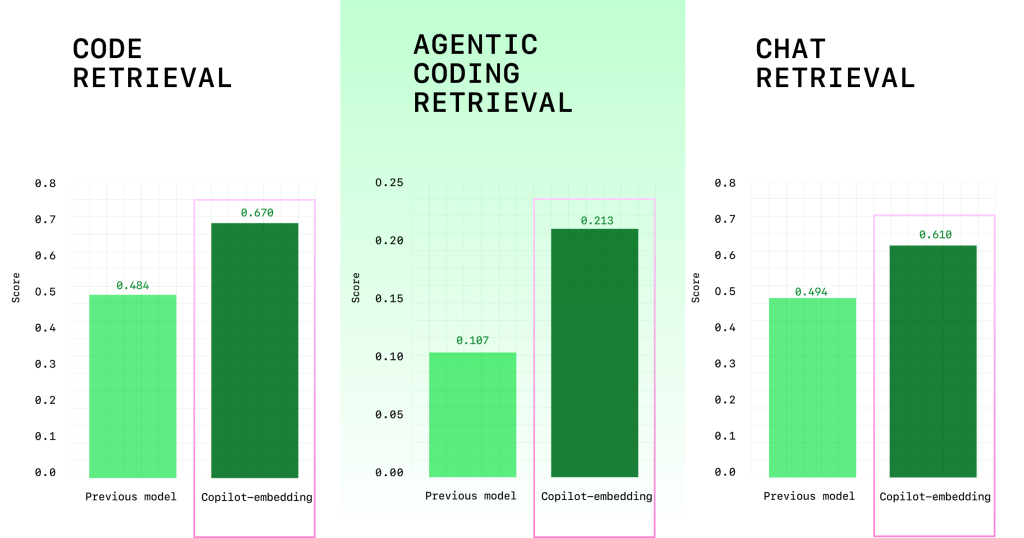
Improved retrieval quality: +37.6% relative lift (average score improved from 0.362 to 0.498) on our multi-benchmark evaluation (Figure 1). For C# developers in VS Code, we saw a +110.7% lift in code acceptance ratios — and for Java developers, we saw a +113.1% lift in code acceptance ratios.
Figure 1: Model score comparison on multiple code retrieval benchmarks
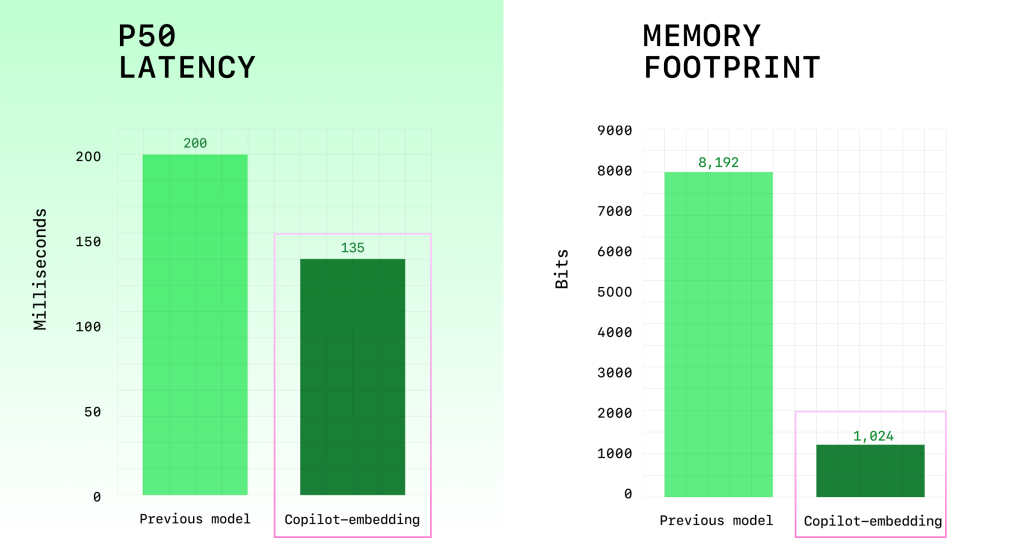
Greater efficiency: ~2x higher embedding throughput reduces retrieval latency (Figure 2), and ~8x smaller index memory size improves scaling in both client and server (Figure 2).
Figure 2: Model efficiency comparison
The following example shows how the new model is doing better in retrieval quality:
Developer prompt: “Which method is invoked to find a single namespace by its name within the project?”
The top code snippet retrieved using the Copilot embedding model contains the findOne function (bolded below), which is correct:
The top code snippet retrieved using previous model contains the find function (bolded below), which is incorrect but semantically similar to the findOne function:
The Copilot embedding model offers improved responses to prompts and instructions. It can also better distinguish between search results that are somewhat relevant and those that are highly relevant.
Other scenarios where developers benefit include:
Searching for a test function in a large monorepo
Finding a helper method spread across multiple files
Debugging code: “show me where this error string is handled”
How we trained
Our objective was to optimize retrieval quality for real developer workloads while keeping latency and memory within our budgets.
We optimized retrieval quality using contrastive learning with InfoNCE loss and Matryoshka Representation Learning — an approach that helps embeddings distinguish between nearly identical snippets while supporting multiple embedding sizes for flexibility.
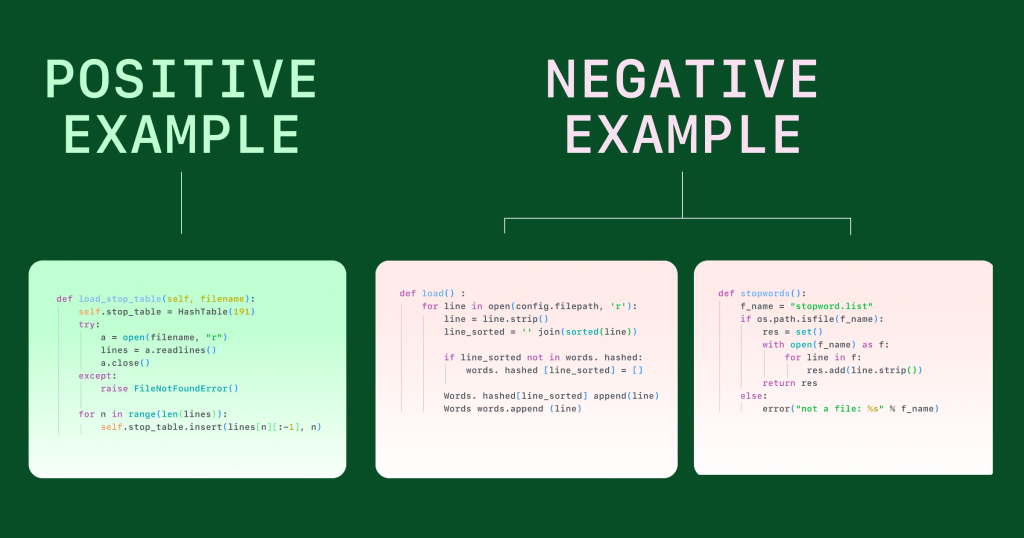
A key ingredient was training with hard negatives: code examples that look correct but aren’t. Most failures in code search come from these “near misses,” so teaching the model to separate “almost right” from “actually right” drove the biggest quality gains. We mined hard negatives from large, diverse corpora (public GitHub and Microsoft/GitHub internal repositories), and used LLMs to surface tricky near misses. This helped us reduce shortcut learning and improve generalization.
The following example shows how contrastive learning with hard negatives trains the model to distinguish between relevant code and nearly relevant code samples. For a query that asks how a table of stop words is populated, the most relevant code sample shows the function that loads the stop word table from a file. Functions that load words into a table or read stop words from a file are used as hard negatives that do not answer the query. (The query for the following example was “How is the stop word table populated?”.)
The top five programming languages in our training data included:
Language
Data mix ratio
Python
36.7%
Java
19.0%
C++
13.8%
JavaScript/TypeScript
8.9%
C#
4.6%
Other languages
17.0%
The evaluation suite
We use a multi-benchmark evaluation, not a single test to cover different aspects of code retrieval. These include:
Natural language (NL) to code: Responding to NL queries with relevant functions/snippets.
Code to NL: natural language summaries of code.
Code to code: similar-function search (refactored or translated code).
Problems to code: turning problem descriptions into suggested code fixes.
What’s next
The new Copilot embedding model is one step in making AI coding assistants not only smarter, but more reliable for everyday development. Moving forward, we’re:
Expanding training and evaluation data to more languages and repositories.
Refining hard negative mining pipeline for better quality.
Using efficiency gains to deploy larger, more accurate models.
Want to try our improved agentic search experiences?
Huge thanks to the engineers and researchers across GitHub and Microsoft who built the training pipeline, evaluation suites, and serving stack — and to the GitHub Copilot product and engineering teams for a smooth rollout.
Written by
As a Partner Applied Science Manager in Microsoft CoreAI, I lead an applied research team that measurably boosts developer productivity with ML and AI. We evolve GitHub Copilot in Completion, Chat, Code Review, and agentic workflows by continuously refining models and applying in-context learning for deeper, context-aware assistance.
Related posts
Explore more from GitHub
Docs
Everything you need to master GitHub, all in one place.
Catch up on the GitHub podcast, a show dedicated to the topics, trends, stories and culture in and around the open source developer community on GitHub.