惯性聚合 高效追踪和阅读你感兴趣的博客、新闻、科技资讯
阅读原文 在惯性聚合中打开

推荐订阅源

Y
Y Combinator Blog
IT之家
IT之家
博客园_首页
人人都是产品经理
人人都是产品经理
博客园 - Franky
I
InfoQ
Recent Announcements
P
Proofpoint News Feed
H
Hackread – Cybersecurity News, Data Breaches, AI and More
GbyAI
GbyAI
大猫的无限游戏
大猫的无限游戏
aimingoo的专栏
aimingoo的专栏
Cyber Security Advisories - MS-ISAC
月光博客
月光博客
Microsoft Security Blog
OSCHINA 社区最新新闻
OSCHINA 社区最新新闻
B
Blog RSS Feed
MongoDB | Blog
MongoDB | Blog
雷峰网
雷峰网
博客园 - 聂微东
N
Netflix TechBlog - Medium
奇客Solidot–传递最新科技情报
奇客Solidot–传递最新科技情报
The GitHub Blog
The GitHub Blog
D
Docker

StudyingLover's Blog

Diffusion Policy笔记 rwkv笔记 act笔记 nanovllm-block_manager opencode多智能体 nanobot-pre-train nanobot-rl nanobot-sft nanobot-checkpoint_manager nanobot-gpt nanobot-mid-train Vision Mamba (Vim)笔记 BPE演示 最后一遍学习Transformer YOLOv5 目标检测笔记 下载根服务器解析记录 Dynaseal A Backend-Controlled LLM API Key Distribution Scheme with Constrained Invocation Parameters 判断链表有环 王道25数据结构勘误 关于perplexity的open-sourcing-r1-1776 AI为什么不像人类一样进行多轮对话 新博客改造日记和功能测试 linuxqq只显示登陆背景图 数字设计和计算机体系结构(机械工业出版社)勘误(自制) Dynaseal:面向未来端侧llm agent的llm api key分发机制 A Definitive Guide to Markdown Style This post is using MDX, Where you can embed JSX and Astro components RT-Patch学习 pydantic实现的LLM ReAct fastapi 和 uvicorn 设置监听 ipv6
docker搭建elasticsearch并使用python连接
About the Author StudyingLover · 2023-10-10 · via StudyingLover's Blog

docker搭建elasticsearch并使用python连接

搭建

创建一个docker网络

docker network create elastic

然后拉elasticsearch 的docker 容器

docker pull docker.elastic.co/elasticsearch/elasticsearch:8.10.2

运行容器

docker run --name es01 --net elastic -p 9200:9200 -it -m 1GB docker.elastic.co/elasticsearch/elasticsearch:8.10.2

如果遇到报错Elasticsearch exited unexpectedly, with exit code 78 ,在终端运行sudo sysctl -w vm.max_map_count=262144然后删掉刚才的镜像,重新运行容器。(这个设置重启后会失效,可以在/etc/sysctl.conf以设置使其永久有效。)

成功运行终端会弹出很多信息,然后最后会给出密码等,如下
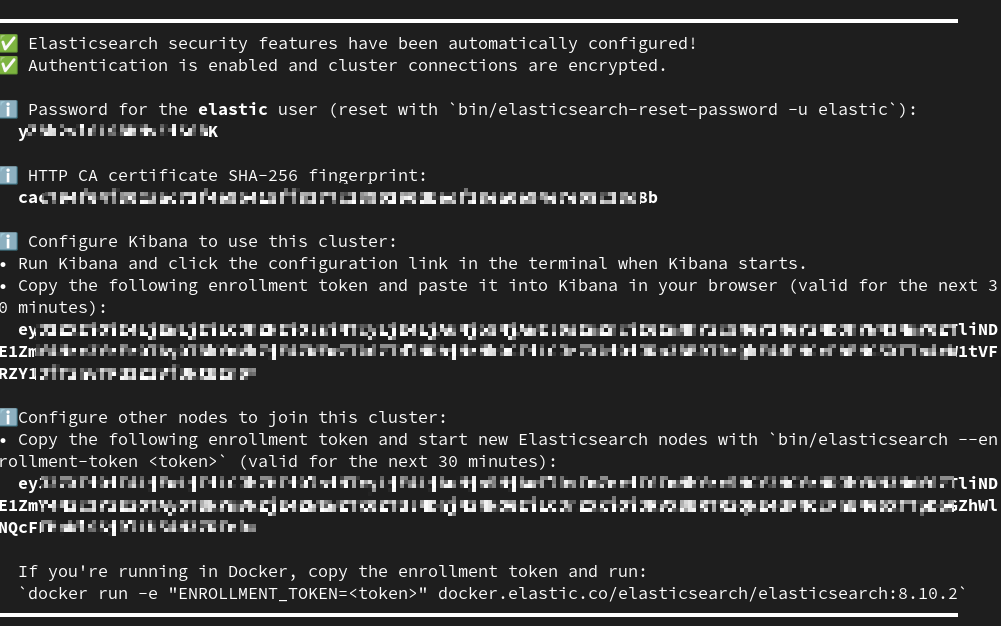
记得保存密码,可以将密码加到环境变量里export ELASTIC_PASSWORD="your_password",他只会弹出一次。如果忘了也可以重置密码

docker exec -it es01 /usr/share/elasticsearch/bin/elasticsearch-reset-password -u elastic
docker exec -it es01 /usr/share/elasticsearch/bin/elasticsearch-create-enrollment-token -s kibana

验证是否正常运行

把证书从容器中复制一份

docker cp es01:/usr/share/elasticsearch/config/certs/http_ca.crt .

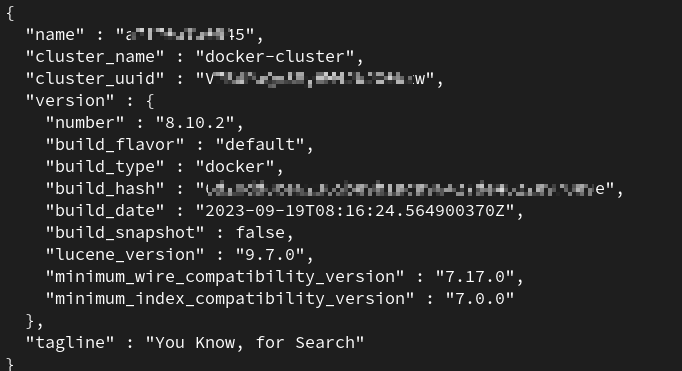
然后运行命令查看restful api是否正常运行

curl --cacert http_ca.crt -u elastic:$ELASTIC_PASSWORD https://localhost:9200

如果看到类似下图的信息就成功了 image.png

python连接

运行下面的代码,password改成你自己的代码。

from elasticsearch import AsyncElasticsearch
import ssl
import asyncio

ssl_context = ssl.create_default_context(cafile='info/http_ca.crt')
es = AsyncElasticsearch(
    ['https://localhost:9200'],
    http_auth=('elastic', 'password'),
    scheme="https",
    ssl_context=ssl_context
)

async def main():
    info = await es.info()
    print(info)
    await es.close()

# 运行主函数
asyncio.run(main())

看到类似下面的输出代表运行成功 image.png