











clip_interrogator教程
文字生成图片是近年来多模态和大模型研究的热门方向,openai提出的CLIP提供了一个方法建立起了图片和文字的联系,但是只能做到给定一张图片选择给定文本语义最相近的那一个,实际项目开发中我们总是需要从一张图片获取描述,感谢社区的活力,clip-interrogator应运而生。
受限于clip-interrogator 等于没有的文档,就有了这篇文章来写一些怎么使用clip-interrogator。
clip-interrogator项目地址GitHub
在线体验huggingface-clip-interrogator huggingface-clip-interrogator2
clip-interrogator原理
首先,clip-interrogator会使用BILP生成一段对图片的自然语言描述。
接下来会根据四种模式,从data文件夹下的txt文件中组合出文字生成图片常用的prompt,通过CLIP进行编码,然后将图片也用CLIP进行编码,计算出相似度最大的一组prompt,和BILP生成的prompt拼接到一起,就得到了一组prompt。
安装
pip install clip-interrogator==0.5.4如果需要BLIP2最新的WIP支持,运行
pip install clip-interrogator==0.6.0使用
快速开始
from PIL import Image
from clip_interrogator import Config, Interrogator
image = Image.open(image_path).convert('RGB')
ci = Interrogator(Config(clip_model_name="ViT-L-14/openai"))
print(ci.interrogate(image))将image_path 换成自己图片的路径即可
模型
BLIP
BLIP可以传入两种选项,large 和 base,默认使用large
base用法是
from PIL import Image
from clip_interrogator import Config, Interrogator
image = Image.open(image_path).convert('RGB')
ci = Interrogator(Config(caption_model_name='blip-base',clip_model_name="RN50-quickgelu/openai"))
print(ci.interrogate_fast(image))
CLIP
这里使用的模型的是openai的ViT-L-14。
我们也可以更改模型,文档在这完全没说清可以用什么,我做了试错
报错显示可用的模型有'coca_base', 'coca_roberta-ViT-B-32', 'coca_ViT-B-32', 'coca_ViT-L-14', 'convnext_base', 'convnext_base_w', 'convnext_base_w_320', 'convnext_large', 'convnext_large_d', 'convnext_large_d_320', 'convnext_small', 'convnext_tiny', 'convnext_xlarge', 'convnext_xxlarge', 'convnext_xxlarge_320', 'mt5-base-ViT-B-32', 'mt5-xl-ViT-H-14', 'RN50', 'RN50-quickgelu', 'RN50x4', 'RN50x16', 'RN50x64', 'RN101', 'RN101-quickgelu', 'roberta-ViT-B-32', 'swin_base_patch4_window7_224', 'ViT-B-16', 'ViT-B-16-plus', 'ViT-B-16-plus-240', 'ViT-B-32', 'ViT-B-32-plus-256', 'ViT-B-32-quickgelu', 'ViT-bigG-14', 'ViT-e-14', 'ViT-g-14', 'ViT-H-14', 'ViT-H-16', 'ViT-L-14', 'ViT-L-14-280', 'ViT-L-14-336', 'ViT-L-16', 'ViT-L-16-320', 'ViT-M-16', 'ViT-M-16-alt', 'ViT-M-32', 'ViT-M-32-alt', 'ViT-S-16', 'ViT-S-16-alt', 'ViT-S-32', 'ViT-S-32-alt', 'vit_medium_patch16_gap_256', 'vit_relpos_medium_patch16_cls_224', 'xlm-roberta-base-ViT-B-32', 'xlm-roberta-large-ViT-H-14'
这里其实是我一直没搞懂的一个地方,经过很多次试错,
/前面被称为model,但是很多模型是用不了的,/后面被称作 tag (通过读源码猜测是预训练模型来源) ,是可以写不同的内容,例如openai,有的时候还需要不填,但是究竟可以怎么组合一直没找到,下面做了一个总结,
| 模型 | tag |
|---|---|
| coca_base | 不传 |
| RN50 | ’openai’, ‘yfcc15m’, ‘cc12m’ |
| RN50-quickgelu | ’openai’, ‘yfcc15m’, ‘cc12m’ |
| RN101 | ’openai’, ‘yfcc15m’ |
| RN101-quickgelu | ’openai’, ‘yfcc15m’ |
| RN50x4 | ’openai’ |
| RN50x16 | ’openai’ |
| RN50x64 | ’openai’ |
| ViT-B-32 | ’openai’, ‘laion400m_e31’, ‘laion400m_e32’, ‘laion2b_e16’, ‘laion2b_s34b_b79k’ |
| ViT-B-32-quickgelu | ’openai’, ‘laion400m_e31’, ‘laion400m_e32’ |
| ViT-B-16 | ’openai’, ‘laion400m_e31’, ‘laion400m_e32’, ‘laion2b_s34b_b88k’ |
| ViT-L-14-336 | ’openai’ |
| ViT-S-32-alt | 不传 |
| ViT-S-32 | 不传 |
| ViT-S-16-alt | 不传 |
| ViT-S-16 | 不传 |
| ViT-M-32-alt | 不传 |
| ViT-M-32 | 不传 |
| ViT-M-16-alt | 不传 |
| ViT-M-16 | 不传 |
| xlm-roberta-base-ViT-B-32 | ’laion5b_s13b_b90k’ |
| xlm-roberta-large-ViT-H-14 | ’frozen_laion5b_s13b_b90k’ |
不传的意思是不写
/后面的部分不是只写模型名字,正确的用法例如coca_base/
例如使用RN50-quickgelu/openai 的用法就是ci = Interrogator(Config(clip_model_name="RN50-quickgelu/openai"))
文档中有这么一句ViT-L for Stable Diffusion 1, and ViT-H for Stable Diffusion 2,意思是 ViT-L 是给 Stable Diffusion 1 用的,ViT-H是给 Stable Diffusion 2 用的
模式
模式有best , classic, fast和negative 三种,开发者在这里的设计很奇怪,不同模式的使用不是传不同的参数而是使用不同的方法。best 模式就是上面的用法,fast 模式的用法是
from PIL import Image
from clip_interrogator import Config, Interrogator
image = Image.open(image_path).convert('RGB')
ci = Interrogator(Config(clip_model_name="RN50-quickgelu/openai"))
print(ci.interrogate_fast(image))
classic 模式用法
from PIL import Image
from clip_interrogator import Config, Interrogator
image = Image.open(image_path).convert('RGB')
ci = Interrogator(Config(clip_model_name="RN50-quickgelu/openai"))
print(ci.interrogate_classic(image))
negative 模式用法
from PIL import Image
from clip_interrogator import Config, Interrogator
image = Image.open(image_path).convert('RGB')
ci = Interrogator(Config(clip_model_name="RN50-quickgelu/openai"))
print(ci.interrogate_negative(image))
quiet
quiet 选项的作用是不输出中间过程,使用方法是直接写进Config 即可
,例如
from PIL import Image
from clip_interrogator import Config, Interrogator
image = Image.open('/content/test.png').convert('RGB')
ci = Interrogator(Config(clip_model_name="RN50-quickgelu/openai",quiet=True))
print(ci.interrogate_fast(image))
使用前,会有各种进度条
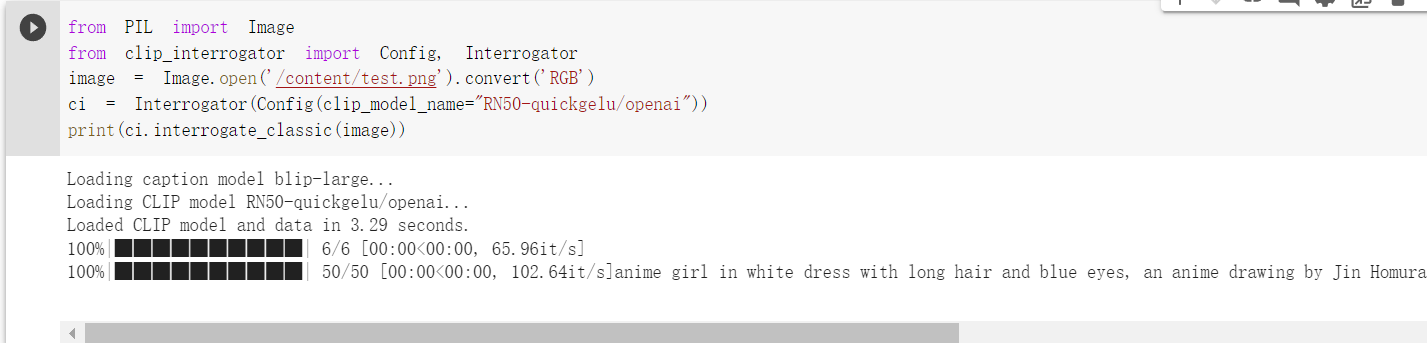
使用后,所有过程中的输出会被隐藏

自定义词库
如果你安装的是0.6.0,那么可以使用自定义词库
from clip_interrogator import Config, Interrogator, LabelTable, load_list
from PIL import Image

ci = Interrogator(Config(blip_model_type=None))
image = Image.open(image_path).convert('RGB')
table = LabelTable(load_list('terms.txt'), 'terms', ci)
best_match = table.rank(ci.image_to_features(image), top_count=1)[0]
print(best_match)