惯性聚合 高效追踪和阅读你感兴趣的博客、新闻、科技资讯
阅读原文 在惯性聚合中打开

推荐订阅源

T
The Blog of Author Tim Ferriss
WordPress大学
WordPress大学
freeCodeCamp Programming Tutorials: Python, JavaScript, Git & More
小众软件
小众软件
博客园_首页
Blog — PlanetScale
Blog — PlanetScale
B
Blog RSS Feed
Martin Fowler
Martin Fowler
M
MIT News - Artificial intelligence
博客园 - 三生石上(FineUI控件)
博客园 - 【当耐特】
N
News | PayPal Newsroom
K
Kaspersky official blog
大猫的无限游戏
大猫的无限游戏
人人都是产品经理
人人都是产品经理
N
Netflix TechBlog - Medium
B
Blog
Recorded Future
Recorded Future
U
Unit 42
J
Java Code Geeks
Security Latest
Security Latest
H
Hackread – Cybersecurity News, Data Breaches, AI and More
V
Vulnerabilities – Threatpost
Cisco Talos Blog
Cisco Talos Blog
钛媒体:引领未来商业与生活新知
钛媒体:引领未来商业与生活新知
Scott Helme
Scott Helme
Apple Machine Learning Research
aimingoo的专栏
aimingoo的专栏
T
Threatpost
Last Week in AI
Last Week in AI
Know Your Adversary
Know Your Adversary
Project Zero
Project Zero
cs.CL updates on arXiv.org
Cloudbric
Cloudbric
AWS News Blog
AWS News Blog
NISL@THU
NISL@THU
有赞技术团队
有赞技术团队
博客园 - 叶小钗
N
News and Events Feed by Topic
V
V2EX
T
Troy Hunt's Blog
月光博客
月光博客
博客园 - Franky
P
Proofpoint News Feed
OSCHINA 社区最新新闻
OSCHINA 社区最新新闻
V
Visual Studio Blog
C
Cisco Blogs
The Cloudflare Blog
T
Tor Project blog
Google Online Security Blog

The latest on AI & ML - The GitHub Blog

Better tools made Copilot code review worse. Here's how we actually improved it. Automating cross-repo documentation with GitHub Agentic Workflows How GitHub Copilot enables zero DNS configuration for GitHub Pages Evaluating performance and efficiency of the GitHub Copilot agentic harness across models and tasks I automated my job (and it made me a better leader) How we built an internal data analytics agent Getting more from each token: How Copilot improves context handling and model routing GitHub Copilot CLI for Beginners: Overview of common slash commands Accelerating researchers and developers building multilingual AI with a new open dataset How we made GitHub Copilot CLI more selective about delegation Making secret scanning more trustworthy: Reducing false positives at scale Give GitHub Copilot CLI real code intelligence with language servers From one-off prompts to workflows: How to use custom agents in GitHub Copilot CLI GitHub recognized as a Leader in the Gartner® Magic Quadrant™ for Enterprise AI Coding Agents for the third year in a row Take your local GitHub sessions anywhere Building a general-purpose accessibility agent—and what we learned in the process Dungeons & Desktops: Building a procedurally generated roguelike with GitHub Copilot CLI Improving token efficiency in GitHub Agentic Workflows Agent pull requests are everywhere. Here’s how to review them. Validating agentic behavior when “correct” isn’t deterministic Register now for OpenClaw: After Hours @ GitHub GitHub Copilot CLI for Beginners: Interactive v. non-interactive mode Building an emoji list generator with the GitHub Copilot CLI
What are git worktrees, and why should I use them?
Natalie Guevara · 2026-06-17 · via The latest on AI & ML - The GitHub Blog

It seems like the latest hotness in git these days is the concept of worktrees. Which… is kind of funny because they’ve been around since 2015.

But, nevertheless, they are cool, and you might be wondering why you’d use them, how they differ from branches, and why they are suddenly so popular.

Let’s talk about it!

Context switching with branches and stashing

Let’s say you lived in a worktree-less world, and were working on a ticket, and suddenly an urgent bug came to you and you had to switch contexts.

First, you might stash your work:

git stash "wip feature login" 

Then you’d switch to your main branch and update:

git checkout main 
git pull origin main

Then make a bugfix branch:

git checkout -b hotfix-bug

Then you’d fix everything, commit, and push the branch:

git add . 
git commit -m "fix broken submit button" 
git push origin hotfix-bug

Then after merging a pull request, you might return back to your computer and pull main and remove the bug branch:

git checkout main 
git pull origin main 
git branch -d hotfix-bug 

And then you could go back to the feature you were working on:

git checkout feature-login 
git stash pop

Phew. Where were we?

The mental overhead of switching around, reloading files, reinstalling node_modules based on whatever changed, and so on, is a lot. The context switching burden is heavy.

Now, this is a basic example, but sometimes developers would work around this kind of chaos with doing some more complicated git stash commands, or even multiple clones of the same repo (I’m guilty of that one).

Until… worktrees!

Context switching with worktrees

With worktrees, you never leave your branch and you never stash, and your editor context for your original feature stays untouched.

git worktree add ../hotfix-workspace -b hotfix-bug main

This instantly creates a sibling folder called hotfix-workspace, and bases it on main, and checks out a new branch called hotfix-bug.

Now you can open that folder in a new editor window (or cd into it) and fix the bug. Your original editor window stays exactly as you left it.

cd ../hotfix-workspace 
# ...fix fix fix... 
git add . 
git commit -m "fix broken submit button" 
git push origin hotfix-bug

You merge the pull request online just like before, and once it’s merged, you can simply delete the temporary folder.

cd ../main-project 
git worktree remove ../hotfix-workspace

This is so much smoother! There’s zero risk of stash conflicts, there’s no editor disruption, and you can truly work in parallel.

So… why now?

For a really long time, worktrees were relatively unknown. Most developers had never heard of them, because either Git GUIs didn’t support them (or treated them as second-class citizens), or because they just usually followed the known pattern of feature branch, then work, then PR, then merge, then repeat.

Now, our work as developers has changed. AI has made us work in parallel more than we ever have before in the history of software development. Developers run so many sessions in parallel, and “code review culture” is growing beyond “code writing culture.”

Agents and humans can do more in parallel with worktrees. It’s the default mode for the GitHub Copilot app, and for many other modern tools.

What’s the catch?

Worktrees do solve a whole lot of issues, but there’s definitely some things to watch out for.

  • Dependency bloat: each worktree folder requires its own copy of your project dependencies. If you’re running npm install or pip install across multiple of them, your computer might get very full, very quickly.
  • Folder management: you have to delete the worktree folders, to avoid cluttering your parent directory over time. Apps like the GitHub Copilot app do often handle this for you, but it’s still something you might have to do yourself if you’re operating in the terminal yourself.
  • Global .gitignore requirements: if you create worktree folders inside your main repo directory, you have to manually add them to .gitignore to not accidentally track them. You can make these worktrees outside of your main repo (and many apps do that by default), but it’s worth noting.
  • One branch limits: Git prevents you from checking out the exact same branch in two different worktrees at the same time to prevent data corruption.

How do I use worktrees in the GitHub Copilot app?

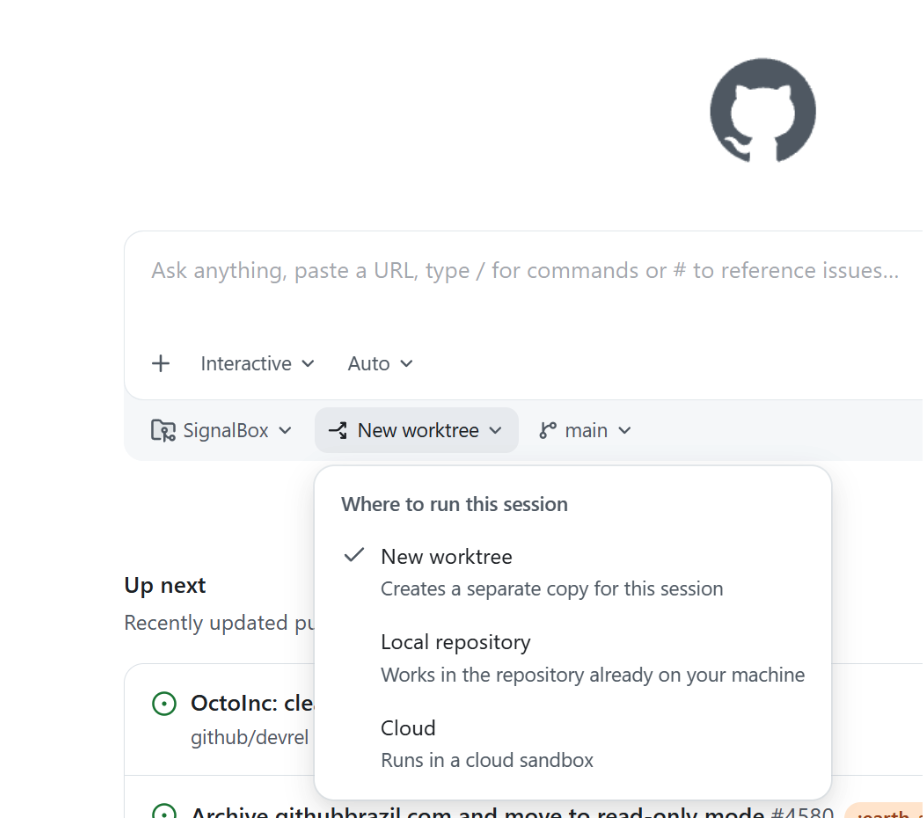
Great question! What’s awesome is… they “just work” out of the box. When you open the app, there’s a dropdown that asks you where you want to run your new session on the home screen. The default is a new worktree.

Screenshot of the 'New worktree' dropdown in the GitHub Copilot app. Options are 'New worktree', 'Local repository', or 'Cloud.'

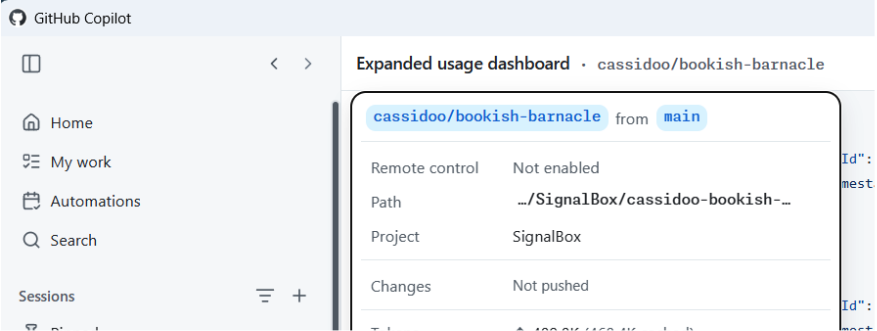
Then, once you kick off a new session, you can click the session name at the top of the app, and you’ll see the (fun!) generated name of your worktree, as well as the bath where it’s located, the project that worktree is for, and details about the changes that you’ve made.

Screenshot of the worktree generated in the previous step.

Easy peasy lemon squeezy!

Should I use worktrees?

I will give you the most senior developer answer I can: It depends! You might prefer working in one way or another. You might not do as much work in parallel and like the mental model of branches and stashing. You might only do worktrees from now on. You might want to do both!

The world’s your oyster, and you can try them all in the GitHub Copilot app today.

Written by

Cassidy Williams

Cassidy is senior director for developer advocacy here at GitHub. She enjoys building software, advising startups, and teaching developers how to build better. She has a weekly newsletter at cassidoo.co/newsletter where you can get her updates, practice coding problems, and a joke in your inbox!

Related posts

Explore more from GitHub

Docs

Docs

Everything you need to master GitHub, all in one place.

Go to Docs

GitHub

GitHub

Build what’s next on GitHub, the place for anyone from anywhere to build anything.

Start building

Customer stories

Customer stories

Meet the companies and engineering teams that build with GitHub.

Learn more

GitHub Universe 2026

GitHub Universe 2026

Join us October 28-29 in San Francisco or online for GitHub Universe, our flagship developer event uniting people, agents, and the world’s code.

Register now