

As a staff manager of software engineering, Matteo Vasirani leads product analytics and data science at GitHub.








Large data and analytics organizations often struggle to make access to data and insights truly self-serve. The industry tried to solve this problem, quite unsuccessfully, for decades, but now AI is giving us a credible way to do just that.
At GitHub scale, providing dedicated analytics support to dozens of product teams is challenging, and therefore many teams are left to solve this problem on their own. Though there is a lot of valuable product telemetry that product and engineering teams can use to make decisions, figuring out which data model, which grain, which filter, and then write the query and validate the result has always been difficult without the support of a data analyst.
Enter Qubot, our internal GitHub Copilot-powered analytics agent. Qubot allows any Hubber (that’s what we call GitHub employees) to ask questions about any data model in GitHub’s data warehouse in plain language and get an answer within seconds.
Qubot is not a reporting tool or a dashboard replacement. Instead, it’s intended for exploratory questions like “Which cohort of users has the highest retention on this feature?” or “What product contributed to move this metric the most last week?” Qubot has zero cost maintenance and helps teams ramp up quickly on datasets they may be unfamiliar with.
In this blog post, we’ll go over how we built Qubot, how it’s changed, and what we learned.
The architecture has three main components: user interface, context layer, and query engine.
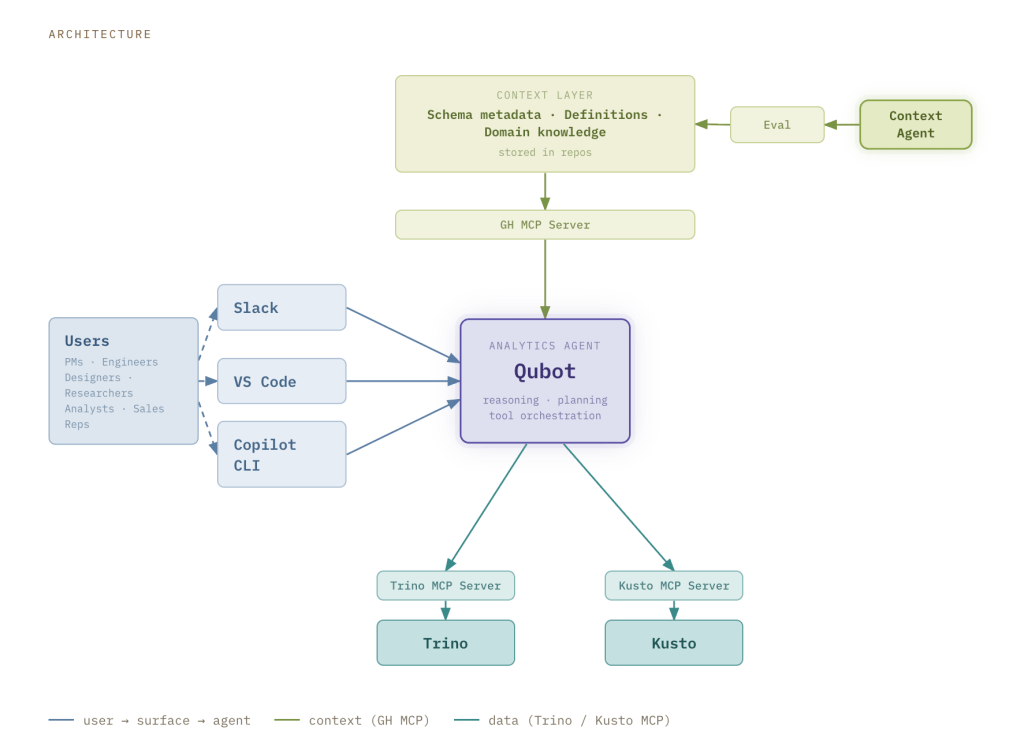
Qubot is accessible through Slack, VS Code, and the Copilot CLI. The Slack interface doesn’t require any configuration, and it is the preferred collaboration tool of Hubbers. When someone posts a question in the Qubot Slack channel, a Qubot instance is spawned as a Copilot Cloud Agent running on github.com. The answer is provided directly in Slack, allowing the user to share the result with others, but also iterate in the thread to evolve or refine the question. All the results are also stored as a markdown report in a pull request that the user can reference to fine tune the query or use it in a dashboard.
Qubot is also available in VS Code and the Copilot CLI, for users that want an experience more integrated with their workflows. Qubot can be installed with one command as a plugin, and it becomes available in any agent session in VS Code or Copilot CLI alongside any other custom agents, skills, and tools configured by the user.
Our data warehouse contains data at different stages of curation: raw events (bronze), conformed facts and dimensions (silver), and curated datasets designed for specific business use cases (gold). The context layer is built in a federated way, with knowledge that is tailored to the type of data.
We also leverage our ETL pipelines to systematically enrich the context layer with additional signals and derived metadata. The context is loaded at runtime via the GitHub MCP Server, fetching it from the context layer.
The context layer is constantly enriched with new knowledge persisted across multiple repositories. At GitHub, we primarily use markdown for documentation, so we don’t need to interface with multiple different tools.
We’ve streamlined federated context contribution through a context agent. Teams can contribute via a standardized template or by referencing a repository containing relevant context. The agent then ingests, organizes, and normalizes this information into a structured format that has proven effective for Qubot based on our evaluations.
Every change to the context layer or agent configuration gets evaluated before it ships. When someone wants to enrich the context layer with new knowledge, they can open a pull request. The new context goes through an offline eval framework that measures accuracy of the response, latency in finding the right answer, and catches regressions before they reach users.
The benchmarking framework for evaluating Qubot across structured test cases has three components:
gh agent-task create, runs multiple parallel trials, polls for completion, and saves detailed JSON results.The end-to-end flow is: define test cases → run Qubot N times per case → collect results → aggregate stats → compare configurations.
Qubot connects to both Kusto and Trino, the two query engines that power most of GitHub’s analytics workloads, via a MCP server. We developed a custom implementation of the Trino MCP server, while for Kusto we deployed a local version of the Fabric RTI MCP Server. Kusto is fast and well-suited to exploratory questions over recent event data. Trino handles complex joins and deeper historical analysis.
Rather than forcing users to know which to use, Qubot defaults to Kusto and switches to Trino automatically when the question requires it.
Qubot has been widely adopted at GitHub, with hundreds of enthusiastic users running thousands of queries. The number of questions that Hubbers ask in the data and analytics Slack channels has reduced dramatically, because now they can explore the data with greater autonomy and reach out only for complicated questions. It also allows Hubbers that never dared to dip into the data warehouse to access the data they need to drive their decision making. That is one of the reasons for offering multiple interfaces like Slack, Copilot CLI, and VS Code; Hubbers are very technical, but we wanted to offer an option with no barrier to entry and zero configuration.
We quickly discovered that the context layer is key to enriching the reasoning capabilities of Copilot and to create an expert analytics agent. In our experiments we found that structured and well curated context not only makes Qubot more accurate, but also three times faster at returning the right answer. This has profound implications on the analytics engineering discipline, because it makes this type of artifact a first class citizen in how data is modeled, rather than an afterthought.
Qubot has been a rare example of successful hub-and-spoke execution. It removes strain from the data and analytics team, as product teams own the telemetry for their surfaces and business teams own the definition of their gold data. Qubot acted as a gravitational force to centralize all this distributed knowledge into a single tool that can benefit all GitHub, providing incentives to partner teams to contribute to Qubot, instead of creating multiple tools limited to their own domains.
Qubot engineering team: Weijie Tan, Tobias Tschuemperlin, Vamsi Anamaneni
Special thanks: Yaswanth Anantharaju
As a staff manager of software engineering, Matteo Vasirani leads product analytics and data science at GitHub.

Cynthia Joseph is senior product manager for the Data team.

Build what’s next on GitHub, the place for anyone from anywhere to build anything.

Join us October 28-29 in San Francisco or online for GitHub Universe, our flagship developer event uniting people, agents, and the world’s code.
此内容由惯性聚合(RSS阅读器)自动聚合整理,仅供阅读参考。 原文来自 — 版权归原作者所有。

