

Principal Software Engineer in CodeAI and Github Copilot Coding Agents





While the model provides the raw intelligence, the harness shapes how effectively that intelligence is applied. The GitHub Copilot agentic harness is a single shared component of the GitHub Copilot SDK, which powers the GitHub Copilot CLI, GitHub Copilot app, and Copilot code review, along with a wide variety of experiences across GitHub and Microsoft. Improve the harness, and every surface benefits.
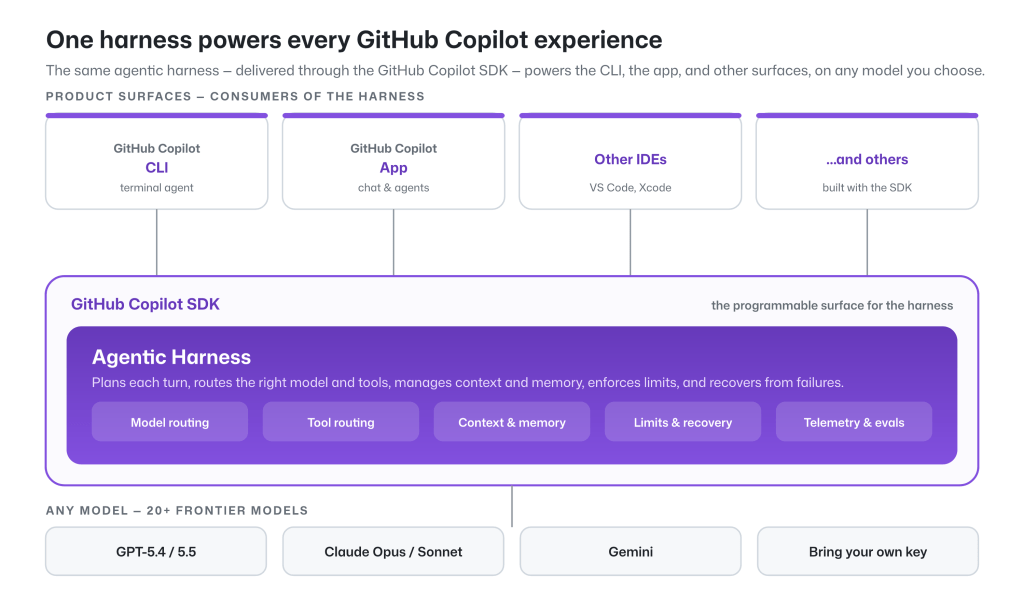
The tools, context, and workflow are orchestrated by the harness. A harness should be fast, token-efficient, and predictable for developers. That’s what we designed GitHub Copilot’s agentic harness to do.
In this post, we’ll present data showing the efficiency and performance of the GitHub Copilot agentic harness across a wide range of agentic software engineering tasks.
We continuously evaluate the capability and efficiency of the GitHub Copilot agentic harness through a combination of public and internally developed benchmarks. Our public benchmarks include industry standards, while several internal benchmarks are derived from large codebases inside GitHub and Microsoft. We complement this with real-world metrics and online experiments to ensure we understand the harness’s performance in controlled environments and its practical impact on agentic problem solving and task completion.
We control as many variables as possible to evaluate the performance of GitHub Copilot’s harness compared to the model provider’s harness: use the same model, the same benchmark task, normalized on context window, reasoning efforts, tool selection, and MCP servers.
Below we report our latest results for a subset of the benchmarks we track, across four leading models: Claude Sonnet 4.6, Claude Opus 4.7, GPT‑5.4, and GPT‑5.5:
| Benchmark | Domain | Purpose |
|---|---|---|
| SWE-bench Verified | 500 human-validated bug-fix tasks from open-source Python repositories | Established industry-standard benchmark for coding agents |
| SWE-bench Pro | More difficult, multi-step engineering tasks requiring deeper reasoning and broader code changes | Better reflects complex, real-world software engineering work |
| SkillsBench | How effectively an agent uses skills to solve tasks | Evaluates extensibility and skill use and triggering capabilities |
| TerminalBench | Agent performance on terminal-based tasks | Measures effectiveness in command-line workflows used by developers |
| Win-Hill | Internal benchmark for tasks running inside Windows containers | Validates that performance generalizes across operating systems and environments |
Throughout, we compare GitHub Copilot CLI against the model-vendor harnesses that ship those models natively: Claude Code for Sonnet 4.6 and Opus 4.7, and Codex CLI for GPT‑5.4 and GPT‑5.5.
Holding the model and task fixed, across multiple benchmark results, the GitHub Copilot harness achieves task completion rates on par with other model-vendor harnesses, while showing lower token consumption across most configurations.
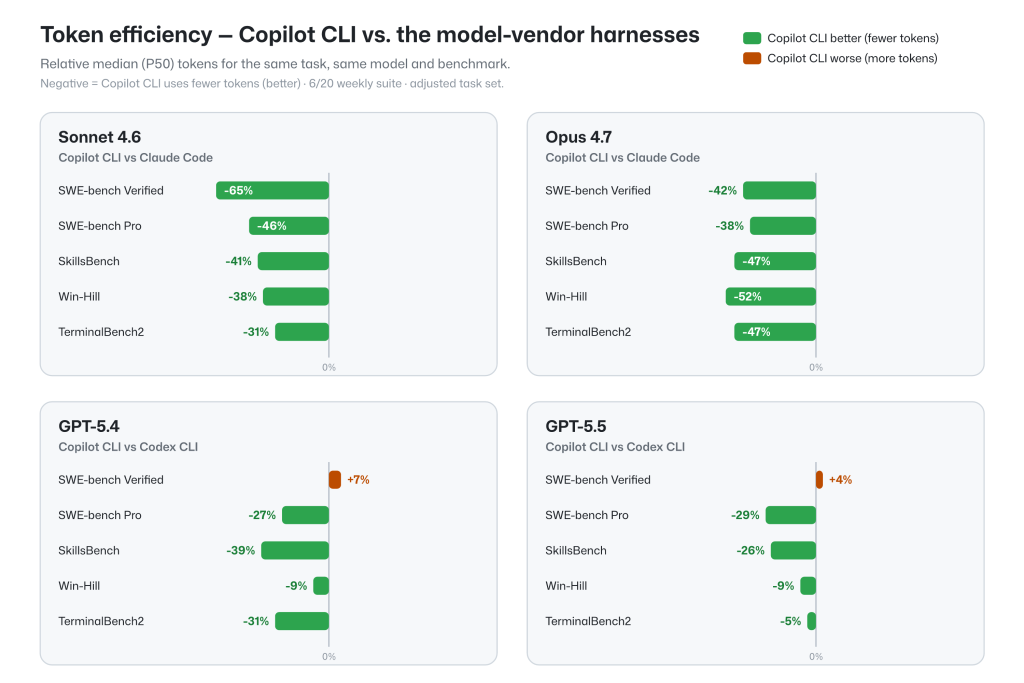
Token efficiency only matters if the work actually gets done.
Task resolution rates for the GitHub Copilot agentic harness across these benchmarks are on-par with model-vendor harnesses when used with a fixed model and benchmark task. This ensures that the full potential of the underlying model is available, along with multi-model flexibility, token efficiency, and memory and context capabilities.
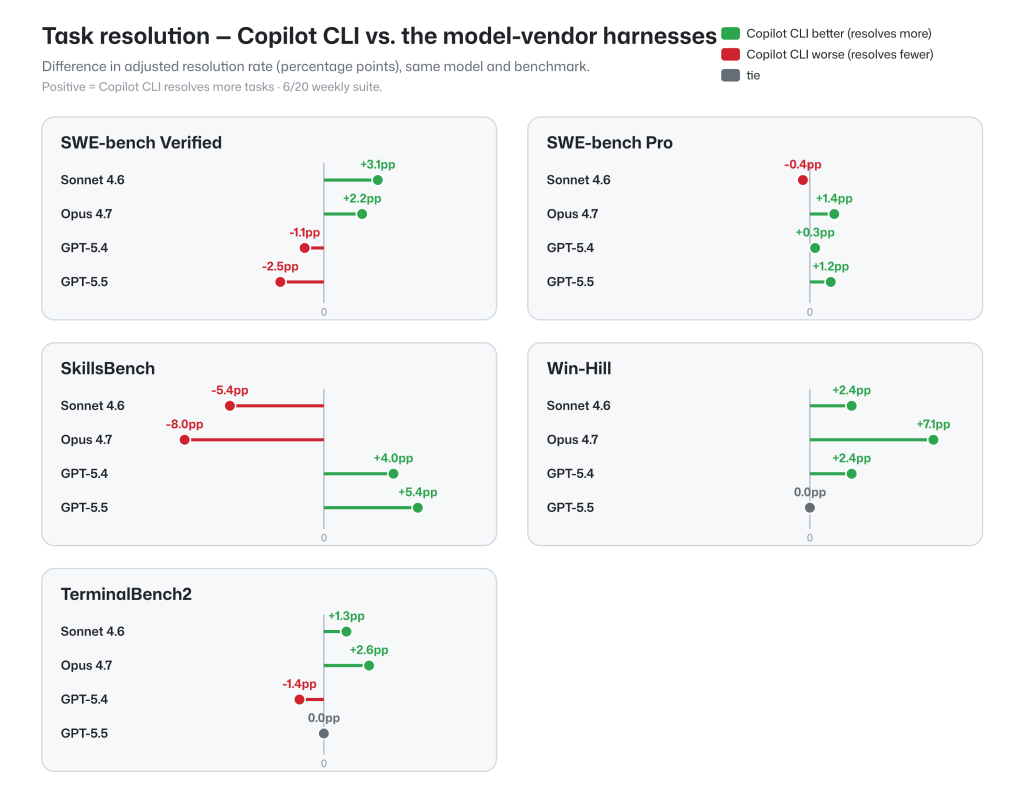
These results reflect effective parity, since the differences in either direction are within the variance due to the stochastic nature of the models, making the cross-harness performance on-par.
To continuously improve the GitHub Copilot agentic harness on task completion and token efficiency, we regularly perform thorough analyses across benchmarks. Below is an example of variance analysis on TerminalBench 2.0, which not only highlights GitHub Copilot’s strength on task completion and token efficiency, but also shows the run-to-run variance intrinsic to this kind of benchmark.
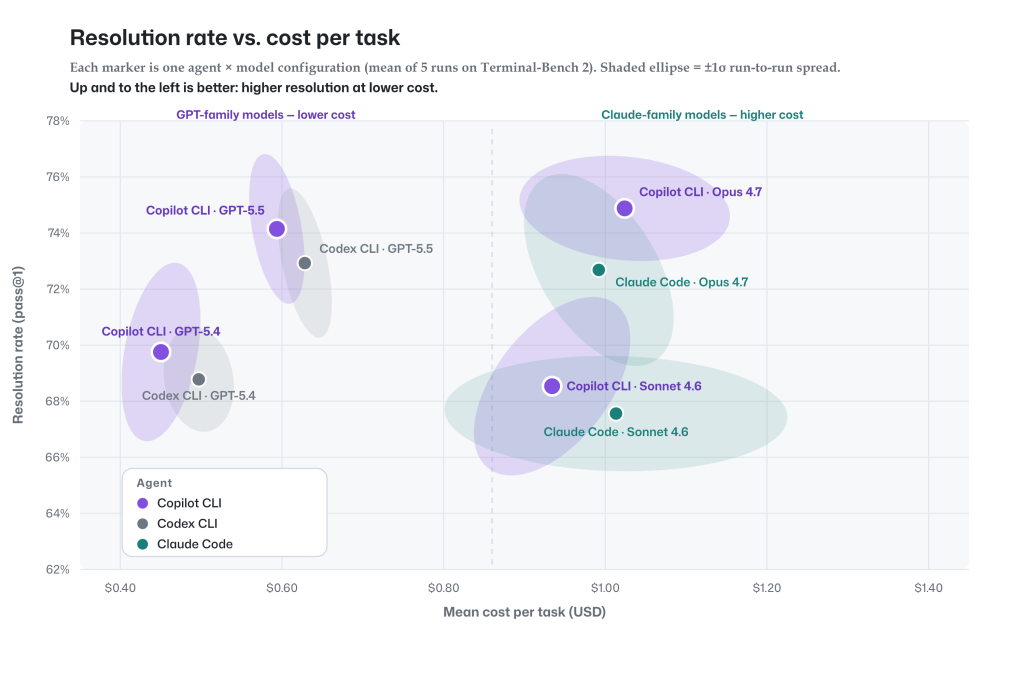
Every marker is one agent-and-model configuration on TerminalBench 2.0, with resolution rate on the vertical axis and dollar cost per task on the horizontal axis. The shaded ellipse around each point shows the ±1σ run-to-run spread, displaying how much each configuration varies between runs.
Three things stand out:
The GitHub Copilot agentic harness supports 20+ frontier models across the GPT, Claude, Gemini, and MAI families, plus bring your own key for open‑source and local models. You can choose the right model for the capability and cost profile of each task, or let Auto model selection choose for you, balancing task intent and model health to optimize token efficiency.
A multi‑model architecture also unlocks harness‑level capabilities a model-vendor harness simply can’t offer. Rubber Duck, for example, uses cross‑model‑family critique, where one model reviews another’s work to improve outcomes beyond what any single model produces alone.
Benchmarks are just one signal among several. We are constantly working to improve quality across benchmarks, real-world usage metrics, and online experiments, while pushing to efficiently make the most out of every token.
GitHub Copilot delivers task‑resolution on par with leading model-vendor harnesses while using fewer tokens across several configurations, without locking you into a single model through its multi‑model architecture. For developers, this means you can get comparable task completion with lower token cost, while still choosing the model that best fits your task.
Try GitHub Copilot with the model of your choice, compare approaches on the tasks you run every day, and see how different models and agent strategies perform in your environment.
Learn more about:
The same agentic harness powers these experience. We’re continuing to improve its quality, efficiency, and flexibility.
To make the comparison as controlled and reproducible as possible, we run each agent with equivalent settings across models, tasks, and environments.
All runs have a two-hour timeout. All agents run non-interactively single-turn, with web-tools disabled, and all tools allowed.
TerminalBench2 analysis: Default settings enabled for agents with reasoning effort set to medium (e.g. tool search is enabled for Claude Code and Copilot CLI uses github-mcp-server). Codex and Claude Code use direct Anthropic and OpenAI endpoints. To ensure complete and reliable results, any missing data or infrastructure-related failures were re-run until all 89 TerminalBench2 tasks produced results. Model-generated errors were retained and not excluded from the analysis. Each model was evaluated across five independent runs, and Copilot was tested in two separate evaluation batches to enable comparison with Claude Code and Codex.
All benchmarks: All agent model pairs normalized to same context window size, same prompt token limits, reasoning effort (medium) and settings—no tool search, no MCP servers. Keeping the harness’s default built-in tools. Infrastructure-related anomalies and network-access effects are excluded across all agents for a benchmark to ensure fair comparisons. To reduce the impact of run-to-run variability on smaller benchmarks (<100 instances), five independent runs were conducted, and the best scored run is reported. All metrics are presented as pass@1. These normalizations mean results differ from public benchmark submissions, which typically use higher reasoning effort and other tuned settings.
Principal Software Engineer in CodeAI and Github Copilot Coding Agents

Partner Architect at GitHub Copilot

Build what’s next on GitHub, the place for anyone from anywhere to build anything.

Join us October 28-29 in San Francisco or online for GitHub Universe, our flagship developer event uniting people, agents, and the world’s code.
此内容由惯性聚合(RSS阅读器)自动聚合整理,仅供阅读参考。 原文来自 — 版权归原作者所有。

