








推荐:7种方式实现pandas创建多重索引。pandas中df的列索引和行索引都可以有name属性(多层索引就是names属性),所以一旦涉及多层索引,pandas需要预留位置来展示多层索引可能存在的names属性,因此在一些展示上可能和我们想的不同。我们看1个两层索引的df在excel中的样子(你可能好奇为啥有空行):
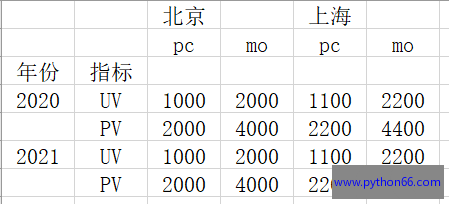
通过index_col和header参数来读取上述excel,读取成行和列都是2层索引的df,展示如下:
# -*- coding:UTF-8 -*-
import pandas as pd

df = pd.read_excel('11.xlsx',index_col=[0,1],header=[0,1])
print(df)
print('-----------')
print(df.index.values)
print(df.columns.values)
print(type(df.index))
           北京          上海
           pc    mo    pc    mo
年份   指标
2020 UV  1000  2000  1100  2200
     PV  2000  4000  2200  4400
2021 UV  1000  2000  1100  2200
     PV  2000  4000  2200  4400
-----------
[(2020, 'UV') (2020, 'PV') (2021, 'UV') (2021, 'PV')]
[('北京', 'pc') ('北京', 'mo') ('上海', 'pc') ('上海', 'mo')]
<class 'pandas.core.indexes.multi.MultiIndex'>
上面的excel之所以有空行,是因为行索引names属性的存在,读取上述格式excel时候【年份、指标】是行索引的名字(names属性),如下代码可印证:
# -*- coding:UTF-8 -*-
import pandas as pd

df = pd.read_excel('11.xlsx',index_col=[0,1],header=[0,1])
print(df)
print('------------')
print(df.index.names)
print('------------')
df.index.names = (None,None) # 删除行索引名字
print(df)
           北京          上海
           pc    mo    pc    mo
年份   指标
2020 UV  1000  2000  1100  2200
     PV  2000  4000  2200  4400
2021 UV  1000  2000  1100  2200
     PV  2000  4000  2200  4400
------------
['年份', '指标']
------------
           北京          上海
           pc    mo    pc    mo
2020 UV  1000  2000  1100  2200
     PV  2000  4000  2200  4400
2021 UV  1000  2000  1100  2200
     PV  2000  4000  2200  4400
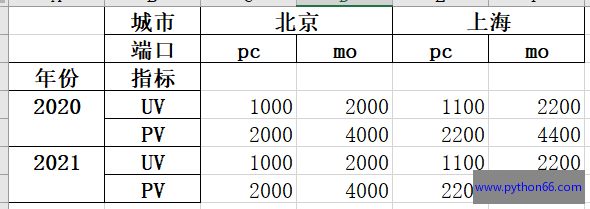
然后我们再给列索引增加names属性,列索引是双层,也是需要元组,然后整个df如下:
# -*- coding:UTF-8 -*-
import pandas as pd

df = pd.read_excel('11.xlsx',index_col=[0,1],header=[0,1])
print(df)
print('------------')
df.columns.names=('城市','端口')
print(df)
           北京          上海
           pc    mo    pc    mo
年份   指标
2020 UV  1000  2000  1100  2200
     PV  2000  4000  2200  4400
2021 UV  1000  2000  1100  2200
     PV  2000  4000  2200  4400
------------
城市         北京          上海
端口         pc    mo    pc    mo
年份   指标
2020 UV  1000  2000  1100  2200
     PV  2000  4000  2200  4400
2021 UV  1000  2000  1100  2200
     PV  2000  4000  2200  4400
我们把上述df写入excel就是这样子。
很赞哦!
python编程网提示:转载请注明来源www.python66.com。
有宝贵意见可添加站长微信(底部),获取技术资料请到公众号(底部)。同行交流请加群

此内容由惯性聚合(RSS阅读器)自动聚合整理,仅供阅读参考。 原文来自 — 版权归原作者所有。