






本节测试下selenium启动浏览器的一些配置参数,比如UA信息,模拟手机,是否加载图片等。首先找到可以检测浏览器UA信息及屏幕分辨率的网站。
http://www.sunchateau.com/free/UA.htm,打开该网站即可显示当前浏览器和屏幕的信息。
# -*- coding: utf-8 -*-
import time
from selenium import webdriver
from selenium.webdriver.chrome.options import Options

option = Options()
# 移动UA
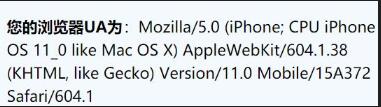
iphone_ua = 'Mozilla/5.0 (iPhone; CPU iPhone OS 11_0 like Mac OS X) AppleWebKit/604.1.38 (KHTML, like Gecko) Version/11.0 Mobile/15A372 Safari/604.1'
# 窗口大小
option.add_argument('--window-size=900,800')
# 移动分辨率及UA
mobile_emulation = {
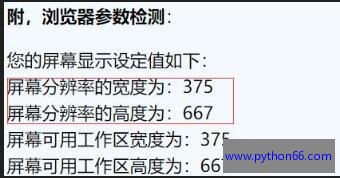
    "deviceMetrics": {"width": 375, "height": 667,'pixelRatio':3},
    "userAgent": iphone_ua,
    "pixelRatio": 2 #设备像素比
}
# 禁止图片和弹窗
prefs = {
    'profile.default_content_setting_values' : {
        'images' : 2, # 禁止图片加载
        'notifications':2 # 禁止弹窗
    }
}

option.add_experimental_option('prefs',prefs)
option.add_experimental_option('mobileEmulation',mobile_emulation)
option.add_argument('--disable-gpu') # linux下用 避免一些bug
#手动指定浏览器位置 如路径是谷歌默认安装位置可省略
option.binary_location = "C:/Program Files (x86)/Google/Chrome/Application/chrome.exe"
driver = webdriver.Chrome(options=option)
driver.get('http://www.sunchateau.com/free/UA.htm')


time.sleep(5)
driver.quit()
运行代码,可以看到该网站显示的信息和我们配置的完全一样!说明配置有效
配置UA也可以用如下方法
option.add_argument('--user-agent=""') # 设置请求头的User-Agent
禁止加载图片也可以如下方法
option.add_argument('--blink-settings=imagesEnabled=false')
更多启动参数可以参考这里的文档
https://peter.sh/experiments/chromium-command-line-switches/
有些有强迫症的同学非要指明谷歌浏览器路径和webdriver的路径,我就单独列出来这个
from selenium import webdriver
from selenium.webdriver.chrome.options import Options


option = Options()
# 谷歌浏览器路径
option.binary_location = "C:/Program Files (x86)/Google/Chrome/Application/chrome.exe"
# webdriver的路径
driver = webdriver.Chrome(executable_path='D:/python3/install/chromedriver')
所有配置是否可行一定要亲自尝试,同一种配置如果浏览器版本不同可能就不生效了!常见的配置如下:
注意高版本浏览器:禁用浏览器正在被自动化程序控制的提示
注意高版本浏览器:window.navigator.webdriver=true修改
	  option.add_argument('--user-agent=""') # 设置请求头的User-Agent
	  option.add_argument('--window-size=1280x1024') # 设置浏览器窗口大小
	  option.add_argument('--start-maximized') # 浏览器启动时全屏
	  option.add_argument('--disable-infobars') # 禁用浏览器正在被自动化程序控制的提示!谷歌76版本起该方法失效。
	  option.add_experimental_option("excludeSwitches", ['enable-automation']);# 正常浏览器window.navigator.webdriver的值为 undefined。而使用selenium访问则该值为true,该方法规避这种风险,但是谷歌浏览器79.0.3945.88不生效。
	  option.add_argument('--incognito') # 隐身模式(无痕模式)
	  option.add_argument('--hide-scrollbars') # 隐藏滚动条, 应对一些特殊页面
	  option.add_argument('--disable-javascript') # 禁用javascript
	  option.add_argument('--blink-settings=imagesEnabled=false') # 不加载图片, 提升速度
	  option.add_argument('--headless') # 无头模式 浏览器不提供可视化页面
	  option.add_argument('--ignore-certificate-errors') # 屏蔽--ignore-certificate-errors提示信息
	  option.add_argument('--disable-gpu') # 禁用谷歌浏览器GPU加速-配置1(linux上用)
	  option.add_argument('–disable-software-rasterizer')# 禁用谷歌浏览器GPU加速-配置2(linux上用)
	  option.add_argument('--disable-extensions')# 禁用扩展插件
很赞哦!
python编程网提示:转载请注明来源www.python66.com。
有宝贵意见可添加站长微信(底部),获取技术资料请到公众号(底部)。同行交流请加群

此内容由惯性聚合(RSS阅读器)自动聚合整理,仅供阅读参考。 原文来自 — 版权归原作者所有。