



惯性聚合 高效追踪和阅读你感兴趣的博客、新闻、科技资讯
阅读原文 在惯性聚合中打开

推荐订阅源

C
Check Point Blog
freeCodeCamp Programming Tutorials: Python, JavaScript, Git & More
博客园 - 聂微东
月光博客
月光博客
博客园 - 司徒正美
爱范儿
爱范儿
aimingoo的专栏
aimingoo的专栏
量子位
Recent Announcements
V
V2EX
P
Proofpoint News Feed
小众软件
小众软件
云风的 BLOG
云风的 BLOG
腾讯CDC
宝玉的分享
宝玉的分享
Microsoft Azure Blog
大猫的无限游戏
大猫的无限游戏
Vercel News
Vercel News
The GitHub Blog
The GitHub Blog
A
About on SuperTechFans
B
Blog
博客园_首页
GbyAI
GbyAI
博客园 - Franky

老董笔记

尚硅谷机构在哪?尚硅谷培训怎么样?靠谱吗-互联网IT百科 韩顺平介绍,传智讲师,开办泰牛,入尚硅谷等一系列-互联网IT百科 pandas多重索引标准样式(写入excel有空行)-互联网IT百科 cannot join with no overlapping index names-互联网IT百科 pandas多列变多行(即宽表变长表)melt和stack函数-互联网IT百科 pandas多行转多列(长表变宽表)pivot和unstack-互联网IT百科 Index contains duplicate entries, cannot reshape完美解决-互联网IT百科 single positional indexer is out-of-bounds-互联网IT百科 Can only compare identically-labeled Series objects-互联网IT百科 pandas transform用法详解(多个案例)-互联网IT百科 python四舍五入精确实现-互联网IT百科 pandas的groupby使用apply分组排序-互联网IT百科 index 0 is out of bounds for axis 0 with size 0-互联网IT百科 pandas分组过滤filter函数-互联网IT百科 联想Win10系统如何禁用触摸屏关闭触摸-互联网IT百科 groupby分组计算transform转换返回相同长度序列-互联网IT百科 brooks seo教程python教程,brooks seo教程网盘,布鲁seo资源-互联网IT百科 电脑右键文件夹一直转圈电卡死怎么回事-互联网IT百科 施琪嘉的心理成长课(荐)-互联网IT百科 百度SEO公司_SEO推广公司哪家好_SEO外包服务如何选-老董笔记 groupby后agg同1列用多个聚合函数、不同列用不同函数、自定义函数-互联网IT百科 pandas的groupby单列多列分组聚合运算-互联网IT百科 DataFrameGroupBy对象及分组个数、分组大小、组名索引、组数据详解-互联网IT百科 pandas中groupby之Grouper and axis must be same length-互联网IT百科 pandas中groupby的分组原理-互联网IT百科 pandas的groupby的使用详解大全-互联网IT百科 openpyxl单元格自动换行强制换行Alignment(wrapText=True)-互联网IT百科 python教程全套(可就业)-互联网IT百科 联想win10系统CPU显示100%,电脑呼呼响怎么回事-互联网IT百科 如何自制CPU,CPU原理是怎么样的?-互联网IT百科
selenium、webdriver及浏览器的关系及对应版本安装-互联网IT百科
2020-12-24 · via 老董笔记

  selenkium支持多种浏览器,包括Chrome,Safari,Firefox、Edge 等,我们以Chrome浏览器为例学习。先完成以下3步:

  1 selenium安装

  安装selenium和安装requests或者其他库一样,直接pip命令完成就行。直接用pip install selenium即可。

  2 浏览器驱动下载

  下载地址:http://chromedriver.storage.googleapis.com/index.html

  国外的站点如果打不开可以移步这里:http://npm.taobao.org/mirrors/chromedriver/

  3 驱动和浏览器版本的映射关系

  https://registry.npmmirror.com/binary.html?path=chromedriver/

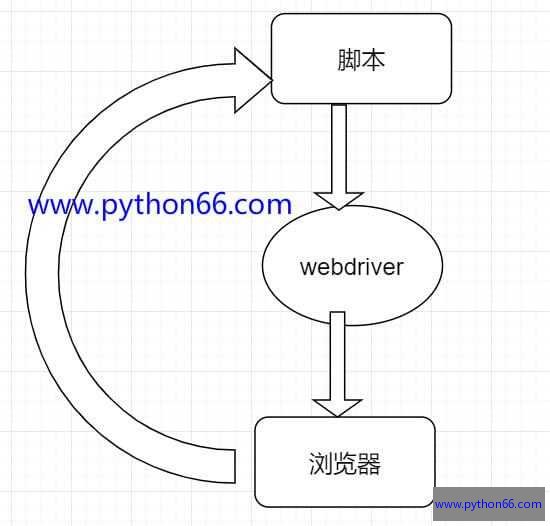
  一般只要webdriver和chrome浏览器版本号能对上,就能使用!有了以上物料,我们需要搞清selenium、chromedriver、浏览器三者之间的关系

  1 程序发送Selenium命令给浏览器的驱动程序(简单理解为脚本就是命令)

  2 浏览器驱动程序接收到命令后 ,驱动浏览器去执行命令

  3 浏览器驱动程序获取命令执行的结果,返回给自程序

  4 程序对返回结果进行处理
  

  OK,现在开始写程序来让谷歌浏览器来打开百度首页,初步感受下。

# -*- coding: utf-8 -*-
from selenium import webdriver
from time import sleep

# 创建浏览器对象
driver = webdriver.Chrome(executable_path='D:/python3/install/chromedriver.exe')
# 用get打开百度页面
driver.get("http://www.baidu.com")

# sleep几秒,否则会很快退出
sleep(3)
# 关闭浏览器
driver.quit()

执行以上代码,观察下浏览器自己会启动并且打开百度。

  补充selenium4的方式

  from   selenium.webdriver.chrome.service  import   Service

  s=Service(executable_path=chromedriver_path)

  driver=webdriver.Chrome(service=s)

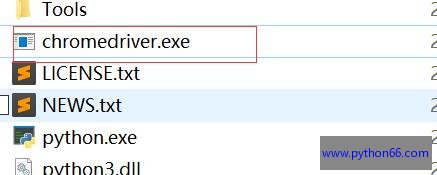
  如果把chromedriver的路径放到环境变量,参数里面可以不写路径。因为python解释器(python.exe)被我们加入了环境变量,所以直接把chromedriver放在python解释器的同一目录即可。
# -*- coding: utf-8 -*-
from selenium import webdriver
from time import sleep

# 创建浏览器对象
driver = webdriver.Chrome()
# 用get打开百度页面
driver.get("http://www.baidu.com")

sleep(3)
# 关闭浏览器
driver.quit()

很赞哦!

python编程网提示:转载请注明来源www.python66.com。
有宝贵意见可添加站长微信(底部),获取技术资料请到公众号(底部)。同行交流请加群 python学习会