


发布者:发布消息
订阅者:得到订阅的发布者发布的消息
redis客户端可以订阅任意多的频道
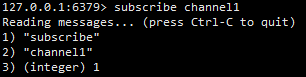
使用subscribe订阅频道和publish发布频道
客户端A订阅一个channel1:
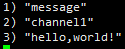
另一个客户端B发布内容:

客户端A收到消息:
Bitmaps本身是一个字符串,可以对字符串进行位操作
setbit <key> <offset> <value> # 设置偏移量offset位置的值为value
getbit <key> <offset> # 取偏移量offset处的值
bitcount <start> <end> # 统计值为1的bit数,默认统计整个字符串,可设置开始和结束位置
bitop and/or/not/xor k [k1 k2 ...] # 进行与或非和异或等操作,结果存到k

注意:offset的偏移从0开始
HyperLogLog只会根据输入元素计算基数,不会存储输入元素
比如这样一个集[1,1,2,2,3,3],他的集合是{1,2,3},基数为3
pfadd <key> v1 v2... # 加入一组元素
pfcount k # 近似计算基数
pfmerge k1 k2 k3... # 把后面的基数合并到k1中
地理信息,也就是元素的2维坐标,也就是经纬度
geoadd k 经度 纬度 地理名 # 添加一个地理位置的经纬度
geopos k 地理名 # 获取地理位置的经纬度
geodist k 地理1 地理2 单位# 得到两个位置间的直线距离
georadius k 经度 纬度 半径 # 取某个位置半径内的地理位置
使用java操作redis的工具,先导入依赖:
<dependency>
    <groupId>redis.clients</groupId>
    <artifactId>jedis</artifactId>
    <version>3.7.0</version>
</dependency>
外部连接redis服务器,要修改一些默认配置:
使用jedis方法:
获取jedis对象
Jedis jedis = new Jedis(url,port);
进行各种操作,比如存值取值等,下面就是存一个List然后取出来的操作
jedis.lpush("myList","dog","cat","cow","tiger");
List<String> list = jedis.lrange("myList",0,-1);
要求:
思路:
public class JedisPhone {
    public static void main(String...args){
        JedisPhone phone = new JedisPhone();
        phone.sendCode("18982137871");
        System.out.println(phone.checkCode("18982137871","288308"));
    }

    // 1. 发送手机的验证码
    public void sendCode(String phone){
        String countKey = "Count:"+ phone;
        Jedis jedis = new Jedis("XXX",6379);  //ip地址保密
        String count = jedis.get(countKey);
        if(count == null){
            jedis.set(countKey, String.valueOf(0));
        }else if(Integer.parseInt(count) <=1){	//null->0->1
            jedis.incr(countKey);
        }else{
            System.out.println("发送次数已达到上限");
        }

        String codeKey = "Code:" + phone;
        StringBuilder code = new StringBuilder("");
        Random random = new Random();
        for (int i=0; i<6; i++){
            int temp = random.nextInt(10);
            code.append(temp);
        }
        jedis.set(codeKey, code.toString());

        jedis.close();
    }

    // 2. 输入验证码进行验证
    public boolean checkCode(String phone, String code){
        Jedis jedis = new Jedis("xxx",6379);  //ip地址保密
        String codeKey = "Code:" + phone;
        if(code.equals(jedis.get(codeKey))){
            jedis.close();
            return true;
        }
        jedis.close();
        return false;
    }
}
此内容由惯性聚合(RSS阅读器)自动聚合整理,仅供阅读参考。 原文来自 — 版权归原作者所有。